Organizations increasingly turn to AI to transform work processes, but this rapid adoption of models has amplified the need for explainable AI. Explaining AI helps us understand how and why models make predictions. For example, a financial institution might wish to use an AI model to automatically flag credit card transactions for fraudulent activity. While an accurate fraud model would be a first step, accuracy alone isn’t sufficient. Banks and regulators are often required to explain why an AI model is making a specific prediction. Was a fraud decision based on the transaction amount? The cardholder’s gender? Their spend history? Explainable AI helps answer these types of questions, promotes fair business practices, assists with regulatory requirements, and protects against bias and discrimination.
Implementing explainable AI in Google Cloud is an increasingly easy and common practice. Data scientists can use Google Cloud’s Vertex AI to understand what factors contribute to predictions for even the most complex deep learning models. But what about citizen data scientists?
From our partners:
In this post we’ll look at how data analysts can also take advantage of explainable AI by creating models in SQL using BigQuery ML and then explain those model predictions to stakeholders and domain experts using “What-If Scenario Dashboards” in Looker.
Building a Fraud Model in SQL Using BigQuery Machine Learning
BigQuery Machine Learning (BQML) allows analysts to create a variety of machine learning models entirely in SQL. In addition to democratizing data science capabilities, BQML benefits organizations by allowing models to be trained and predictions made without moving any data eliminating many data governance and MLOps challenges.
In this example, a retail bank has a dataset of credit card transactions, card holder details, and merchant information. A query creates the model training data including transaction amount, the distance between a merchant and the customer’s home, and the transaction time of day. These features are generated entirely in SQL taking advantage of BigQuery’s support for geo-spatial functions.
The sample dataset is publicly available to query. Make sure to create a dataset named retail_banking in your project to store the resulting ML datasets and models.
Example BigQuery SQL to Prepare a Model Training Dataset
CREATE OR REPLACE TABLE retail_banking.training_data as (SELECTcard_transactions.trans_id AS trans_id,card_transactions.is_fraud AS is_fraud,--amount for transaction: higher amounts are more likely to be fraudcast(card_transactions.amount as FLOAT64) AS card_transactions_amount,--distance from the customers home: further distances are more likely to be fraudST_DISTANCE((ST_GEOGPOINT((cast(card_transactions.merchant_lon as FLOAT64)),(cast(card_transactions.merchant_lat as FLOAT64)))), (ST_GeogPoint((cast(SPLIT(client.address,'|')[OFFSET(4)] as float64)),(cast(SPLIT(client.address,'|')[OFFSET(3)] as float64))))) AS card_transactions_transaction_distance,--hour that transaction occured: fraud occurs in middle of night (usually between midnight and 4 am)EXTRACT(HOUR FROM TIMESTAMP(CONCAT(card_transactions.trans_date,' ',card_transactions.trans_time)) ) AS card_transactions_transaction_hour_of_dayFROM `looker-private-demo.retail_banking.card_transactions` AS card_transactionsLEFT JOIN `looker-private-demo.retail_banking.card` AS cardON card.card_number = card_transactions.cc_numberLEFT JOIN `looker-private-demo.retail_banking.disp` AS disp ON card.disp_id = disp.disp_idLEFT JOIN `looker-private-demo.retail_banking.client`AS client ON disp.client_id = client.client_id );
After creating the training data, a short query fits a regression model to predict whether a transaction is fraudulent. BQML includes robust defaults along with many options for specifying model behavior. BigQuery provides model fit metrics, training logs, and other model details.
Build Model
CREATE OR REPLACE MODEL retail_banking.fraud_predictionOPTIONS(model_type='logistic_reg', labels=['is_fraud']) ASSELECT * EXCEPT(trans_id)FROM retail_banking.training_data-- Account for class imbalance. Alternatively, use AUTO_CLASS_WEIGHTS=True in the model optionsWHERE (is_fraud IS TRUE) OR(is_fraud IS NOT TRUE AND rand() <=(SELECT COUNTIF(is_fraud)/COUNT(*) FROM retail_banking.training_data));
You can use other models in BigQuery ML such as xgboost and deep neural networks as well. Explainability works with those techniques also.
Explainable AI in BQML
Beyond training and inspecting a model, BQML makes it easy to access explainable AI capabilities. Users can provide new hypothetical transactions and view the model’s prediction and explanation.
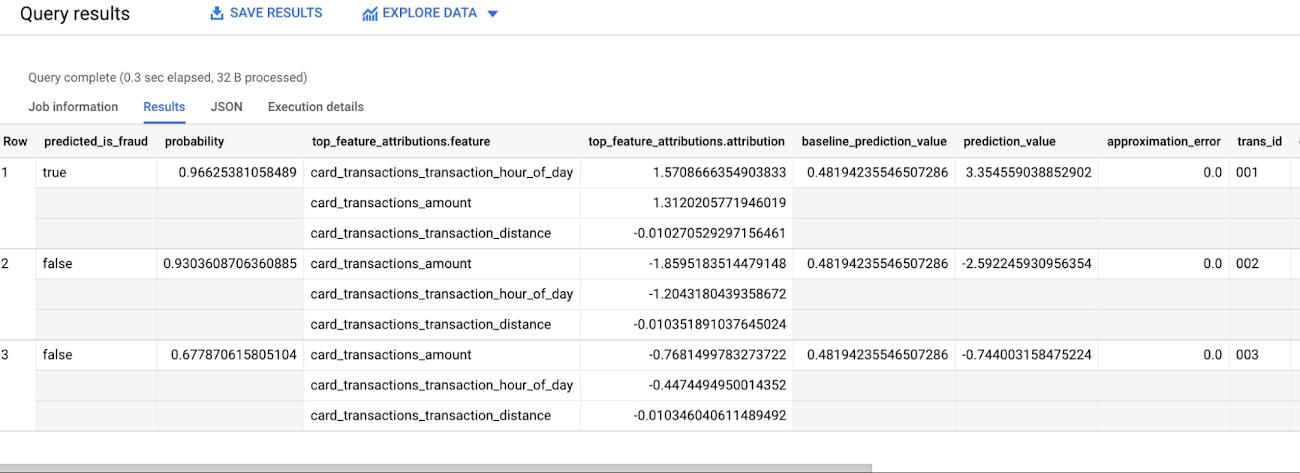
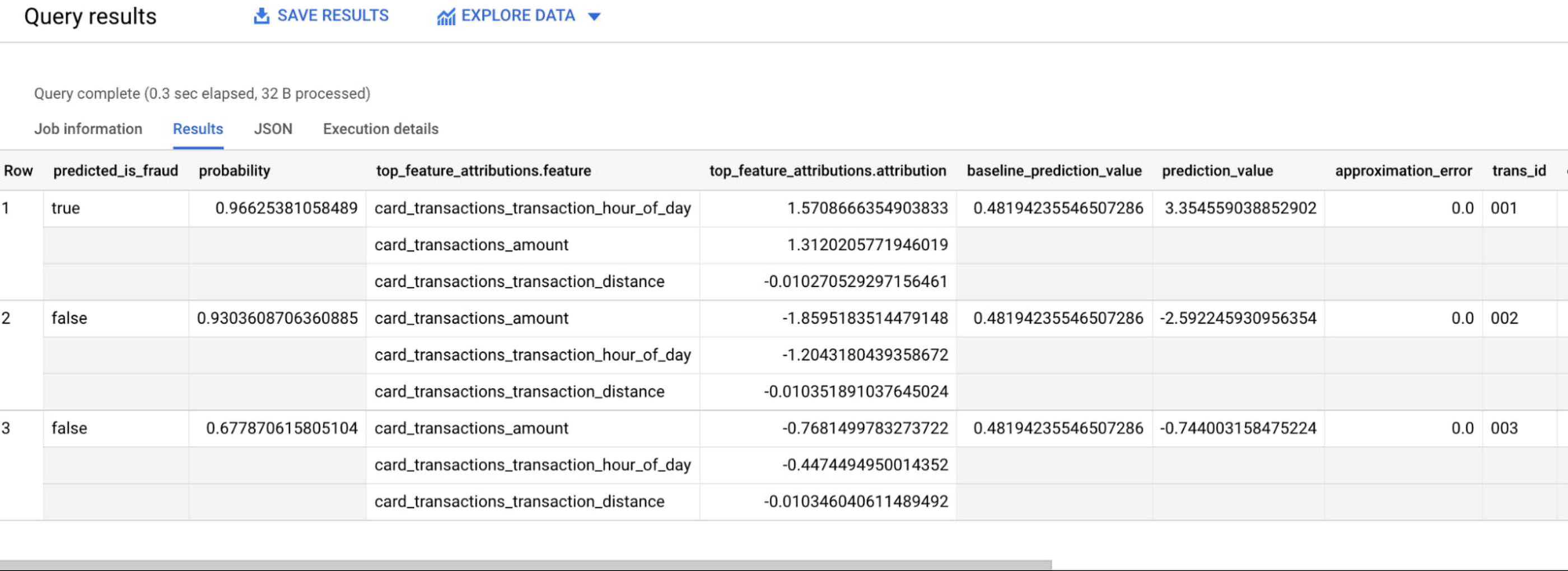
For example, the following query creates three hypothetical transactions with varying amounts, distances, and times of day. The model predicts the first transaction is fraudulent because of the large monetary value and early hour.
BQML Explainable AI Query and Result
SELECT * FROM ML.EXPLAIN_PREDICT(MODEL retail_banking.fraud_prediction, (SELECT '001' as trans_id, 500.00 as card_transactions_amount, 600 as card_transactions_transaction_distance, 2 as card_transactions_transaction_hour_of_dayUNION ALLSELECT '002' as trans_id, 5.25 as card_transactions_amount, 2 as card_transactions_transaction_distance, 13 as card_transactions_transaction_hour_of_dayUNION ALLSELECT '003' as trans_id, 175.50 as card_transactions_amount, 45 as card_transactions_transaction_distance, 10 as card_transactions_transaction_hour_of_day), STRUCT(0.55 AS threshold))
Creating a “What-If Scenario Dashboard” in Looker
While BQML unlocks a rich set of capabilities, it can be more valuable to bring explainable AI to non-technical stakeholders such as business domain experts or executives. These individuals are often better qualified to interpret and validate a model’s explanation. Providing an interface to explainable AI improves the trust, adoption, and overall success of an AI initiative.
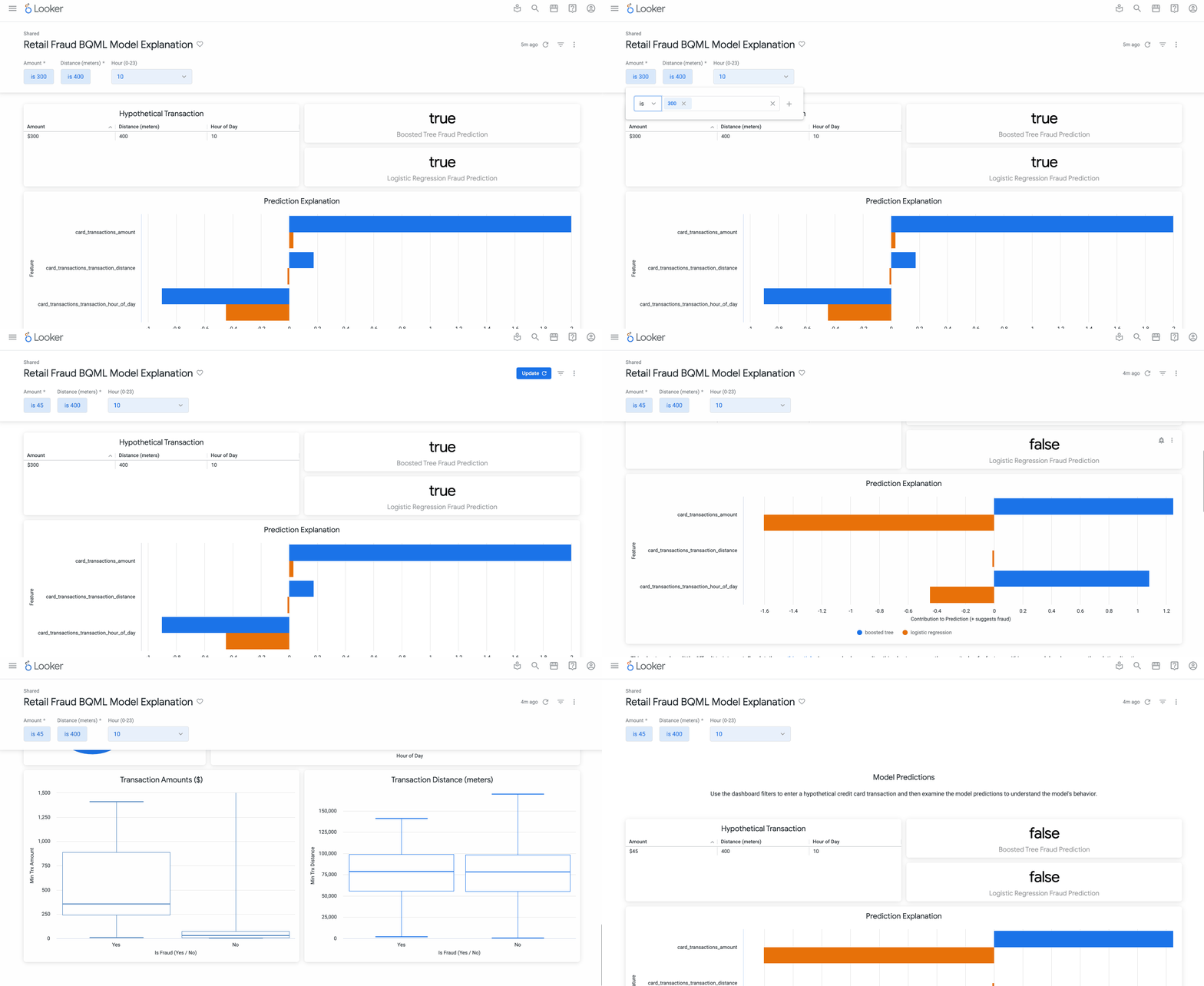
Looker helps bring BQML’s explainable AI to stakeholders. Looker is a modern BI tool and data platform that is deeply integrated with BigQuery. With Looker, analysts create governed dashboards and data experiences using a unique semantic model. In this example we use the semantic model to parameterize the BQML SQL statement and create a dashboard. Once built, end users can enter their own transaction details using dashboard filters and view the prediction and model explanation – all without writing any code!
Looker Explainable AI Dashboard
BQML Predictions in Looker’s Semantic Model
The LookML pattern below creates the “What-If Scenario” dashboard. Define a parameter for each hypothetical user input. Build a derived table using ML.EXPLAIN_PREDICT on a subquery with the user’s input parameters. This pattern should be modified based on your dataset, trained model, and desired user inputs. Alternatively, you can reference the existing BQML Looker blocks on the Looker marketplace for an end-to-end guide to using BigQuery Machine Learning with Looker.
view: model_user_predictions {parameter: distance {type: number}parameter: amount {type: number}parameter: hour {type: number}derived_table: {sql:SELECT * FROM ML.EXPLAIN_PREDICT(MODEL retail_banking.fraud_prediction, (SELECT '001' AS trans_id,{% parameter amount %} AS card_transactions_amount,{% parameter distance %} AS card_transactions_transaction_distance,{% parameter hour %} AS card_transactions_transaction_hour_of_day), STRUCT(0.50 AS threshold) );;}dimension: predicted_is_fraud {type: stringsql: ${TABLE}.predicted_is_fraud ;;}
Historically model interpretation has been limited to data science teams. Collaborating with business stakeholders has required significant back-and-forth or the development of custom data science applications. Looker and BigQuery ML provide an alternative approach that empowers SQL analysts and enables business collaboration.
Next Steps
You can start with BigQuery Machine Learning and Explainable AI by writing a short query. Or you can learn more about how teams are doing data science with Looker, jumpstart your own use case with the Looker Marketplace BQML blocks, or explore how AI-powered data experiences are possible using Vertex AI and the Looker platform.
By: Sean Lopp (Google Cloud Customer Engineer)
Source: Google Cloud Blog
For enquiries, product placements, sponsorships, and collaborations, connect with us at [email protected]. We'd love to hear from you!
Our humans need coffee too! Your support is highly appreciated, thank you!