aster.cloud aster.cloud
  • /
  • Platforms
    • Public Cloud
    • On-Premise
    • Hybrid Cloud
    • Data
  • Architecture
    • Design
    • Solutions
    • Enterprise
  • Engineering
    • Automation
    • Software Engineering
    • Project Management
    • DevOps
  • Programming
    • Learning
  • Tools
  • About
  • /
  • Platforms
    • Public Cloud
    • On-Premise
    • Hybrid Cloud
    • Data
  • Architecture
    • Design
    • Solutions
    • Enterprise
  • Engineering
    • Automation
    • Software Engineering
    • Project Management
    • DevOps
  • Programming
    • Learning
  • Tools
  • About
aster.cloud aster.cloud
  • /
  • Platforms
    • Public Cloud
    • On-Premise
    • Hybrid Cloud
    • Data
  • Architecture
    • Design
    • Solutions
    • Enterprise
  • Engineering
    • Automation
    • Software Engineering
    • Project Management
    • DevOps
  • Programming
    • Learning
  • Tools
  • About
  • DevOps
  • Programming

How To: Create A Flask/API Project In Ubuntu

  • root
  • April 6, 2019
  • 2 minute read

Prerequisites

  • Operating System: Ubuntu 16 or Ubuntu 18
  • Python 3.X is installed
  • Python Pip is installed
  • Python Virtual Environment is installed (Optional)


Structure Overview

|__ dotlah_flask_api
    |__ api
        |__ res
            |__ __init__.py
            |__ application_res.py
        |__ __init__.py
    |__ app_wsgi.py
    |__ runserver.py
    |__ requirements.txt
    |__ README.md

Replace the dotlah_flask_api directory with the project name of your choice.


Partner with aster.cloud
for your next big idea.
Let us know here.


From our partners:

CITI.IO :: Business. Institutions. Society. Global Political Economy.
CYBERPOGO.COM :: For the Arts, Sciences, and Technology.
DADAHACKS.COM :: Parenting For The Rest Of Us.
ZEDISTA.COM :: Entertainment. Sports. Culture. Escape.
TAKUMAKU.COM :: For The Hearth And Home.
ASTER.CLOUD :: From The Cloud And Beyond.
LIWAIWAI.COM :: Intelligence, Inside and Outside.
GLOBALCLOUDPLATFORMS.COM :: For The World's Computing Needs.
FIREGULAMAN.COM :: For The Fire In The Belly Of The Coder.
ASTERCASTER.COM :: Supra Astra. Beyond The Stars.
BARTDAY.COM :: Prosperity For Everyone.

Steps

01. Create the necessary directories and files. You can use the following shell script to create it, or manually enter them in the terminal, or create them from another way.

$ cd ~ 
$ nano setup-flask-api.sh 


#!/bin/bash
mkdir $1
mkdir -p $1/api/res

touch $1/api/res/__init__.py
touch $1/api/res/application_res.py
touch $1/app_wsgi.py
touch $1/runserver.py
touch $1/requirements.txt
touch $1/README.md


02.  Run the setup script.

# FORMAT
$ sh setup-flask-api.sh <project-name-without-space> 

# SAMPLE 
$ sh setup-flask-api.sh dotlah_flask_api 


While it is totally safe to create a Project with spaces, it is more of a standard in this case.


03. Navigate to the Project directory

# FORMAT 
$ cd <project-name-without-space> 

# SAMPLE 
$ cd dotlah_flask_api 


04. Update the necessary Python library/packages by setting the value of the requirements.txt

$ nano requirements.txt 


Set the value:

flask 


05. (Optional but recommended). Create a virtual environment dedicated to the Flask/API project.

For instructions on how to install and configure virtual environment. See this guide.

# FORMAT 

# SAMPLE 
$ cd dotlah_flask_api 
$ python3 -m venv project-venv 


06. Activate the Virtual Environment.

$ source project-venv/bin/activate  


07. Install the flask library via Pip using the requirements.txt

(project-venv) $ pip install -r requirements.txt 


08. Update the content of runserver.py.

(project-venv) $ nano runserver.py 


# -*- coding: utf-8 -*-

# Start Flask with default web server
from api import application

application.run(host='127.0.0.1', port=8888, debug=True)


Read More  How-To: Deploy Python Flask applications using NGINX and uWSGI - Installation (Part 1 of 3)

09.  Update the dunder python file.

(project-venv) $ nano api/__init__.py 


This imports the res python module, the endpoints will be located at the application_res or other res (Resource) python file.

from flask import Flask 

application = Flask(__name__) 

import api.res.application_res 


10.  Update the application_res.py.

(project-venv) $ nano api/res/application_res.py 


# -*- coding: utf-8 -*-

from flask import jsonify
from api import application

@application.route('/', methods=['GET'])
def get_app_properties():
name = 'dotlah-flask-api'
version = '0.0.1'

app_properties = \
{
  'name' : name
  , 'version' : version
}

return jsonify(app_properties)


Above will create a GET endpoint accessible by the root path, (/).

11. Run the application

(project-venv) $ python runsever.py 


It should show something similar
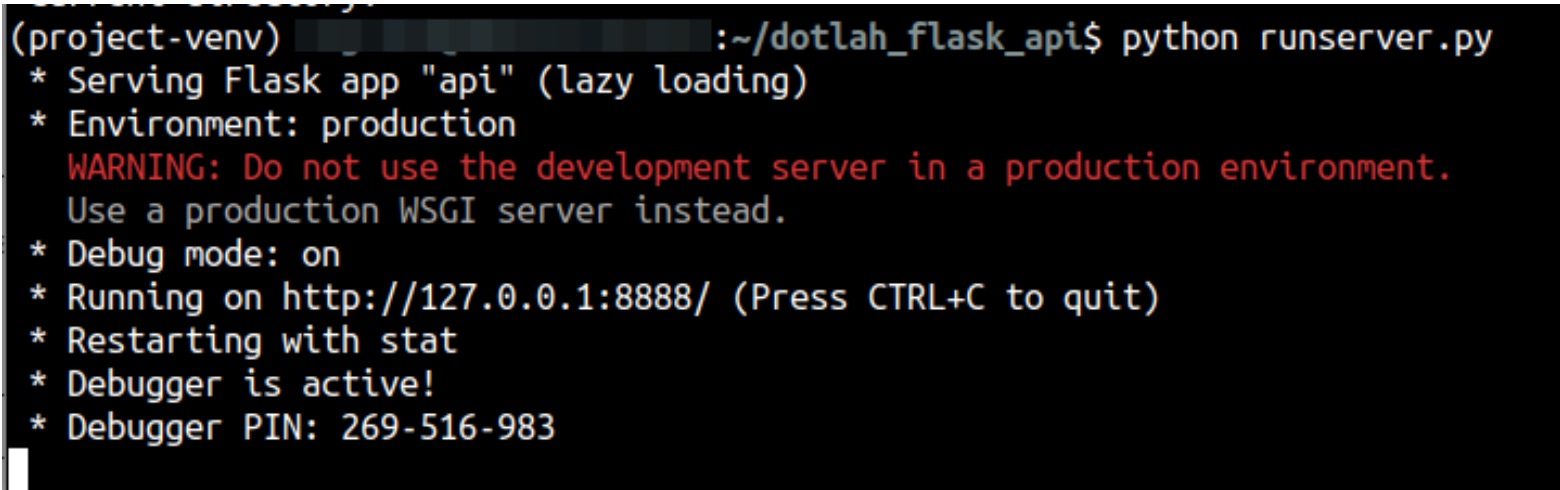
Note that running the application via this way (runserver.py) should only be used on local development. If needed to deploy on a Web Application server, a middleware or WSGI server should be used instead.


12. Test the application on the browser or via CURL.

Via Curl (open another terminal session)

$ curl http://localhost:8888


Via Browser

http://localhost:8888

For enquiries, product placements, sponsorships, and collaborations, connect with us at [email protected]. We'd love to hear from you!

Our humans need coffee too! Your support is highly appreciated, thank you!

root

Related Topics
  • API
  • Flask
  • How To
  • Python
  • Ubuntu
You May Also Like
Users with laptops working with database. Data storage and organization, information access and management, big data protection concept. Vector isolated illustration.
View Post
  • Architecture
  • DevOps
  • Technology

What is application migration? Examples and best practices

  • August 18, 2025
aster-cloud-sms-pexels-tim-samuel-6697306
View Post
  • Programming
  • Software

Send SMS texts with Amazon’s SNS simple notification service

  • July 1, 2025
aster-cloud-website-pexels-goumbik-574069
View Post
  • Programming
  • Software

Host a static website on AWS with Amazon S3 and Route 53

  • June 27, 2025
View Post
  • DevOps
  • Engineering
  • Platforms

How To Fail At Platform Engineering

  • March 11, 2024
View Post
  • Computing
  • DevOps
  • Platforms

The IBM Approach To Reliable Quantum Computing

  • November 28, 2023
DevOps artifact management
View Post
  • Design
  • DevOps
  • Engineering

10 Awesome Benefits Of Artifact Management And Why You Need It

  • August 2, 2023
Automation | Gears
View Post
  • Automation
  • DevOps
  • Engineering

Automating CI/CD With GitHub Actions

  • June 13, 2023
View Post
  • Architecture
  • Data
  • Engineering
  • People
  • Programming
  • Software Engineering
  • Technology
  • Work & Jobs

Predictions: Top 25 Careers Likely In High Demand In The Future

  • June 6, 2023

Stay Connected!
LATEST
  • digital-nomad-freelancer-worker-2151205464 1
    One paperwork problem – Get your Digital Nomad Visa employment documents fast from UK, EU or Singapore
    • June 16, 2026
  • 2
    Samsung Art Store Brings Art Basel to Homes Worldwide With New Curated Collection
    • June 15, 2026
  • 3
    You Do Not Need to Invest in the IPO of SpaceX, Anthropic, and OpenAI
    • June 10, 2026
  • 4
    The consequences of relying on AI for accurate news
    • June 10, 2026
  • 5
    Connecting AI agents with unstructured data using Google Cloud Storage MCP Servers
    • June 10, 2026
  • 6
    WWDC26: Apple unveils next generation of Apple Intelligence, Siri AI, powerful parental controls, and an expansive set of software improvements
    • June 8, 2026
  • 7
    IBM and Google Cloud Announce Strategic Partnership to Scale AI with Human Expertise and AI‑Powered Delivery
    • June 4, 2026
  • Data center 8
    Data Sovereignty in Spain. It’s Not Just About the Law, It’s About Efficiency
    • June 3, 2026
  • 9
    Ink vs Pixels. What you miss versus what you are actually missing.
    • June 1, 2026
  • 10
    Banks race to patch new cyber vulnerabilities, and other cybersecurity news
    • May 25, 2026
about
Hello World!

We are aster.cloud. We’re created by programmers for programmers.

Our site aims to provide guides, programming tips, reviews, and interesting materials for tech people and those who want to learn in general.

We would like to hear from you.

If you have any feedback, enquiries, or sponsorship request, kindly reach out to us at:

[email protected]
Most Popular
  • pope-leo-xiv-cq5dam-1500.844 1
    Pope Leo XIV to Publish First Encyclical on Artificial Intelligence and Human Dignity on 25 May
    • May 22, 2026
  • 2
    Portfolio to Clients, and is Strengthened by Ongoing Project Glasswing Work
    • May 20, 2026
  • reMarkable Paper Pure 3
    Everything The reMarkable Paper Pure Actually Does
    • May 14, 2026
  • 4
    Scaling cloud and AI: Microsoft Azure’s commitment to Europe’s digital future
    • May 11, 2026
  • Anthropic Institute 5
    Introducing The Anthropic Institute
    • March 11, 2026
  • /
  • Technology
  • Tools
  • About
  • Contact Us

Input your search keywords and press Enter.