If you want to use your local timezone for your database running on Cloud SQL for SQL Server, then this blog is for you.
Cloud SQL is a fully managed relational database service for Microsoft SQL Server, MySQL and PostgreSQL. With Cloud SQL, you can run the same relational databases you know with their rich extension collections, configuration flags, and developer ecosystem, but without the hassle of self management.
From our partners:
As a managed database service, Cloud SQL can remove a significant operational overhead in securing, patching, and maintaining a SQL Server instance. One of the ways that it helps ensure the instance stability and reliability is by reducing the control surface to the user. As a DBA or developer, this can be a new way of working if you are used to installing and managing SQL Server with high level privileges like sysadmin. In this case, you may need to find alternative approaches to get the intended behavior from your SQL Server instance.
We were recently helping a customer migrate their SQL Server databases to Cloud SQL for SQL Server. During the migration assessment we realized that while Cloud SQL for SQL Server defaults to the UTC timezone, the customer was in IST timezone. As of this writing, Cloud SQL for SQL Server doesn’t allow changing the instance level timezone setting. What to do?
Changing the database timezone
SQL Server users typically fetch the local timezone by using the GETDATE() function with insert/update statements or as a default constraint for a datetime column in a select statement.
1. Insert/update statements:
INSERT INTO sampletable (ID, Name, Salary, Date)VALUES (1,’John’, 10000, GETDATE())
Or
UPDATE sampletable SET Date = GETDATE() WHERE Name = ‘John’
2. As a default constraint:
CREATE TABLE Sales (OrderID int Primary key,ProductID varchar(100),Qty SmallInt,UnitPrice money,SalesDate Datetime default GETDATE());
Since Cloud SQL uses UTC time zone, every time you use the above DML statements, Cloud SQL will insert UTC Date/Time in the respective rows.
To override the UTC timezone with the one of your choice, you can use the AT TIME ZONE function that converts an inputdate to the corresponding datetimeoffset value in the target time zone.
Let’s walk through an example.
Prerequisites
Before proceeding to the example, ensure that you have:
- Created a Cloud SQL for SQL Server instance, including configuring the default user.
See Creating Instances and Configuring the default user account. - Installed the SQL Server command-line tools on your client.
- Connected to your Cloud SQL instance. For the connection options and how to choose from among them, see the Connecting overview page.
After connecting to your database running on the Cloud SQL for SQL Server instance, check the present timezone.
SELECT CURRENT_TIMEZONE( ) AS ‘Present server Timezone';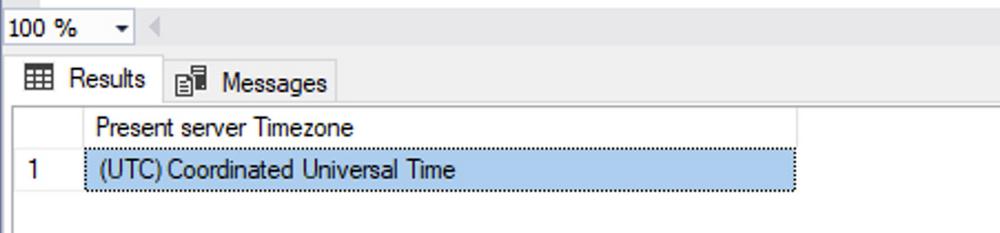
Confirm that it’s set to UTC.
Example Walkthrough
Create a table with a datetime column in your database.
CREATE TABLE Sales(OrderID int Primary key,ProductID varchar(100),Qty SmallInt,UnitPrice money,SalesDate datetime);
Insert some data into the table.
INSERT INTO Sales VALUES (1,'P1', 10, 100, GETDATE());INSERT INTO Sales VALUES (2,'P2', 2, 50, GETDATE());INSERT INTO Sales VALUESinsert into Sales values (3,'P3', 5, 60, GETDATE());INSERT INTO Sales VALUESinsert into Sales values (4,'P1', 3, 100, GETDATE());INSERT INTO Sales VALUESinsert into Sales values (5,'P2', 20, 50, GETDATE());
Select the table to confirm that the data is getting stored in the UTC timezone.
SELECT * FROM Sales;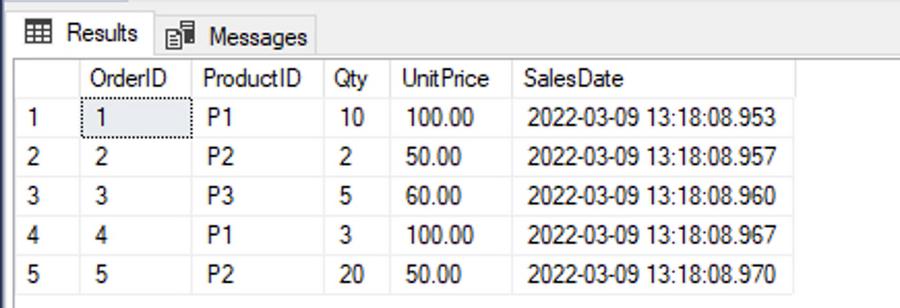
To retrieve the salesDate with the local timezone (in this example, IST Timezone), use the following:
SELECT OrderID, ProductID, Qty, UnitPrice, SalesDate, CONVERT(datetimeoffset,SalesDate) AT TIME ZONE 'India Standard Time' AS SalesDateIST FROM Sales;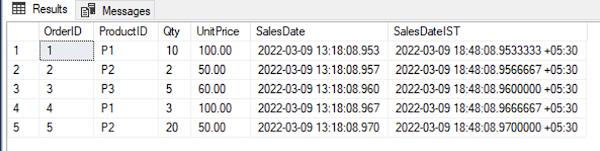
Notice the difference between SalesDate and SalesDateIST above.
This process can work well for new applications where you need to retrieve the data based on the local timezone. If you are migrating an existing database which already has local time within the existing tables, any new data inserted in Cloud SQL for SQL Server will default to the UTC timezone, resulting in data inconsistency issues. To overcome this problem, you can create a function that returns the local time as follows:
CREATE FUNCTION udf_Localdate(@UTC_DT Datetime)RETURNS DATETIMEASBEGINDECLARE @result datetime = null;SELECT @result = @UTC_DT AT TIME ZONE 'India Standard Time';RETURN @result;END
Now when you run the following command, SalesDateIST will return the SalesDate based on the IST time zone.
SELECT OrderID, ProductID, Qty, UnitPrice, SalesDate, dbo.udf_localdate(SalesDate) AS SalesDateIST FROM Sales;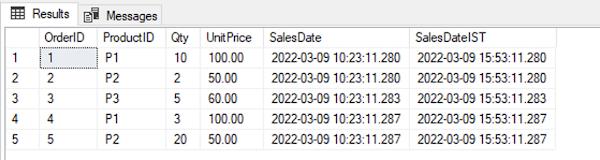
Once again, notice the difference between SalesDate and SalesDateIST above.
You can also use the function to insert the data with the timezone of your choice.
To try this function out, truncate the table and insert the data again using the function dbo.udf_localdate:
TRUNCATE TABLE sales;GOINSERT INTO Sales VALUES (1,'P1', 10, 100, dbo.udf_localdate(GETDATE()));INSERT INTO Sales VALUES (2,'P2', 2, 50, dbo.udf_localdate(GETDATE()));INSERT INTO Sales VALUES (3,'P3', 5, 60, dbo.udf_localdate(GETDATE()));INSERT INTO Sales VALUES (4,'P1', 3, 100, dbo.udf_localdate(GETDATE()));INSERT INTO Sales VALUES (5,'P2', 20, 50, dbo.udf_localdate(GETDATE()));
Now, the data is inserted into the table as IST Timezone and you do not need to convert this data while querying as you can see below.
SELECT * FROM Sales;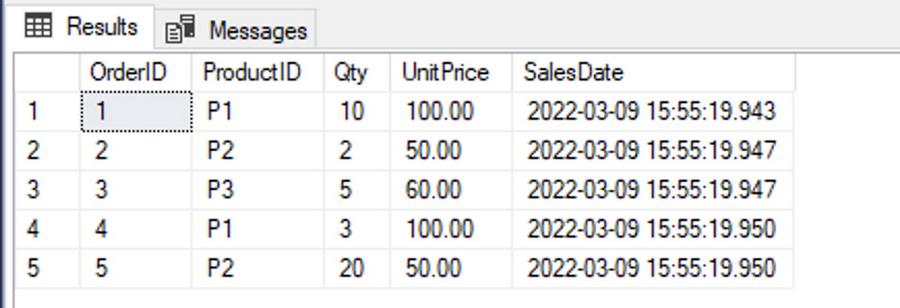
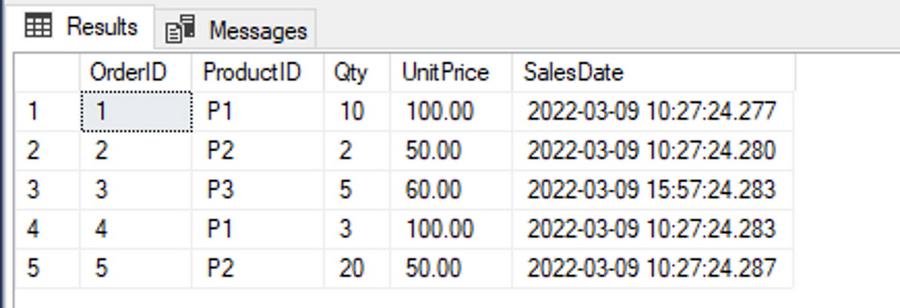
This fix solves a part of the problem where the date value is specified in the Insert/Update statement. However, you might also be using GETDATE() as a default constraint in your table, which means that if you don’t specify a value, the current date in the UTC time zone would be inserted into Datetime columns (as you can see in the example below.)
CREATE TABLE Sales_default (OrderID int Primary key,ProductID varchar(100),Qty SmallInt,UnitPrice money,SalesDate Datetime default GETDATE());GOINSERT INTO Sales_default (OrderID, productID, qty, unitprice) VALUES (1,'P1', 10, 100);INSERT INTO Sales_default(OrderID, productID, qty, unitprice) VALUES (2,'P2', 2, 50);INSERT INTO Sales_default (OrderID, productID, qty, unitprice,SalesDate) VALUES (3,'P3', 5, 60, dbo.udf_localdate(GETDATE()));INSERT INTO Sales_default (OrderID, productID, qty, unitprice) VALUES (4,'P1', 3, 100);INSERT INTO Sales_default (OrderID, productID, qty, unitprice) VALUES (5,'P2', 20, 50);
Notice the UTC Timezone reflected in SalesDate.
To ensure that the Datetime value inserted by the default constraint is in the timezone of your choice, replace the GETDATE system function in the constraint with the Localdate function defined earlier. To do so, drop the existing default constraint and recreate it as follows:
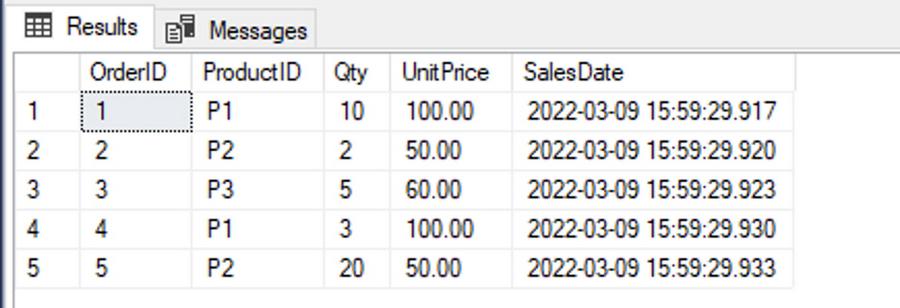
ALTER TABLE Sales_default drop constraint DF__Sales_def__Sales__628FA481GOALTER TABLE Sales_default add constraint DF__Sales_def__Sales__628FA481 default dbo.udf_localdate(GETDATE()) for SalesDateGOTRUNCATE TABLE sales_defaultGOINSERT INTO Sales_default (OrderID, productID, qty, unitprice) VALUES (1,'P1', 10, 100);INSERT INTO Sales_default(OrderID, productID, qty, unitprice) VALUES (2,'P2', 2, 50);INSERT INTO Sales_default (OrderID, productID, qty, unitprice,SalesDate) VALUES (3,'P3', 5, 60, dbo.udf_localdate(GETDATE()));INSERT INTO Sales_default (OrderID, productID, qty, unitprice) VALUES (4,'P1', 3, 100);INSERT INTO Sales_default (OrderID, productID, qty, unitprice) VALUES (5,'P2', 20, 50);
Now if you select the table, you will see that the data is inserted with the IST timezone.
SELECT OrderID, ProductID, Qty, UnitPrice, SalesDate FROM Sales_default;
To see the list of timezones supported by SQL Server, run the following command:
SELECT * FROM sys.time_zone_info;
Conclusion
When migrating your databases to Cloud SQL for SQL Server, pay close attention to the supported features including the supported timezone. If your application uses a non-UTC timezone, use the workarounds described in this blog to ensure a successful migration and reap the benefits of Cloud SQL while focusing on your business priorities.
By: Rishi Kapoor (Customer Engineer, Cloud Sales) and Rahul Deshmukh (Product Manager, Google Cloud)
Source: Google Cloud Blog
For enquiries, product placements, sponsorships, and collaborations, connect with us at [email protected]. We'd love to hear from you!
Our humans need coffee too! Your support is highly appreciated, thank you!