Have you ever thought of leveraging Google Cloud’s Support API to programmatically manage your support cases? Or what if you wanted to create some scripts that can be plugged into your existing support case management system? In this blog post, I’ll walk you through how we can utilize Google Cloud’s Support API in order to solve a very particular use case a company is facing.
From our partners:
NOTE: Be very careful when making requests to the Cloud Support API as this affects live cases that could notify live support agents when updated. If you are just testing the API, be sure to create cases with the testCase flag set to true.
Problem: The company wants to copy the operations team’s email alias to each support case that is open. One way to do this is to manually go through each support case in the GCP console to add the email address. But this can get very tedious, especially if they have many active support cases!
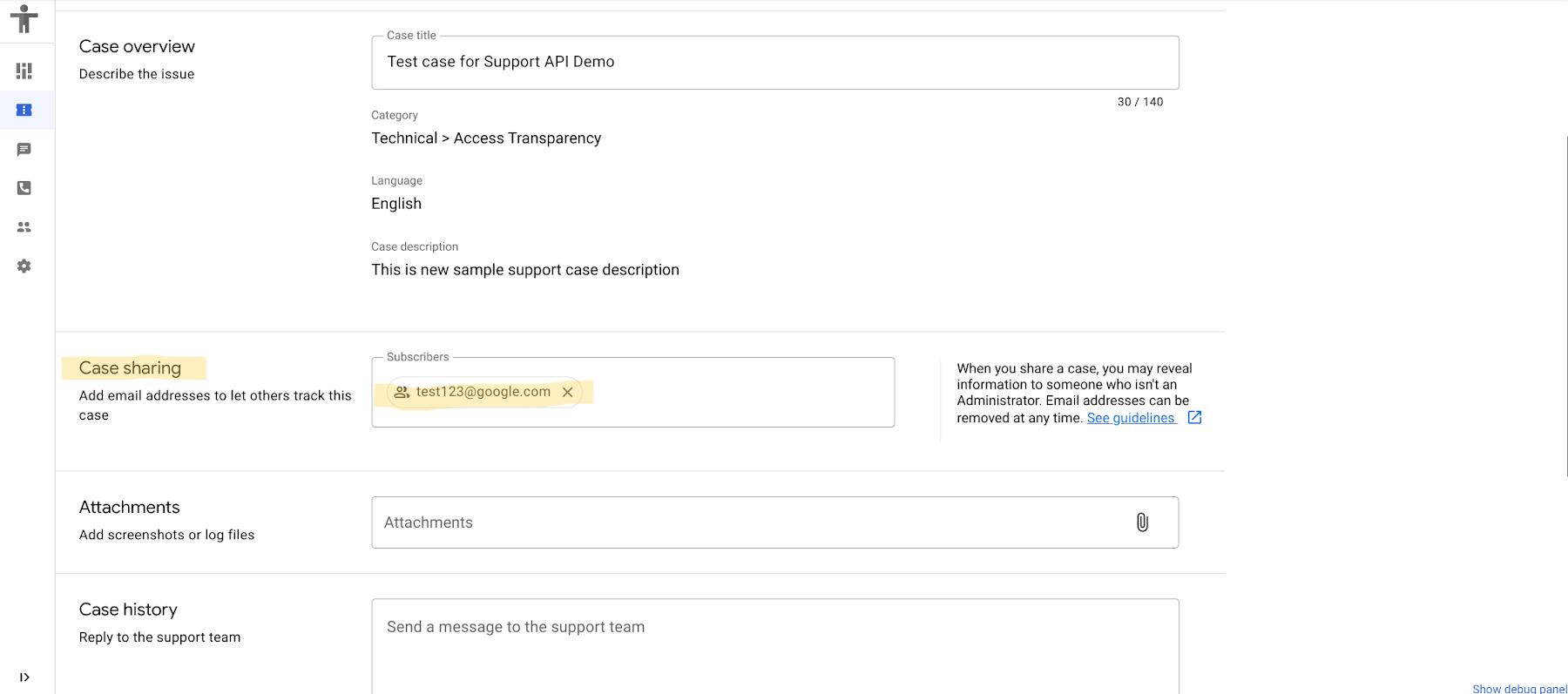
Solution: To solve this problem, we can write a simple Java program that will update all open cases with the email address that they want to include. This blog is going to walk you through the steps of the solution but feel free to refer to the final code here.
Before you begin:
We need to set up the following before getting started:
- Verify that you have a GCP account with at least Standard Support
- Enable “Google Cloud Support API” in your Cloud Console’s API & Services page
- Create a service account with the following roles:
- “Organization Viewer” role or any role that grants the “resourcemanager.organizations.get” permission
- “Tech Support Editor” role
- Download the service account’s private key in a JSON format and set your environment variable “GOOGLE_APPLICATION_CREDENTIALS” to point to its path
Let’s start coding!
Step 1: Initialize a Java project
You’ll first need to initialize a Java project. I highly recommend using build automation tools like maven in order to do so. You may follow the quickstart guide here to initialize your Java project.
Step 2: Add dependencies for Cloud Support API
There are three main dependencies that are needed for our Java program to connect with the Cloud Support API – Google API Client Library for Java, Cloud Support API Client Library for Java (v2 beta), and Google Auth Library. Since we are using maven, it’s as simple as adding these three dependencies into your .pom file for these to be included in your Java project.
<dependency><groupId>com.google.api-client</groupId><artifactId>google-api-client</artifactId><version>1.33.2</version></dependency><dependency><groupId>com.google.apis</groupId><artifactId>google-api-services-cloudsupport</artifactId><version>v2beta-rev20211103-1.32.1</version></dependency><dependency><groupId>com.google.auth</groupId><artifactId>google-auth-library-oauth2-http</artifactId><version>1.4.0</version></dependency>
Step 3: Add the boilerplate code to your project
You may use the boilerplate code that I’ve written below to simplify your code.
import com.google.api.client.googleapis.javanet.GoogleNetHttpTransport;import com.google.api.client.http.HttpRequestInitializer;import com.google.api.client.http.HttpTransport;import com.google.api.client.json.JsonFactory;import com.google.api.client.json.gson.GsonFactory;import com.google.api.services.cloudsupport.v2beta.CloudSupport;import com.google.api.services.cloudsupport.v2beta.model.CloudSupportCase;import com.google.api.services.cloudsupport.v2beta.model.ListCasesResponse;import com.google.auth.http.HttpCredentialsAdapter;import com.google.auth.oauth2.GoogleCredentials;import java.io.IOException;import java.security.GeneralSecurityException;import java.util.ArrayList;import java.util.Collections;import java.util.List;import javax.swing.JOptionPane;// starter code for cloud support API to initialize itpublic class App {// Shared constantsstatic final String CLOUD_SUPPORT_SCOPE = "https://www.googleapis.com/auth/cloudsupport";static String projectResource = "projects/";public static void main(String[] args) {try {CloudSupport cloudSupport = getCloudSupportService();// with the CloudSupport object, you may call other methods of the Support API// for example, cloudSupport.cases().get("name of case").execute();System.out.println("CloudSupport API is ready to use: " + cloudSupport);projectResource = projectResource + JOptionPane.showInputDialog("Please enter your project number: ");} catch (IOException e) {System.out.println("IOException caught! \n" + e);} catch (GeneralSecurityException e) {System.out.println("GeneralSecurityException caught! \n" + e);}}// helper method will return a CloudSupport object which is required for the// main API service to be used.public static CloudSupport getCloudSupportService() throws IOException, GeneralSecurityException {JsonFactory jsonFactory = GsonFactory.getDefaultInstance();HttpTransport httpTransport = GoogleNetHttpTransport.newTrustedTransport();// this will only work if you have already set the environment variable// GOOGLE_APPLICATION_CREDENTIALS to point to the path with your service account// keyGoogleCredentials credentials = GoogleCredentials.getApplicationDefault().createScoped(Collections.singletonList(CLOUD_SUPPORT_SCOPE));HttpRequestInitializer requestInitializer = new HttpCredentialsAdapter(credentials);return new CloudSupport.Builder(httpTransport, jsonFactory, requestInitializer).build();}}
This boilerplate code has one main helper function – getCloudSupportService(). This is used to authenticate your app to the Cloud Support API and create a CloudSupport object, which is the starting point for all other Cloud Support API calls.
Step 4: Write methods to update cc field of active cases
You may include the helper methods below to your app to implement the ability to update the cc field of active cases. This post assumes that you have at least one open support case.
public static void updateAllEmailsWith(String email) throws IOException, GeneralSecurityException {List<CloudSupportCase> listCases = listAllCases(projectResource);for (CloudSupportCase csc : listCases) {System.out.println("I'm going to update email address for case: " + csc.getName() + "\n");updateCaseWithNewEmail(csc, email);}}// list all open casespublic static List<CloudSupportCase> listAllCases(String parentResource)throws IOException, GeneralSecurityException {CloudSupport supportService = getCloudSupportService();ListCasesResponse listCasesResponse = supportService.cases().list(parentResource).setFilter("state=OPEN").execute();List<CloudSupportCase> listCases = listCasesResponse.getCases();System.out.println("Printing all " + listCases.size() + " open cases of parent resource: " + parentResource);for (CloudSupportCase csc : listCases) {System.out.println(csc + "\n\n");}return listCases;}// this helper method is used in updateAllEmailsWith()private static void updateCaseWithNewEmail(CloudSupportCase caseToBeUpdated, String email)throws IOException, GeneralSecurityException {List<String> currentAddresses = caseToBeUpdated.getSubscriberEmailAddresses();CloudSupport supportService = getCloudSupportService();if (caseToBeUpdated.getState().toLowerCase().equals("closed")) {System.out.println("Case is closed, we cannot update its cc field.");return;}if (currentAddresses != null && !currentAddresses.contains(email)) {currentAddresses.add(email);CloudSupportCase updatedCase = caseToBeUpdated.setSubscriberEmailAddresses(currentAddresses);//Ensure that severity is not set. Only priority should be used, or else//this will throw an error.updatedCase.setSeverity(null);supportService.cases().patch(caseToBeUpdated.getName(), updatedCase).execute();System.out.println("I updated the email for: \n" + updatedCase + "\n");// must handle case when they don't have any email addresses} else if (currentAddresses == null) {currentAddresses = new ArrayList<String>();currentAddresses.add(email);CloudSupportCase updatedCase = caseToBeUpdated.setSubscriberEmailAddresses(currentAddresses);supportService.cases().patch(caseToBeUpdated.getName(), updatedCase).execute();System.out.println("I updated the email for: " + updatedCase + "\n");} else {System.out.println("Email is already there! \n\n");}}
The code snippet above has three methods:
updateAllEmailsWith()listAllCases()updateCaseWithNewEmail()
Note that updateAllEmailsWith() has to first call listAllCases() in order to get all open support cases. Afterwards, it will call updateCaseWithNewEmail() for each open support case in order to update it to include the new email address. Also note that when calling listAllCases() you need to pass in the parent resource, which is specified in the variable projectResource. This variable is updated as the app takes in your project number as an input.
Step 5: Call updateAllEmailsWith() from <b>main()</b>
Now that we have set up our app to include all the methods we need, what remains is simply calling the method updateAllEmailsWith() with the email address that you’d like to add. It will use all the helper methods that we just wrote in order to get all open support cases and update each one with the email address that we want.
We’re done coding! Easy, right? Leveraging Cloud Support API will definitely make managing your support cases much easier. It can help automate some actions that would be very tedious to do!
Next steps: This example is just one of many different use cases that we can have for the Cloud Support API. We can also use the API to create attachments, add comments, or even search cases. Each organization may require different functionalities from Google Cloud’s Support, and these can be implemented with the use of Cloud Support API. For more information, check out the following resources bellow:
By: Eugene Enclona (Cloud Technical Resident)
Source: Google Cloud Blog
For enquiries, product placements, sponsorships, and collaborations, connect with us at [email protected]. We'd love to hear from you!
Our humans need coffee too! Your support is highly appreciated, thank you!