aster.cloud aster.cloud
  • /
  • Platforms
    • Public Cloud
    • On-Premise
    • Hybrid Cloud
    • Data
  • Architecture
    • Design
    • Solutions
    • Enterprise
  • Engineering
    • Automation
    • Software Engineering
    • Project Management
    • DevOps
  • Programming
    • Learning
  • Tools
  • About
  • /
  • Platforms
    • Public Cloud
    • On-Premise
    • Hybrid Cloud
    • Data
  • Architecture
    • Design
    • Solutions
    • Enterprise
  • Engineering
    • Automation
    • Software Engineering
    • Project Management
    • DevOps
  • Programming
    • Learning
  • Tools
  • About
aster.cloud aster.cloud
  • /
  • Platforms
    • Public Cloud
    • On-Premise
    • Hybrid Cloud
    • Data
  • Architecture
    • Design
    • Solutions
    • Enterprise
  • Engineering
    • Automation
    • Software Engineering
    • Project Management
    • DevOps
  • Programming
    • Learning
  • Tools
  • About
  • Data
  • Engineering
  • Tools

Route Datadog Monitoring Alerts To Google Cloud With Eventarc

  • aster.cloud
  • September 12, 2022
  • 4 minute read

A few weeks ago, we announced third-party event sources for Eventarc, with the first cohort of third-party providers by our ecosystem partners. This blog post describes how to listen for events from one of those third-party providers, Datadog, and route them to a service in Google Cloud via Eventarc.

Datadog is a monitoring platform for cloud applications. It brings together end-to-end traces, metrics, and logs to make your applications and infrastructure observable. In Datadog, you can create monitors that track metrics, events, logs, integration availability, and network endpoints, and you can set alert thresholds on those monitors. Once these thresholds are reached, Datadog notifies your teams or services via email, Slack, and now a Google Cloud service via Eventarc.


Partner with aster.cloud
for your next big idea.
Let us know here.


From our partners:

CITI.IO :: Business. Institutions. Society. Global Political Economy.
CYBERPOGO.COM :: For the Arts, Sciences, and Technology.
DADAHACKS.COM :: Parenting For The Rest Of Us.
ZEDISTA.COM :: Entertainment. Sports. Culture. Escape.
TAKUMAKU.COM :: For The Hearth And Home.
ASTER.CLOUD :: From The Cloud And Beyond.
LIWAIWAI.COM :: Intelligence, Inside and Outside.
GLOBALCLOUDPLATFORMS.COM :: For The World's Computing Needs.
FIREGULAMAN.COM :: For The Fire In The Belly Of The Coder.
ASTERCASTER.COM :: Supra Astra. Beyond The Stars.
BARTDAY.COM :: Prosperity For Everyone.

Let’s take a look at what it takes to set up one of those monitors and notify a Google Cloud service when a threshold is reached.

Discover the Datadog provider

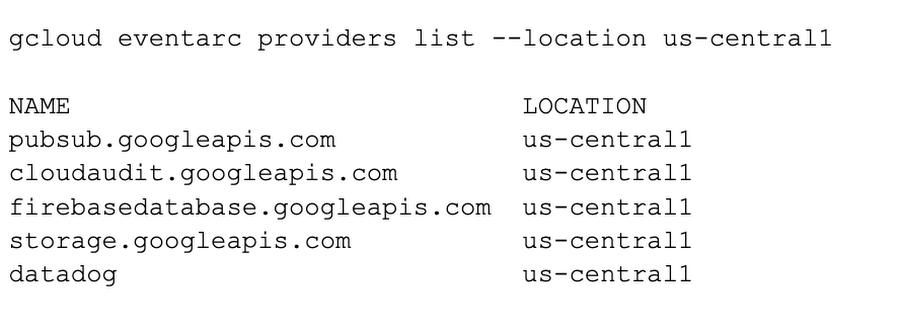
An Eventarc provider is a service or entity that can emit events directly to Google Cloud; those events are then routed to your project. Third-party providers, such as Datadog, are non-Google Cloud providers that are integrated with Google Cloud through Eventarc.

You can see all Google Cloud providers (and also the Datadog provider) in a region in Google Cloud Console or using gcloud:
 

Create a channel

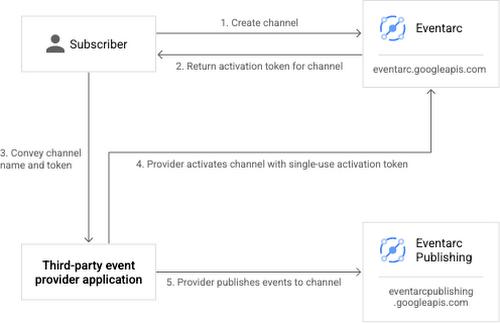
To receive events from a provider, you need to set up a channel. The process involves creating and activating the channel with the provider:
 

Event subscription flow


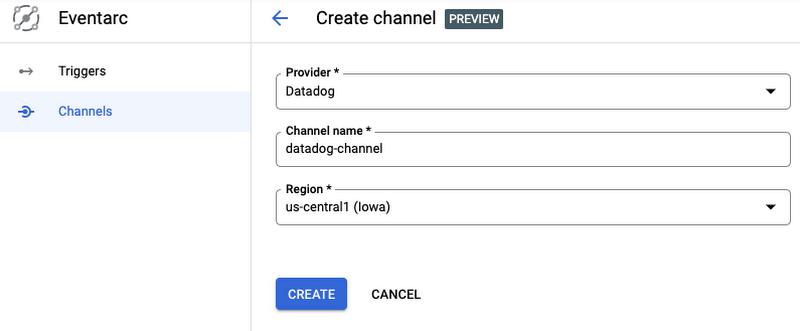
You can create a Datadog channel from the Eventarc section of Google Cloud Console:
Creating a channel


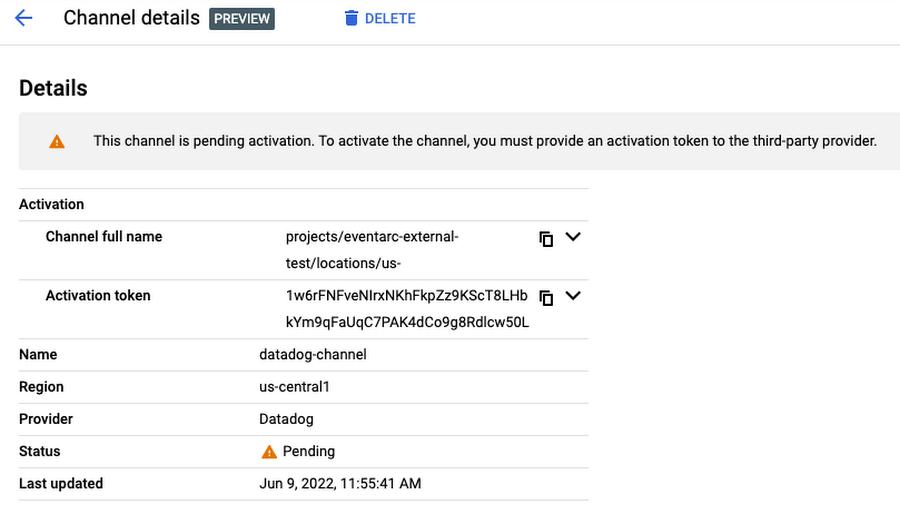
The channel will be in a pending state until you send the activation token to Datadog:
Read More  Cloudian Object Storage Now Integrated With Teradata Vantage


Channel in a pending state


Login to Datadog, go to the integrations page, and make sure the Google Eventarc integration is installed:
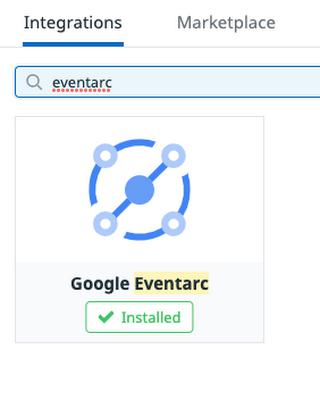
Google Eventarc integration


In the configuration section of the Google Eventarc integration, enter the full channel name and the activation token:
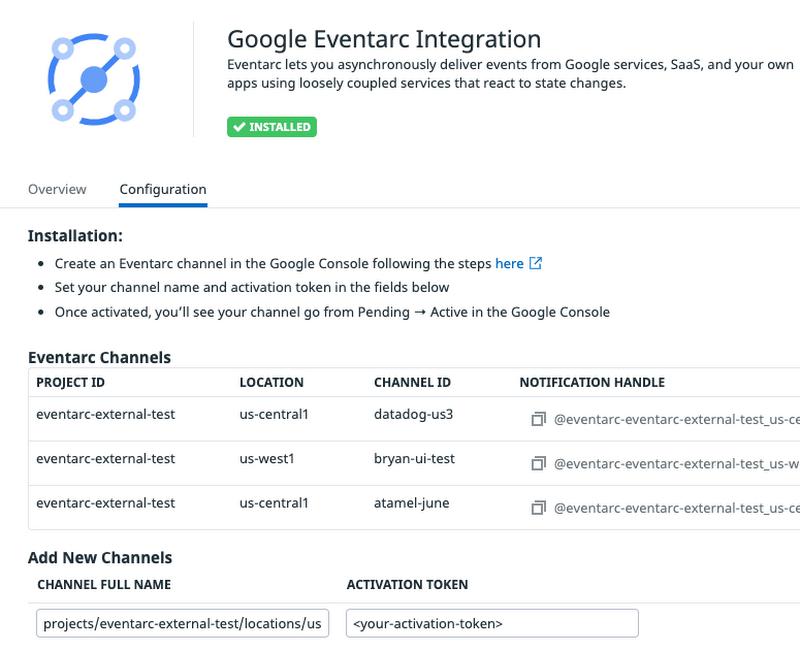
 

Google Eventarc integration


After a few seconds, you should see the channel become active in Google Cloud Console:
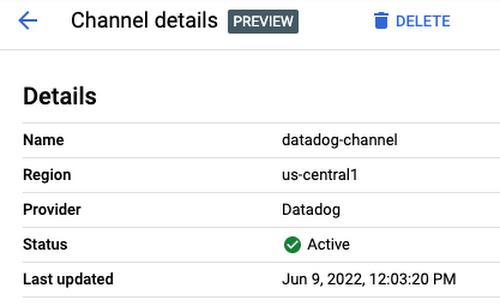
 

Channel in an active state


Now, you’re ready to use the channel.

Create a workflow

You need a destination in Google Cloud to receive events from Datadog. Eventarc supports a number of event destinations including Cloud Run, Workflows, and Kubernetes services. In this case, deploy a workflow to simply log the received events.


main:
  params: [event]
  steps:
  - logStep:
      call: sys.log
      args:
        data: ${event}


Note that the workflow is receiving an event as a parameter. This event will come from Datadog monitoring via Eventarc. Once the event is received, the workflow simply logs the received event.

Create an Eventarc trigger

You are now ready to connect events from the Datadog provider to Workflows with an Eventarc trigger.


Create a trigger with the Datadog channel, event type, and the workflow destination:


gcloud eventarc triggers create datadog-trigger1 \
  --location $REGION \
  --destination-workflow $WORKFLOW_NAME \
  --destination-workflow-location $REGION \
  --channel $CHANNEL_NAME \
  --event-filters type=datadog.v1.alert \
  --service-account [email protected]


Create a Datadog monitor

You are now ready to create a Datadog monitor and connect it to Eventarc. In this example, it is a simple Hello-World type monitor with default values. You will manually trigger it to generate the monitoring alerts, which in turn will generate an Eventarc event in Google Cloud.

To create a monitor in Datadog, first log in to Datadog. Then hold the pointer over Monitors in the main menu and click New Monitor. There are many monitor types. Choose the Metric monitor type.

Read More  Lift And Shift: Lessons For Video Media Applications

In the New Monitor page, leave the defaults for steps 1 and 2.

  • In step 3, set Alert threshold to 1
  • In step 4, set Test monitor for Eventarc as the monitor name and set Notify your team to @eventarc_<your-project-id>_<your-region>_<your-channel-name>

Test the Datadog and Eventarc integration

To test the Datadog monitor and the Eventarc trigger, you can manually trigger the monitor.

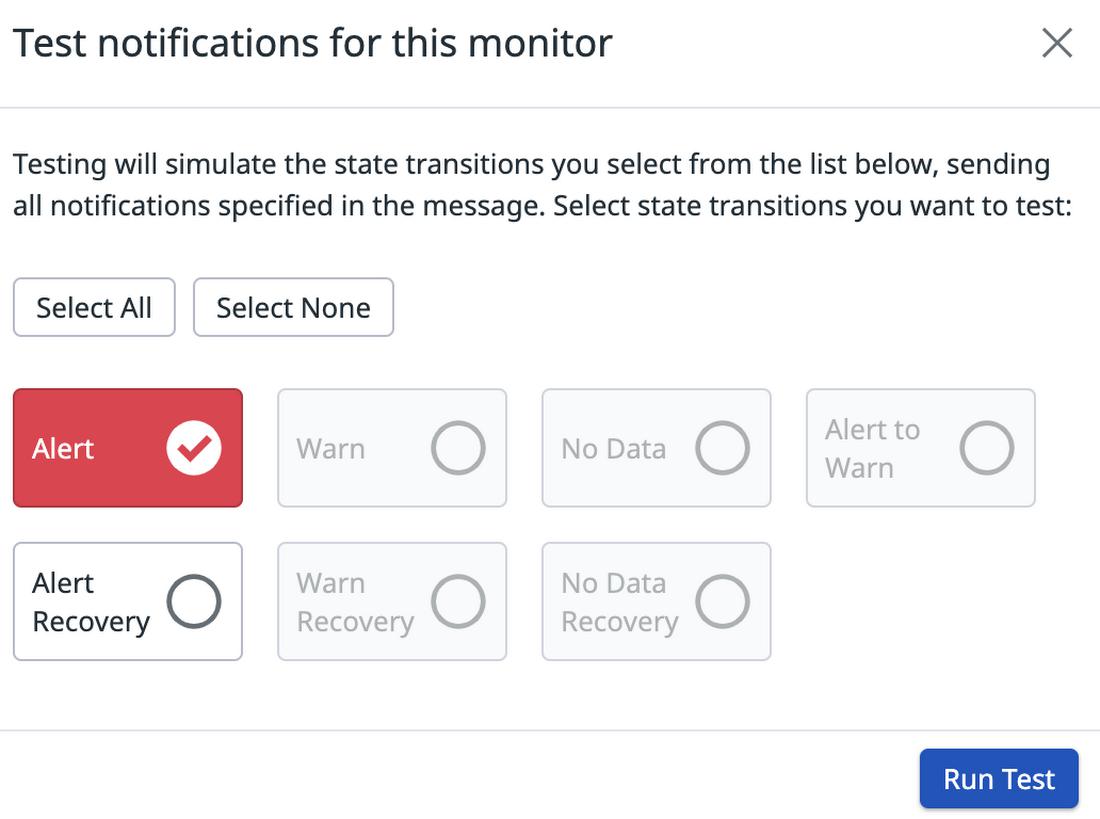
At the bottom of the monitor creation page, click the Test Notifications button:

Test notifications button


Then, click the Run Test button:


Test notifications


This should simulate the state transition in the monitor and trigger an Eventarc event. In the workflow, you should see that there’s a new execution. In the details of that execution, you should see the Datadog event type datadog.v1.alert generated from the monitoring alert in the input of the workflow and also in the logs:
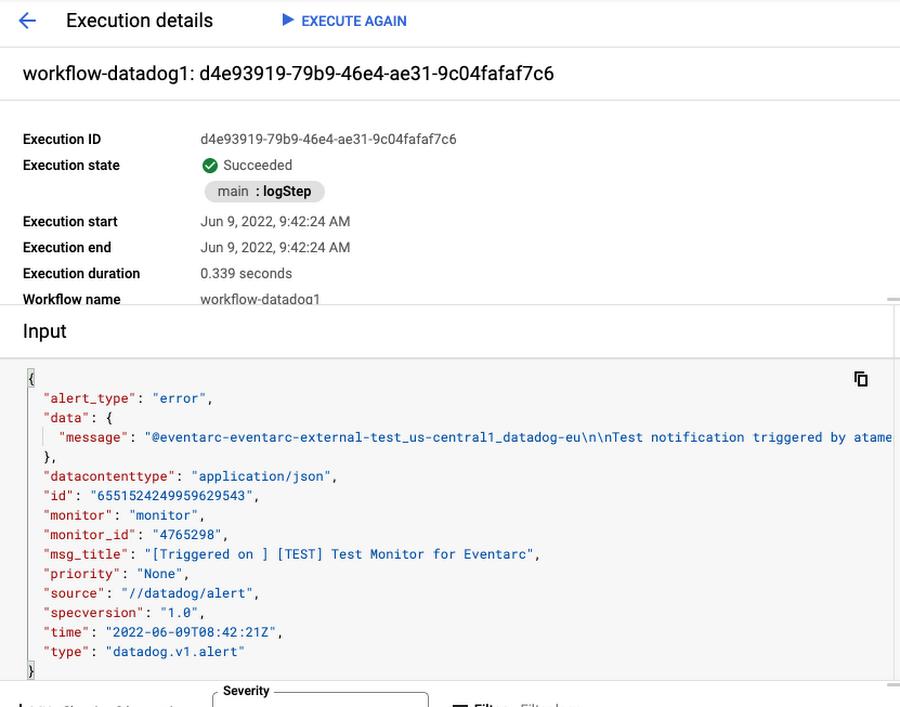
 

Workflows execution


Next steps

This post covered how to route Datadog monitoring alerts to Google Cloud with Eventarc. If you want to run through these steps in your own project, we have a codelab that you can try.


It is only useful to listen for alerts if you can act upon them. In this second codelab, you will learn how to respond to Datadog monitoring alerts with Workflows. More specifically, you will create two Compute Engine virtual machines and monitor them with a Datadog monitor. Once one of the VMs is deleted, you will receive an alert from Datadog to Workflows via Eventarc. In turn, Workflows will recreate the deleted VM to get the number of running VMs back to two. This is just a simple example of how to automatically respond to Datadog alerts with services in Google Cloud.

Read More  Rackspace Technology Supports Gohenry’s Global Expansion With Migration To Google Cloud


Feel free to reach out to me on Twitter @meteatamel for any questions or feedback.


By: Mete Atamel (Developer Advocate)
Source: Google Cloud Blog


For enquiries, product placements, sponsorships, and collaborations, connect with us at [email protected]. We'd love to hear from you!

Our humans need coffee too! Your support is highly appreciated, thank you!

aster.cloud

Related Topics
  • DataDog
  • Eventarc
  • Google Cloud
  • Tutorials
You May Also Like
Data center
View Post
  • Data
  • Public Cloud

Data Sovereignty in Spain. It’s Not Just About the Law, It’s About Efficiency

  • June 3, 2026
View Post
  • Data
  • Platforms
  • Technology

Scaling cloud and AI: Microsoft Azure’s commitment to Europe’s digital future

  • May 11, 2026
View Post
  • Data

Streamline read scalability with Cloud SQL autoscaling read pools

  • March 23, 2026
View Post
  • Data
  • Platforms
  • Public Cloud

PayPal’s historically large data migration is the foundation for its gen AI innovation

  • March 4, 2026
View Post
  • Technology
  • Tools

IBM Launches Enterprise Advantage Service to Help Businesses Scale Agentic AI

  • January 19, 2026
View Post
  • Data
  • Technology

3 obstacles to agentic AI adoption and how to overcome them

  • December 22, 2025
Points, Lines and a Question
View Post
  • Architecture
  • Design
  • Engineering
  • People

What Is The Point In Making Points?

  • November 26, 2025
View Post
  • Engineering
  • Software Engineering

Development gets better with Age

  • October 9, 2025

Stay Connected!
LATEST
  • 1
    Expectations vs. Reality: The AI We Thought We’d Have in 10 Years
    • June 19, 2026
  • digital-nomad-freelancer-worker-2151205464 2
    One paperwork problem – Get your Digital Nomad Visa employment documents fast from UK, EU or Singapore
    • June 16, 2026
  • 3
    Samsung Art Store Brings Art Basel to Homes Worldwide With New Curated Collection
    • June 15, 2026
  • 4
    You Do Not Need to Invest in the IPO of SpaceX, Anthropic, and OpenAI
    • June 10, 2026
  • 5
    The consequences of relying on AI for accurate news
    • June 10, 2026
  • 6
    Connecting AI agents with unstructured data using Google Cloud Storage MCP Servers
    • June 10, 2026
  • 7
    WWDC26: Apple unveils next generation of Apple Intelligence, Siri AI, powerful parental controls, and an expansive set of software improvements
    • June 8, 2026
  • 8
    IBM and Google Cloud Announce Strategic Partnership to Scale AI with Human Expertise and AI‑Powered Delivery
    • June 4, 2026
  • Data center 9
    Data Sovereignty in Spain. It’s Not Just About the Law, It’s About Efficiency
    • June 3, 2026
  • 10
    Ink vs Pixels. What you miss versus what you are actually missing.
    • June 1, 2026
about
Hello World!

We are aster.cloud. We’re created by programmers for programmers.

Our site aims to provide guides, programming tips, reviews, and interesting materials for tech people and those who want to learn in general.

We would like to hear from you.

If you have any feedback, enquiries, or sponsorship request, kindly reach out to us at:

[email protected]
Most Popular
  • 1
    Banks race to patch new cyber vulnerabilities, and other cybersecurity news
    • May 25, 2026
  • pope-leo-xiv-cq5dam-1500.844 2
    Pope Leo XIV to Publish First Encyclical on Artificial Intelligence and Human Dignity on 25 May
    • May 22, 2026
  • 3
    Portfolio to Clients, and is Strengthened by Ongoing Project Glasswing Work
    • May 20, 2026
  • reMarkable Paper Pure 4
    Everything The reMarkable Paper Pure Actually Does
    • May 14, 2026
  • 5
    Scaling cloud and AI: Microsoft Azure’s commitment to Europe’s digital future
    • May 11, 2026
  • /
  • Technology
  • Tools
  • About
  • Contact Us

Input your search keywords and press Enter.