In a previous post, I showed how to use a GitOps approach to manage the deployment lifecycle of a service orchestration. This approach makes it easy to deploy changes to a workflow in a staging environment, run tests against it, and gradually roll out these changes to the production environment.
While GitOps helps to manage the deployment lifecycle, it’s not enough. Sometimes, you need to make changes to the workflow before deploying to different environments. You need to design workflows with multiple environments in mind.
From our partners:
For example, instead of hardcoding the URLs called from the workflow, you should replace the URLs with staging and production URLs depending on where the workflow is being deployed.
Let’s explore three different ways of replacing URLs in a workflow.
Option 1: Pass URLs as runtime arguments
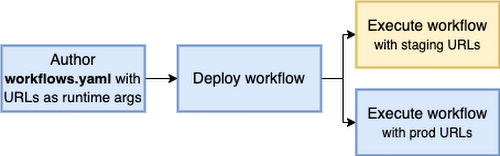
In the first option, you define URLs as runtime arguments and use them whenever you need to call a service:
main:params: [args]steps:- init:assign:- url1: ${args.urls.url1}- url2: ${args.urls.url2}
You can deploy workflow1.yaml as an example:
gcloud workflows deploy multi-env1 --source workflow1.yaml
Run the workflow in the staging environment with staging URLs:
gcloud workflows run multi-env1 --data='{"urls":{"url1": "https://us-central1-projectid.cloudfunctions.net/func1-staging", "url2": "https://us-central1-projectid.cloudfunctions.net/func2-staging"}}'
And, run the workflow in the prod environment with prod URLs:
gcloud workflows run multi-env1 --data='{"urls":{"url1": "https://us-central1-projectid.cloudfunctions.net/func1-prod", "url2": "https://us-central1-projectid.cloudfunctions.net/func2-prod"}}'
Note: These runtime arguments can also be passed when triggering using API, client libraries, or scheduled triggers but not when triggering with Eventarc.
Option 2: Use Cloud Build to deploy multiple versions
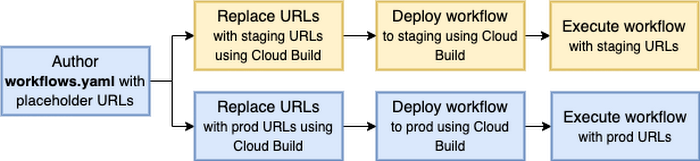
In the second option, you use Cloud Build to deploy multiple versions of the workflow with the appropriate staging and prod URLs replaced at deployment time.
Run setup.sh to enable required services and grant necessary roles.
Define a YAML (see workflow2.yaml for an example) that has placeholder values for URLs:
main:steps:- init:assign:- url1: REPLACE_url1- url2: REPLACE_url2
Define cloubuild.yaml that has a step to replace placeholder URLs and a deployment step:
steps:- id: 'replace-urls'name: 'gcr.io/cloud-builders/gcloud'entrypoint: bashargs:- -c- |sed -i -e "s~REPLACE_url1~$_URL1~" workflow2.yamlsed -i -e "s~REPLACE_url2~$_URL2~" workflow2.yaml- id: 'deploy-workflow'name: 'gcr.io/cloud-builders/gcloud'args: ['workflows', 'deploy', 'multi-env2-$_ENV', '--source', 'workflow2.yaml']
Deploy the workflow in the staging environment with staging URLs:
gcloud builds submit --config cloudbuild.yaml --substitutions=_ENV=staging,_URL1="https://us-central1-projectid.cloudfunctions.net/func1-staging",_URL2="https://us-central1-projectid.cloudfunctions.net/func2-staging"
Deploy the workflow in the prod environment with prod URLs:
gcloud builds submit --config cloudbuild.yaml --substitutions=_ENV=prod,_URL1="https://us-central1-projectid.cloudfunctions.net/func1-prod",_URL2="https://us-central1-projectid.cloudfunctions.net/func2-prod"
Now, you have two workflows ready to run in staging and prod environments:
gcloud workflows run multi-env2-staginggcloud workflows run multi-env2-prod
Option 3: Use Terraform to deploy multiple versions
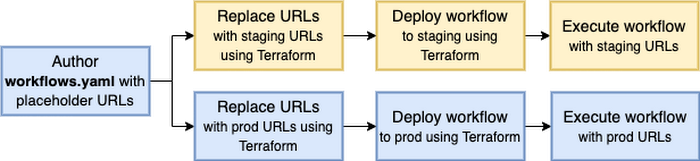
In the third option, you use Terraform to deploy multiple versions of the workflow with the appropriate staging and prod URLs replaced at deployment time.
Define a YAML (see workflow3.yaml for an example) that has placeholder values for URLs:
main:steps:- init:assign:- url1: ${url1}- url2: ${url2}
Define main.tf that creates staging and prod workflows:
variable "project_id" {type = string}variable "url1" {type = string}variable "url2" {type = string}locals {env = ["staging", "prod"]}# Define and deploy staging and prod workflowsresource "google_workflows_workflow" "multi-env3-workflows" {for_each = toset(local.env)name = "multi-env3-${each.key}"project = var.project_idregion = "us-central1"source_contents = templatefile("${path.module}/workflow3.yaml", { url1 : "${var.url1}-${each.key}", url2 : "${var.url2}-${each.key}" })}
Initialize Terraform:
terraform init
Check the planned changes:
terraform plan -var="project_id=YOUR-PROJECT-ID" -var="url1=https://us-central1-projectid.cloudfunctions.net/func1" -var="url2=https://us-central1-projectid.cloudfunctions.net/func2"
Deploy the workflow in the staging environment with staging URLs and the prod environment with prod URLs:
terraform apply -var="project_id=YOUR-PROJECT-ID" -var="url1=https://us-central1-projectid.cloudfunctions.net/func1" -var="url2=https://us-central1-projectid.cloudfunctions.net/func2"
Now, you have two workflows ready to run in staging and prod environments:
gcloud workflows run multi-env3-staginggcloud workflows run multi-env3-prod
Pros and cons
At this point, you might be wondering which option is best.
Option 1 has a simpler setup (a single workflow deployment) but a more complicated execution, as you need to pass in URLs for every execution. If you have a lot of URLs, executions can get too verbose with all the runtime arguments for URLs. Also, you can’t tell which URLs your workflow will call until you actually execute the workflow.
Option 2 has a more complicated setup with multiple workflow deployments with Cloud Build. However, the workflow contains the URLs being called and that results in a simpler execution and debugging experience.
Option 3 is pretty much the same as Option 2 but for Terraform users. If you’re already using Terraform, it probably makes sense to also rely on Terraform to replace URLs for different environments.
This post provided examples of how to implement multi-environment workflows. If you have questions or feedback, feel free to reach out to me on Twitter @meteatamel.
By: Mete Atamel (Developer Advocate)
Source: Google Cloud Blog
For enquiries, product placements, sponsorships, and collaborations, connect with us at [email protected]. We'd love to hear from you!
Our humans need coffee too! Your support is highly appreciated, thank you!