aster.cloud aster.cloud
  • /
  • Platforms
    • Public Cloud
    • On-Premise
    • Hybrid Cloud
    • Data
  • Architecture
    • Design
    • Solutions
    • Enterprise
  • Engineering
    • Automation
    • Software Engineering
    • Project Management
    • DevOps
  • Programming
    • Learning
  • Tools
  • About
  • /
  • Platforms
    • Public Cloud
    • On-Premise
    • Hybrid Cloud
    • Data
  • Architecture
    • Design
    • Solutions
    • Enterprise
  • Engineering
    • Automation
    • Software Engineering
    • Project Management
    • DevOps
  • Programming
    • Learning
  • Tools
  • About
aster.cloud aster.cloud
  • /
  • Platforms
    • Public Cloud
    • On-Premise
    • Hybrid Cloud
    • Data
  • Architecture
    • Design
    • Solutions
    • Enterprise
  • Engineering
    • Automation
    • Software Engineering
    • Project Management
    • DevOps
  • Programming
    • Learning
  • Tools
  • About
  • Tools

How To Install PyCharm (Python IDE) In Ubuntu

  • root
  • October 7, 2019
  • 1 minute read

Overview

PyCharm is an IDE (Integrated Development Environment) for the Python programming. language.

If you haven’t installed Python in your machine check out this guide for Ubuntu.


Partner with aster.cloud
for your next big idea.
Let us know here.


From our partners:

CITI.IO :: Business. Institutions. Society. Global Political Economy.
CYBERPOGO.COM :: For the Arts, Sciences, and Technology.
DADAHACKS.COM :: Parenting For The Rest Of Us.
ZEDISTA.COM :: Entertainment. Sports. Culture. Escape.
TAKUMAKU.COM :: For The Hearth And Home.
ASTER.CLOUD :: From The Cloud And Beyond.
LIWAIWAI.COM :: Intelligence, Inside and Outside.
GLOBALCLOUDPLATFORMS.COM :: For The World's Computing Needs.
FIREGULAMAN.COM :: For The Fire In The Belly Of The Coder.
ASTERCASTER.COM :: Supra Astra. Beyond The Stars.
BARTDAY.COM :: Prosperity For Everyone.


Prerequisites

  • Ubuntu 18.04


Installation

01. Download the installer at the PyCharm official website. Select from either Professional or Community.
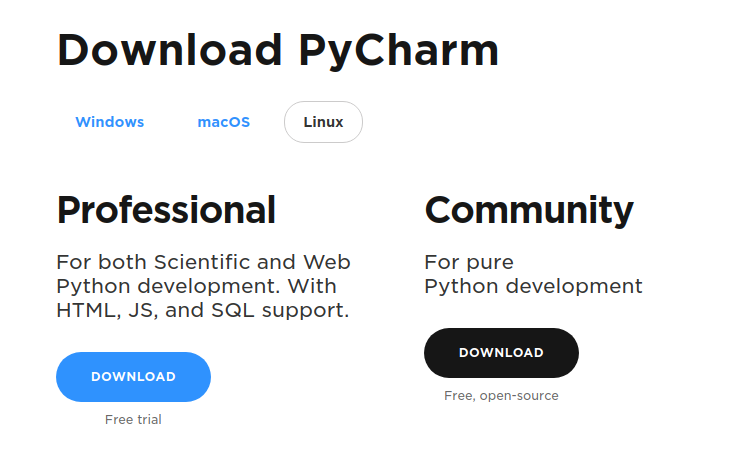
The Professional edition provides a lot of features that boosts productivity, but can also be done on the Community version, but might need to do it some other way. An example is the Flask supported runtime.


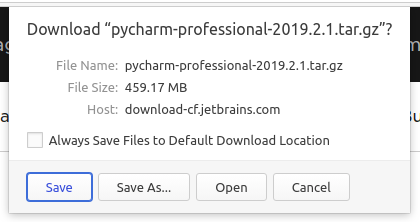
02. Download the installer into the local machine.
 

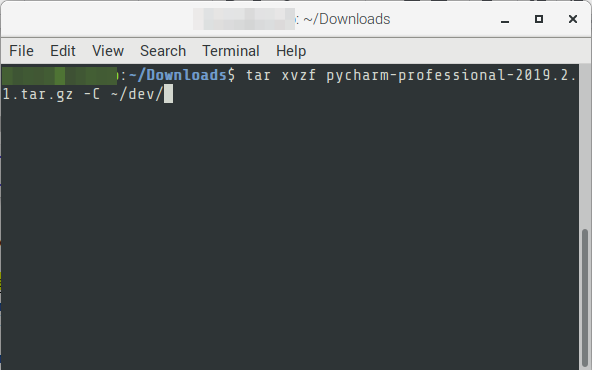
03. Open a terminal window, change directory to the downloaded file. Execute the following.


# FORMAT

$ cd {{download folder}}

$ tar xvzf pycharm_{{professional|community-version}}.tar.gz -C {{destination-directory}}

# EXAMPLE

$ cd ~/Downloads

$ tar xvzf pycharm-professional-2019.2.1.tar.gz -C ~/dev/
 

04. Navigate to the extracted destination directory and run the following to run PyCharm.

# FORMAT

$ cd {{destination-directory}}/{{pycharm-version}}

$ bin/pycharm.sh

# EXAMPLE

$ cd ~/dev/pycharm-2019.2.1/

$ bin/pycharm.sh 


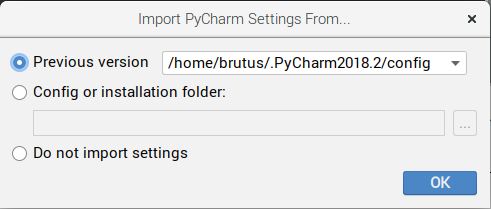
05. If a previous version of PyCharm is installed an option to import previous setting will be shown. This will import project workspace and IDE settings. Choose the preferred option.

For Professional edition users, the previous license key will be detected and used by PyCharm.
 

06. The application will open.


07. Congratulations! PyCharm is ready for Python development.

Read More  Which Universities Are Producing Today's Programming Talent?

For enquiries, product placements, sponsorships, and collaborations, connect with us at [email protected]. We'd love to hear from you!

Our humans need coffee too! Your support is highly appreciated, thank you!

root

Related Topics
  • IDE
  • Installation
  • PyCharm
  • Python
You May Also Like
zedreviews-fathers-day-50830
View Post
  • Gears
  • Technology
  • Tools

Father’s Day Outdoors, Round Two – Gear for the Action, the Tailgate, and Beating the Heat

  • June 20, 2026
zedreviews-fathers-day-2147684744
View Post
  • Gears
  • Technology
  • Tools

The Ultimate Father’s Day Gift Guide – Home Entertainment Upgrades Dad Actually Wants

  • June 20, 2026
View Post
  • Technology
  • Tools

IBM Launches Enterprise Advantage Service to Help Businesses Scale Agentic AI

  • January 19, 2026
notta-ai-header
View Post
  • Featured
  • Tools

Notta vs Fireflies: Which AI Transcription Tool Deserves Your Attention in 2025?

  • May 16, 2025
zedreviews-Apple-iPhone-16-Pro-finish-lineup-240909
View Post
  • Featured
  • Gears
  • Tech
  • Technology
  • Tools

Apple debuts iPhone 16 Pro and iPhone 16 Pro Max

  • September 10, 2024
zedreviews-Apple-AirPods-Active-Noise-Cancellation-240909
View Post
  • Featured
  • Gears
  • Tech
  • Technology
  • Tools

Apple introduces AirPods 4 and the world’s first all-in-one hearing health experience with AirPods Pro 2

  • September 10, 2024
Automation
View Post
  • Automation
  • Platforms
  • Tools

Automate Your Data Warehouse Migration To BigQuery With New Data Migration Tool

  • August 24, 2023
Developers | Software | Program | Engineering
View Post
  • Software Engineering
  • Technology
  • Tools

Top IDEs And Compilers For C++.

  • July 4, 2023

Stay Connected!
LATEST
  • 1
    Apple unveils groundbreaking MacBook Pro with PROLED XDR Display and Touch for the first time on Mac
    • October 28, 2026
  • 2
    Apple introduces the new 14‑inch MacBook Pro with M6
    • October 27, 2026
  • 3
    Apple unveils new iMac with M6, delivering a major boost in performance and AI capabilities
    • October 27, 2026
  • 4
    IBM and Siemens Collaborate on Research to Advance Nanostack Architecture
    • October 14, 2026
  • 5
    Chinese tech giant Huawei unveils Mate 90 series smartphones with flagship Tau chips adopting logic folding technology
    • October 2, 2026
  • 6
    IBM Acquires Logiq Consulting to Expand Secure Digital Transformation and Cybersecurity Capabilities in the UK
    • September 24, 2026
  • 7
    Accenture and Google Cloud Transform Software Development with Volvo Cars
    • September 22, 2026
  • 8
    Synthetic data could ease people’s concerns about privacy breaches. But who gets to create it?
    • September 15, 2026
  • 9
    Apple Flagship Hardware Launch for September 2026
    • September 10, 2026
  • 10
    Multi-cloud with AWS and Azure just got a whole lot easier thanks to a new interconnect service
    • September 2, 2026
about
Hello World!

We are aster.cloud. We’re created by programmers for programmers.

Our site aims to provide guides, programming tips, reviews, and interesting materials for tech people and those who want to learn in general.

We would like to hear from you.

If you have any feedback, enquiries, or sponsorship request, kindly reach out to us at:

[email protected]
Most Popular
  • 1
    Broadcom eyes security, performance boosts with vDefend and Avi Load Balancer updates
    • August 7, 2026
  • Why real SaaS resilience means breaking free of the hyperscaler
    • August 11, 2026
  • Agentic AI is spurring a ‘fundamental shift’ in cloud infrastructure consumption
    • August 17, 2026
  • 4
    VMware targets ‘three core AI cost drivers’ with new Private AI Cloud service
    • September 2, 2026
  • 5
    Digital sovereignty in the age of AI: You don’t have to choose between control and innovation
    • August 10, 2026
  • /
  • Technology
  • Tools
  • About
  • Contact Us

Input your search keywords and press Enter.