One of the most frequent questions customers ask is “how do I find this in my logs?”—often followed by a request to use regular expressions in addition to our logging query language. We’re delighted to announce that we recently added support for regular expressions to our query language — now you can search through your logs using the same powerful language selectors as you use in your tooling and software!
Even with regex support, common queries and helpful examples in our docs, searching petabytes of structured or unstructured log data efficiently is an art, and sometimes there’s no substitute for talking to an expert. We asked Dan Jacques, a software engineering lead on logging who led the effort to add regular expressions to the logging query language, to share some background on how logging works and tips and tricks for exploring your logs.
From our partners:
Can you tell me a little bit about Cloud Logging’s storage and query backend?
Cloud Logging stores log data in a massive internal time-series database. It’s optimized for handling time-stamped data like logs, which is one of the reasons you don’t need to swap out old logs data to cold storage like some other logging tools. This is the same database software that powers internal Google service logs and monitoring. The database is designed with scalability in mind and processes over 2.5 EB (exabytes!) of logs per month, which thousands of Googlers and Google Cloud customers query to do their jobs every day…
Can you tell me about your experience adding support for regular expressions into the logging query language?
I used Google Cloud Platform and Cloud Logging as a Googler quite a bit prior to joining the team, and had experienced a lack of regular expression support as a feature gap. Championing regular expression support was high on my list of things to do. Early this year I got a chance to scope out what it would require. Shortly after, my team and I got to work implementing regular expression support.
As someone who has to troubleshoot issues for customers, can you share some tips and best practices for making logging queries perform as well as possible?
Cloud Logging provides a very flexible, largely free-form logging structure, and a very powerful and forgiving query language. There are clear benefits to this approach: log data from a large variety of services and sources fit into our schema, and you can issue queries using a simple and readable query notation. However, the downside of being general purpose is that it’s challenging to optimize for every data and query pattern. As a general guide, you can improve performance by narrowing the scope of your queries as much as possible, which in turn narrows the amount of data we have to search. Here are some specific ideas for narrowing scope and improving performance:
- Add “resource type” and “log name” fields to your query whenever you can. These fields are indexed in such a way that make them particularly effective at improving performance. Even if the rest of your query already only selects records from a certain log/resource, adding these constraints informs our system not to spend time looking elsewhere. The new Field Explorer feature can help drill down into specific resources.
Original search: "CONNECTING"
Specific search:
LOG_ID(stdout)
resource.type="k8s_container"
resource.labels.location="us-central1-a"
resource.labels.cluster_name="test"
resource.labels.namespace_name="istio-system"
"CONNECTING"
- Choose as narrow a time range as possible. Let’s suppose you’re looking for a VM that was deleted about a year ago. Since our storage system is optimized for time, limiting your time range to a month will really help with performance. You can select the timestamp through the UI or by adding it to the search explicitly.
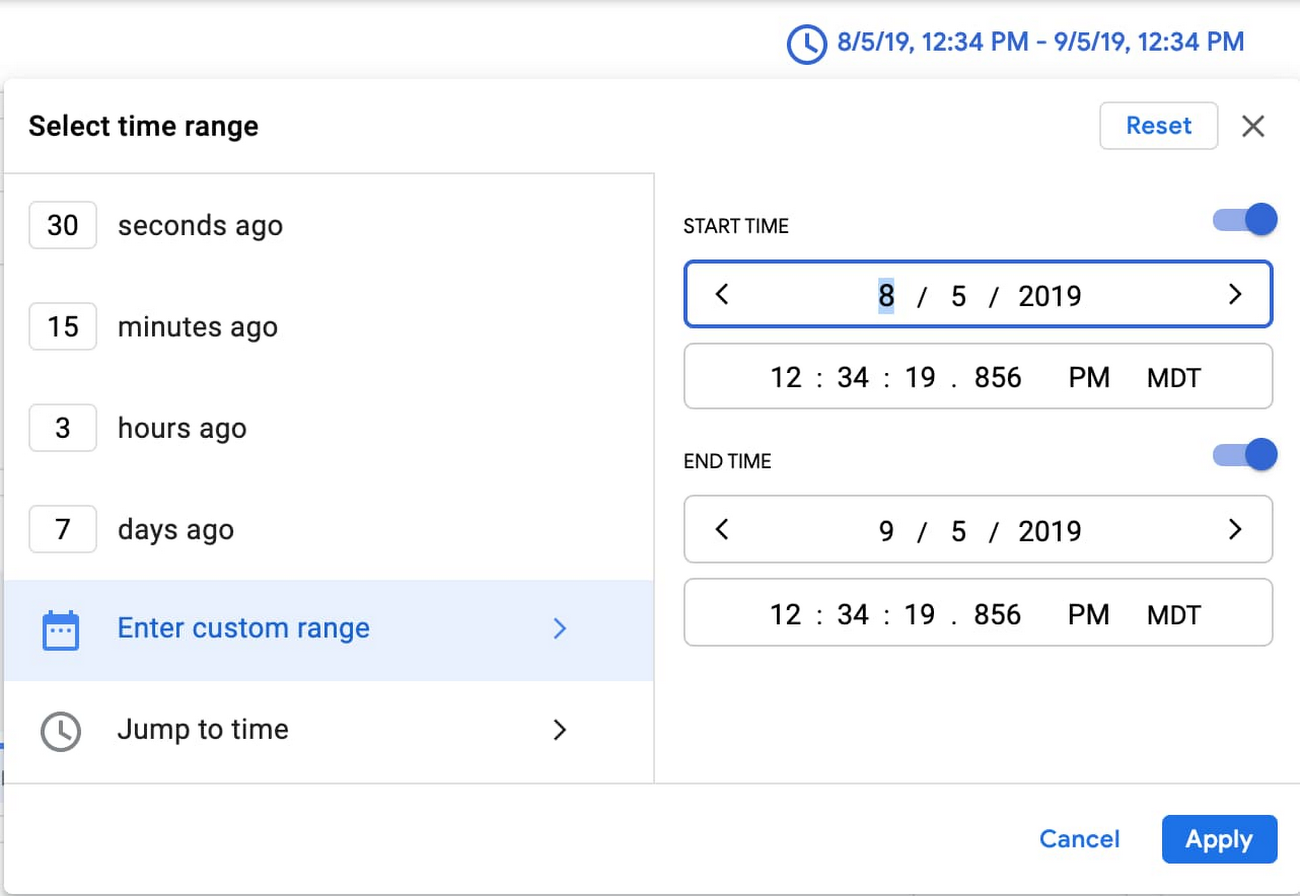
Pro tip: you can paste a timestamp like the one below directly into the field for custom time.
Original search: "CONNECTING"
Specific search:
timestamp>="2019-08-05T18:34:19.856588299Z"
timestamp<="2019-09-05T18:34:19.856588299Z"
"CONNECTING"
- Put highly-queried data into indexed fields. You can use the Cloud Logging agent to route log data to indexed fields for improved performance, for example. Placing indexed data in the “labels” LogEntry field will generally yield faster look-ups.
- Restrict your queries to a specific field. If you know that the data you’re looking for is in a specific field, restrict the query to that field rather than using the less efficient global restriction.
Original search: "CONNECTING"
Specific search:
textPayload =~ "CONNECTING"
Can you tell us more about using regular expressions in Cloud Logging?
Our filter language is very good at finding text, or values expressed as text, in some cases to the point of oversimplification at the expense of specificity. Prior to regular expressions, if you wanted to search for any sort of pattern complexity, you had to build a similitude of that complexity out of conjunctive and disjunctive terms, often leading to over-querying log entries and underperforming queries.
Now, with support for regular expressions, you can perform a case-sensitive search, match complex patterns, or even substring search for a single “*” character.
The RE2 syntax we use for regular expressions is a familiar, well-documented, and performant regular expression language. Offering it to users as a query option allows users to naturally and performantly express exactly the log data that they are searching for.
For example, previously if you wanted to search for a text payload beginning with “User” and ending with either “Logged In” or “Logged Out”, you would have to use a substring expression like:
(textPayload:User AND (textPayload:"Logged In" OR textPayload:"Logged Out"))
Something like this deviates significantly from the actual intended query:
- There is no ordering in substring matching, so “I have Logged In a User” would match the filter’s constraints.
- Each term executes independently, so this executes up to three matches per candidate log entry internally, costing additional matching time.
- Substring matches are case-insensitive. There is no way to exclude e.g., “logged in”.
But with a regular expression, you can execute:
textPayload =~ "^User.*Logged (In|Out)$"
This is simpler and selects exactly what you’re looking for.
Since we dogfood our own tools and the Cloud Logging team uses Cloud Logging for troubleshooting, our team has found it really useful and I hope it’s as useful to our customers!
Ready to get started with Cloud Logging?
Keep in mind these tips from Dan that will speed up your searches:
- Add a resource type and log name to your query whenever possible,
- Keep your selected time range as narrow as possible.
- If you know that what you’re looking for is part of a specific field, search on that field rather than using a global search.
- Use regex to perform case sensitive searches or advanced pattern matching against string fields. Substring and global search are always case insensitive.
- Add highly-queried data fields into the indexed “labels” field.
Head over to the Logs Viewer to try out these tips as well as the new regex support.
For enquiries, product placements, sponsorships, and collaborations, connect with us at [email protected]. We'd love to hear from you!
Our humans need coffee too! Your support is highly appreciated, thank you!