aster.cloud aster.cloud
  • /
  • Platforms
    • Public Cloud
    • On-Premise
    • Hybrid Cloud
    • Data
  • Architecture
    • Design
    • Solutions
    • Enterprise
  • Engineering
    • Automation
    • Software Engineering
    • Project Management
    • DevOps
  • Programming
    • Learning
  • Tools
  • About
  • /
  • Platforms
    • Public Cloud
    • On-Premise
    • Hybrid Cloud
    • Data
  • Architecture
    • Design
    • Solutions
    • Enterprise
  • Engineering
    • Automation
    • Software Engineering
    • Project Management
    • DevOps
  • Programming
    • Learning
  • Tools
  • About
aster.cloud aster.cloud
  • /
  • Platforms
    • Public Cloud
    • On-Premise
    • Hybrid Cloud
    • Data
  • Architecture
    • Design
    • Solutions
    • Enterprise
  • Engineering
    • Automation
    • Software Engineering
    • Project Management
    • DevOps
  • Programming
    • Learning
  • Tools
  • About
  • Tech
  • Tools

How To Install Vokoscreen Video Desktop Recorder For Ubuntu

  • root
  • August 26, 2019
  • 2 minute read

Overview

Vokoscreen is a video desktop recorder for Ubuntu that allows selection of the screen area, setting the number of frames, and even provide a zoom function on the area the cursor is located.


Partner with aster.cloud
for your next big idea.
Let us know here.


From our partners:

CITI.IO :: Business. Institutions. Society. Global Political Economy.
CYBERPOGO.COM :: For the Arts, Sciences, and Technology.
DADAHACKS.COM :: Parenting For The Rest Of Us.
ZEDISTA.COM :: Entertainment. Sports. Culture. Escape.
TAKUMAKU.COM :: For The Hearth And Home.
ASTER.CLOUD :: From The Cloud And Beyond.
LIWAIWAI.COM :: Intelligence, Inside and Outside.
GLOBALCLOUDPLATFORMS.COM :: For The World's Computing Needs.
FIREGULAMAN.COM :: For The Fire In The Belly Of The Coder.
ASTERCASTER.COM :: Supra Astra. Beyond The Stars.
BARTDAY.COM :: Prosperity For Everyone.

Prerequisites

  • Ubuntu 18.04


Installation

01. Install using the following commands


$ sudo apt-get update

$ sudo apt-get install vokoscreen


02. Once installed can access the application using the launcher
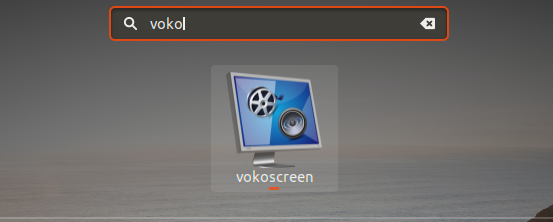
 

or via the command line

$ vokoscreen


03. It will open the Vokoscreen user interface.
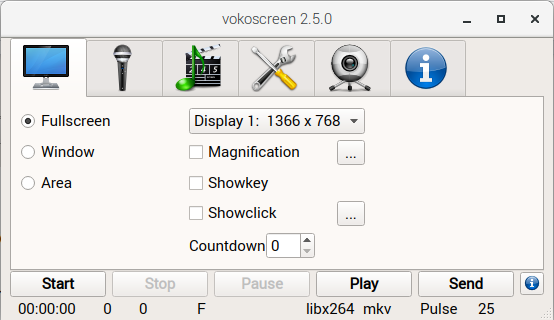


Features

Recording Area

  • Fullscreen – records the whole content of the desktop
  • Window – allows selecting an application window to record
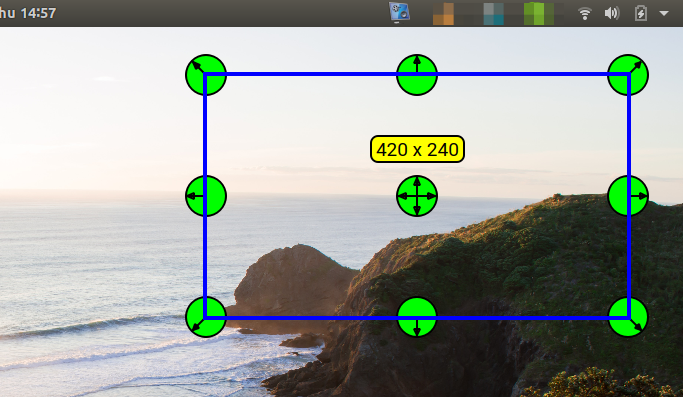
  • Area – will open a floating selection with edit to allow which section of the screen can be recorded


Area Selection
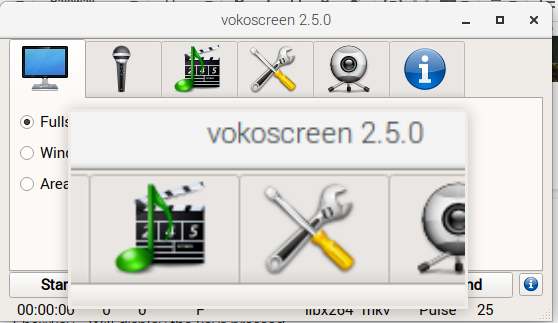
  • Magnification – Enables a zoom on the cursor
  • Showkey – Will display the keys pressed
  • Showclick – Shows a circle around the cursor to highlight any click event


Magnification
 

Audio Input
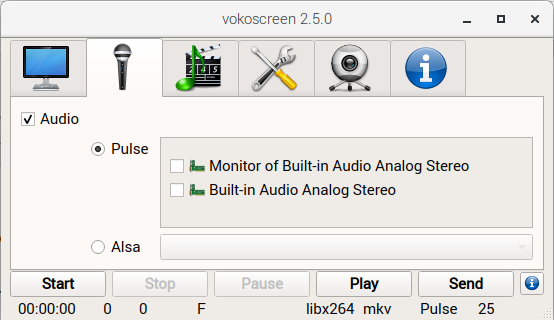
Determine the source of the audio to include in the Video recording. You can record any audio output from the operating system. An example is when you are recording a video conference and need to save a recording for future reference on participants that are not able to join.


Video Output Format
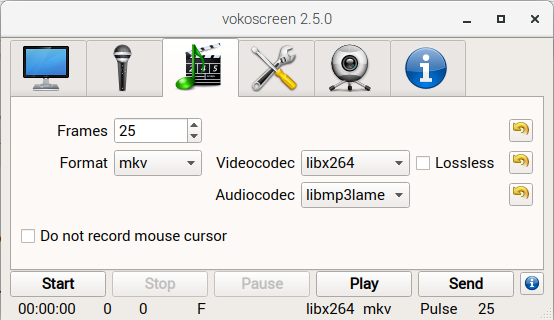
The “Frames” option determine the number of frames to include per second. Other settings include the output “Format” (MKV, MP4 and GIF), “Videocodec” (libx264, mpeg4 and huffyuv) and “Audiocodec” (libmp3lame, libvorbis, pcm_s16le, and aac).


Other Settings
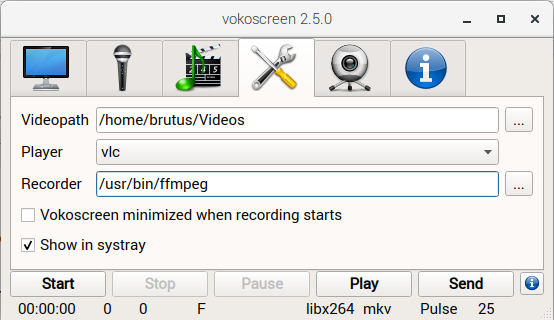
The directory on where to place the video recording can be configured using the “Videopath” option. The “Player” will be opened after a recording is completed and the “Play” button is selected.

Read More  Canonical Enables Linux Desktop App Support With Flutter


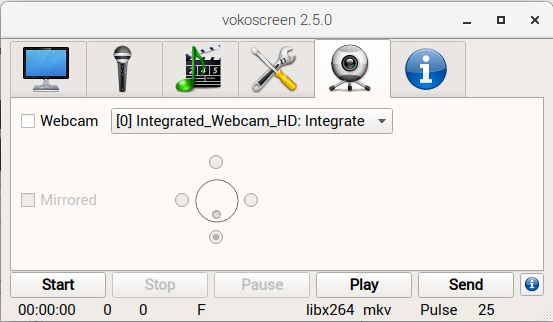
Webcam Settings

When enabled allows recording the video recorder by the system camera.


For enquiries, product placements, sponsorships, and collaborations, connect with us at [email protected]. We'd love to hear from you!

Our humans need coffee too! Your support is highly appreciated, thank you!

root

Related Topics
  • Desktop Recorder
  • How To
  • Install
  • Ubuntu
  • Vokoscreen
You May Also Like
zedreviews-fathers-day-50830
View Post
  • Gears
  • Technology
  • Tools

Father’s Day Outdoors, Round Two – Gear for the Action, the Tailgate, and Beating the Heat

  • June 20, 2026
zedreviews-fathers-day-2147684744
View Post
  • Gears
  • Technology
  • Tools

The Ultimate Father’s Day Gift Guide – Home Entertainment Upgrades Dad Actually Wants

  • June 20, 2026
Smartphone hero image
View Post
  • Gears
  • Tech

Zed Approves | Smartphones for Every Budget Range

  • January 29, 2026
View Post
  • Technology
  • Tools

IBM Launches Enterprise Advantage Service to Help Businesses Scale Agentic AI

  • January 19, 2026
Early Black Friday Gears
View Post
  • Tech

Friday Deals – And It’s Not Even Black Friday Yet

  • November 13, 2025
notta-ai-header
View Post
  • Featured
  • Tools

Notta vs Fireflies: Which AI Transcription Tool Deserves Your Attention in 2025?

  • May 16, 2025
Getting things done makes her feel amazing
View Post
  • Computing
  • Data
  • Featured
  • Learning
  • Tech
  • Technology

Nurturing Minds in the Digital Revolution

  • April 25, 2025
View Post
  • Tech

Deep dive into AI with Google Cloud’s global generative AI roadshow

  • February 18, 2025

Stay Connected!
LATEST
  • 1
    IBM Study: One in Four Malicious Breaches are AI-Enabled, Costing Companies $6 Million on Average
    • July 29, 2026
  • 2
    Accelerating the frontiers of scientific discovery: Google’s $40M commitment to the Genesis Mission
    • July 26, 2026
  • 3
    3 Questions: Neural transparency and the future of AI design
    • July 17, 2026
  • 4
    Intel Invests €5 Billion to Expand Manufacturing in Europe
    • July 13, 2026
  • 5
    IBM and Red Hat Expand Lightwell with New Offerings to Build the Trust Infrastructure for AI-Era Open Source
    • July 8, 2026
  • 6
    When I Was Young
    • July 4, 2026
  • 7
    The Fastest AI Fried Chicken In The World
    • June 29, 2026
  • 8
    Zed Approves | How to Stay Cool in Extreme Heat
    • June 29, 2026
  • 9
    The AI investment surge hasn’t produced the expected results yet. That could change in 2026
    • June 26, 2026
  • 10
    Zed Approves | It’s Prime Day 2026! Time to Upgrade Your World Cup Viewing Setup and Beat the Heat
    • June 25, 2026
about
Hello World!

We are aster.cloud. We’re created by programmers for programmers.

Our site aims to provide guides, programming tips, reviews, and interesting materials for tech people and those who want to learn in general.

We would like to hear from you.

If you have any feedback, enquiries, or sponsorship request, kindly reach out to us at:

[email protected]
Most Popular
  • 1
    Zed Approves | The Best Prime Day PC Deals: Top Gaming Rigs, Workstations, and Everyday Laptops
    • June 24, 2026
  • neon-cart 2
    Zed Approves: How to Gear Up for GTA 6 This Amazon Prime Day (2026 Quick Guide)
    • June 22, 2026
  • zedreviews-valerion 3
    Father’s Day Outdoors – Build Dad the Ultimate Backyard Watch Party
    • June 20, 2026
  • zedreviews-fathers-day-50830 4
    Father’s Day Outdoors, Round Two – Gear for the Action, the Tailgate, and Beating the Heat
    • June 20, 2026
  • zedreviews-fathers-day-2147684744 5
    The Ultimate Father’s Day Gift Guide – Home Entertainment Upgrades Dad Actually Wants
    • June 20, 2026
  • /
  • Technology
  • Tools
  • About
  • Contact Us

Input your search keywords and press Enter.