aster.cloud aster.cloud
  • /
  • Platforms
    • Public Cloud
    • On-Premise
    • Hybrid Cloud
    • Data
  • Architecture
    • Design
    • Solutions
    • Enterprise
  • Engineering
    • Automation
    • Software Engineering
    • Project Management
    • DevOps
  • Programming
    • Learning
  • Tools
  • About
  • /
  • Platforms
    • Public Cloud
    • On-Premise
    • Hybrid Cloud
    • Data
  • Architecture
    • Design
    • Solutions
    • Enterprise
  • Engineering
    • Automation
    • Software Engineering
    • Project Management
    • DevOps
  • Programming
    • Learning
  • Tools
  • About
aster.cloud aster.cloud
  • /
  • Platforms
    • Public Cloud
    • On-Premise
    • Hybrid Cloud
    • Data
  • Architecture
    • Design
    • Solutions
    • Enterprise
  • Engineering
    • Automation
    • Software Engineering
    • Project Management
    • DevOps
  • Programming
    • Learning
  • Tools
  • About
  • Software

What’s New On The Chromebook App Hub

  • aster.cloud
  • January 23, 2020
  • 3 minute read

In classrooms around the world, educators rely on Chromebooks to keep their students’ data secure. Students like them because they are fast, easy to use and built for collaboration. And because documents are all stored in the cloud, students can share devices and access their work from anywhere. Most importantly, Chromebook apps and features help teachers customize their lessons for students.

New features in the Chromebook App Hub

When teachers customize learning experiences, students can learn in a way that works best for them. That’s why we created the Chromebook App Hub.


Partner with aster.cloud
for your next big idea.
Let us know here.


From our partners:

CITI.IO :: Business. Institutions. Society. Global Political Economy.
CYBERPOGO.COM :: For the Arts, Sciences, and Technology.
DADAHACKS.COM :: Parenting For The Rest Of Us.
ZEDISTA.COM :: Entertainment. Sports. Culture. Escape.
TAKUMAKU.COM :: For The Hearth And Home.
ASTER.CLOUD :: From The Cloud And Beyond.
LIWAIWAI.COM :: Intelligence, Inside and Outside.
GLOBALCLOUDPLATFORMS.COM :: For The World's Computing Needs.
FIREGULAMAN.COM :: For The Fire In The Belly Of The Coder.
ASTERCASTER.COM :: Supra Astra. Beyond The Stars.
BARTDAY.COM :: Prosperity For Everyone.

The Chromebook App Hub lets educators and developers showcase and discover Chromebook apps and ideas for classroom activities. Since we launched the Chromebook App Hub, educators and developers have contributed over 270 apps and classroom ideas, and counting.

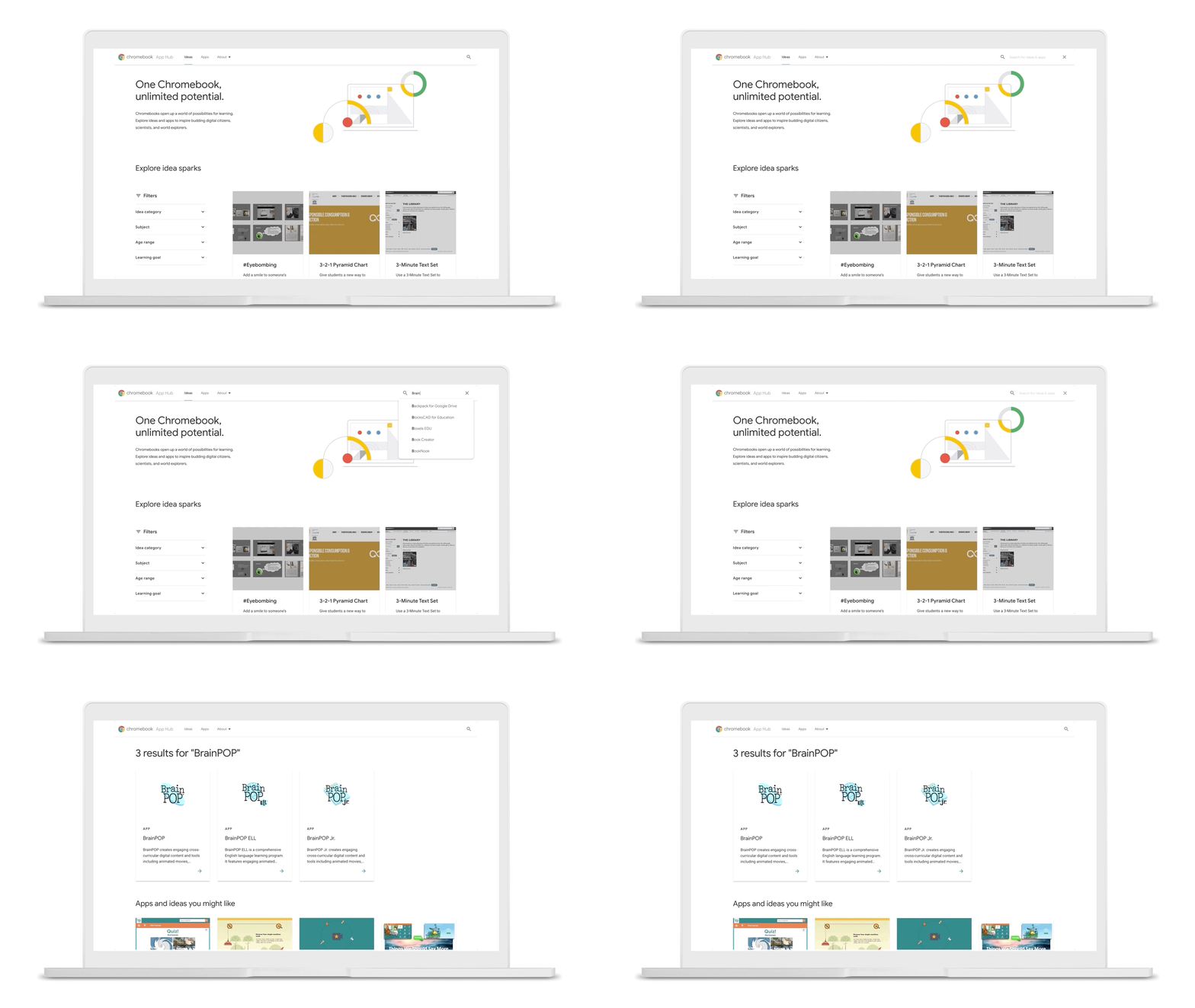
Here are some new features that make it easier for educators to find what they need on the Chromebook App Hub:

  • Search for your favorite apps and idea, and share them with other educators
  • New filter options that allow teachers to search by class subject, device feature, and Google integrations to find the best app to enhance their lessons
  • 20+ apps optimized for Chromebook tablets, and the ability to filter apps by privacy laws like GDPR and COPPA
Chromebook-wrapper-gif-SL.gif

Better access to touch-based learning

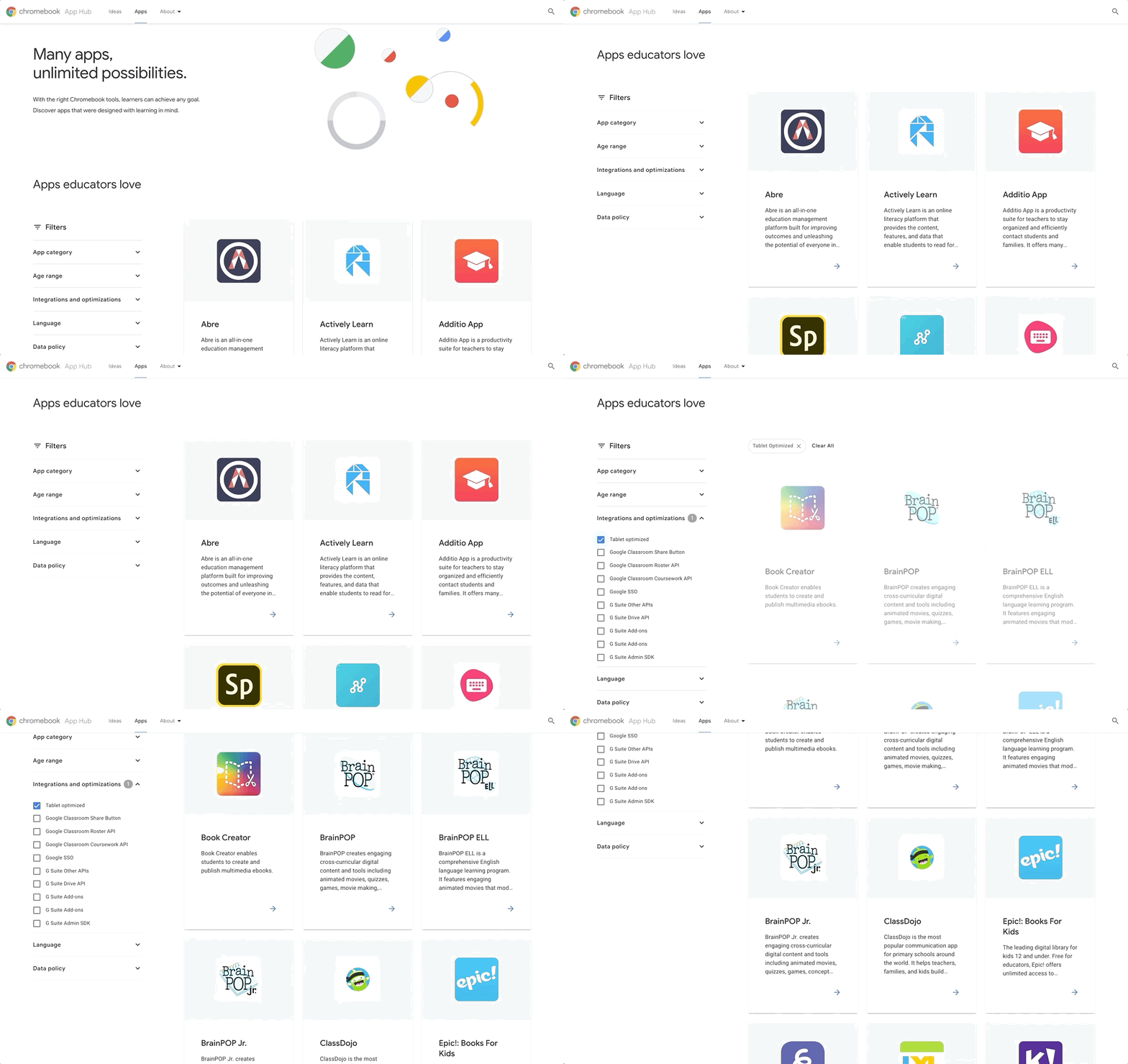
Whether it’s tablets like the new Lenovo 10e, Chromebooks with touchscreens, or devices that work with styluses, educators are increasingly turning to touchscreen capabilities to support varied learning styles and encourage student creativity.

And with the new filter functionality in the Chromebook App Hub, it’s now easier to find touch-optimized apps like:

  • Canva for Education: With drag-and-drop design tools, classroom-friendly content and templates, teachers and students can use Canva to create posters, worksheets, infographics, reports and animated presentations.
  • Adobe Spark: With features like drag-and-drop and pinch-to-zoom, students can use Spark to easily create narrated videos, writing assignments, presentations, flyers, newsletters, portfolios, and web pages.
  • Nearpod: A student engagement platform with ready-to-run interactive lessons that are touch-optimized for Chromebooks and tablets. Within Google Slides, educators can incorporate Nearpod features, while the Google Chrome extension enables teachers to easily access the Nearpod library within Google Classroom.
  • Kahoot: Create, host and play multiple choice quizzes. Teachers can take advantage of Google’s single sign-on for log-in and account creation as well as share homework challenges with students easily through Google Classroom.
Read More  Google Cloud Next 2019 | Northern Trust - Breaking The Mold To Become A Digital, Data-Driven Leader
03_Tablet_Optimized_Original.gif

Supporting diverse learners

The Chromebook App Hub includes apps that support learners with impaired vision or hearing, physical disabilities, and diverse learning styles.

Here are a few available:

  • WriQ from Texthelp: With their own personalized mini dashboard, students can  track how long they can write for before stopping, and positive nudge notifications spur them to do better each day.
  • Clicker Apps, from Crick Software provide customizable support to emergent, developing, and struggling readers and writers. During Bett this year, Crick is also launching a brand new Clicker Writer app.
  • Scanning Pens: The ReaderPen reads scanned text aloud or via earphones, aiding learners who need extra reading support. Students can scan the text directly into a Google Doc with the scan-to-file feature and upload recorded audio onto a Chromebook or Android device to allow for easy access when reviewing.
  • Wizkids AppWriter: An all-in-one accessibility tool for Chrome that offers support with English as a Foreign Language (EFL), writing and pronouncing words in Modern Foreign Languages (MFL), and assists with everyday literacy needs. Now, AppWriter also  includes a new and intuitive speech-to-text synthesizer. Find out more during Bett and register for a free trial.


Bayo Olotu, Program Manager, Chrome OS

This article is republished from Google Blog.


For enquiries, product placements, sponsorships, and collaborations, connect with us at [email protected]. We'd love to hear from you!

Our humans need coffee too! Your support is highly appreciated, thank you!

aster.cloud

Related Topics
  • App Hub
  • Chromebook
  • Chromebook Apps
  • Education
  • google
  • Google Apps
  • Google Chromebook
You May Also Like
men with computer website information and chat bubbles vector illustration
View Post
  • Software
  • Software Engineering

What is an ISV (independent software vendor)?

  • August 27, 2025
aster-cloud-erp-bill_of_materials_2
View Post
  • Software
  • Software Engineering

What is an SBOM (software bill of materials)?

  • July 2, 2025
aster-cloud-sms-pexels-tim-samuel-6697306
View Post
  • Programming
  • Software

Send SMS texts with Amazon’s SNS simple notification service

  • July 1, 2025
aster-cloud-website-pexels-goumbik-574069
View Post
  • Programming
  • Software

Host a static website on AWS with Amazon S3 and Route 53

  • June 27, 2025
View Post
  • Software
  • Technology

Canonical Releases Ubuntu 25.04 Plucky Puffin

  • April 17, 2025
View Post
  • Software
  • Technology

IBM Accelerates Momentum in the as a Service Space with Growing Portfolio of Tools Simplifying Infrastructure Management

  • March 27, 2025
Vehicle manufacturing
View Post
  • Software

IBM Study: Vehicles Believed to be Software Defined and AI Powered by 2035

  • December 12, 2024
aster-cloud-tux-gaming
View Post
  • Computing
  • Gears
  • Software

5 best Linux distributions for gamers in 2024

  • September 11, 2024

Stay Connected!
LATEST
  • 1
    IBM Study: One in Four Malicious Breaches are AI-Enabled, Costing Companies $6 Million on Average
    • July 29, 2026
  • 2
    Accelerating the frontiers of scientific discovery: Google’s $40M commitment to the Genesis Mission
    • July 26, 2026
  • 3
    3 Questions: Neural transparency and the future of AI design
    • July 17, 2026
  • 4
    Intel Invests €5 Billion to Expand Manufacturing in Europe
    • July 13, 2026
  • 5
    IBM and Red Hat Expand Lightwell with New Offerings to Build the Trust Infrastructure for AI-Era Open Source
    • July 8, 2026
  • 6
    When I Was Young
    • July 4, 2026
  • 7
    The Fastest AI Fried Chicken In The World
    • June 29, 2026
  • 8
    Zed Approves | How to Stay Cool in Extreme Heat
    • June 29, 2026
  • 9
    The AI investment surge hasn’t produced the expected results yet. That could change in 2026
    • June 26, 2026
  • 10
    Zed Approves | It’s Prime Day 2026! Time to Upgrade Your World Cup Viewing Setup and Beat the Heat
    • June 25, 2026
about
Hello World!

We are aster.cloud. We’re created by programmers for programmers.

Our site aims to provide guides, programming tips, reviews, and interesting materials for tech people and those who want to learn in general.

We would like to hear from you.

If you have any feedback, enquiries, or sponsorship request, kindly reach out to us at:

[email protected]
Most Popular
  • 1
    Zed Approves | The Best Prime Day PC Deals: Top Gaming Rigs, Workstations, and Everyday Laptops
    • June 24, 2026
  • neon-cart 2
    Zed Approves: How to Gear Up for GTA 6 This Amazon Prime Day (2026 Quick Guide)
    • June 22, 2026
  • zedreviews-valerion 3
    Father’s Day Outdoors – Build Dad the Ultimate Backyard Watch Party
    • June 20, 2026
  • zedreviews-fathers-day-50830 4
    Father’s Day Outdoors, Round Two – Gear for the Action, the Tailgate, and Beating the Heat
    • June 20, 2026
  • zedreviews-fathers-day-2147684744 5
    The Ultimate Father’s Day Gift Guide – Home Entertainment Upgrades Dad Actually Wants
    • June 20, 2026
  • /
  • Technology
  • Tools
  • About
  • Contact Us

Input your search keywords and press Enter.