Migrating your resources and workloads to a cloud platform can seem daunting at first—particularly in a traditional VMware environment. In a previous blog, we showed how to provision networking and connectivity so you can run VMware Cloud Foundation natively on Google Cloud VMware Engine. In this installment, we discuss some additional strategies for migrating to the cloud with Google Cloud VMware Engine.
Migration challenges
When moving from on-premises to the cloud, one of the first things that many would-be migrators worry about is incompatibilities between the compute, storage, and networking technologies in the cloud platform versus on-prem. For example:
From our partners:
- Does the cloud platform support the legacy OS and application versions you need?
- Do you need to adapt or change existing customized backup, monitoring, security, compliance, etc., processes to work in the cloud?
- Do you need to retrain your technical staff to acquire new skills to run in the cloud?
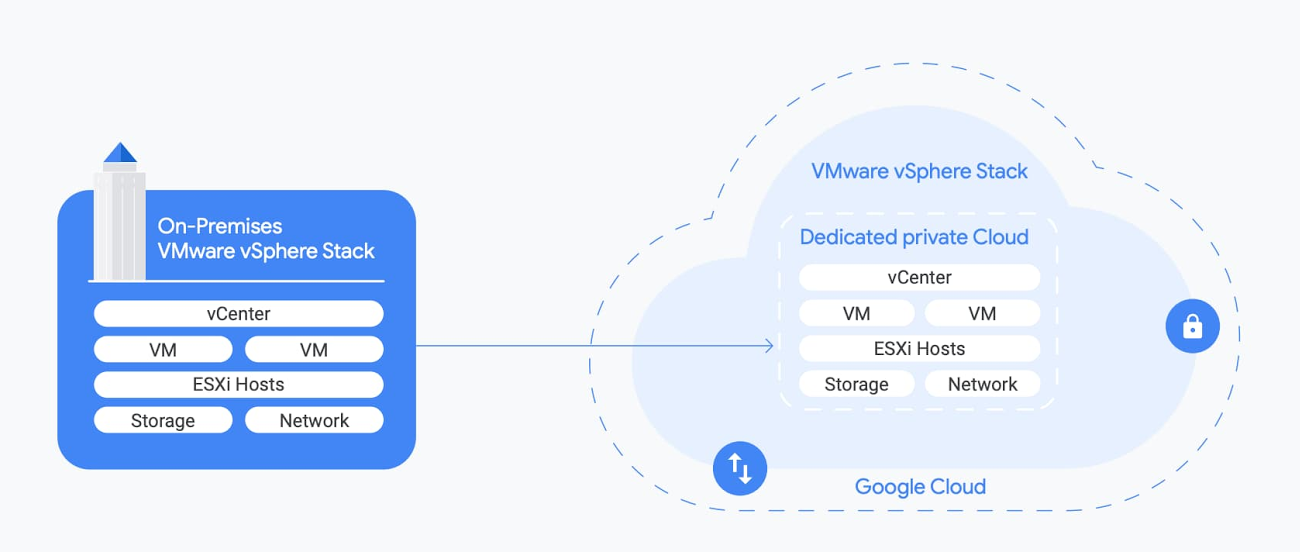
The good news is that these challenges are not insurmountable. We developed Google Cloud VMware Engine to let you migrate to the cloud without incurring the cost or complexity of refactoring applications. This means you can run and manage workloads on the cloud the same way you currently run your on-prem environment. Your VMware workloads will run in Google Cloud’s reliable and high performance environment in harmony with your existing on-prem tools, policies, and processes.
VMware Engine makes migration easy because it gives you a full stack of compute, storage, and networking technology that is compatible with your on-prem VMware environment. And because it is based on VMware, you can leverage all your existing automation strategies and tools. No need to retrain your IT staff—they already have all the skills they need, and the opportunity to learn new ones!
Starting your migration
Assessment is the first step of the migration process. Start out by building an inventory of your applications and sorting them into different buckets based on factors such as priority and application affinity. We recently acquired Stratozone to help enterprises accelerate their cloud migrations: simplifying discovery, assessment, and dependency analysis across workloads moving to the cloud. We also support other migration assessment tools by vendors such as CloudPhysics. Using the resulting inventory, you can create a sizing assessment to help understand your target footprint in the cloud—or in the case of VMware Engine, the number of ESXi nodes you’ll need.
Building out the target landing zone infrastructure in VMware Engine is the next step. This includes first deciding on a Google Cloud Organization and Project structure that dictates access control to VMware Engine resources. Then, you’ll need to:
- Create private clouds with an estimated number and size of vSphere clusters
- Set up infrastructure services (DNS, DHCP etc.) within your environment
- Establish network connectivity for your private cloud (including network connectivity to on-prem, internet and network firewall rules to control traffic flow)
- Configure an identity source for vSphere and NSX in the private cloud
Next, you’ll need to design your network architecture (subnets, routes, firewalls etc.) for applications in the target VMware environment, and formalize your architecture for VM/application backups and monitoring (both infrastructure and app monitoring). You can use the Google Cloud Console and vSphere UI interface to configure target landing zones.
Once you’ve prepared the landing zones, you’re ready to start moving workloads to VMware Engine. Migration is primarily a lift & shift (re-hosting) of your vSphere virtual machines to a vSphere target environment in the private cloud, and is a typical VM-2-VM migration. You may also need to move your file data to Google Cloud.
Migrating your applications
When migrating your applications from on-prem to Google Cloud VMware Engine, here are the three main strategies to consider:
1. Use specialized migration tools (VMware HCX)
HCX is a SaaS service from VMware that enables large-scale workload migrations across any VMware platforms (vSphere 5.0+) including migrations between on-prem vSphere and Google Cloud VMware Engine.
HCX enables bi-directional migrations independent of vSphere SSO domains, vSphere versions, hardware or network. It enables migrations requiring no replatforming of the workloads or applications including no changes to IP or MAC addresses, VM UUID and certs and offers you a choice in migration methodologies (cold, warm, live) to meet your workload SLA. The data is transported over a secure proxy for vMotion and replication traffic and utilizes WAN-optimized links for migration across the internet or WAN. To sum it up, HCX is a purpose-built, specialized tool for migrating VMs from vSphere 5.0+ to a modern software-defined data center.
An HCX subscription is included in your Google Cloud VMware Engine subscription and provides HCX licenses for both your on-prem site as well as your private cloud. When you create a private cloud, the HCX Manager Cloud appliance is automatically deployed, configured, and registered with the HCX service, making your target environment ready for migration. You can download the HCX Connector image and licence activation code for your on-prem environment from the HCX Manager Cloud UI. You can read more about the process here.
2. Use off-the-shelf replication and DR orchestration tools
You can use failover / migration functionality commonly available in DR orchestration tools to migrate your workloads from on-prem to VMware Engine. Virtual machine data can be replicated to VMware Engine using any data replication technology that works with vSAN as the target. Built-in vSphere replication and VMware Site Recovery Manager (SRM) as well as backup and disaster recovery tools from Google Cloud partners, Actifio, Veeam and Zerto, are some tools you can use.
For migrating databases like Microsoft SQL Server, Oracle, and others, you can also leverage the database’s native data replication/log shipping technologies for data transfer. You can add instances running in VMware Engine to the on-prem cluster, replicate your data and then use cutover functionality to migrate the database.
3. Use the built-in features of vSphere
You can use the vSphere content library to store and share OVF templates, VMTX templates, ISOs, scripts, and text files.
You can publish content from your on-prem content library and subscribe to it from the content library in the VMware Engine private cloud. You can subsequently choose to transfer all images from on-prem to the cloud right away, or do it only as needed. The images can optionally be stored using any NFS/SMB storage service in Google Cloud that interoperates with VMware Engine.
You can also re-use existing standardized images/templates to create new VMs in the VMware Engine environment. And you can create OVAs from existing on-prem VMs, and then deploy these in VMware Engine post transfer.
Data migration
After you have migrated your application, you may want to migrate your data to the cloud to reduce latency and response times for your applications.
To migrate data (file, backup, archive etc.), you can use any industry-standard tool that works with Google Cloud, or use Google Cloud services like Transfer service for on-prem and Transfer Appliance.
Finally, once the migrated data is uploaded to Google Cloud Storage, it can be accessed and consumed by your applications running within VMware VMs in Google Cloud.
Go deep with VMware Engine
We hope this post gives you a good overview of how to move VMs and data from on-prem to VMware Engine. In the coming weeks, we’ll share more about VMware Engine and building business resiliency, enabling work from anywhere, and your enterprise database options. To learn more or to get started, visit the VMware Engine website where you’ll find detailed information on key features, use cases, product documentation, and pricing.
For enquiries, product placements, sponsorships, and collaborations, connect with us at [email protected]. We'd love to hear from you!
Our humans need coffee too! Your support is highly appreciated, thank you!