aster.cloud aster.cloud
  • /
  • Platforms
    • Public Cloud
    • On-Premise
    • Hybrid Cloud
    • Data
  • Architecture
    • Design
    • Solutions
    • Enterprise
  • Engineering
    • Automation
    • Software Engineering
    • Project Management
    • DevOps
  • Programming
    • Learning
  • Tools
  • About
  • /
  • Platforms
    • Public Cloud
    • On-Premise
    • Hybrid Cloud
    • Data
  • Architecture
    • Design
    • Solutions
    • Enterprise
  • Engineering
    • Automation
    • Software Engineering
    • Project Management
    • DevOps
  • Programming
    • Learning
  • Tools
  • About
aster.cloud aster.cloud
  • /
  • Platforms
    • Public Cloud
    • On-Premise
    • Hybrid Cloud
    • Data
  • Architecture
    • Design
    • Solutions
    • Enterprise
  • Engineering
    • Automation
    • Software Engineering
    • Project Management
    • DevOps
  • Programming
    • Learning
  • Tools
  • About
  • Platforms

Introducing The Anthos Developer Sandbox—Free With A Google Account

  • aster.cloud
  • November 16, 2020
  • 3 minute read

Your colleagues in IT operations talk about needing a platform that can run a wide variety of apps: new or existing, running on Linux or Windows, long-running or serverless, capable of rapidly scaling up and down according to demand. Anthos is Google Cloud’s answer to these requirements for hybrid and multi-cloud. With Anthos, you not only get to choose how your apps will run but also where the runtimes are located—on-prem, in Google Cloud or in another cloud provider. But that may leave you wondering, “So what does it actually look like to develop on top of Anthos?”

We’re excited to launch the Anthos Developer Sandbox, giving you an easy way to learn how to develop on Anthos. With only a few minutes of your time you can get a developer-focused overview of Anthos. Better yet, the Anthos Developer Sandbox is available at no cost, to anyone with a Google account! You don’t need to be a Google Cloud customer, you don’t need to have billing enabled, and you don’t need the help of your IT department to experience Anthos first hand—simply click the button below to get started with the guided flow and then use the Sandbox to create and iterate on your own applications.


Partner with aster.cloud
for your next big idea.
Let us know here.


From our partners:

CITI.IO :: Business. Institutions. Society. Global Political Economy.
CYBERPOGO.COM :: For the Arts, Sciences, and Technology.
DADAHACKS.COM :: Parenting For The Rest Of Us.
ZEDISTA.COM :: Entertainment. Sports. Culture. Escape.
TAKUMAKU.COM :: For The Hearth And Home.
ASTER.CLOUD :: From The Cloud And Beyond.
LIWAIWAI.COM :: Intelligence, Inside and Outside.
GLOBALCLOUDPLATFORMS.COM :: For The World's Computing Needs.
FIREGULAMAN.COM :: For The Fire In The Belly Of The Coder.
ASTERCASTER.COM :: Supra Astra. Beyond The Stars.
BARTDAY.COM :: Prosperity For Everyone.

google cloud shell.jpg

The Anthos Developer Sandbox includes the following tools, plus a guided flow for learning how to use each of them:

  • Cloud Shell Editor – A development workstation in the cloud. Announced last month and available on ide.cloud.google.com, Cloud Shell Editor makes it easy to deploy cloud-native apps from an in-browser IDE, powered by the Eclipse Theia IDE platform and including all the underlying tools you need.
  • Cloud Code – A set of IDE enhancements that bring you the tools you need for modern cloud-native development like Skaffold and Minikube, and provides an idiomatic and consistent development experience.
  • Cloud Build Local – A tool for running Cloud Build builds locally, without needing an active Google Cloud Platform project.
Read More  Cloud Domains, Now GA, Makes It Easy To Register And Manage Custom Domains

With these three components you have everything you need to iterate on, debug, and test your own applications before deploying to Anthos. Once you have finished experimenting, the Anthos Developer Sandbox cleans up all of the related resources for you. The Anthos Developer Sandbox doesn’t incur any fees as it’s wholly encapsulated in the Cloud Shell free-to-use environment.
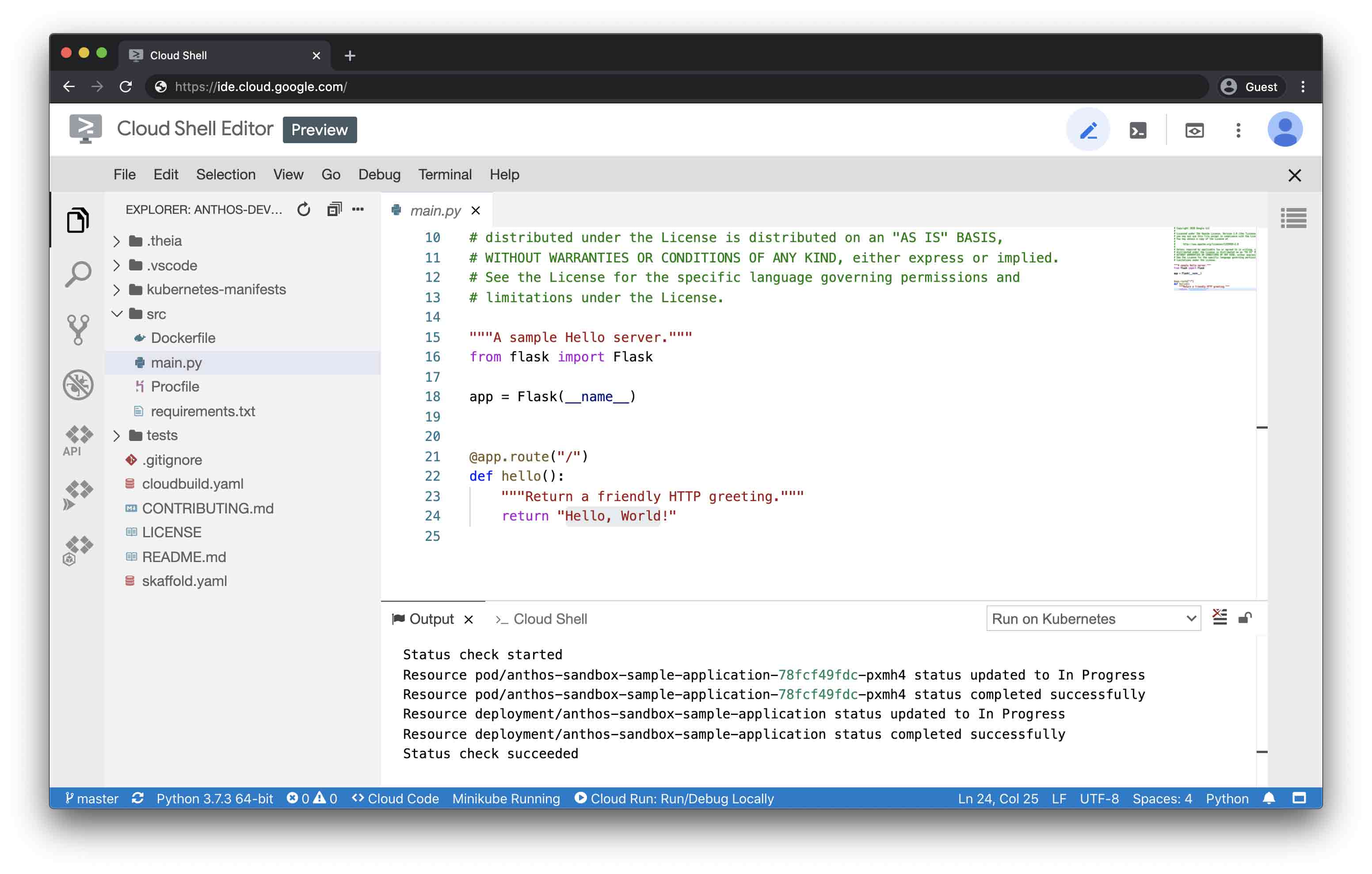
google cloud shell editor.jpg
Cloud Shell Editor (pictured) all within your web-browser.

Regardless of which runtime you choose, the Anthos Developer Sandbox guides you to perform common day-to-day development tasks with Anthos, including:

  • Running an application with Cloud Code in a local development environment for Kubernetes that emulates Anthos clusters
  • Using Cloud Build to run your tests locally
  • Iterating on your application with live updates as you develop
  • Using Buildpacks to simplify your application image creation without needing Dockerfiles
  • Deploying your app to the Cloud Run Emulator, which provides a similar experience to Cloud Run for Anthos

The Anthos Developer Sandbox shows you the tools you can use to build an idiomatic developer experience on top Anthos’ container-based runtimes like GKE and Cloud Run. Although we’re focused on developer tasks with this Sandbox, operators may also be interested in Anthos capabilities such as the embedded service mesh and GitOps-style configuration management in the full platform. These capabilities are a good follow on step from the Sandbox.

After you’ve completed the Anthos Developer Sandbox guided walkthrough, you can adapt the process to deploy one of your own applications. The following tutorials will help you learn and improve your development experience with Anthos:

  • Deploy to Cloud Run for Anthos on Google Cloud
  • Deploying internal services using Cloud Run for Anthos on Google Cloud
  • Safe rollouts with Anthos Config Management
Read More  Microsoft To Open New Datacenter Region In Spain And Expand Strategic Partnership With Telefónica To Boost Spain’s Competitiveness

With the Anthos Developer Sandbox, we’re excited to show off the great developer tools that we’ve created for you, and we look forward to helping you have an even more streamlined and productive developer experience. Let us know how you like the Anthos Developer Sandbox by joining the #anthos channel of our Community Slack!


Vic Iglesias Senior Product Manager & Dustin Ingram Senior Developer Advocate

Source: Google Cloud Blog


For enquiries, product placements, sponsorships, and collaborations, connect with us at [email protected]. We'd love to hear from you!

Our humans need coffee too! Your support is highly appreciated, thank you!

aster.cloud

Related Topics
  • Anthos
  • Cloud Shell
  • Google Cloud
You May Also Like
View Post
  • Data
  • Platforms
  • Technology

Scaling cloud and AI: Microsoft Azure’s commitment to Europe’s digital future

  • May 11, 2026
View Post
  • Data
  • Platforms
  • Public Cloud

PayPal’s historically large data migration is the foundation for its gen AI innovation

  • March 4, 2026
View Post
  • Platforms
  • Technology

Microsoft Sovereign Cloud adds governance, productivity and support for large AI models securely running even when completely disconnected 

  • March 3, 2026
Google Cloud and Smart Communications
View Post
  • Platforms
  • Technology

Smart Communications, Inc. Dials into Google Cloud AI to Help Personalize Digital Services for Filipinos

  • October 25, 2024
View Post
  • Platforms
  • Public Cloud

Empowering builders with the new AWS Asia Pacific (Malaysia) Region

  • August 30, 2024
Red Hat and Globe Telecoms
View Post
  • Platforms
  • Technology

Globe Collaborates with Red Hat Open Innovation Labs to Modernize IT Infrastructure for Greater Agility and Scalability

  • August 19, 2024
Huawei Cloud Cairo Region Goes Live
View Post
  • Cloud-Native
  • Computing
  • Platforms

Huawei Cloud Goes Live in Egypt

  • May 24, 2024
Asteroid
View Post
  • Computing
  • Platforms
  • Technology

Asteroid Institute And Google Cloud Identify 27,500 New Asteroids, Revolutionizing Minor Planet Discovery With Cloud Technology

  • April 30, 2024

Stay Connected!
LATEST
  • digital-nomad-freelancer-worker-2151205464 1
    One paperwork problem – Get your Digital Nomad Visa employment documents fast from UK, EU or Singapore
    • June 16, 2026
  • 2
    Samsung Art Store Brings Art Basel to Homes Worldwide With New Curated Collection
    • June 15, 2026
  • 3
    You Do Not Need to Invest in the IPO of SpaceX, Anthropic, and OpenAI
    • June 10, 2026
  • 4
    The consequences of relying on AI for accurate news
    • June 10, 2026
  • 5
    Connecting AI agents with unstructured data using Google Cloud Storage MCP Servers
    • June 10, 2026
  • 6
    WWDC26: Apple unveils next generation of Apple Intelligence, Siri AI, powerful parental controls, and an expansive set of software improvements
    • June 8, 2026
  • 7
    IBM and Google Cloud Announce Strategic Partnership to Scale AI with Human Expertise and AI‑Powered Delivery
    • June 4, 2026
  • Data center 8
    Data Sovereignty in Spain. It’s Not Just About the Law, It’s About Efficiency
    • June 3, 2026
  • 9
    Ink vs Pixels. What you miss versus what you are actually missing.
    • June 1, 2026
  • 10
    Banks race to patch new cyber vulnerabilities, and other cybersecurity news
    • May 25, 2026
about
Hello World!

We are aster.cloud. We’re created by programmers for programmers.

Our site aims to provide guides, programming tips, reviews, and interesting materials for tech people and those who want to learn in general.

We would like to hear from you.

If you have any feedback, enquiries, or sponsorship request, kindly reach out to us at:

[email protected]
Most Popular
  • pope-leo-xiv-cq5dam-1500.844 1
    Pope Leo XIV to Publish First Encyclical on Artificial Intelligence and Human Dignity on 25 May
    • May 22, 2026
  • 2
    Portfolio to Clients, and is Strengthened by Ongoing Project Glasswing Work
    • May 20, 2026
  • reMarkable Paper Pure 3
    Everything The reMarkable Paper Pure Actually Does
    • May 14, 2026
  • 4
    Scaling cloud and AI: Microsoft Azure’s commitment to Europe’s digital future
    • May 11, 2026
  • Anthropic Institute 5
    Introducing The Anthropic Institute
    • March 11, 2026
  • /
  • Technology
  • Tools
  • About
  • Contact Us

Input your search keywords and press Enter.