aster.cloud aster.cloud
  • /
  • Platforms
    • Public Cloud
    • On-Premise
    • Hybrid Cloud
    • Data
  • Architecture
    • Design
    • Solutions
    • Enterprise
  • Engineering
    • Automation
    • Software Engineering
    • Project Management
    • DevOps
  • Programming
    • Learning
  • Tools
  • About
  • /
  • Platforms
    • Public Cloud
    • On-Premise
    • Hybrid Cloud
    • Data
  • Architecture
    • Design
    • Solutions
    • Enterprise
  • Engineering
    • Automation
    • Software Engineering
    • Project Management
    • DevOps
  • Programming
    • Learning
  • Tools
  • About
aster.cloud aster.cloud
  • /
  • Platforms
    • Public Cloud
    • On-Premise
    • Hybrid Cloud
    • Data
  • Architecture
    • Design
    • Solutions
    • Enterprise
  • Engineering
    • Automation
    • Software Engineering
    • Project Management
    • DevOps
  • Programming
    • Learning
  • Tools
  • About
  • Software
  • Tech
  • Tools

Bring An Old MacBook Back To Life With Linux

  • root
  • January 19, 2021
  • 3 minute read

It takes about an hour to make an outdated Mac useful again with Fedora.

Recently, I stumbled on an old MacBook Pro 13″ from late 2011, with a 125GB SSD and 8GB RAM. I’ve taken this machine on trips around the world, and back in the day, I ran many a session, workshop, or demo to share all the AppDev goodness from JBoss technologies.


Partner with aster.cloud
for your next big idea.
Let us know here.


From our partners:

CITI.IO :: Business. Institutions. Society. Global Political Economy.
CYBERPOGO.COM :: For the Arts, Sciences, and Technology.
DADAHACKS.COM :: Parenting For The Rest Of Us.
ZEDISTA.COM :: Entertainment. Sports. Culture. Escape.
TAKUMAKU.COM :: For The Hearth And Home.
ASTER.CLOUD :: From The Cloud And Beyond.
LIWAIWAI.COM :: Intelligence, Inside and Outside.
GLOBALCLOUDPLATFORMS.COM :: For The World's Computing Needs.
FIREGULAMAN.COM :: For The Fire In The Belly Of The Coder.
ASTERCASTER.COM :: Supra Astra. Beyond The Stars.
BARTDAY.COM :: Prosperity For Everyone.

After verifying that its battery works, charging it up, and reinstalling a new OS X, it turns out that the Safari browser version is limited to an old security specification, which means it can’t connect to a lot of HTTPS sites now. This renders this solution defunct.

What to do with this old thing?

It’s been a few years since I worked solely on Linux workstations as a developer. I specifically worked on Fedora, so I decided to try to install the latest version on this MacBook Pro.

It took me just over an hour to get Fedora 33 working on this laptop with the steps below.


Download Fedora 33 and create a live USB

The first step is to find the right way to install Fedora. This machine has a CD slot, so you could burn an ISO and boot from it, but I chose to go straight to a bootable USB option.

I got on my other MacBook and visited the Fedora Workstation site, which links to Fedora Media Writer. Click on the icon for your machine type (in my case, the Apple logo), and you get an installation package.
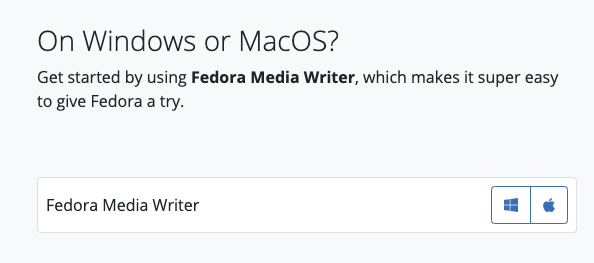
 

Fedora Media Writer download screen

(Eric D. Shabell, CC BY-SA 4.0)

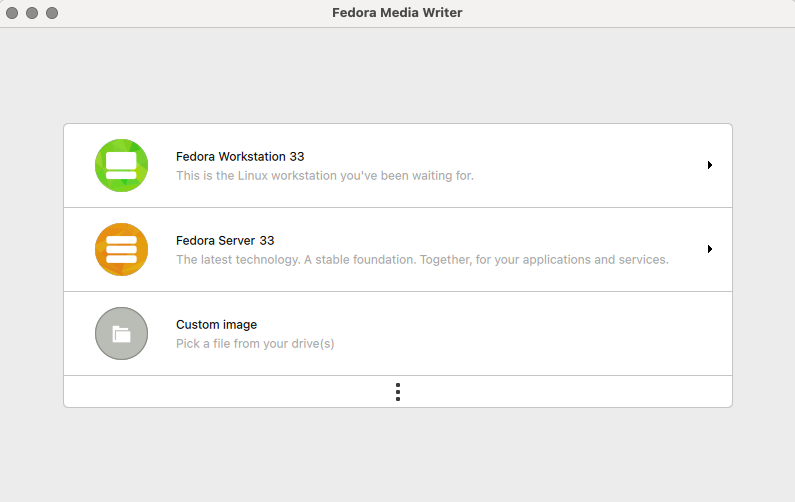
Start installing it to see a graphical user interface (GUI) that guides you through the process. Select the Fedora Workstation 33 option:
Read More  Best Smartwatches, Your Gateway to Health Monitoring and Everyday Use


Fedora Workstation download in Fedora Media Writer

(Eric D. Shabell, CC BY-SA 4.0)

Next, select the Create Live USB option in the top-right corner:
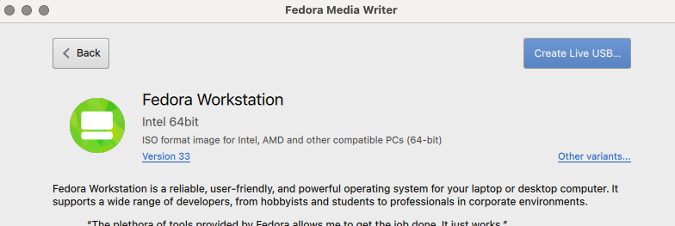
 

Create Live USB button

(Eric D. Shabell, CC BY-SA 4.0)

The image will start to download, and you will see a drop-down menu to select where to install it:
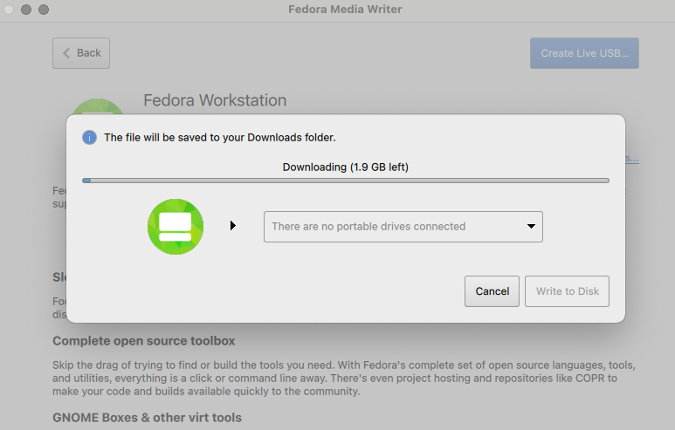
 

Downloading Fedora Workstation

(Eric D. Shabell, CC BY-SA 4.0)

Plug in a USB stick with enough space available, then after the download finishes, you can select and install the image on it. Once it’s finished, close the GUI and remove the USB stick.


Install Linux

Insert the USB stick you created into the port on the left side of your MacBook Pro, and restart it while holding down the Option (or Alt) key just to the left of the Cmd key. This opens a menu of options to start the machine; use the EFI option, as that’s the USB image.

The laptop will boot from the USB device, and you can follow the normal Fedora installation process. It helps if you can plug the MacBook Pro into a network cable connection, as the Broadcom WiFi device will not work out of the box.
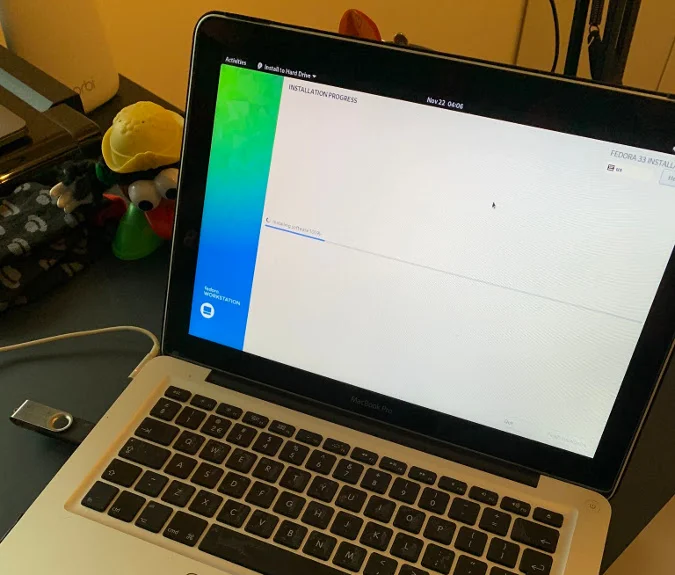
 

MacBook Pro

(Eric D. Shabell, CC BY-SA 4.0)

You should get the opportunity to install Fedora to your hard drive and put it on your machine permanently.
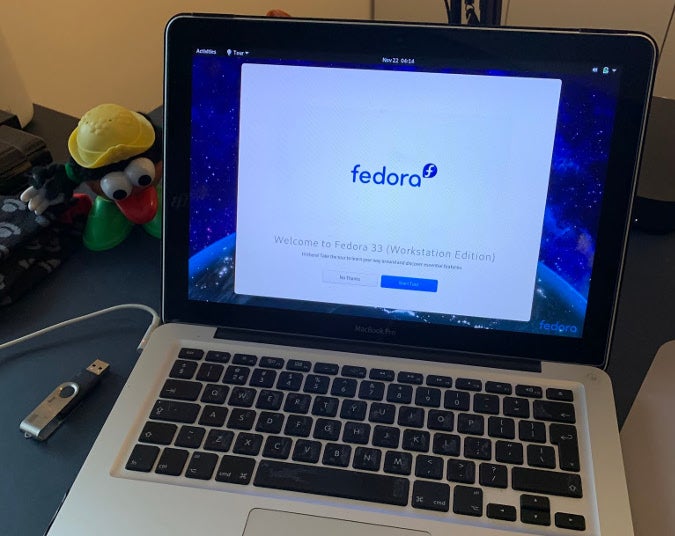
 

Installing Fedora on MacBook Pro

(Eric D. Shabell, CC BY-SA 4.0)

Once the installer completes, reboot your machine, and Fedora 33 should now be the option to boot from.
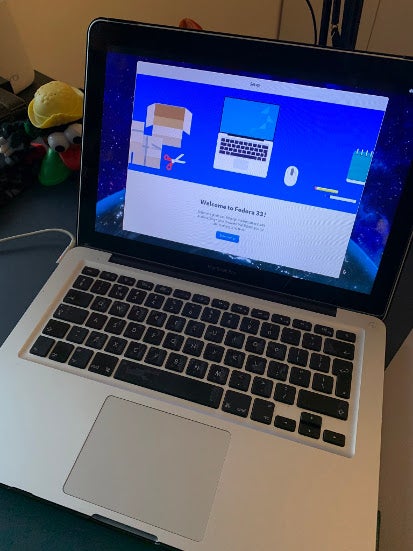
 

MacBook Pro booting into Fedora

(Eric D. Shabell, CC BY-SA 4.0)

The only thing missing is a WiFi driver, so keep your network cable connected to install the development packages for the kernel you are running and to build the broadcom-wl driver for that kernel.

Read More  Compose For Wear OS 1.1 Is Now Stable: Check Out New Features!

Verify the card you need for WiFi:

<span class="co4">$ </span><span class="kw2">lspci</span> <span class="re5">-vnn</span> <span class="re5">-d</span> 14e4:

There will be several items in the output, including something like:

Network controller [0280]: Broadcom Inc. and subsidiaries….

Subsystem: Apple Inc. AirPort Extreme…

Install a repository to pull the Broadcom stuff:

<span class="co4">$ </span><span class="kw2">su</span> <span class="re5">-c</span> <span class="st_h">'dnf install -y http://download1.rpmfusion.org/nonfree/fedora/rpmfusion-nonfree-release-$(rpm -E %fedora).noarch.rpm'</span>

The next part is interesting: As you look at the running kernel, you’ll see v5.9.8-200.fc33, but you will use the development kernel packages to build your Broadcom wireless driver. So, you need to install v5.8.15-301.fc33 (available at the time of this writing). Check them using uname -r, and list the installed kernel packages using sudo dnf list kernel:

$ sudo dnf list kernel

kernel.x86_64                     5.8.15-301.fc33

kernel.x86_64                     5.9.8-200.fc33

Install the development packages:

<span class="co4">$ </span><span class="kw2">sudo</span> dnf <span class="kw2">install</span> <span class="re5">-y</span> akmods kernel-devel-5.8.15-<span class="nu0">301</span>.fc33
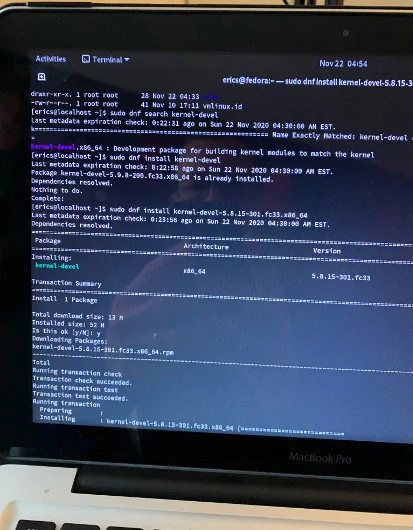
 

Installing development packages

(Eric D. Shabell, CC BY-SA 4.0)

Install the Broadcom wireless package:

<span class="co4">$ </span><span class="kw2">sudo</span> dnf <span class="kw2">install</span> <span class="re5">-y</span> broadcom-wl

Build the kernel module:

<span class="co4">$ </span><span class="kw2">sudo</span> akmods
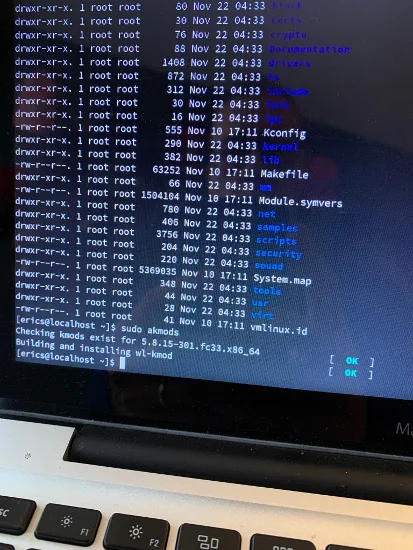
 

Building the kernel module

(Eric D. Shabell, CC BY-SA 4.0)

Reboot your machine, and you should be able to view the wireless driver (wl) with:

<span class="co4">$ </span><span class="kw2">lsmod</span> <span class="sy0">|</span> <span class="kw2">grep</span> wl

Set up your wireless connection in Fedora:
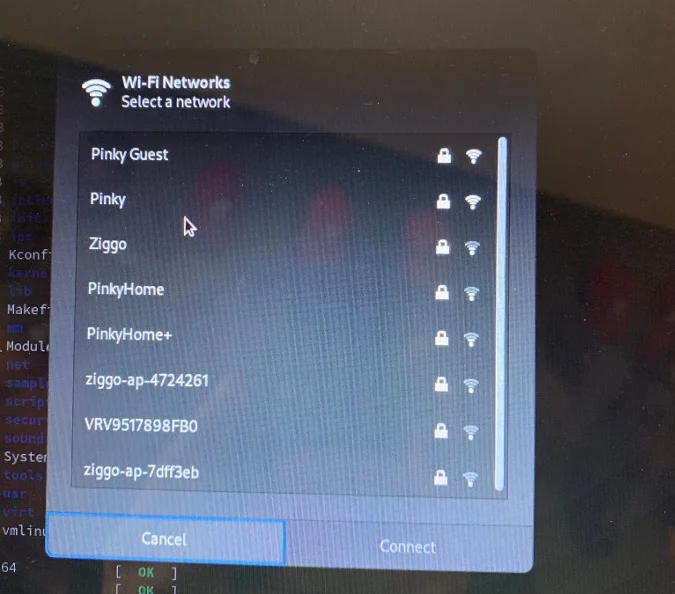
 

Set up wireless connection

(Eric D. Shabell, CC BY-SA 4.0)

This article is a bit out of the ordinary for me, but I hope it might help someone else enjoy some fun on the weekend with some old hardware!

Going off the beaten path now… installing #Fedora on a macbook pro from 2011. Wish me luck! pic.twitter.com/zlsESnq2Px

— Eric D. Schabell (@ericschabell) November 22, 2020


Read More  UNICEF And Microsoft Launch Global Learning Platform To Help Address COVID-19 Education Crisis

This feature is originally appeared in opensource.com


For enquiries, product placements, sponsorships, and collaborations, connect with us at [email protected]. We'd love to hear from you!

Our humans need coffee too! Your support is highly appreciated, thank you!

root

Related Topics
  • Apple
  • Fedora
  • Laptop
  • Linux
  • MacBook
You May Also Like
Smartphone hero image
View Post
  • Gears
  • Tech

Zed Approves | Smartphones for Every Budget Range

  • January 29, 2026
View Post
  • Technology
  • Tools

IBM Launches Enterprise Advantage Service to Help Businesses Scale Agentic AI

  • January 19, 2026
Early Black Friday Gears
View Post
  • Tech

Friday Deals – And It’s Not Even Black Friday Yet

  • November 13, 2025
men with computer website information and chat bubbles vector illustration
View Post
  • Software
  • Software Engineering

What is an ISV (independent software vendor)?

  • August 27, 2025
aster-cloud-erp-bill_of_materials_2
View Post
  • Software
  • Software Engineering

What is an SBOM (software bill of materials)?

  • July 2, 2025
aster-cloud-sms-pexels-tim-samuel-6697306
View Post
  • Programming
  • Software

Send SMS texts with Amazon’s SNS simple notification service

  • July 1, 2025
aster-cloud-website-pexels-goumbik-574069
View Post
  • Programming
  • Software

Host a static website on AWS with Amazon S3 and Route 53

  • June 27, 2025
notta-ai-header
View Post
  • Featured
  • Tools

Notta vs Fireflies: Which AI Transcription Tool Deserves Your Attention in 2025?

  • May 16, 2025

Stay Connected!
LATEST
  • 1
    Expectations vs. Reality: The AI We Thought We’d Have in 10 Years
    • June 19, 2026
  • digital-nomad-freelancer-worker-2151205464 2
    One paperwork problem – Get your Digital Nomad Visa employment documents fast from UK, EU or Singapore
    • June 16, 2026
  • 3
    Samsung Art Store Brings Art Basel to Homes Worldwide With New Curated Collection
    • June 15, 2026
  • 4
    You Do Not Need to Invest in the IPO of SpaceX, Anthropic, and OpenAI
    • June 10, 2026
  • 5
    The consequences of relying on AI for accurate news
    • June 10, 2026
  • 6
    Connecting AI agents with unstructured data using Google Cloud Storage MCP Servers
    • June 10, 2026
  • 7
    WWDC26: Apple unveils next generation of Apple Intelligence, Siri AI, powerful parental controls, and an expansive set of software improvements
    • June 8, 2026
  • 8
    IBM and Google Cloud Announce Strategic Partnership to Scale AI with Human Expertise and AI‑Powered Delivery
    • June 4, 2026
  • Data center 9
    Data Sovereignty in Spain. It’s Not Just About the Law, It’s About Efficiency
    • June 3, 2026
  • 10
    Ink vs Pixels. What you miss versus what you are actually missing.
    • June 1, 2026
about
Hello World!

We are aster.cloud. We’re created by programmers for programmers.

Our site aims to provide guides, programming tips, reviews, and interesting materials for tech people and those who want to learn in general.

We would like to hear from you.

If you have any feedback, enquiries, or sponsorship request, kindly reach out to us at:

[email protected]
Most Popular
  • 1
    Banks race to patch new cyber vulnerabilities, and other cybersecurity news
    • May 25, 2026
  • pope-leo-xiv-cq5dam-1500.844 2
    Pope Leo XIV to Publish First Encyclical on Artificial Intelligence and Human Dignity on 25 May
    • May 22, 2026
  • 3
    Portfolio to Clients, and is Strengthened by Ongoing Project Glasswing Work
    • May 20, 2026
  • reMarkable Paper Pure 4
    Everything The reMarkable Paper Pure Actually Does
    • May 14, 2026
  • 5
    Scaling cloud and AI: Microsoft Azure’s commitment to Europe’s digital future
    • May 11, 2026
  • /
  • Technology
  • Tools
  • About
  • Contact Us

Input your search keywords and press Enter.