If you’re managing large and complex projects, try replacing Microsoft Project with an open source option.
Projects like building a satellite, developing a robot, or launching a new product are all expensive, involve different providers, and contain hard dependencies that must be tracked.
From our partners:
The approach to project management in the world of large projects is quite simple (in theory at least). You create a project plan and split it into smaller pieces until you can reasonably assign costs, duration, resources, and dependencies to the various activities. Once the project plan is approved by the people in charge of the money, you use it to track the project’s execution. Drawing all of the project’s activities on a timeline produces a bar chart called a Gantt chart.
Gantt charts have always been used in waterfall project methodologies, but they can also be used with agile. For example, large projects may use a Gantt chart for a scrum sprint and ignore other details like user stories, thereby embedding agile phases. Other large projects may include multiple product releases (e.g., minimum viable product [MVP], second version, third version, etc.). In this case, the super-structure is kind of agile, with each phase planned as a Gantt chart to deal with budgets and complex dependencies.
Project management tools
There are literally hundreds of tools available to manage large projects with Gantt charts, and Microsoft Project is probably the most popular. It is part of the Microsoft Office family, scales to hundreds of thousands of activities, and has an incredible number of features that support almost every conceivable way to manage a project schedule. With Project, it’s not always clear what is more expensive: the software license or the training courses that teach you how to use the tool.
Another drawback is that Microsoft Project is a standalone desktop application, and only one person can update a schedule. You would need to buy licenses for Microsoft Project Server, Project for the web, or Microsoft Planner if you want multiple users to collaborate.
Fortunately, there are open source alternatives to the proprietary tools, including the applications in this article. All are open source and include a Gantt for scheduling hierarchical activities based on resources and dependencies. ProjectLibre, GanttProject, and TaskJuggler are desktop applications for a single project manager; ProjeQtOr and Redmine are web applications for project teams, and ]project-open[ is a web application for managing entire organizations.
I evaluated the tools based on a single user planning and tracking a single large project. My evaluation criteria includes Gantt editor features, availability on Windows, Linux, and macOS, scalability, import/export, and reporting. (Full disclosure: I’m the founder of ]project-open[, and I’ve been active in several open source communities for many years. This list includes our product, so my views may be biased, but I tried to focus on each product’s best features.)
Redmine 4.1.0
(Frank Bergmann, CC BY-SA 4.0)
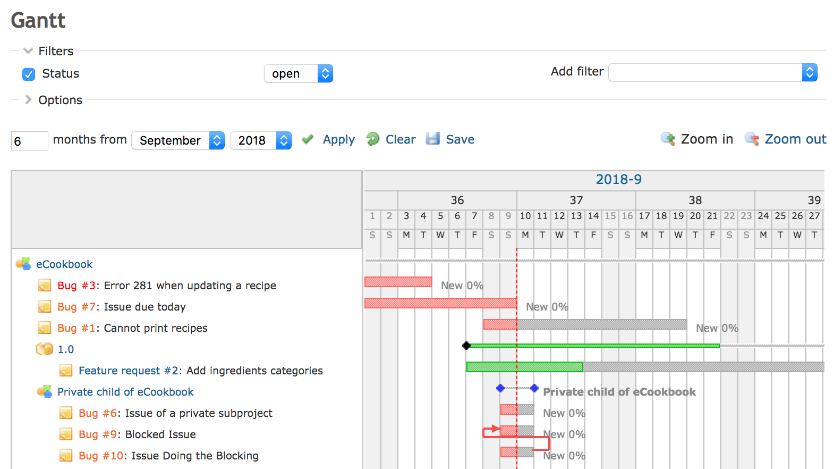
Redmine is a web-based project management tool with a focus on agile methodologies.
The standard installation includes a Gantt timeline view, but it lacks fundamental features like scheduling, drag-and-drop, indent and outdent, and resource assignments. You have to edit task properties individually to change the task tree’s structure.
Redmine has Gantt editor plugins, but they are either outdated (e.g., Plus Gantt) or proprietary (e.g., ANKO Gantt chart). If you know of other open source Gantt editor plugins, please share them in the comments.
Redmine is written in Ruby on Rails and available for Windows, Linux, and macOS. The core is available under a GPLv2 license.
- Best for: IT teams working using agile methodologies
- Unique selling proposition: It’s the original “upstream” parent project of OpenProject and EasyRedmine.
]project-open[ 5.1
![]project-open[](https://opensource.com/sites/default/files/uploads/project-open.png "]project-open[")
(Frank Bergmann, CC BY-SA 4.0)
]project-open[ is a web-based project management system that takes the perspective of an entire organization, similar to an enterprise resource planning (ERP) system. It can also manage project portfolios, budgets, invoicing, sales, human resources, and other functional areas. Specific variants exist for professional services automation (PSA) for running a project company, project management office (PMO) for managing an enterprise’s strategic projects, and enterprise project management (EPM) for managing a department’s projects.
The ]po[ Gantt editor includes hierarchical tasks, dependencies, and scheduling based on planned work and assigned resources. It does not support resource calendars and non-human resources. The ]po[ system is quite complex, and the GUI might need a refresh.
]project-open[ is written in TCL and JavaScript and available for Windows and Linux. The ]po[ core is available under a GPLv2 license with proprietary extensions available for large companies.
- Best for: Medium to large project organizations that need a lot of financial project reporting
- Unique selling proposition: ]po[ is an integrated system to run an entire project company or department.
ProjectLibre 1.9.3
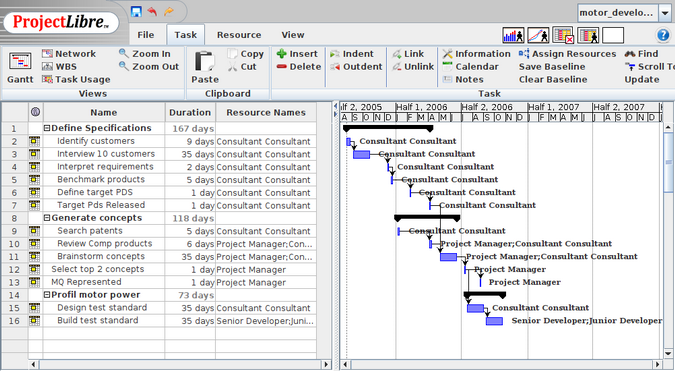
ProjectLibre is probably the closest you can get to Microsoft Project in the open source world. It is a desktop application that supports all-important project planning features, including resource calendars, baselines, and cost management. It also allows you to import and export schedules using MS-Project’s file format.
ProjectLibre is perfectly suitable for planning and executing small or midsized projects. However, it’s missing some advanced features in MS-Project, and its GUI is not the prettiest.
ProjectLibre is written in Java and available for Windows, Linux, and macOS and licensed under an open source Common Public Attribution (CPAL) license. The ProjectLibre team is currently working on a Web offering called ProjectLibre Cloud under a proprietary license.
- Best for: An individual project manager running small to midsized projects or as a viewer for project members who don’t have a full MS-Project license
- Unique selling proposition: It’s the closest you can get to MS-Project with open source.
GanttProject 2.8.11
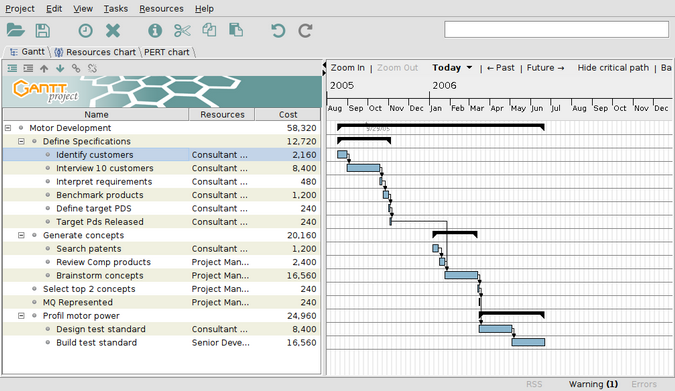
(Frank Bergmann, CC BY-SA 4.0)
GanttProject is similar to ProjectLibre as a desktop Gantt editor but with a more limited feature set. It doesn’t support baselines nor non-human resources, and the reporting functionality is more limited.
GanttProject is a desktop application written in Java and available for Windows, Linux, and macOS under the GPLv3 license.
- Best for: Simple Gantt charts or learning Gantt-based project management techniques.
- Unique selling proposition: It supports program evaluation and review technique (PERT) charts and collaboration using WebDAV.
TaskJuggler 3.7.1
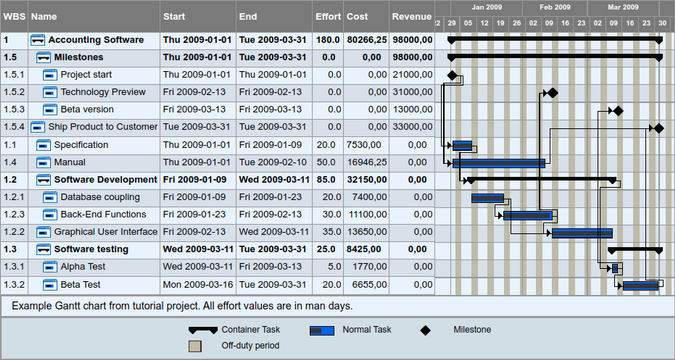
(Frank Bergmann, CC BY-SA 4.0)
TaskJuggler schedules multiple parallel projects in large organizations, focusing on automatically resolving resource assignment conflicts (i.e., resource leveling).
It is not an interactive Gantt editor but a command-line tool that works similarly to a compiler: It reads a list of tasks from a text file and produces a series of reports with the optimum start and end times for each task depending on the assigned resources, dependencies, priorities, and many other parameters. It supports multiple projects, baselines, resource calendars, shifts, and time zones and has been designed to scale to enterprise scenarios with many projects and resources.
Writing a TaskJuggler input file with its specific syntax may be beyond the average project manager’s capabilities. However, you can use ]project-open[ as a graphical frontend for TaskJuggler to generate input, including absences, task progress, and logged hours. When used this way, TaskJuggler becomes a powerful what-if scenario planner.
TaskJuggler is written in Ruby and available for Windows, Linux, and macOS under a GPLv2 license.
- Best for: Medium to large departments managed by a true nerd
- Unique selling proposition: It excels in automatic resource-leveling.
ProjeQtOr 9.0.4
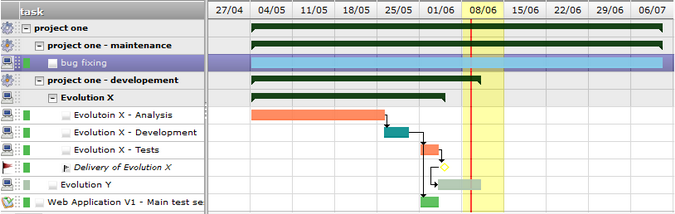
(Frank Bergmann, CC BY-SA 4.0)
ProjeQtOr is a web-based project management application that’s suitable for IT projects. It supports risks, budgets, deliverables, and financial documents in addition to projects, tickets, and activities to integrate many aspects of project management into a single system.
ProjeQtOr provides a Gantt editor with a feature set similar to ProjectLibre, including hierarchical tasks, dependencies, and scheduling based on planned work and assigned resources. However, it doesn’t support in-place editing of values (e.g., task name, estimated time, etc.); users must change values in an entry form below the Gantt view and save the values.
ProjeQtOr is written in PHP and available for Windows, Linux, and macOS under the Affero GPL3 license.
- Best for: IT departments tracking a list of projects
- Unique selling proposition: Lets you store a wealth of information for every project, keeping all information in one place.
Other tools
The following systems may be valid options for specific use cases but were excluded from the main list for various reasons.
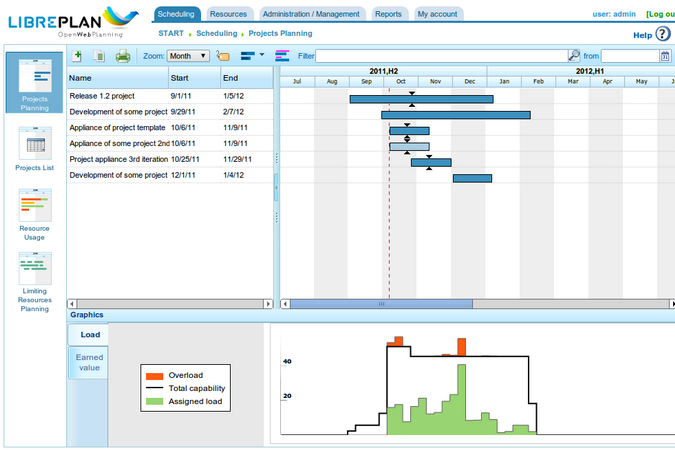
(Frank Bergmann, CC BY-SA 4.0)
- LibrePlan is a web-based project management application focusing on Gantt charts. It would have figured prominently in the list above due to its feature set, but there is no installation available for recent Linux versions (CentOS 7 or 8). The authors say updated instructions will be available soon.
- dotProject is a web-based project management system written in PHP and available under the GPLv2.x license. It includes a Gantt timeline report, but it doesn’t have options to edit it, and dependencies don’t work yet (they’re “only partially functional”).
- Leantime is a web-based project management system with a pretty GUI written in PHP and available under the GPLv2 license. It includes a Gantt timeline for milestones but without dependencies.
- Orangescrum is a web-based project-management tool. Gantt charts are available as a paid add-on or with a paid subscription.
- Talaia/OpenPPM is a web-based project portfolio management system. However, version 4.6.1 still says “Coming Soon: Interactive Gantt Charts.”
- Odoo and OpenProject both restrict some important features to the paid enterprise edition.
In this review, I aimed to include all open source project management systems that include a Gantt editor with dependency scheduling. If I missed a project or misrepresented something, please let me know in the comments.
For enquiries, product placements, sponsorships, and collaborations, connect with us at [email protected]. We'd love to hear from you!
Our humans need coffee too! Your support is highly appreciated, thank you!