We’re excited to announce the general availability of a new feature in Google Kubernetes Engine (GKE): image streaming. This revolutionary GKE feature has the potential to drastically improve your application scale-up time, allowing you to respond to increased user demand more rapidly, and save money by provisioning less spare capacity. We achieve this by reducing the image pull-time for your container from several minutes (in the case of large images) to a couple of seconds (irrespective of container size), and allowing your application to start booting immediately while GKE streams the container data in parallel.
The way Kubernetes traditionally works when scaling up your application is that the entire container image must be downloaded onto the node before the application can boot. The bigger your container image, the longer this takes, despite the fact that most applications don’t actually need every byte of data in the container image to start booting (and some data in the container may even never be used). For example, your application may spend a bunch of time connecting to external databases, which barely requires any data from the container image. With image streaming, we asked ourselves, what if we could deliver to your application just the data it needs, when it needs it, rather than waiting for all that extra data to be downloaded first?
From our partners:
Image streaming works by mounting the container data layer in containerd using a sophisticated network mount, and backing it with multiple caching layers on the network, in-memory and on-disk. Your container transitions from the ImagePulling status to Running in a couple of seconds (regardless of container size) once we prepare the image streaming mount; this effectively parallelizes the application boot with the data transfer of required data in the container image. As a result, you can expect to see much faster container boot times and snappier autoscaling.
Image streaming performance varies, as it is highly dependent on your application profile. In general, though, the bigger your images, the greater the benefit you’ll see. Google Cloud partner Databricks saw an impressive reduction in overall application cold-startup times, which includes node boot-time.
“With image streaming on GKE, we saw a 3X improvement in application startup time, which translates into faster execution of customer workloads, and lower costs for our customers by reducing standby capacity.” – Ihor Leshko, Senior Engineering Manager, Databricks
In addition to parallelizing data delivery, GKE image streaming employs a multi-level caching system: It starts with an in-memory and on-disk cache on the node, and moves up to regionally replicated Artifact Registry caches designed specifically for image streaming which leverage the same technology as Cloud Spanner under the hood.
Image streaming is completely transparent as far as your containerized application is concerned. Since the data your container reads is initially streamed over the network, rather than from the disk, raw read performance is slightly slower with image streaming than when the whole image is available on the disk. This effect is more than offset during container boot by the parallel nature of the design, as your container got a lengthy head start by skipping the whole image pull process. However, to achieve equal read performance once the application is running, GKE still downloads the complete container image in parallel, just like before. In other words, while GKE is downloading the container image, you get the parallelism benefits of image streaming; then, once it’s downloaded, you get the same on-disk read performance as before—for the best of both worlds.
Getting started with GKE image streaming
Image streaming is available today at no additional cost to users of GKE’s Standard mode of operation, when used with images from Artifact Registry, Google Cloud’s advanced registry for container images and other artifacts. Images in Container Registry, or external container registries, are not supported for image streaming optimization (they will continue to work, just without benefiting from image streaming), so now is a great time to migrate them to Artifact Registry if you haven’t already.
You can use image streaming on both new and existing GKE clusters. Be sure to enable the Container Filesystem API, use the COS containerd node image variant, and reference container images that are hosted in Artifact Registry. In the UI, simply check the “enable image streaming” checkbox on the cluster creation page.
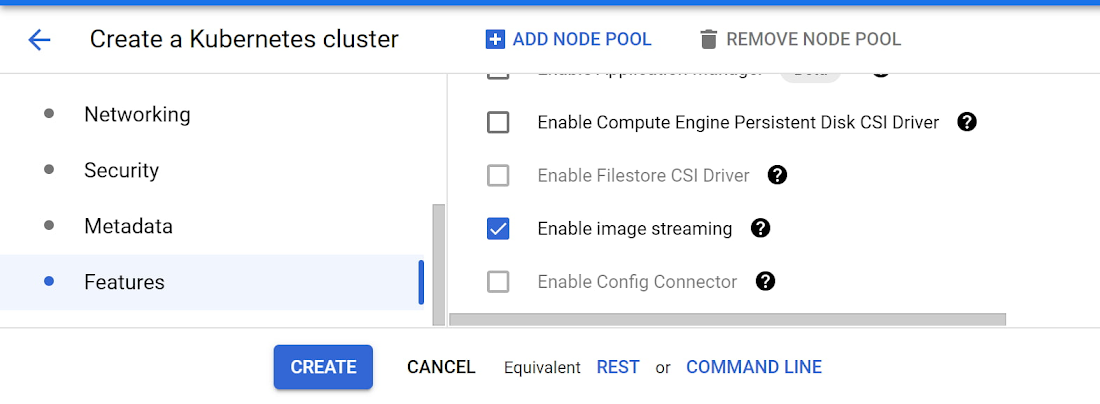
Alternately, from the CLI, here’s how to create an image streaming cluster:
gcloud container clusters create CLUSTER_NAME \--region=COMPUTE_REGION \--image-type="COS_CONTAINERD" \--enable-image-streaming
You can also upgrade your existing clusters to enable image streaming through the UI, or by running:
gcloud container clusters update CLUSTER_NAME \--enable-image-streaming
and then deploy your workload referencing an image from Artifact Registry. If everything worked as expected, you should notice your container entering the “Running” status about a second after the “ContainerCreating” status.
To verify that image streaming was engaged as expected, run
$ kubectl get eventsdefault 11s Normal ImageStreaming node/gke-riptide-small-default-pool-27b7945d-k7mt Image us-docker.pkg.dev/google-samples/containers/gke/gb-frontend:v5 is backed by image streaming.
The ImageStreaming event as seen in the example output above indicates that image streaming was engaged for this image pull.
Since image streaming is only used until the image is fully downloaded to disk, you’ll need to test this on a fresh node to see the full effect. And remember, to get image streaming, you need to enable the API, turn on image streaming in your cluster, use the COS containerd image, and reference images from Artifact Registry. Image streaming does introduce an additional memory reservation on the node in order to provide the caching system, which reduces the memory available for your workloads on those nodes. For all the details, including further information on testing and debugging, check out the image streaming documentation. For more such capabilities register to join us live on Nov 18th for Kubernetes Tips and Tricks to Build and Run Cloud Native Apps.
For enquiries, product placements, sponsorships, and collaborations, connect with us at [email protected]. We'd love to hear from you!
Our humans need coffee too! Your support is highly appreciated, thank you!