
We often use infrastructure-as-code (IaC) to deploy cloud resources at scale and store this code in source control repositories. Multi-folder repositories can be used to combine similar IaC into a single repository with following benefits:
- Reduced overhead of managing multiple CI/CD pipelines
- Better code visibility
- Reduced overhead of managing multiple ACLs for similar code
We also often use CI/CD pipelines to deploy the IaC within these repositories. In this post, we will cover a method of optimizing IaC pipelines by deploying only what has changed from the last run of the pipeline, resulting in improved performance and reduced cost.
From our partners:
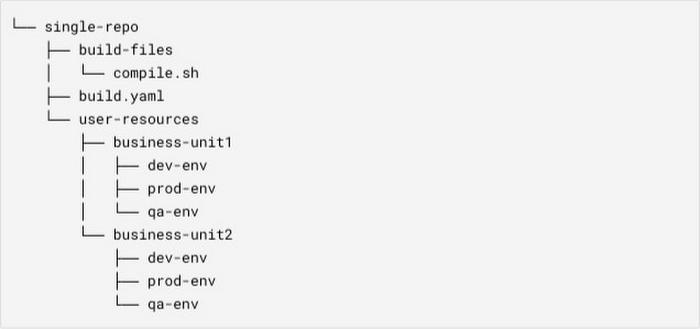
An example of multi-folder IaC repository:
Business Impact
The approach described in this post is expected to result in the following benefits:
- Faster builds: By only running what has changed.
- Increased developer productivity: You can achieve faster feedback cycles from your IaC pipelines which can improve developer agility.
- Cost optimization: You will be able to reduce the cost of your IaC pipelines by reducing the build times.
Getting started
- You will need a cloud source repository (or any other source control repositories) containing multiple folders of IaC like Terraform.
- You will also need a Cloud Build pipeline with the push to branch event based trigger.
General approach used today
In a multi-folder IaC repository, you will need to iterate over all the folders to deploy the IaC. For the repository example shown above, one of the steps in the Cloud Build pipeline would look like the following:
base_dir=$root_dir/user-resources# Get all folders inside `user-resources`.business_units=$(find "$base_dir" -mindepth 1 -maxdepth 1 -type d)for business_unit in $business_units; dobusiness_unit_name="$(basename "$component_path")"# Get all environment folders inside each business-unit folder.env_paths=$(find "$business_unit" -mindepth 1 -maxdepth 1 -type d)for env_path in $env_paths; doenv=$(basename "$env_path")# ..# Your logic to be executed in every environment folder.# example : terraform apply -auto-approve# ..donedone
In this approach, you will need to run code in all the folders of the repository, even if the latest commit change affected only a single folder. This approach has the following disadvantages:
- Slower feedback of code deployment status impacting developer agility
- Longer build times, resulting in higher operational costs of running the IaC pipelines
Selective deployment
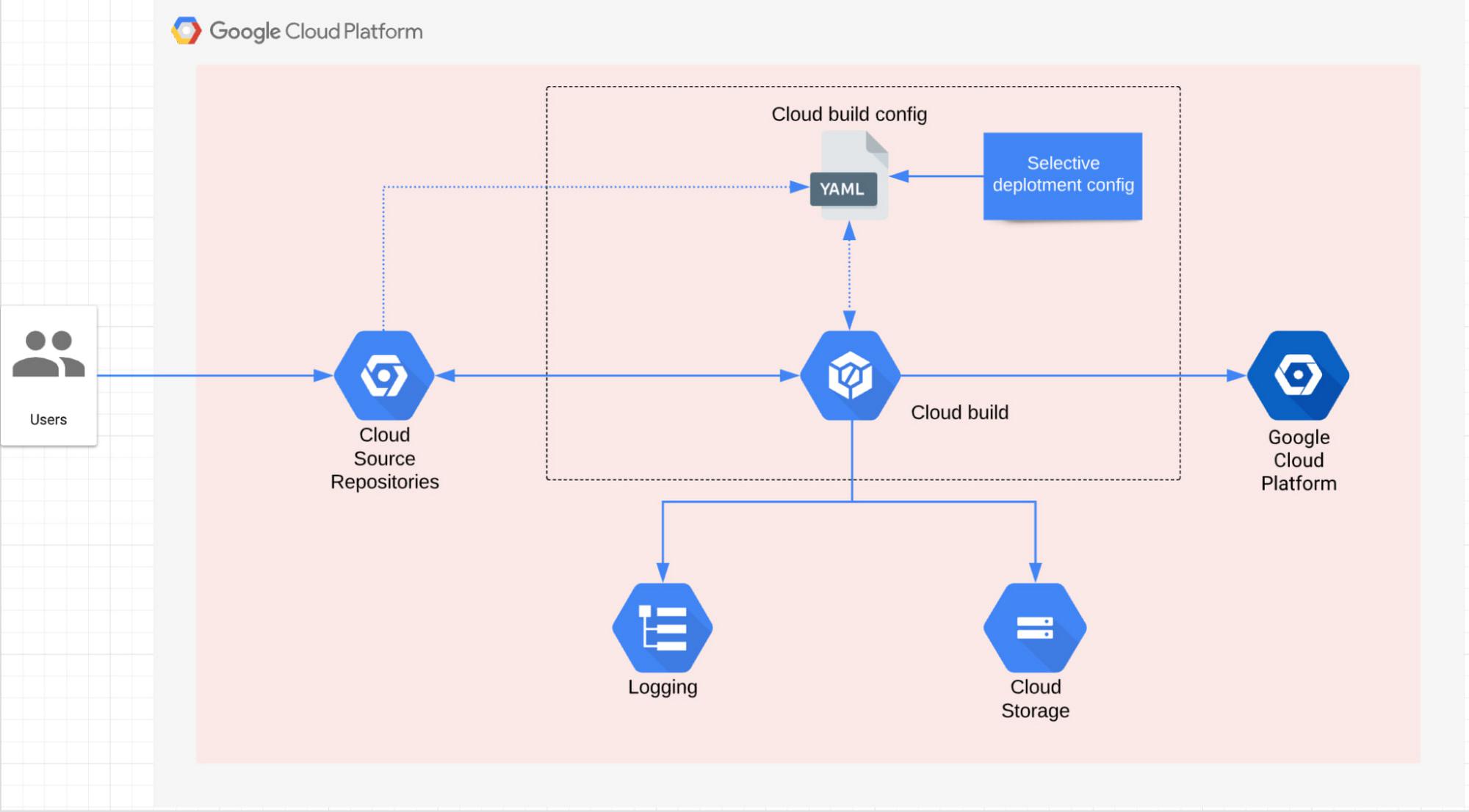
In this approach, you will only run IaC which was changed after the last successful deployment of an IaC pipeline.
Solution design
The following steps are the high level solution design of selective deployment:
- Last successful build: you will need to find the last successful Cloud Build run.
- Compute delta: you will need to find what folders are affected after the last successful deployment of your pipeline.
- Execute: finally, you can deploy IaC code in folders from the compute delta step.
Implementation steps
Step 1: Find the commit associated with your last successful build:
- In this step, you will find the last successful build using the gcloud command `gcloud builds list`. Notice the filters in the example code below are only fetching successful commits for a single Cloud Build trigger.
If you use an event based Cloud Build trigger, where the event is pushing off a code into the repository, you will have a commit associated with this build. Thus, you can use the `gcloud builds describe` command to get the commit associated with a given Cloud Build run.
nth_successful_commit() {local n=$1 # n=1 --> Last successful commit.local trigger_name=$2local project=$3local trigger_id=$(get_trigger_value $trigger_name $project "id")local nth_successful_build=$(gcloud builds list --filter "buildTriggerId=$trigger_id AND STATUS=(SUCCESS)" --format "value(id)" --limit=$build_find_limit --project $project | awk "NR==$n") || exit 1local nth_successful_commit=$(gcloud builds describe $nth_successful_build --format "value(substitutions.COMMIT_SHA)" --project $project) || exit 1echo $nth_successful_commit}
Step 2: Find the folders changed after the last successful commit
- You can use the `git diff` command to find the difference between the commit associated with the last successful build (from step 1) and the commit associated with the current build run.
- The diff output can be stored in a log file to be used in the next step. For audit purposes, you can also store this log file in a cloud storage bucket after the build completion.
previous_commit_sha=$(nth_successful_commit 1 $apply_trigger_name $project) || exit 1git diff --name-only ${previous_commit_sha} ${commit_sha} | sort -u > $logs_dir/diff.log || exit 1
Step 3: Iterate over changed folders
- You can now iterate over folders from git diff output from step 2 and run the code.
Important points/Edge cases
Including the repository history in a build
To build your source on a Git repo, Cloud Build performs a shallow clone of the repo. This means that only the single commit that started the build is checked out in the workspace to build. This will prevent you from performing the `git diff` operation needed to find the folders changed. You will need to include the repository build history by following the steps defined here.
- id: 'unshallow'name: gcr.io/cloud-builders/gitargs: ['fetch', '--unshallow']
Last successful build does not exist
You need to have at least one successful build in your build history. You can execute the pipeline without selective deployment to get the first successful build.
Manual commit as input
You might need to manually pass a specific commit to calculate the `git diff`. This feature can be useful for running the last couple of builds again to recover from an error.
if [ -z $manual_previous_commit_sha ] ; thenecho "command : nth_successful_commit 1 $apply_trigger_name $project"previous_commit_sha=$(nth_successful_commit 1 $apply_trigger_name $project) || exit 1elseecho "Using manually provided commit sha $manual_previous_commit_sha for diff."previous_commit_sha=$manual_previous_commit_shafi
Running all folders or a subset of folders when the centralized module is changed
There might be a centralized folder like a Terraform module in your repository. If a change is made at the centralized folder level, you will need to run all folders.
modules_changed="false"echo "Checking if modules are changed..."if grep -o 'modules/[a-z, 0-9, A-Z, -, _]*[/]' logs/diff.log; thenmodules_changed="true"echo "Diff found in modules/, running all projects"# ..# Use the legacy approach to iterate over all folders.# ..elsemodules_changed="false"echo "No diff found in modules/"# ..# Use selective deployment to iterate over only changed folders.# ..fi
By: Maitreya Mulchandani (Strategic Cloud Engineer) and Venkata Ponnam (Strategic Cloud Engineer)
Source: Google Cloud Blog
For enquiries, product placements, sponsorships, and collaborations, connect with us at [email protected]. We'd love to hear from you!
Our humans need coffee too! Your support is highly appreciated, thank you!