
aster.cloud aster.cloud
  • /
  • Platforms
    • Public Cloud
    • On-Premise
    • Hybrid Cloud
    • Data
  • Architecture
    • Design
    • Solutions
    • Enterprise
  • Engineering
    • Automation
    • Software Engineering
    • Project Management
    • DevOps
  • Programming
    • Learning
  • Tools
  • About
  • /
  • Platforms
    • Public Cloud
    • On-Premise
    • Hybrid Cloud
    • Data
  • Architecture
    • Design
    • Solutions
    • Enterprise
  • Engineering
    • Automation
    • Software Engineering
    • Project Management
    • DevOps
  • Programming
    • Learning
  • Tools
  • About
aster.cloud aster.cloud
  • /
  • Platforms
    • Public Cloud
    • On-Premise
    • Hybrid Cloud
    • Data
  • Architecture
    • Design
    • Solutions
    • Enterprise
  • Engineering
    • Automation
    • Software Engineering
    • Project Management
    • DevOps
  • Programming
    • Learning
  • Tools
  • About
  • Tools

Understanding Chrome Browser Support Options For Your Business

  • aster.cloud
  • March 14, 2022
  • 3 minute read

Keeping business running is essential to maintaining employee productivity. Some IT teams like the added assurance of Chrome support to help tackle unexpected issues and avoid potential downtime. In the event of an issue, our browser experts can help troubleshoot online or over the phone and get your team back up and running, no matter what time of day it is.

With Chrome, you have a variety of support options for your business. We’ve put together a list of these below as well as detailed how to start opening tickets today.


Partner with aster.cloud
for your next big idea.
Let us know here.


From our partners:

CITI.IO :: Business. Institutions. Society. Global Political Economy.
CYBERPOGO.COM :: For the Arts, Sciences, and Technology.
DADAHACKS.COM :: Parenting For The Rest Of Us.
ZEDISTA.COM :: Entertainment. Sports. Culture. Escape.
TAKUMAKU.COM :: For The Hearth And Home.
ASTER.CLOUD :: From The Cloud And Beyond.
LIWAIWAI.COM :: Intelligence, Inside and Outside.
GLOBALCLOUDPLATFORMS.COM :: For The World's Computing Needs.
FIREGULAMAN.COM :: For The Fire In The Belly Of The Coder.
ASTERCASTER.COM :: Supra Astra. Beyond The Stars.
BARTDAY.COM :: Prosperity For Everyone.


Understanding your support options

With the many support options available, IT teams can choose the one that’s right for their organization.

For starters, many organizations prefer to manage their Chrome deployment using our readily available online resources. Our Help Center hosts articles on a variety of topics with detailed information and step-by-step instructions for how to deploy and manage Chrome in enterprise environments. There’s also an online community where admins can post questions for other Chrome admins and Google teams to troubleshoot issues or learn best practices. However, some companies want direct access to Chrome experts, and we have you covered.

Many enterprises already have access to Chrome’s support team included in their existing agreements with Google. Customers receive Chrome support for their entire organization if they have any of the following:

  • 100 or more Chrome Enterprise Upgrade licenses across Chrome OS or Chrome OS Flex
  • 100 or more Google Workspace licenses
  • Google Cloud Platform Enhanced or Premium support

If you’re looking for another option, we also offer standalone Chrome Browser Enterprise Support. This option is priced per user or through a site license and requires a minimum amount of 1,000 licenses. If you’re interested in learning more about this option, contact us.

Read More  4 More Reasons To Use Chrome’s Cloud-Based Management


Role access

Before creating a support ticket,  ensure that you have the appropriate role access level required to receive support.

As a Chrome Enterprise Upgrade or Google Workspace customer, you may need to have Super Admin access or have your Super Admin create this role for you. To create the admin role access, have your super admin navigate to Account>Admin Roles and click Create new role. Check the box under the Security section that says “Support” and click the save button.
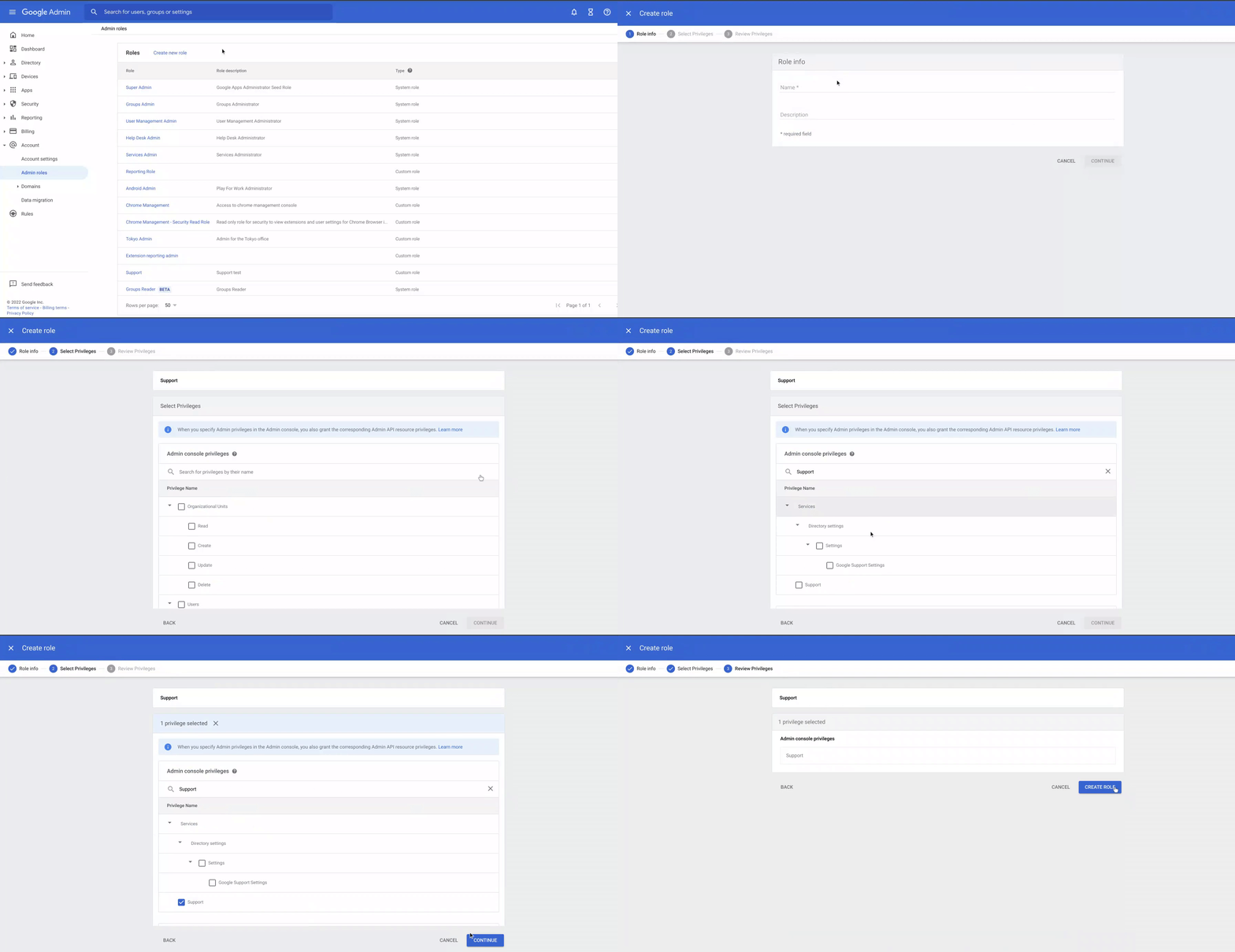
 

For Google Cloud Platform customers, you need to have a Tech Support Editor role before creating any support cases.


How to open a support ticket

After you’ve picked a support option that is right for your organization, and confirmed you had the right administrative access you’re ready to start opening up support tickets.

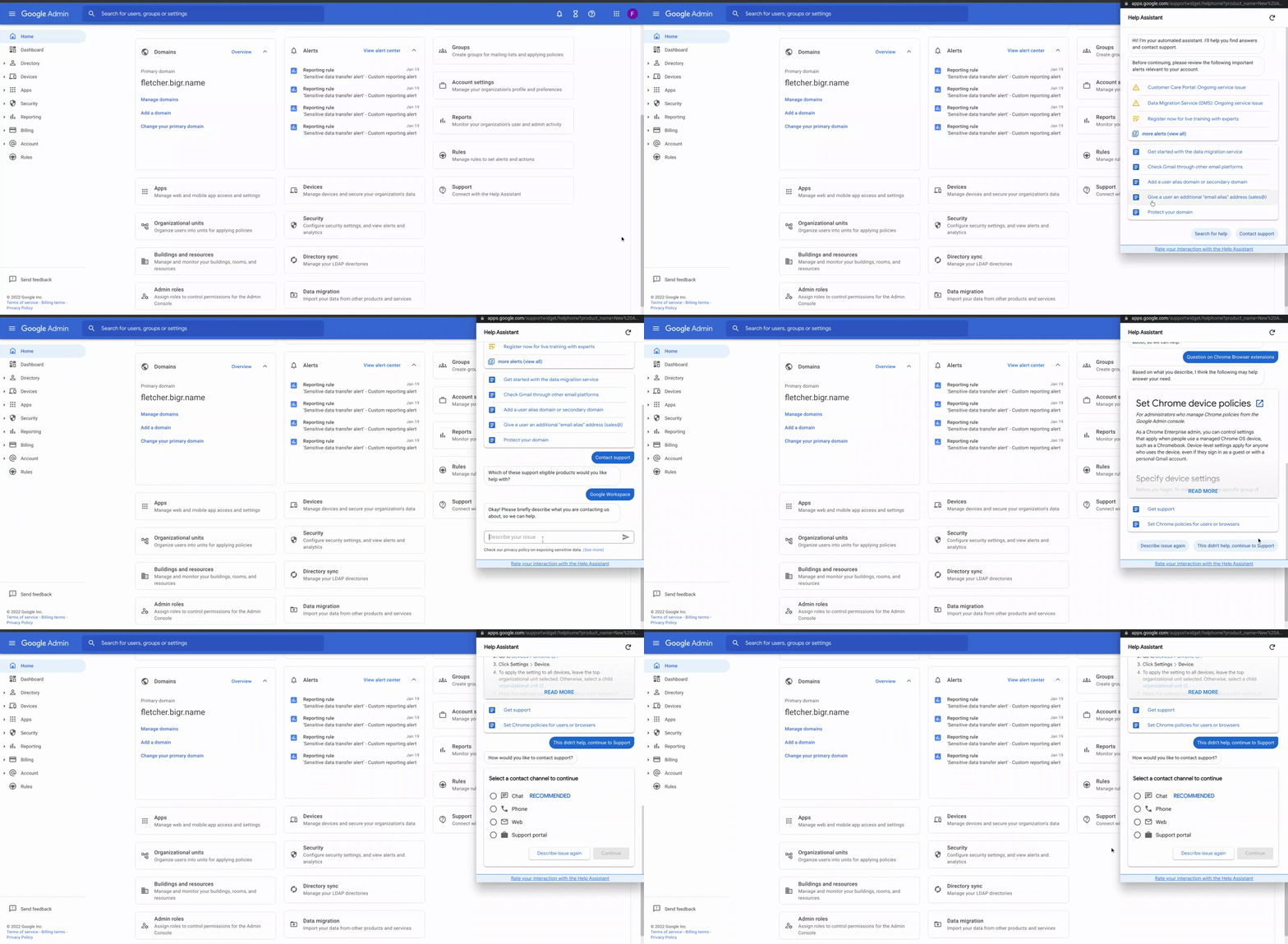
If you’re a Chrome Enterprise Upgrade or Google Workspace customer, opening tickets is as simple as:

  1. Opening the Google admin console and browse to the home page
  2. Scrolling down and click on the Support button to launch the Help Assistant
  3. Clicking “contact support”, select your product and describe your issue or question
  4. You will be presented with some relevant support articles, and if those don’t answer your question, click on, “This didn’t help, continue to Support”
  5. Select your method of contact and work with Support to resolve your issue or question
 

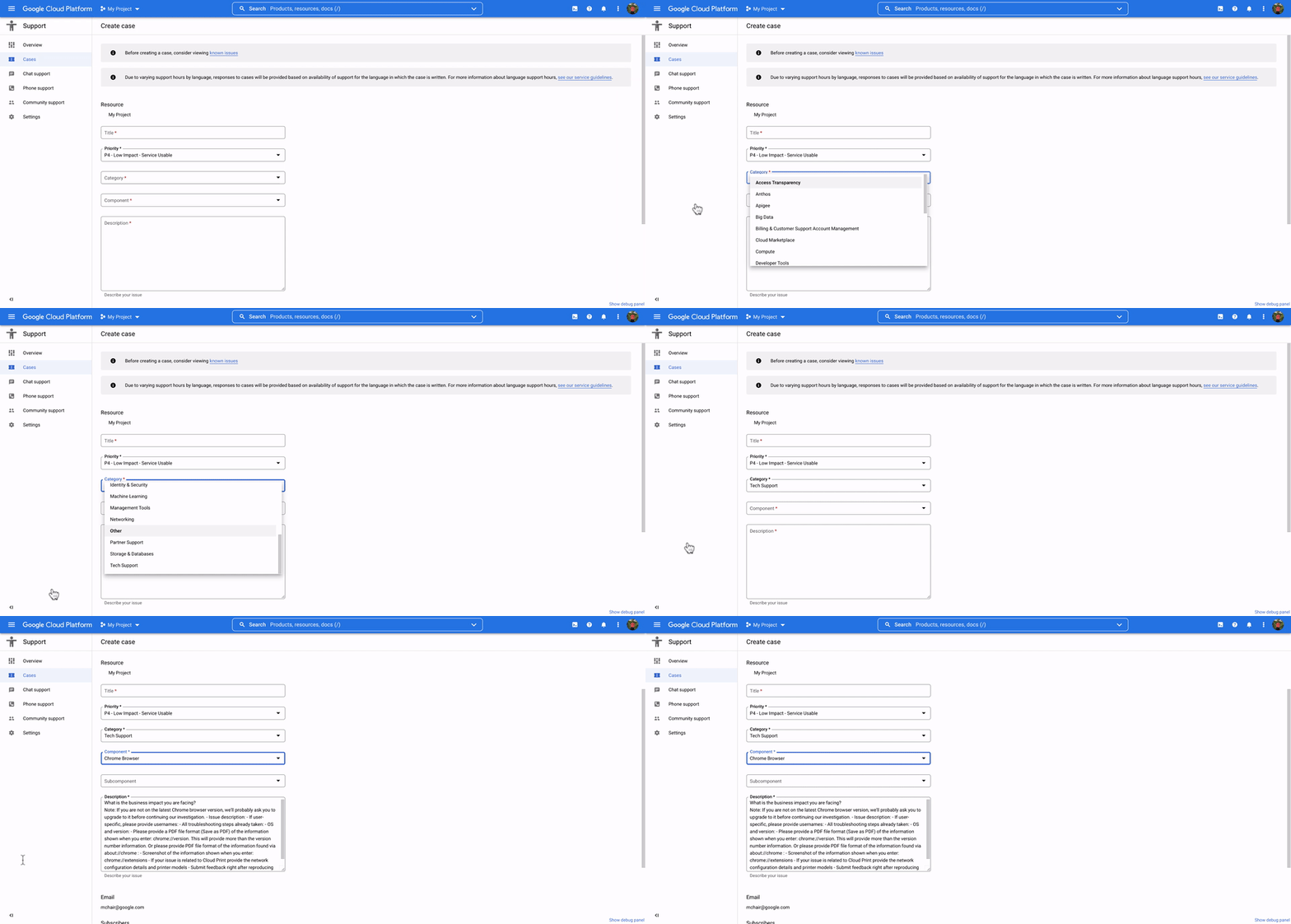
If you’re a Google Cloud Platform customer follow these steps to create a new support case:

  1. Sign in to the Google Cloud Console Support page as a support user
  2. Select the project for which you’d like to open a support case
  3. Open “Cases”
  4. Click “Create case”
  5. Complete the required fields and submit the form
Read More  Establish Consistent Business Language And Improve Trust In Your Data


While IT teams can’t predict all potential issues before they arise, the Chrome team is always here to help troubleshoot them. Having the right support for your business can be a game changer in today’s hybrid work environment. Choose the right option for your business to stay one step ahead.


By: Fletcher Oliver (Chrome Browser Customer Engineer)
Source: Google Cloud Blog


For enquiries, product placements, sponsorships, and collaborations, connect with us at [email protected]. We'd love to hear from you!

Our humans need coffee too! Your support is highly appreciated, thank you!

aster.cloud

Related Topics
  • Chrome Enterprise
  • Google Cloud
  • Tutorial
  • User Support
You May Also Like
View Post
  • Technology
  • Tools

IBM Launches Enterprise Advantage Service to Help Businesses Scale Agentic AI

  • January 19, 2026
notta-ai-header
View Post
  • Featured
  • Tools

Notta vs Fireflies: Which AI Transcription Tool Deserves Your Attention in 2025?

  • May 16, 2025
zedreviews-Apple-iPhone-16-Pro-finish-lineup-240909
View Post
  • Featured
  • Gears
  • Tech
  • Technology
  • Tools

Apple debuts iPhone 16 Pro and iPhone 16 Pro Max

  • September 10, 2024
zedreviews-Apple-AirPods-Active-Noise-Cancellation-240909
View Post
  • Featured
  • Gears
  • Tech
  • Technology
  • Tools

Apple introduces AirPods 4 and the world’s first all-in-one hearing health experience with AirPods Pro 2

  • September 10, 2024
Automation
View Post
  • Automation
  • Platforms
  • Tools

Automate Your Data Warehouse Migration To BigQuery With New Data Migration Tool

  • August 24, 2023
Developers | Software | Program | Engineering
View Post
  • Software Engineering
  • Technology
  • Tools

Top IDEs And Compilers For C++.

  • July 4, 2023
View Post
  • Engineering
  • Tools

Red Hat Puts Podman Container Management On The Desktop

  • May 30, 2023
View Post
  • Engineering
  • Practices
  • Tools

Tricentis Launches Quality Engineering Community ShiftSync

  • May 23, 2023

Stay Connected!
LATEST
  • 1
    Expectations vs. Reality: The AI We Thought We’d Have in 10 Years
    • June 19, 2026
  • digital-nomad-freelancer-worker-2151205464 2
    One paperwork problem – Get your Digital Nomad Visa employment documents fast from UK, EU or Singapore
    • June 16, 2026
  • 3
    Samsung Art Store Brings Art Basel to Homes Worldwide With New Curated Collection
    • June 15, 2026
  • 4
    You Do Not Need to Invest in the IPO of SpaceX, Anthropic, and OpenAI
    • June 10, 2026
  • 5
    The consequences of relying on AI for accurate news
    • June 10, 2026
  • 6
    Connecting AI agents with unstructured data using Google Cloud Storage MCP Servers
    • June 10, 2026
  • 7
    WWDC26: Apple unveils next generation of Apple Intelligence, Siri AI, powerful parental controls, and an expansive set of software improvements
    • June 8, 2026
  • 8
    IBM and Google Cloud Announce Strategic Partnership to Scale AI with Human Expertise and AI‑Powered Delivery
    • June 4, 2026
  • Data center 9
    Data Sovereignty in Spain. It’s Not Just About the Law, It’s About Efficiency
    • June 3, 2026
  • 10
    Ink vs Pixels. What you miss versus what you are actually missing.
    • June 1, 2026
about
Hello World!

We are aster.cloud. We’re created by programmers for programmers.

Our site aims to provide guides, programming tips, reviews, and interesting materials for tech people and those who want to learn in general.

We would like to hear from you.

If you have any feedback, enquiries, or sponsorship request, kindly reach out to us at:

[email protected]
Most Popular
  • 1
    Banks race to patch new cyber vulnerabilities, and other cybersecurity news
    • May 25, 2026
  • pope-leo-xiv-cq5dam-1500.844 2
    Pope Leo XIV to Publish First Encyclical on Artificial Intelligence and Human Dignity on 25 May
    • May 22, 2026
  • 3
    Portfolio to Clients, and is Strengthened by Ongoing Project Glasswing Work
    • May 20, 2026
  • reMarkable Paper Pure 4
    Everything The reMarkable Paper Pure Actually Does
    • May 14, 2026
  • 5
    Scaling cloud and AI: Microsoft Azure’s commitment to Europe’s digital future
    • May 11, 2026
  • /
  • Technology
  • Tools
  • About
  • Contact Us

Input your search keywords and press Enter.