aster.cloud aster.cloud
  • /
  • Platforms
    • Public Cloud
    • On-Premise
    • Hybrid Cloud
    • Data
  • Architecture
    • Design
    • Solutions
    • Enterprise
  • Engineering
    • Automation
    • Software Engineering
    • Project Management
    • DevOps
  • Programming
    • Learning
  • Tools
  • About
  • /
  • Platforms
    • Public Cloud
    • On-Premise
    • Hybrid Cloud
    • Data
  • Architecture
    • Design
    • Solutions
    • Enterprise
  • Engineering
    • Automation
    • Software Engineering
    • Project Management
    • DevOps
  • Programming
    • Learning
  • Tools
  • About
aster.cloud aster.cloud
  • /
  • Platforms
    • Public Cloud
    • On-Premise
    • Hybrid Cloud
    • Data
  • Architecture
    • Design
    • Solutions
    • Enterprise
  • Engineering
    • Automation
    • Software Engineering
    • Project Management
    • DevOps
  • Programming
    • Learning
  • Tools
  • About
  • Tools

Customizing Time Ranges For Budgets In The Console

  • aster.cloud
  • March 17, 2022
  • 3 minute read

TL;DR: You can now use the Google Cloud Console to customize the time ranges of your budgets!


Partner with aster.cloud
for your next big idea.
Let us know here.


From our partners:

CITI.IO :: Business. Institutions. Society. Global Political Economy.
CYBERPOGO.COM :: For the Arts, Sciences, and Technology.
DADAHACKS.COM :: Parenting For The Rest Of Us.
ZEDISTA.COM :: Entertainment. Sports. Culture. Escape.
TAKUMAKU.COM :: For The Hearth And Home.
ASTER.CLOUD :: From The Cloud And Beyond.
LIWAIWAI.COM :: Intelligence, Inside and Outside.
GLOBALCLOUDPLATFORMS.COM :: For The World's Computing Needs.
FIREGULAMAN.COM :: For The Fire In The Belly Of The Coder.
ASTERCASTER.COM :: Supra Astra. Beyond The Stars.
BARTDAY.COM :: Prosperity For Everyone.

Technically you’re saving money because the month is shorter, right?


Good news everyone! If you manage your budgets through the Google Cloud Console, you can now choose custom time ranges for your budgets. Those of you dedicated readers who have been following the billing blogs may have seen the previous posts about using the Budget API as well as using the API to customize the budget period. In this short post, I’ll show you how to do the same thing right in the console!

Budgets and time ranges

First things first, here’s a guide on how budgets work and why you should be using them to keep an eye on your cloud costs. Up until recently, budgets were measured against costs for a month starting on the first day and ending on the last day. Of course, sometimes you want to measure spending in different ways.

With this update, you can choose what time range a budget should apply to. There are four options here:

  • Monthly: the default for budgets, starting on the first day of each month and ending on the last day of each month (January 1st through January 31st, for example)
  • Quarterly: an even split of the year into four quarters starting on January 1st, April 1st, July 1st, and October 1st
  • Yearly: the whole year, starting with January 1st
  • Custom: choose any start date and optional end date to measure spending for

Monthly, quarterly, and yearly budgets are repeated, and will measure your spending against the specific amount you provide or the dynamic amount of the last period.

Read More  Develop And Debug Kubernetes Microservice Applications Fast With Cloud Code And Skaffold Modules

For example, let’s magically pretend it’s April 2nd. If you set up a quarterly budget and choose a target amount of $1000, you’ll be able to measure your spending from April 1st through June 31st. If you instead choose “Last quarter’s spend” for the amount, you’ll measure spending against the last quarter. This is a great way to measure comparable spending and make sure that you’re informed as soon as possible about any surprises (or take action by setting up a programmatic budget notification).
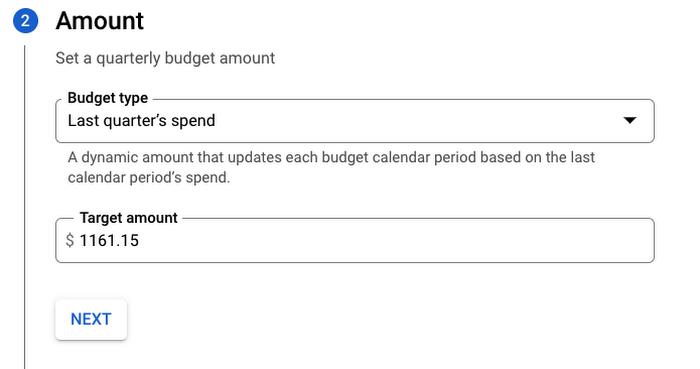
 

Assuming this is April 2nd, that amount is automatically populated with my spending from Jan 1st – March 31st


Monthly, quarterly, and yearly budgets all work the same way, and you can always set multiple thresholds for a budget such as 50%, 75%, and 100% of the target amount. You can even use forecasted amounts to get notifications as soon as Google Cloud predicts you’ll be spending that much, which is kind of like having an overly specific crystal ball!
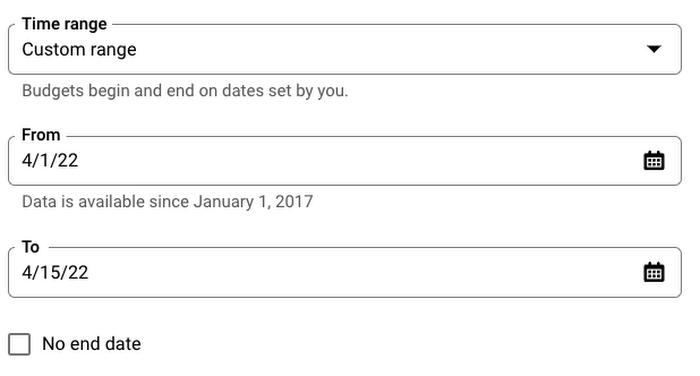
Custom ranges allow for serious flexibility!


Custom time ranges are a bit different and work by choosing a start date and optionally choosing an end date. This is pretty straightforward, but it’s important to note that custom time ranges do not repeat.

Not including an end date means your budget will track spending continuously from the start date and you can be notified when you hit certain amounts. One great example of this could be tracking spending against a fixed grant amount, so you can get notified as you’re approaching the grant limit. You may even want to use a programmatic notification to shut down resources as you approach the limit!

Of course, including an end date will limit the amount of time your budget is active for, and may be good for busy periods like a holiday season increase in demand.

Read More  Forrester Names Google Cloud A Leader In AI Infrastructure

Plan ahead

Now that you know about time ranges, you can create all kinds of budgets to fit your needs! I definitely recommend having multiple budgets so you can more closely track specific spending, such as tracking BigQuery costs in your data projects or Compute Engine costs in your development and testing environments.

The right budgets to set up will depend on your organization, but taking the time to think about what budget information is valuable can be the difference between getting a timely notification or simply creating a filter to delete budget emails because they’re filling up your inbox. Check out the other blog posts if you’d like to learn more, or use this interactive tutorial to help you set one up. Happy budgeting!


By: Mark Mirchandani (Google Cloud Developer Advocate)
Source: Google Cloud Blog


For enquiries, product placements, sponsorships, and collaborations, connect with us at [email protected]. We'd love to hear from you!

Our humans need coffee too! Your support is highly appreciated, thank you!

aster.cloud

Related Topics
  • Cost Optimization
  • Google Cloud
  • Google Cloud Console
You May Also Like
View Post
  • Technology
  • Tools

IBM Launches Enterprise Advantage Service to Help Businesses Scale Agentic AI

  • January 19, 2026
notta-ai-header
View Post
  • Featured
  • Tools

Notta vs Fireflies: Which AI Transcription Tool Deserves Your Attention in 2025?

  • May 16, 2025
zedreviews-Apple-iPhone-16-Pro-finish-lineup-240909
View Post
  • Featured
  • Gears
  • Tech
  • Technology
  • Tools

Apple debuts iPhone 16 Pro and iPhone 16 Pro Max

  • September 10, 2024
zedreviews-Apple-AirPods-Active-Noise-Cancellation-240909
View Post
  • Featured
  • Gears
  • Tech
  • Technology
  • Tools

Apple introduces AirPods 4 and the world’s first all-in-one hearing health experience with AirPods Pro 2

  • September 10, 2024
Automation
View Post
  • Automation
  • Platforms
  • Tools

Automate Your Data Warehouse Migration To BigQuery With New Data Migration Tool

  • August 24, 2023
Developers | Software | Program | Engineering
View Post
  • Software Engineering
  • Technology
  • Tools

Top IDEs And Compilers For C++.

  • July 4, 2023
View Post
  • Engineering
  • Tools

Red Hat Puts Podman Container Management On The Desktop

  • May 30, 2023
View Post
  • Engineering
  • Practices
  • Tools

Tricentis Launches Quality Engineering Community ShiftSync

  • May 23, 2023

Stay Connected!
LATEST
  • 1
    Expectations vs. Reality: The AI We Thought We’d Have in 10 Years
    • June 19, 2026
  • digital-nomad-freelancer-worker-2151205464 2
    One paperwork problem – Get your Digital Nomad Visa employment documents fast from UK, EU or Singapore
    • June 16, 2026
  • 3
    Samsung Art Store Brings Art Basel to Homes Worldwide With New Curated Collection
    • June 15, 2026
  • 4
    You Do Not Need to Invest in the IPO of SpaceX, Anthropic, and OpenAI
    • June 10, 2026
  • 5
    The consequences of relying on AI for accurate news
    • June 10, 2026
  • 6
    Connecting AI agents with unstructured data using Google Cloud Storage MCP Servers
    • June 10, 2026
  • 7
    WWDC26: Apple unveils next generation of Apple Intelligence, Siri AI, powerful parental controls, and an expansive set of software improvements
    • June 8, 2026
  • 8
    IBM and Google Cloud Announce Strategic Partnership to Scale AI with Human Expertise and AI‑Powered Delivery
    • June 4, 2026
  • Data center 9
    Data Sovereignty in Spain. It’s Not Just About the Law, It’s About Efficiency
    • June 3, 2026
  • 10
    Ink vs Pixels. What you miss versus what you are actually missing.
    • June 1, 2026
about
Hello World!

We are aster.cloud. We’re created by programmers for programmers.

Our site aims to provide guides, programming tips, reviews, and interesting materials for tech people and those who want to learn in general.

We would like to hear from you.

If you have any feedback, enquiries, or sponsorship request, kindly reach out to us at:

[email protected]
Most Popular
  • 1
    Banks race to patch new cyber vulnerabilities, and other cybersecurity news
    • May 25, 2026
  • pope-leo-xiv-cq5dam-1500.844 2
    Pope Leo XIV to Publish First Encyclical on Artificial Intelligence and Human Dignity on 25 May
    • May 22, 2026
  • 3
    Portfolio to Clients, and is Strengthened by Ongoing Project Glasswing Work
    • May 20, 2026
  • reMarkable Paper Pure 4
    Everything The reMarkable Paper Pure Actually Does
    • May 14, 2026
  • 5
    Scaling cloud and AI: Microsoft Azure’s commitment to Europe’s digital future
    • May 11, 2026
  • /
  • Technology
  • Tools
  • About
  • Contact Us

Input your search keywords and press Enter.