aster.cloud aster.cloud
  • /
  • Platforms
    • Public Cloud
    • On-Premise
    • Hybrid Cloud
    • Data
  • Architecture
    • Design
    • Solutions
    • Enterprise
  • Engineering
    • Automation
    • Software Engineering
    • Project Management
    • DevOps
  • Programming
    • Learning
  • Tools
  • About
  • /
  • Platforms
    • Public Cloud
    • On-Premise
    • Hybrid Cloud
    • Data
  • Architecture
    • Design
    • Solutions
    • Enterprise
  • Engineering
    • Automation
    • Software Engineering
    • Project Management
    • DevOps
  • Programming
    • Learning
  • Tools
  • About
aster.cloud aster.cloud
  • /
  • Platforms
    • Public Cloud
    • On-Premise
    • Hybrid Cloud
    • Data
  • Architecture
    • Design
    • Solutions
    • Enterprise
  • Engineering
    • Automation
    • Software Engineering
    • Project Management
    • DevOps
  • Programming
    • Learning
  • Tools
  • About
  • Public Cloud

Best Practices For Upgrading Your Anthos Clusters On Bare Metal

  • aster.cloud
  • April 5, 2022
  • 4 minute read
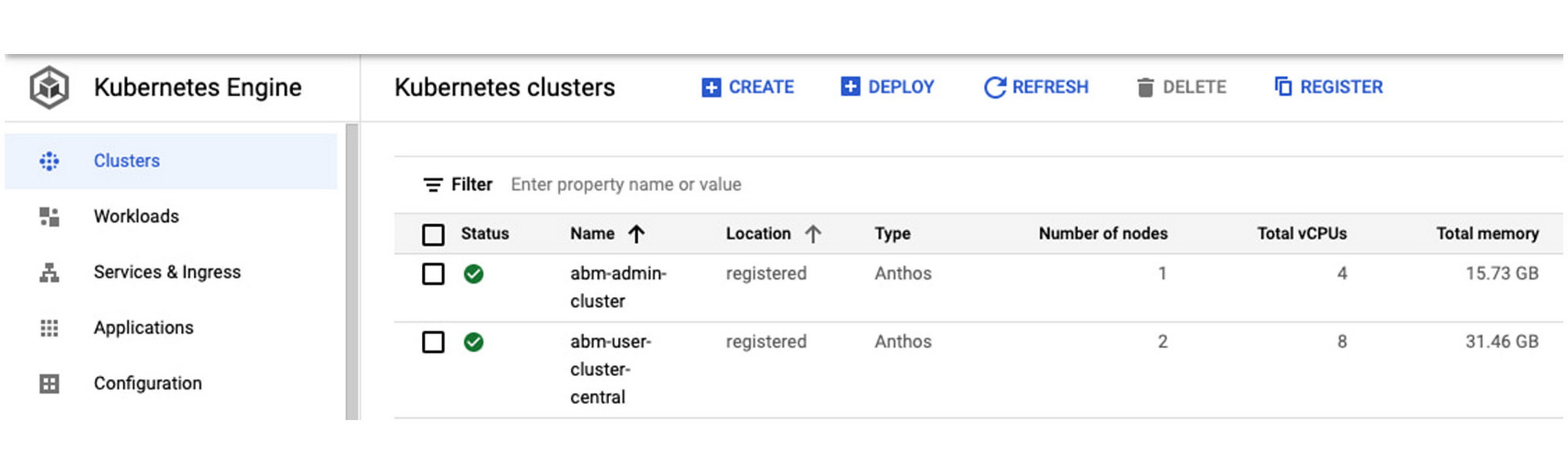
If you’re using Anthos to enable a hybrid or multicloud deployment, one option is to run the Kubernetes-based platform directly on bare metal hardware, without a virtualization layer. Running your applications on Anthos clusters on bare metal delivers strong performance and flexibility, while allowing you to modernize your applications: Anthos clusters on bare metal are fully integrated with the Anthos dashboard in the Google Cloud Console, as well as Cloud Logging and Cloud Monitoring. In addition, a new Anthos Service Mesh dashboard makes it easy to see the application services running on the Anthos clusters in your hybrid environment, offering centralized management from a single pane of glass (Example in Figure 1).
kubernetes cluster.jpg
Figure 1: Anthos clusters on bare metal in in the Google Cloud Console

Anthos on bare metal is a 100% software product on top of your operating system and hardware infrastructure. As such, there are several core lifecycle management activities that you need to perform — things like cluster provisioning, scaling up/down and upgrading. When performing an Anthos cluster upgrade, components such as the underlying Kubernetes, Anthos cluster controllers, etc., are brought up-to-date, providing stability, security and new features to avoid disruption to your workloads.

Upgrading your Anthos cluster software is an essential day-two operation. But before you get started, there are some important things to consider as part of your overall upgrade strategy. Read on for an overview of the Anthos cluster upgrade process, and the key questions you should answer before you proceed with any upgrade.


Partner with aster.cloud
for your next big idea.
Let us know here.


From our partners:

CITI.IO :: Business. Institutions. Society. Global Political Economy.
CYBERPOGO.COM :: For the Arts, Sciences, and Technology.
DADAHACKS.COM :: Parenting For The Rest Of Us.
ZEDISTA.COM :: Entertainment. Sports. Culture. Escape.
TAKUMAKU.COM :: For The Hearth And Home.
ASTER.CLOUD :: From The Cloud And Beyond.
LIWAIWAI.COM :: Intelligence, Inside and Outside.
GLOBALCLOUDPLATFORMS.COM :: For The World's Computing Needs.
FIREGULAMAN.COM :: For The Fire In The Belly Of The Coder.
ASTERCASTER.COM :: Supra Astra. Beyond The Stars.
BARTDAY.COM :: Prosperity For Everyone.

Anthos cluster upgrade overview

A first step is to understand what happens when you upgrade your Anthos bare metal cluster, which proceeds in three stages.

Read More  Who Has The Greenest Cloud? - The Impacts Of Cloud Computing On The Environment

1. Triggering the cluster upgrade – Either through the CLI (“<i>bmctl upgrade cluster</i>”) or the API;

2. Upgrading the control-plane nodes, one node at a time

3. Upgrading the worker nodes, as follows:

  • The worker node is cordoned to prevent new applications from being deployed
  • Applications are gracefully drained and scheduled on other nodes in the cluster
  • After a predefined time all pods are force-terminated and the upgrade begins
  • A new version of Anthos is deployed on the node
  • After the Anthos upgrade, a node health check is executed to ensure the node is healthy
  • Upon the success of node health check, the node is brought back online and is ready to accept workloads

But first, consider this

As you can see, performing an Anthos cluster upgrade is a straightforward process. But before you begin, here are some questions you should ask yourself, to make sure everything works as expected.

Do you want to use multiple environments to roll out the upgrades?

As part of your workflow for delivering software updates, we recommend that you use multiple environments. For example, you can test the new Anthos versions in development environments or run upgrades in the unit test or staging phase before rolling them out in the production environment. Testing out the upgrade in the staging environment minimizes risk and reduces unnecessary application downtime.

Do you want to establish a cadence for upgrades to ensure a smooth operation? 

The Anthos cluster upgrade process is an in-place, rolling upgrade, and proceeds one node at a time to avoid disruptions. The node is put in maintenance mode before upgrading. As such, here are a few rules to remember:

  • Upgrade the admin cluster before upgrading any associated user clusters.
  • Admin and user clusters can run different versions simultaneously during the upgrade. For example, an admin cluster can manage user clusters that are on the same or previous minor version. Managed user clusters can’t be more than one minor version lower than the admin cluster, so before upgrading an admin cluster to a new minor version, make sure that all managed user clusters are at the same minor version as the admin cluster.
  • You can’t skip minor versions when upgrading clusters. For example, you can’t upgrade a version 1.8.0 cluster to version 1.10.0.
Read More  Defense Innovation Unit Selects Google Cloud For Secure Cloud Management Implementation

Do you want to back up before upgrading? 

We recommend that you back up your clusters regularly to ensure your snapshot data is relatively current. Adjust the rate of backups to reflect the frequency of significant changes to your clusters. Starting with Anthos release 1.9, you can use the CLI command (“bmctl backup cluster”) to perform the backup.

Does your environment use a high-availability design? 

We recommend that your cluster HA control plane have a minimum of three nodes. During an upgrade, you may want to  consider adding additional node(s) to provide extra capacity.

Have you reviewed the latest Anthos release notes? 

Before any upgrade, be sure to read the release notes so that you are aware of what’s changed since your last upgrade, including any security fixes and known issues.

Have you adopted Infrastructure as Code best practices and adopted git-based workflows?

Automation improves software deployment efficiency, while a Git-based workflow can help you fix issues in production quickly, even with complex software with a large team is involved.

In addition, when planning for the overall infrastructure upgrade or maintenance strategy, you may want to consider an in-place hardware and OS upgrade process in addition to the Anthos software upgrade. For example, before performing a hardware and OS upgrade, configure the worker node in maintenance mode in the cluster control plane so that applications are gracefully drained and scheduled on other nodes in the cluster.

We hope this gives you a better understanding of the Anthos upgrade process, and the issues you might run into along the way. For more information, please refer to the Anthos clusters on bare metal upgrade technical documentation.

Read More  Patterns For Better Insights And Troubleshooting With Hybrid Cloud Logs

Additional resources

1. Explore Anthos by going over Anthos sample deployment tutorial.

2. Follow our Anthos clusters on bare metal or on VMware installation guide and create Anthos clusters in your existing hardware infrastructure.

3. Streamline your application development processes with Google Cloud Build and Google Cloud Deploy and deploy workloads to your Anthos clusters anywhere.


By Lisa Shen, Google Cloud Platform Product Manager
Source Google Cloud


For enquiries, product placements, sponsorships, and collaborations, connect with us at [email protected]. We'd love to hear from you!

Our humans need coffee too! Your support is highly appreciated, thank you!

aster.cloud

Related Topics
  • Anthos
  • Google Cloud
  • Google Cloud Deploy
  • VMware
You May Also Like
View Post
  • Public Cloud

Accelerating the frontiers of scientific discovery: Google’s $40M commitment to the Genesis Mission

  • July 26, 2026
View Post
  • Public Cloud

Connecting AI agents with unstructured data using Google Cloud Storage MCP Servers

  • June 10, 2026
Data center
View Post
  • Data
  • Public Cloud

Data Sovereignty in Spain. It’s Not Just About the Law, It’s About Efficiency

  • June 3, 2026
View Post
  • Data
  • Platforms
  • Public Cloud

PayPal’s historically large data migration is the foundation for its gen AI innovation

  • March 4, 2026
Google Cloud and ElevenLabs
View Post
  • Public Cloud
  • Technology

ElevenLabs Partners with Google Cloud for Cloud Services and the Latest NVIDIA Blackwell GPUs

  • February 26, 2026
View Post
  • Public Cloud

Delivering a secure, open, and sovereign digital world

  • February 12, 2026
View Post
  • Public Cloud

Formula E and Google Cloud Announce Multi-Year ‘Principal Partnership’

  • January 26, 2026
View Post
  • Public Cloud

Sawasdee Thailand! Google Cloud launches new region in Bangkok

  • January 23, 2026

Stay Connected!
LATEST
  • 1
    IBM Study: One in Four Malicious Breaches are AI-Enabled, Costing Companies $6 Million on Average
    • July 29, 2026
  • 2
    Accelerating the frontiers of scientific discovery: Google’s $40M commitment to the Genesis Mission
    • July 26, 2026
  • 3
    3 Questions: Neural transparency and the future of AI design
    • July 17, 2026
  • 4
    Intel Invests €5 Billion to Expand Manufacturing in Europe
    • July 13, 2026
  • 5
    IBM and Red Hat Expand Lightwell with New Offerings to Build the Trust Infrastructure for AI-Era Open Source
    • July 8, 2026
  • 6
    When I Was Young
    • July 4, 2026
  • 7
    The Fastest AI Fried Chicken In The World
    • June 29, 2026
  • 8
    Zed Approves | How to Stay Cool in Extreme Heat
    • June 29, 2026
  • 9
    The AI investment surge hasn’t produced the expected results yet. That could change in 2026
    • June 26, 2026
  • 10
    Zed Approves | It’s Prime Day 2026! Time to Upgrade Your World Cup Viewing Setup and Beat the Heat
    • June 25, 2026
about
Hello World!

We are aster.cloud. We’re created by programmers for programmers.

Our site aims to provide guides, programming tips, reviews, and interesting materials for tech people and those who want to learn in general.

We would like to hear from you.

If you have any feedback, enquiries, or sponsorship request, kindly reach out to us at:

[email protected]
Most Popular
  • 1
    Zed Approves | The Best Prime Day PC Deals: Top Gaming Rigs, Workstations, and Everyday Laptops
    • June 24, 2026
  • neon-cart 2
    Zed Approves: How to Gear Up for GTA 6 This Amazon Prime Day (2026 Quick Guide)
    • June 22, 2026
  • zedreviews-valerion 3
    Father’s Day Outdoors – Build Dad the Ultimate Backyard Watch Party
    • June 20, 2026
  • zedreviews-fathers-day-50830 4
    Father’s Day Outdoors, Round Two – Gear for the Action, the Tailgate, and Beating the Heat
    • June 20, 2026
  • zedreviews-fathers-day-2147684744 5
    The Ultimate Father’s Day Gift Guide – Home Entertainment Upgrades Dad Actually Wants
    • June 20, 2026
  • /
  • Technology
  • Tools
  • About
  • Contact Us

Input your search keywords and press Enter.