Last fall, the Cloud Run team announced a new feature allowing operators to keep a container instance’s CPU fully-allocated outside of the standard request cycle. By default, Cloud Run instances are only allocated CPU during request processing as well as during container startup and shutdown as per the instance lifecycle. With this release, users can now alter this behavior so the CPU is always allocated and available even when there are no incoming requests (so long as the container instance is up). Setting the CPU to be always allocated can be useful for running background tasks and other asynchronous processing tasks.
From our partners:
In today’s Serverless Expeditions video, my colleague Martin and I cover a weather alerts application that takes advantage of this feature. When end-users access the app, they’re prompted to enter the abbreviation of one of the 55 supported US states/territories to get its latest weather advisories. The app leverages the National Weather Service (NWS) API sponsored by the United States government.
As you can likely guess, weather alerts are ephemeral and expire regularly. The issue the app faced: when users visit the site, the application must make an API call for each request, resulting in an average user response latency of ~1024.2ms (in our most recent testing). Instead of making individual API calls, we can use a fast, scalable, highly-available NoSQL solution like Cloud Firestore/Datastore as a shared caching layer.
States (or territories) requested by end-users can be cached for succeeding requests for the same states, minimizing slower performance due to API calls. Another benefit of using a shared caching mechanism is that it also handles the case where your app gets enough traffic to have more than one instance running, or if you have the same service running in different regions. What not to like about an intermediate caching layer?
Selecting the caching weather alerts every 15 minutes as a reasonable amount of time, we implemented this change in the app, resulting in the average latency dropping significantly, by more than 80% down to ~192.4ms. New questions moving forward: what about states that users don’t normally request? How do we give those users a good (low latency) experience? For all states, how do we keep the cache updated (somewhat) regularly and minimize API calls for end-users? The answer lies with taking advantage of the “always-on” CPU allocation feature.
By setting the CPU as always allocated, we can execute background processing for our app outside the normal request cycle. We can have a thread running every 5 minutes checking for cache entries older than 15 minutes, and if so, fetch and cache the latest alerts from the API. Otherwise it’s up-to-date, so skip to the next state until all have been checked (and possibly updated).
Let’s discuss the app itself. It’s primarily made up of a set of functions whose names and descriptions appear in the table below then explained afterwards:
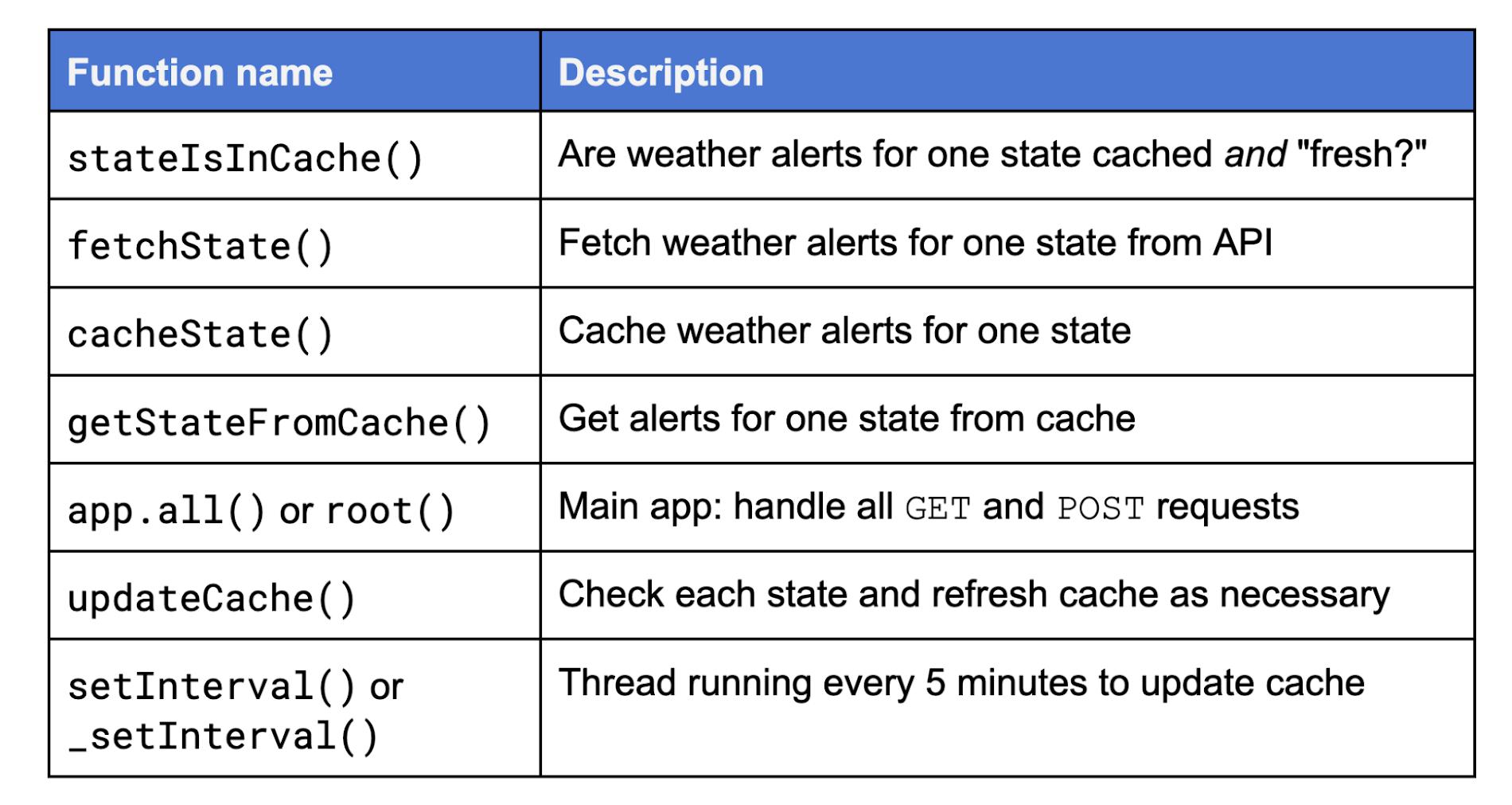
stateIsInCache()checks to see whether weather alerts for the requested state are both cached as well as updated (“fresh”).- If not,
fetchState()is called to fetch the current weather alerts for one state from the API. The results are “ETL’d” (appropriate data extracted and transformed for end-user viewing consumption), andcacheState()is then called to actually put those results in the cache. At one point, both functions were in a larger aggregate namedfetchAndCacheState(), but we felt it was a better design to have single-functionality calls to better divide up the work. - If instead the state is cached and fresh,
getStateFromCache()pulls the cached results. - The “main” web application,
app.all(), handles all HTTP GET and POST requests. updateCache()checks each state and updates the cache as necessary by checking withstateIsInCache(), also called on a per-user request basis.setInterval()is the background thread that runs in the background, callingupdateCache()to refresh the cache every 5 minutes. Note that an instance by default only stays up for 15 minutes after the last request (when the instance is considered idle). This meansupdateCache()can run at most 3 times after a request has completed before the instance itself is shutdown. (Other instances still running can update the cache, and that also applies if you’ve set min-instances to any value greater than zero, so the last instance will stay up and continue to refresh the cache.)
Now let’s look at some code snippets. The most interesting piece of code is probably stateIsInCache():
async function stateIsInCache(state) {const fma = new Date(new Date() - 15*MINUTE); // "15 minutes ago"const stateData = await getStateFromCache(state);const useCache = stateData ? (stateData.lastUpdate > fma) : false;console.log(useCache ? `** Cache fresh, use in-cache data (${state})` :`** Cache stale/missing, API fetch (${state})`)return useCache;}def stateIsInCache(state):useCache = Falsefma = time() - 15*MINUTE # "15 minutes ago"useCache = (stateData['lastUpdate'].timestamp() > fma) \if stateData else Falseprint(('** Cache fresh, use in-cache data (%s)' if useCache \else '** Cache stale/missing, API fetch (%s)') % state)return useCache
It has to check whether a state’s weather advisories is currently cached as well as whether that cached entry is “fresh,” meaning newer than 15 minutes. On the other hand, the most boring bit of code is the most critical, the part of the app that leverages the “always-on CPU” allocation feature. It is a background thread to keep the cache updated every 5 minutes until the container instance is shut down:
async function updateCache() {for (let state of STATES) {await processState(state);}}setInterval(() => {updateCache();}, 5*MINUTE);def _setInterval(func, interval):'mimic JS setInterval()'stop = Event()def loop():while not stop.wait(interval):func()Thread(target=loop).start()def updateCache():for state in STATES:processState(state)_setInterval(updateCache, 5*MINUTE)
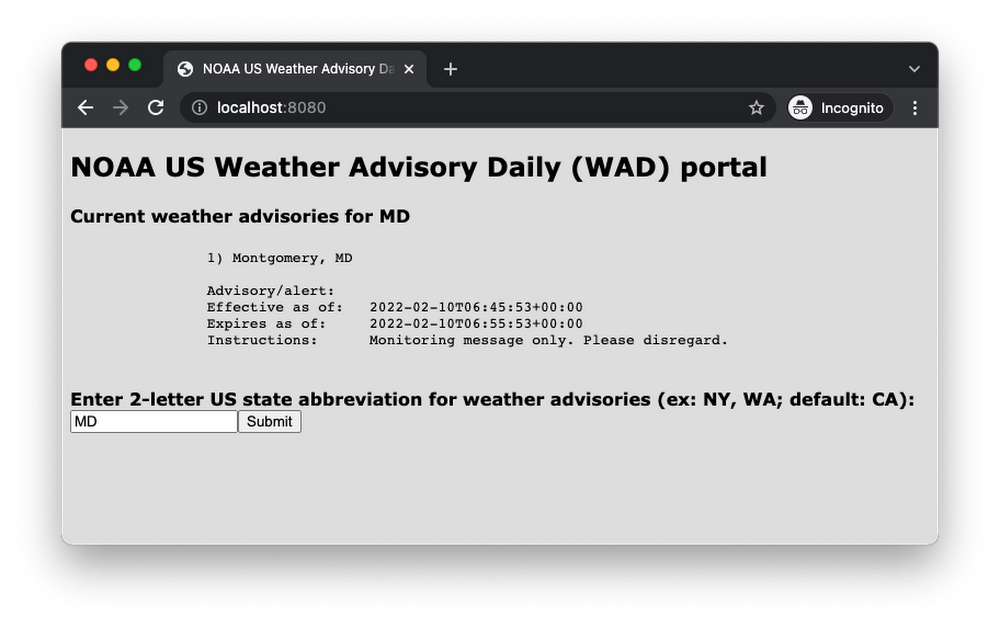
When visiting the app, an empty form is provided to select a state via abbreviation. Upon form submission, results are displayed along with another empty form should an end-user wish to get the weather alerts for another state. Here is a screenshot after the users requests weather alerts for Maryland:
Now that you know how the app works and seen some of the code, realize that the background thread, setInterval() (which calls updateCache()) is really only able to run independently outside of requests. (Yes, it’s possible to have overlaps if your app has long running requests reaching Cloud Run’s default 5-minute request timeout.) However, for most apps, responses happen fairly quickly, and once a request has completed, the instance goes into idle mode whereby the CPU is throttled. This would make it impossible for the background thread to run (in a timely fashion), hence why the “always-on” CPU allocation is required for this app’s functionality.
Learn more about this feature in the Cloud Run CPU Allocation documentation, and feel free to leave us questions or comments on the app or this feature in the video comments section, or, to share what you’d like to see in future episodes. Both the Node.js and Python versions can be found in apps’ open source repo folder. We look forward to seeing what you build using the Cloud Run “always-on” CPU allocation feature!
By: Wesley Chun (Developer Advocate)
Source: Google Cloud Blog
For enquiries, product placements, sponsorships, and collaborations, connect with us at [email protected]. We'd love to hear from you!
Our humans need coffee too! Your support is highly appreciated, thank you!