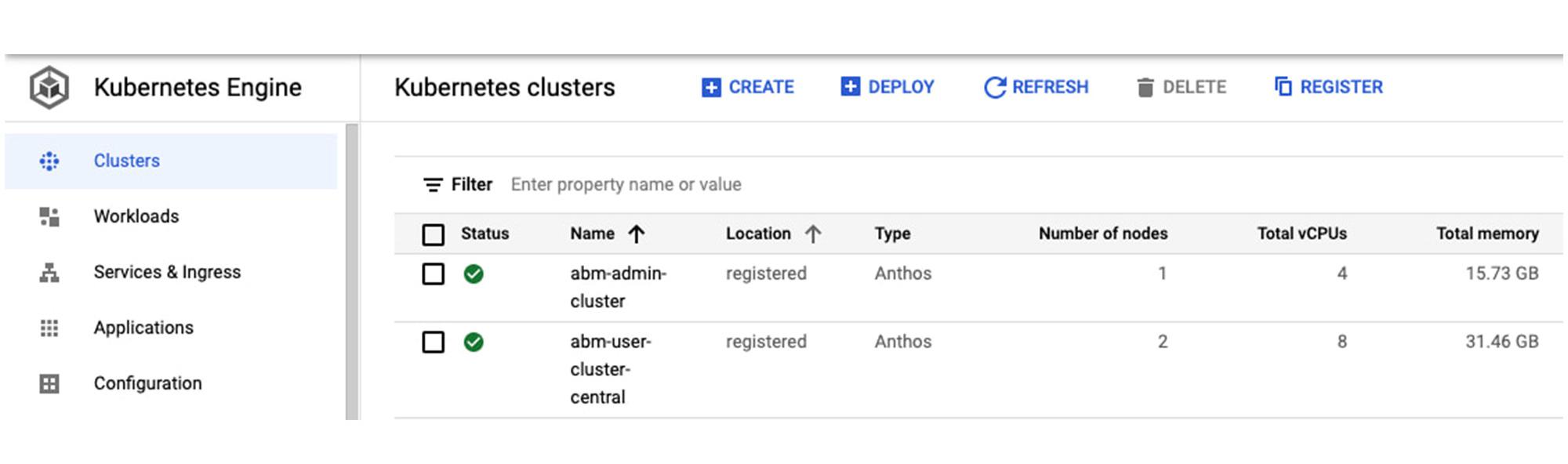
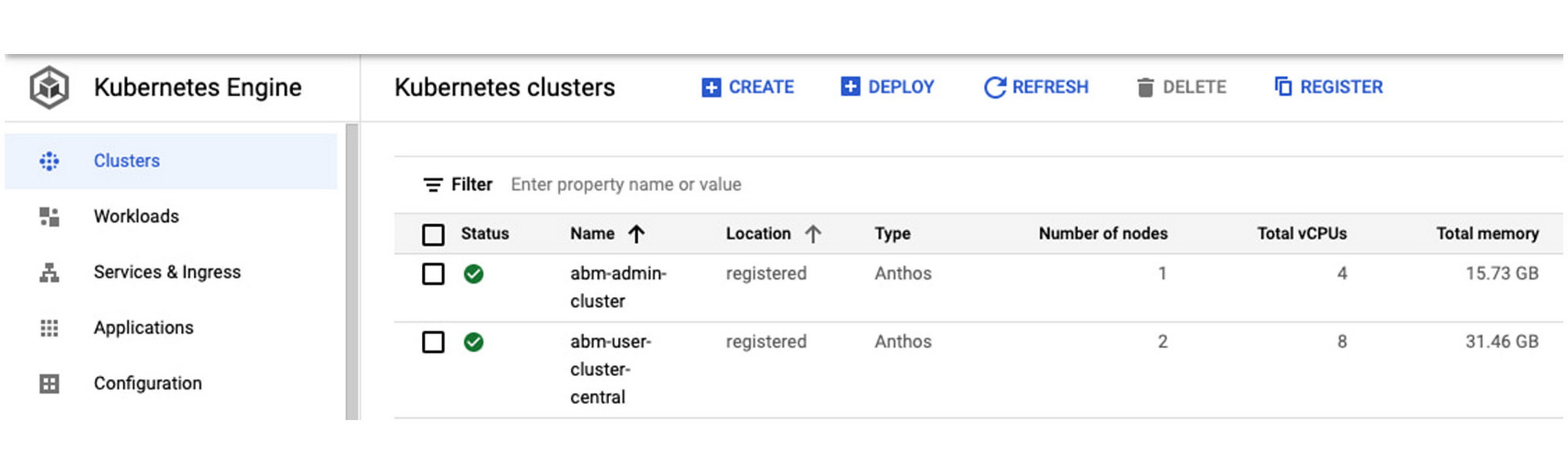
If you’re using Anthos to enable a hybrid or multicloud deployment, one option is to run the Kubernetes-based platform directly on bare metal hardware, without a virtualization layer. Running your applications on Anthos clusters on bare metal delivers strong performance and flexibility, while allowing you to modernize your applications: Anthos clusters on bare metal are fully integrated with the Anthos dashboard in the Google Cloud Console, as well as Cloud Logging and Cloud Monitoring. In addition, a new Anthos Service Mesh dashboard makes it easy to see the application services running on the Anthos clusters in your hybrid environment, offering centralized management from a single pane of glass (Example in Figure 1).
From our partners:
Anthos on bare metal is a 100% software product on top of your operating system and hardware infrastructure. As such, there are several core lifecycle management activities that you need to perform — things like cluster provisioning, scaling up/down and upgrading. When performing an Anthos cluster upgrade, components such as the underlying Kubernetes, Anthos cluster controllers, etc., are brought up-to-date, providing stability, security and new features to avoid disruption to your workloads.
Upgrading your Anthos cluster software is an essential day-two operation. But before you get started, there are some important things to consider as part of your overall upgrade strategy. Read on for an overview of the Anthos cluster upgrade process, and the key questions you should answer before you proceed with any upgrade.
Anthos cluster upgrade overview
A first step is to understand what happens when you upgrade your Anthos bare metal cluster, which proceeds in three stages.
1. Triggering the cluster upgrade – Either through the CLI (“<i>bmctl upgrade cluster</i>”) or the API;
2. Upgrading the control-plane nodes, one node at a time
3. Upgrading the worker nodes, as follows:
- The worker node is cordoned to prevent new applications from being deployed
- Applications are gracefully drained and scheduled on other nodes in the cluster
- After a predefined time all pods are force-terminated and the upgrade begins
- A new version of Anthos is deployed on the node
- After the Anthos upgrade, a node health check is executed to ensure the node is healthy
- Upon the success of node health check, the node is brought back online and is ready to accept workloads
But first, consider this
As you can see, performing an Anthos cluster upgrade is a straightforward process. But before you begin, here are some questions you should ask yourself, to make sure everything works as expected.
Do you want to use multiple environments to roll out the upgrades?
As part of your workflow for delivering software updates, we recommend that you use multiple environments. For example, you can test the new Anthos versions in development environments or run upgrades in the unit test or staging phase before rolling them out in the production environment. Testing out the upgrade in the staging environment minimizes risk and reduces unnecessary application downtime.
Do you want to establish a cadence for upgrades to ensure a smooth operation?
The Anthos cluster upgrade process is an in-place, rolling upgrade, and proceeds one node at a time to avoid disruptions. The node is put in maintenance mode before upgrading. As such, here are a few rules to remember:
- Upgrade the admin cluster before upgrading any associated user clusters.
- Admin and user clusters can run different versions simultaneously during the upgrade. For example, an admin cluster can manage user clusters that are on the same or previous minor version. Managed user clusters can’t be more than one minor version lower than the admin cluster, so before upgrading an admin cluster to a new minor version, make sure that all managed user clusters are at the same minor version as the admin cluster.
- You can’t skip minor versions when upgrading clusters. For example, you can’t upgrade a version 1.8.0 cluster to version 1.10.0.
Do you want to back up before upgrading?
We recommend that you back up your clusters regularly to ensure your snapshot data is relatively current. Adjust the rate of backups to reflect the frequency of significant changes to your clusters. Starting with Anthos release 1.9, you can use the CLI command (“bmctl backup cluster”) to perform the backup.
Does your environment use a high-availability design?
We recommend that your cluster HA control plane have a minimum of three nodes. During an upgrade, you may want to consider adding additional node(s) to provide extra capacity.
Have you reviewed the latest Anthos release notes?
Before any upgrade, be sure to read the release notes so that you are aware of what’s changed since your last upgrade, including any security fixes and known issues.
Have you adopted Infrastructure as Code best practices and adopted git-based workflows?
Automation improves software deployment efficiency, while a Git-based workflow can help you fix issues in production quickly, even with complex software with a large team is involved.
In addition, when planning for the overall infrastructure upgrade or maintenance strategy, you may want to consider an in-place hardware and OS upgrade process in addition to the Anthos software upgrade. For example, before performing a hardware and OS upgrade, configure the worker node in maintenance mode in the cluster control plane so that applications are gracefully drained and scheduled on other nodes in the cluster.
We hope this gives you a better understanding of the Anthos upgrade process, and the issues you might run into along the way. For more information, please refer to the Anthos clusters on bare metal upgrade technical documentation.
Additional resources
1. Explore Anthos by going over Anthos sample deployment tutorial.
2. Follow our Anthos clusters on bare metal or on VMware installation guide and create Anthos clusters in your existing hardware infrastructure.
3. Streamline your application development processes with Google Cloud Build and Google Cloud Deploy and deploy workloads to your Anthos clusters anywhere.
By: Lisa Shen (Google Cloud Platform Product Manager)
Source: Google Cloud Blog
For enquiries, product placements, sponsorships, and collaborations, connect with us at [email protected]. We'd love to hear from you!
Our humans need coffee too! Your support is highly appreciated, thank you!