In the Cloud PA Keynote at I/O Aparna Sinha walked through the backend for an application that connects volunteers with volunteer opportunities in their area. In this blog post we’ll walk through each component of that application in a bit more detail, explaining the new products that Google Cloud has released, the pros and cons of the architecture we chose, and other nerdy technical details we didn’t have time for in the talk.
But first, some architecture diagrams. The application we discussed in the keynote helps connect volunteers with opportunities to help. In the keynote we highlighted two features of the backend for this application: the comment processor and the geographical volunteer-to-opportunity matching functionality.
From our partners:
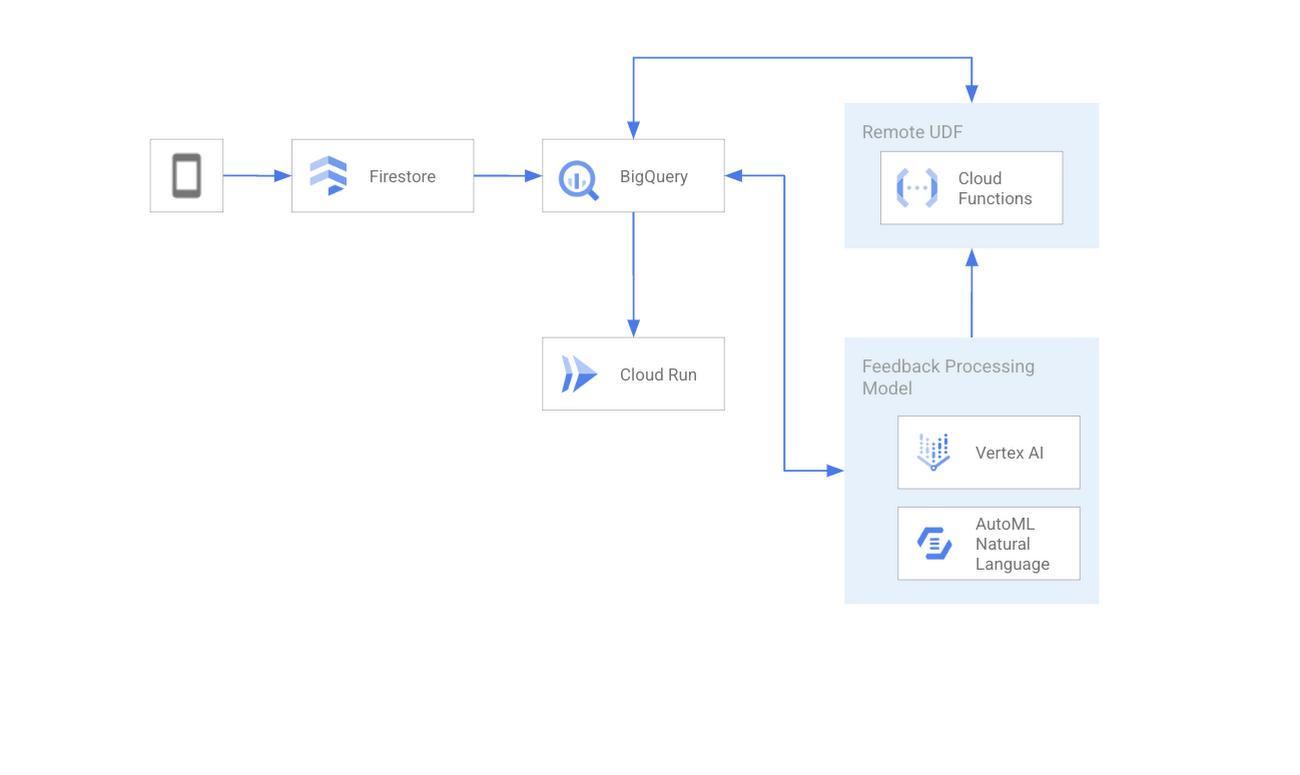
The text processing feature takes free form feedback from users and uses ML and data analytics tools to route the feedback to the team that can best address that feedback. Here’s the architecture diagram for that backend.
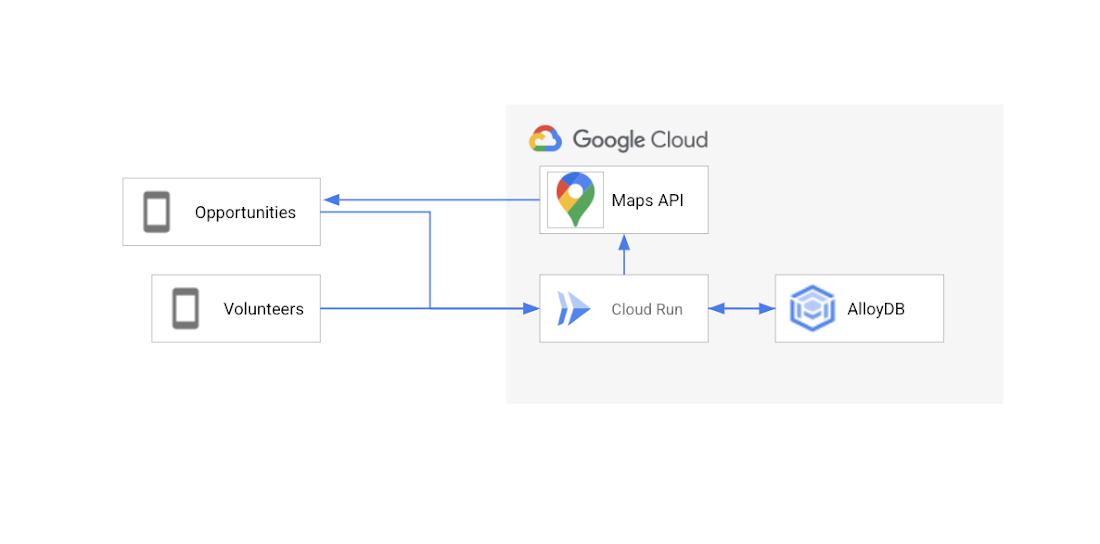
The “opportunities near me” feature allows us to help users find volunteer opportunities near a given location. Here’s the architecture diagram for that feature.
Text Feedback Processing
Let’s start by diving into the text processing pipeline.
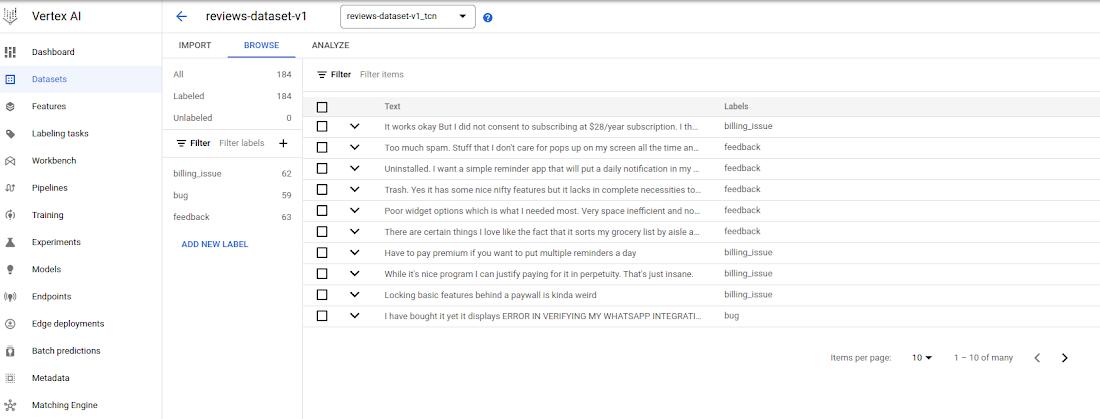
The text feedback processing engine runs on a Machine Learning model, more specifically a text classifier (task part of the Natural Language Processing area). As for many machine learning scenarios, the first step was to collect users’ feedbacks and synthetize a dataset with those feedbacks and a label to define each feedback as part of a category of feedbacks – Here were used “feedback”, “billing_issues” and “bug” as possible categories. By the end of this dataset creation step the dataset structure looked like:
user review | category
<…>
Too much spam. Stuff that I don’t care for pops up on my screen all the time | feedback
It works okay But I did not consent to subscribing at $28/year subscription | billing_issue
I have bought it yet it displays ERROR IN VERIFYING MY ACCOUNT | bug
<…>
Having this dataset ready, it was imported on Vertex AI datasets – for details on how to create a text dataset on Vertex AI, take a look in this guide. The imported dataset could be seen on Vertex AI datasets, including the available feedback categories and number of samples for each category inside the dataset:
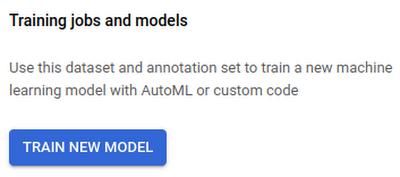
The next step, once the dataset is ready, to create the text classification model was to use Google AutoML. AutoML allows us to train a model with no code, just a few simple steps that can be started directly from the Vertex AI dataset page.
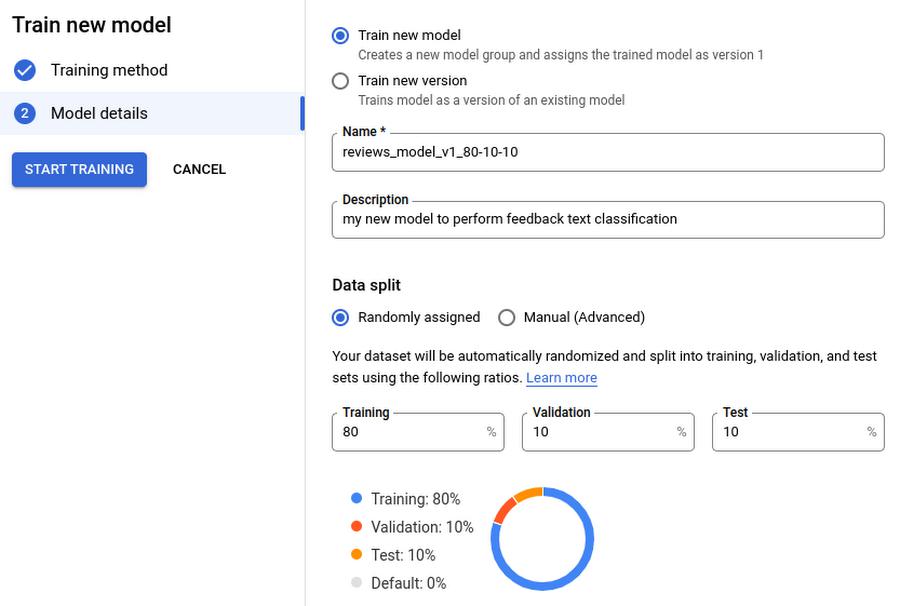
We followed AutoML’s default suggestions, including using the default values for how to split the dataset: 80% for training, 10% for validation, and 10% for testing. AutoML did all the model training and optimization automatically and notified us by email when the training was complete.
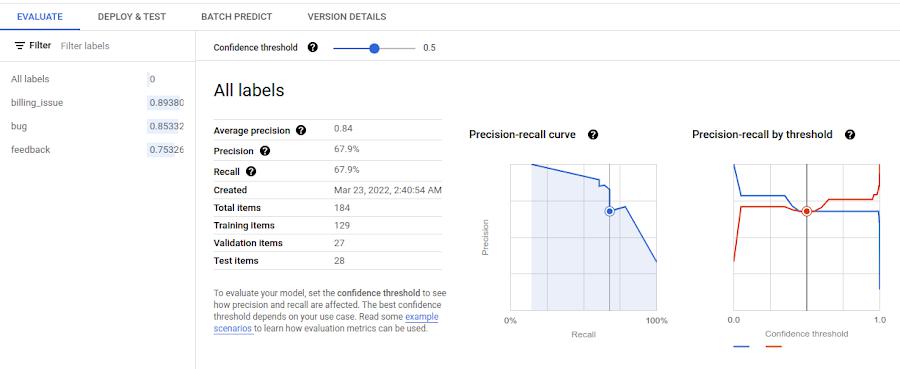
When training was complete, we double checked the model in the Vertex AI console to make sure everything looked good.
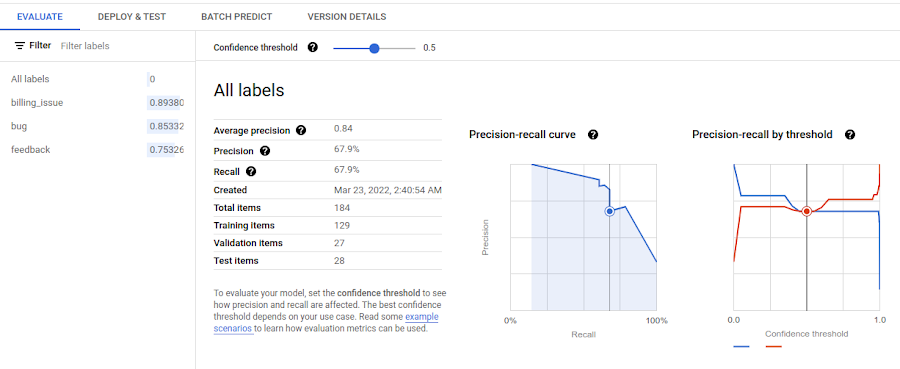
To enable other members of our team to use this model, we deployed it as a Vertex AI endpoint. The endpoint exposes the model via a REST API which made it simple to use for the members of our team that aren’t experts in AI/ML.
Once it is deployed, it is ready to be used by following the directions from Get online predictions from AutoML models.
Once we had our model we could hook up the entire pipeline. Text feedback is stored in the Firebase Realtime Database. To do advanced analytics on this data, we wanted to move it to BigQuery. Luckily, Firebase provides an easy, code free, way to do that, the Stream Collections to BigQuery extension. Once we had that installed I was able to see the text feedback data in BigQuery in real time.
We wanted to classify this data directly from BigQuery. To do this, we built out a Cloud Function to call the Vertex AI endpoint we had just created and used BigQuery’s remote function feature. This Vertex AI endpoint contains a deployed model we previously trained to classify user feedback using AutoML Natural Language Processing.
We deployed the Cloud Function and then created a remote UDF definition on BigQuery, allowing us to call the Cloud Function from BigQuery without having to move the data out of BigQuery or using additional tools. The results were then sent back to BigQuery where it was displayed in the query result with the feedback data categorized.
def predict_classification(calls):# Vertex AI endpoint detailsclient = aiplatform.gapic.PredictionServiceClient(client_options=client_options)endpoint = client.endpoint_path(project=project, location=location, endpoint=endpoint_id)# Call the endpoint for eachfor call in calls:content = call[0]instance = predict.instance.TextClassificationPredictionInstance(content=content,).to_value()instances = [instance]parameters_dict = {}parameters = json_format.ParseDict(parameters_dict, Value())response = client.predict(endpoint=endpoint, instances=instances, parameters=parameters)
Once the feedback data is categorized, using our ML model, we can then route the feedback to the correct people. We used Cloud Run Jobs for this, since it is designed for background tasks like this one. Here’s the code for a job that reads from BigQuery and creates a github issue for each piece of feedback labeled bug_report.
def create_issue(body, timestamp):title = f"User Report: {body}"response = requests.post(f"https://api.github.com/repos/{GITHUB_REPO}/issues",json={"title": title, "body": f"Report Text: {body} \n Timestamp: {timestamp}", "labels": ["Mobile Bug Report", "bug"]},headers={"Authorization": f"token {GITHUB_TOKEN}","Accept": "application/vnd.github.v3+json"})response.raise_for_status()bq = bigquery.client.Client()table = bq.get_table(TABLE_NAME)sql = f"""SELECT timestamp, raw_textFROM `io-2022-keynote-demo.mobile_feedback.tagged_feedback`WHERE category="bug report""""query = bq.query(sql)for row in query.result():issue_body = row.get("raw_text")issue_timestamp = row.get("timestamp")create_issue(issue_body, issue_timestamp)
To handle secrets, like our GitHub token we used secrets manager and then we loaded the secrets into variables with code like this:
SECRET_NAME = "github-token"SECRET_ID = f"projects/{PROJECT_NUMBER}/secrets/{SECRET_NAME}/versions/2"GITHUB_TOKEN = secretmanager.SecretManagerServiceClient().access_secret_version(name=SECRET_ID).payload.data.decode()
Hooking up to CRM or a support ticket database is similar and lets us channel any support requests or pricing issues to the customer success team. We can schedule the jobs to run when we want and as often as we want using Cloud Scheduler. Since we didn’t want to constantly create new bugs, we’ve set the job creating GitHub issues to run once a day using this configuration in cron notation: "0 1 * * *".
Opportunities Near A Location
The second feature we showed in the Cloud Keynote would allow users to see opportunities near a specific location. To do this we utilized the GIS features built into Postgres, so we used Cloud SQL for PostgreSQL. To query the Postgres database we used a Cloud Run service that our mobile app called as needed.
At a certain point we outgrew the PostgreSQL on Cloud SQL solution, as it was too slow. We tried limiting the number of responses we returned, but that wasn’t a great user experience. We needed something that was able to handle a large amount of GIS data in near real time.
AlloyDB excels in situations like this where you need high throughput and real time performance on large amounts of data. Luckily, since AlloyDB is Postgres compatible it is a drop in replacement in our Cloud Run Service, we simply needed to migrate the data from Cloud SQL and change the connection string our Cloud Run Service was using.
Conclusion
So that’s a deeper dive into one of our I/O demos and the products Google Cloud launched at Google I/O this year. Please come visit us in adventure and check out the codelabs and technical sessions at https://io.google/2022/.
By: Cloud Developer Relations
Source: Google Cloud Blog
For enquiries, product placements, sponsorships, and collaborations, connect with us at [email protected]. We'd love to hear from you!
Our humans need coffee too! Your support is highly appreciated, thank you!