aster.cloud aster.cloud
  • /
  • Platforms
    • Public Cloud
    • On-Premise
    • Hybrid Cloud
    • Data
  • Architecture
    • Design
    • Solutions
    • Enterprise
  • Engineering
    • Automation
    • Software Engineering
    • Project Management
    • DevOps
  • Programming
    • Learning
  • Tools
  • About
  • /
  • Platforms
    • Public Cloud
    • On-Premise
    • Hybrid Cloud
    • Data
  • Architecture
    • Design
    • Solutions
    • Enterprise
  • Engineering
    • Automation
    • Software Engineering
    • Project Management
    • DevOps
  • Programming
    • Learning
  • Tools
  • About
aster.cloud aster.cloud
  • /
  • Platforms
    • Public Cloud
    • On-Premise
    • Hybrid Cloud
    • Data
  • Architecture
    • Design
    • Solutions
    • Enterprise
  • Engineering
    • Automation
    • Software Engineering
    • Project Management
    • DevOps
  • Programming
    • Learning
  • Tools
  • About
  • Engineering
  • Technology

Cloud Storage As A File System In Vertex AI Workbench Notebooks

  • aster.cloud
  • June 15, 2022
  • 4 minute read

Cloud Storage as a File System in Vertex AI User Managed Notebooks

What if I told you there is no need to `gsutil cp -r `?

If you’ve developed machine learning models before, you know that data quality and governance issues are predominant. When developing models, you’ll spin up a Vertex AI Workbench Jupyter Notebook and copy some data from Cloud Storage. If the dataset is large, then you’ll wait some time while all data is copied to the notebook. Now you have two copies of the data. Multiply this X times the number of data scientists in your organization and now you have a data reconciliation problem.


Partner with aster.cloud
for your next big idea.
Let us know here.


From our partners:

CITI.IO :: Business. Institutions. Society. Global Political Economy.
CYBERPOGO.COM :: For the Arts, Sciences, and Technology.
DADAHACKS.COM :: Parenting For The Rest Of Us.
ZEDISTA.COM :: Entertainment. Sports. Culture. Escape.
TAKUMAKU.COM :: For The Hearth And Home.
ASTER.CLOUD :: From The Cloud And Beyond.
LIWAIWAI.COM :: Intelligence, Inside and Outside.
GLOBALCLOUDPLATFORMS.COM :: For The World's Computing Needs.
FIREGULAMAN.COM :: For The Fire In The Belly Of The Coder.
ASTERCASTER.COM :: Supra Astra. Beyond The Stars.
BARTDAY.COM :: Prosperity For Everyone.

Now, with Cloud Storage FUSE, you can mount Cloud Storage buckets as file systems on Vertex AI Workbench Notebooks and Vertex AI training jobs. This way you can keep all your data in a single repository (Cloud Storage) and make it available across multiple teams as a single source of truth.

Cloud Storage FUSE

Cloud Storage FUSE is a File System in User Space mounted on Vertex AI systems. It provides 3 benefits over the traditional ways of accessing Cloud Storage:

  • Jobs can start quickly without downloading any data
  • Jobs can perform I/O easily at scale, without the friction of calling the Cloud Storage APIs, handling the responses, or integrating with client-side libraries.
  • Jobs can leverage the optimized performance of Cloud Storage FUSE.

You can learn more about Cloud Storage FUSE and best practices here.

In all custom training jobs, Vertex AI mounts Cloud Storage buckets that you have access to in the /gcs/ directory of each training node’s filesystem. You can read and write directly to the local filesystem in order to read data from Cloud Storage or write data to Cloud Storage.

Read More  Which should I choose? AWS Shield vs WAF vs Firewall Manager

For Vertex AI Workbench Notebooks, Cloud Storage FUSE is supported with just a few steps and next we’ll go through how to do this. Let’s get started!

Getting Started with Vertex AI Workbench Notebooks

Vertex AI Workbench is a fully managed, scalable, enterprise-ready compute infrastructure for running Jupyter Notebooks. Workbench Notebooks have a preinstalled suite of deep learning packages, and support multiple frameworks such as TensorFlow, PyTorch, and scikit-learn. If you need more customization, no problem. You can build custom containers with your favorite frameworks and dependencies.

Mounting Cloud Storage buckets

First we need to create a Vertex AI Workbench Notebook. In this example, we’ll create a user managed notebook. Creating it is simple.

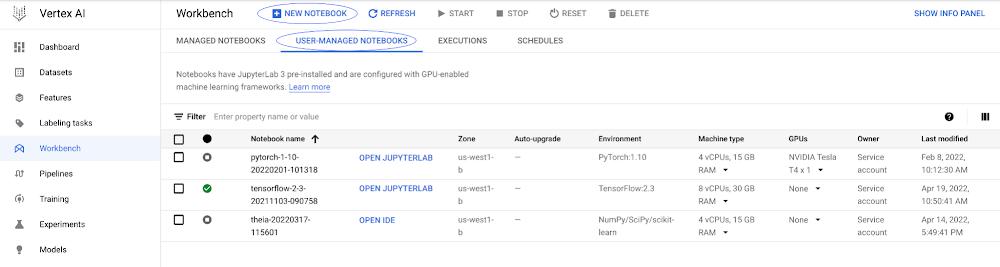
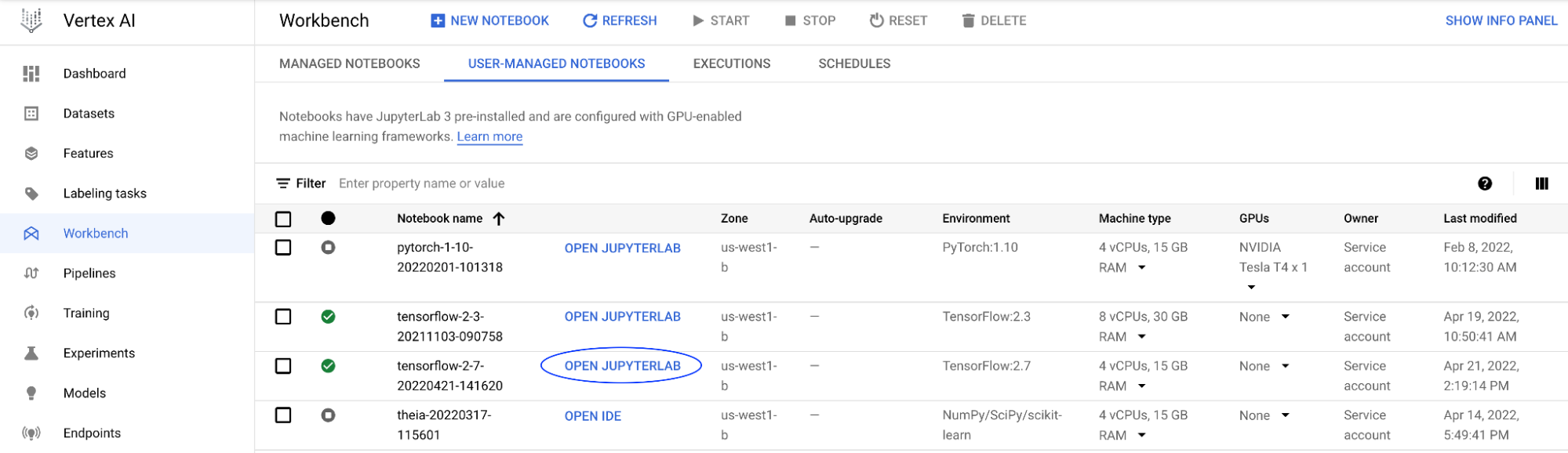
In the Workbench section of the Vertex AI console, select the “User Managed Notebooks” tab and then select “New Notebook” to create a notebook.
 

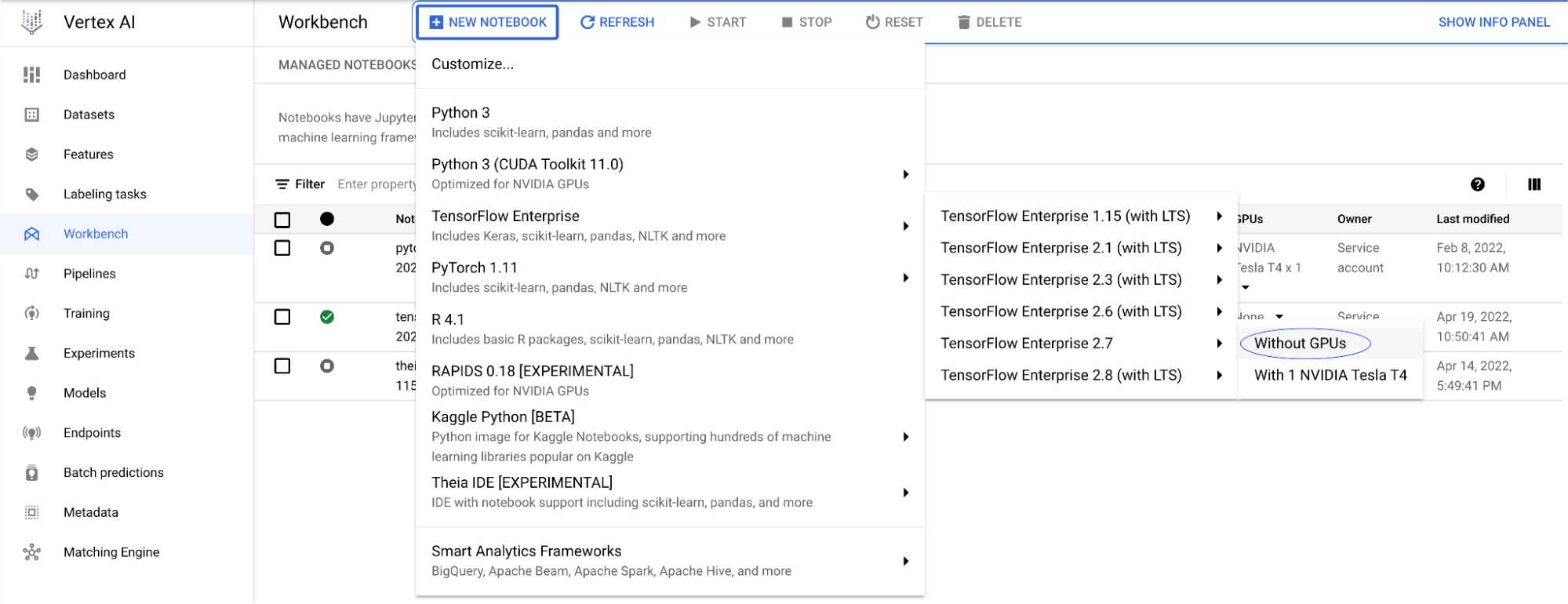
You can select many of the preinstalled suite of deep learning packages or choose a custom container. For this example, you can select the TensorFlow Enterprise 2.7 image without GPUs and press “Create”.
 

Once the notebook is ready, you will see a blue button, “Open Jupyterlab”. Clicking it will open a new browser window with the Jupyter Notebook environment.
 

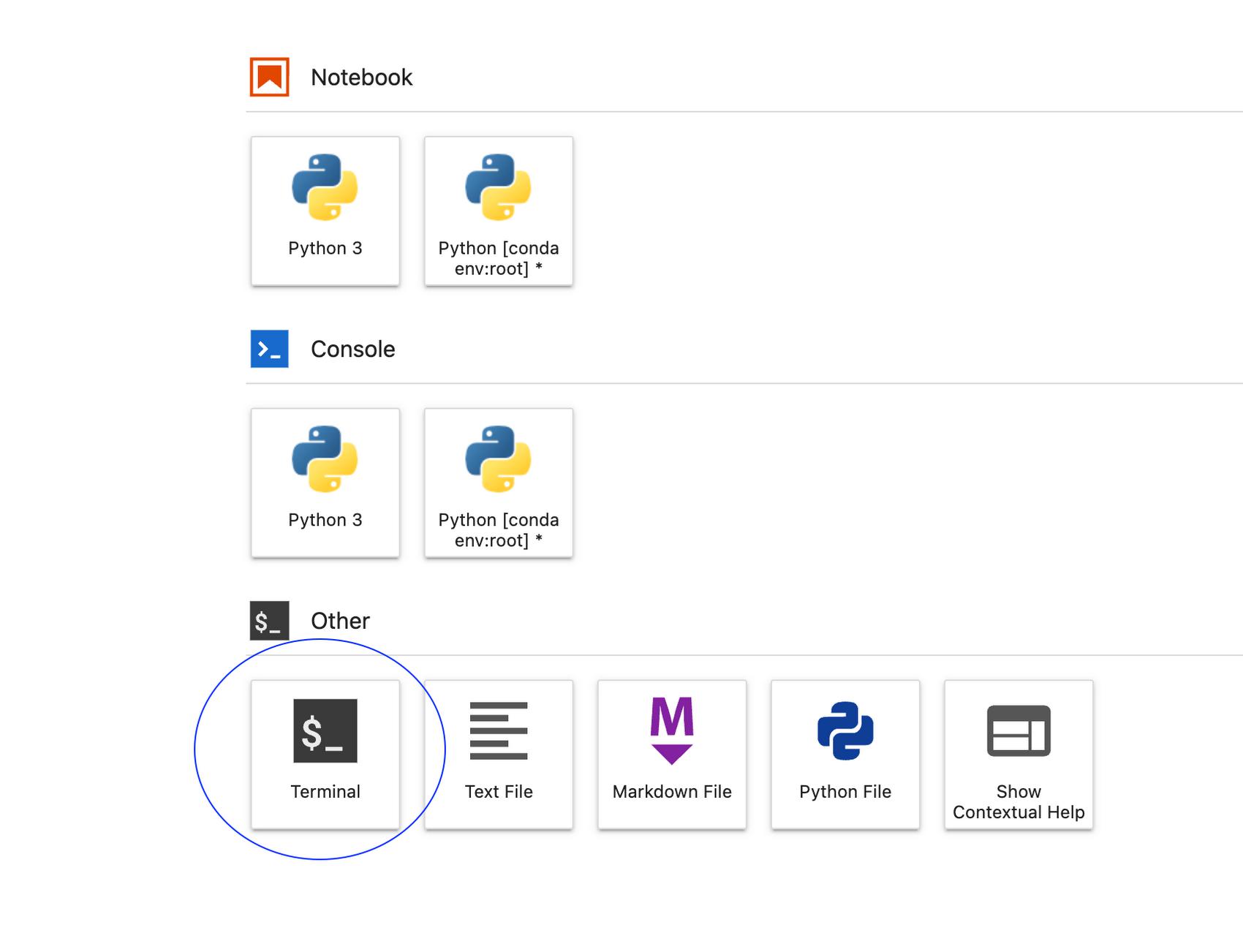
From the Launcher, open a new terminal session. We’ll be running a few commands to mount Cloud Storage buckets as a filesystem in the Notebook.
 

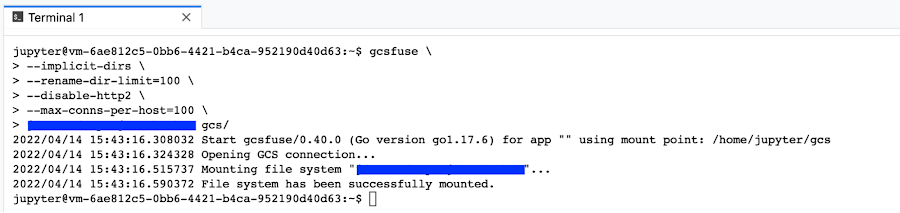
On the terminal window, verify that gcsfuse is installed by running the command gcsfuse

 

Copy the name of the bucket you’ll like to mount, omitting protocol identifier (in this case gs://). For example, if my bucket is gs://my-cloud-bucket, then you’ll just copy my-cloud-bucket.

Read More  Google Cloud Helps Lowe’s Build A True ‘Channel-less’ Customer Experience

Once you have the bucket name copied, you can run the following commands in the terminal window. In this example we take the copied bucket name, my-cloud-bucket, and paste it as a parameter to the gcsfuse command to map to the gcs directory in the last line using a variable.

MY_BUCKET=my-cloud-bucket

cd ~/ # This should take you to /home/jupyter/

mkdir -p gcs # Create a folder that will be used as a mount point

gcsfuse –implicit-dirs \

–rename-dir-limit=100 \

–disable-http2 \

–max-conns-per-host=100 \

$MY_BUCKET “/home/jupyter/gcs”

You can now access the Cloud Storage bucket files from your Workbench Notebook instance as if they were locally. You can even create and run Jupyter Notebooks from the Cloud Storage bucket.


If you would like to mount all buckets in your Cloud Storage project, you can omit the bucket name when using gcsfuse.


cd ~/ # This should take you to /home/jupyter/

mkdir -p gcs # Create a folder that will be used as a mount point

gcsfuse –implicit-dirs \

–rename-dir-limit=100 \

–disable-http2 \

–max-conns-per-host=100 \

“/home/jupyter/gcs/”


In this case, buckets need to be accessed with the full path. For example,


with open(“gcs/my-cloud-bucket/area_cover_dataset.csv”,’r’) as f:

print(f.read())


If you rather use a startup script, you can find a sample script in this post.

Now that we’ve mounted our Cloud Storage buckets, we can load our data directly without making a copy and having to worry about data reconciliation.


By: Juan Acevedo (Enterprise AI/ML Customer Engineer)
Source: Google Cloud Blog


For enquiries, product placements, sponsorships, and collaborations, connect with us at [email protected]. We'd love to hear from you!

Our humans need coffee too! Your support is highly appreciated, thank you!

aster.cloud

Related Topics
  • Cloud Storage
  • Developer
  • File System
  • File System in User Space
  • Google Cloud
  • Tutorial
  • Vertex AI
You May Also Like
View Post
  • Gears
  • Technology

Samsung Art Store Brings Art Basel to Homes Worldwide With New Curated Collection

  • June 15, 2026
View Post
  • Technology

The consequences of relying on AI for accurate news

  • June 10, 2026
View Post
  • Gears
  • Technology

WWDC26: Apple unveils next generation of Apple Intelligence, Siri AI, powerful parental controls, and an expansive set of software improvements

  • June 8, 2026
View Post
  • Technology

IBM and Google Cloud Announce Strategic Partnership to Scale AI with Human Expertise and AI‑Powered Delivery

  • June 4, 2026
View Post
  • Technology

Banks race to patch new cyber vulnerabilities, and other cybersecurity news

  • May 25, 2026
pope-leo-xiv-cq5dam-1500.844
View Post
  • Technology

Pope Leo XIV to Publish First Encyclical on Artificial Intelligence and Human Dignity on 25 May

  • May 22, 2026
View Post
  • Technology

Portfolio to Clients, and is Strengthened by Ongoing Project Glasswing Work

  • May 20, 2026
reMarkable Paper Pure
View Post
  • Gears
  • Technology

Everything The reMarkable Paper Pure Actually Does

  • May 14, 2026

Stay Connected!
LATEST
  • 1
    Expectations vs. Reality: The AI We Thought We’d Have in 10 Years
    • June 19, 2026
  • digital-nomad-freelancer-worker-2151205464 2
    One paperwork problem – Get your Digital Nomad Visa employment documents fast from UK, EU or Singapore
    • June 16, 2026
  • 3
    Samsung Art Store Brings Art Basel to Homes Worldwide With New Curated Collection
    • June 15, 2026
  • 4
    You Do Not Need to Invest in the IPO of SpaceX, Anthropic, and OpenAI
    • June 10, 2026
  • 5
    The consequences of relying on AI for accurate news
    • June 10, 2026
  • 6
    Connecting AI agents with unstructured data using Google Cloud Storage MCP Servers
    • June 10, 2026
  • 7
    WWDC26: Apple unveils next generation of Apple Intelligence, Siri AI, powerful parental controls, and an expansive set of software improvements
    • June 8, 2026
  • 8
    IBM and Google Cloud Announce Strategic Partnership to Scale AI with Human Expertise and AI‑Powered Delivery
    • June 4, 2026
  • Data center 9
    Data Sovereignty in Spain. It’s Not Just About the Law, It’s About Efficiency
    • June 3, 2026
  • 10
    Ink vs Pixels. What you miss versus what you are actually missing.
    • June 1, 2026
about
Hello World!

We are aster.cloud. We’re created by programmers for programmers.

Our site aims to provide guides, programming tips, reviews, and interesting materials for tech people and those who want to learn in general.

We would like to hear from you.

If you have any feedback, enquiries, or sponsorship request, kindly reach out to us at:

[email protected]
Most Popular
  • 1
    Banks race to patch new cyber vulnerabilities, and other cybersecurity news
    • May 25, 2026
  • pope-leo-xiv-cq5dam-1500.844 2
    Pope Leo XIV to Publish First Encyclical on Artificial Intelligence and Human Dignity on 25 May
    • May 22, 2026
  • 3
    Portfolio to Clients, and is Strengthened by Ongoing Project Glasswing Work
    • May 20, 2026
  • reMarkable Paper Pure 4
    Everything The reMarkable Paper Pure Actually Does
    • May 14, 2026
  • 5
    Scaling cloud and AI: Microsoft Azure’s commitment to Europe’s digital future
    • May 11, 2026
  • /
  • Technology
  • Tools
  • About
  • Contact Us

Input your search keywords and press Enter.