An SAP architect designing a backup solution is faced with questions towards the business (what needs to be done) and delivery (how it can be accomplished). This blog gives an overview of the challenges, available options, their advantages and disadvantages. As a conclusion, a blended backup concept will be proposed that uses cloud technology to combine best-of-market approaches to satisfy business requirements without overloading complexity or costs. Finally, we will introduce Actifio GO, the future Google Cloud Backup and DR. It is Google’s enterprise-scale backup solution that provides centralized, policy-based protection of multiple workloads. We will describe its features and how it can help finding out when exactly a logical error occurred and how to even repair databases.
Terms used in this document
From our partners:
It is a good idea to clarify certain central terms using a diagram about a restore process:

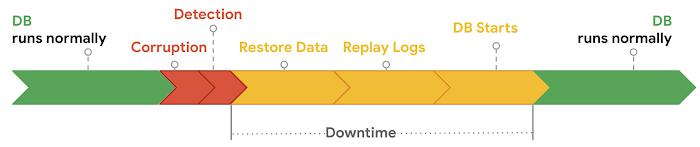
A corruption or a logical error occurs during normal operation. Then the database needs to be restored. After the restore, its logs need to be replayed, sometimes this step is called roll-forward. Then, the database will start, again taking time to complete. Downtime arguably includes corruption and detection. The maximum allowable downtime is called RTO (recovery time objective) and the maximum data loss that can be tolerated is RPO (recovery point objective).
For file systems, the diagram would look the same, just that the replay of logs and database start would be void.
Many customers rely on HA nodes to reduce downtime, and they can help, but not in case of logical errors like deleted tables. To recover from those, full backups or snapshots are the solution. In this article, we will speak about backups when we mean either full backups or snapshots.
Snapshots are fast and cost-efficient. They are a mechanism to only store changes while keeping the original disk state. So, their backup (“snapshot”) and restore (“revert”) can happen in a very short time frame (it is size-independant), while their size corresponds to the amount of data changes. Snapshots will represent the disk content at the time when the snapshot has been taken. If you take a snapshot during normal operation, it will be crash-consistent, just as if the power had been switched off. Databases and file systems will have to recover when you revert to this snapshot. If you want to avoid this time-consuming task for the database, the database needs to place itself into a state that is ready for an application-consistent database snapshot. All SAP NetWeaver supported databases have mechanisms to support this. For HANA, it is the prepare step of a HANA snapshot. From a conceptual perspective, it involves forcing all required DB storage write activity to the disk and then quiescing disk activity at the OS level so the snapshot can be created.
On Google Cloud, you can have snapshots that build on each other. For example you could have 24 snapshots which are each one hour apart from each other. Snapshots reside by default on multi-regional storage which guarantees that they can tolerate a regional outage.
A full database backup will typically take around 0.6xRAM in case of HANA. The size of snapshots on the other hand will start at 0 and grow with incoming data changes.
Ransomware attacks typically encrypt the companies’ data with a key that is only known to the attacker. To recover from such an attack, customers need to restore a backup without this infection – which is hard if the attacker has had the opportunity to infect the backups. But with Google Cloud’s Bucket Lock feature, backups can be set immutable for a retention period up to 100 years.
Backup Solutions by SAP Components

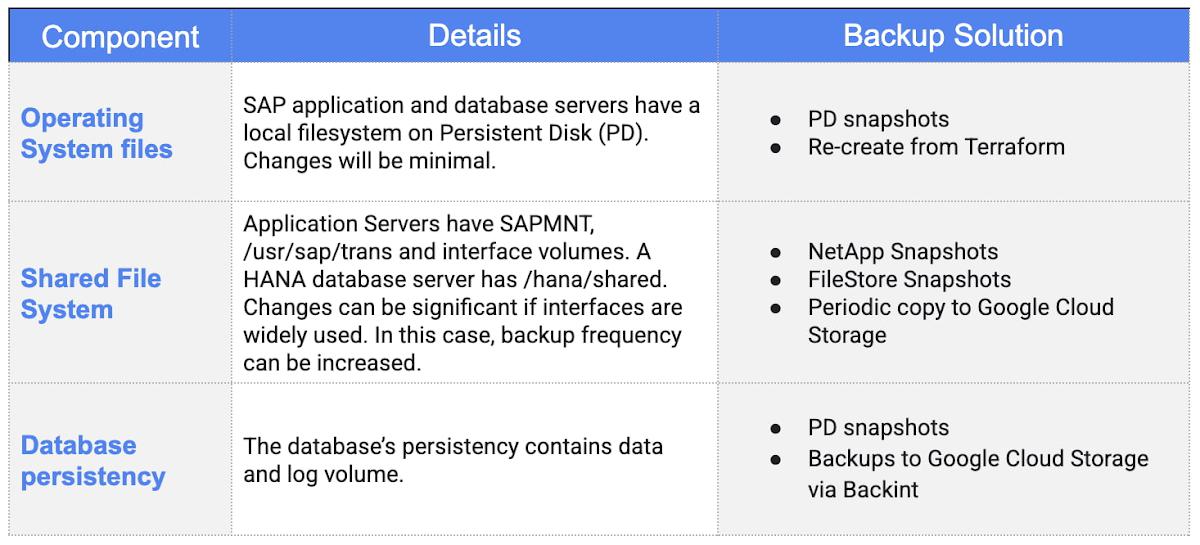
A typical discussion is that there should be more resources for backups of productive systems than for e.g. DEV and QAS. Using snapshots, this regulates itself as the resource consumption will be determined by the amount of changes in the respective system. In other words, in the past there was the idea to run daily full backups in production and weekly full backups in non-production. This implicitly assumes that production is seven times as important as non-production. By taking snapshots instead of full backups, having a lower data change rate automatically saves storage costs. A distinction between the backup SLA for production and non-production is no longer needed.
Blended Backup approach
As discussed, snapshots provide low RTO and can be performed frequently which means they also provide low RPO. On the other hand, full database backups provide an integrity check by SAP and allow for separating the backup from the location and storage infrastructure it was created on. To achieve low costs by low storage consumption and a low RTO/RPO at the same time, we propose:
- Make sure you can quickly create application servers and database servers with their root file system using e.g. Terraform scripts. Being that agile will not only speed up recovery, but also allow you to scale faster on the application layer and envision leaner concepts for DR.
- Take a PD snapshot of the application servers’ and database servers’ root file system every day and delete (merge) the old one. This will be stored in a multi-regional bucket by default. Storage consumption will only be the data changes since the last day.
- Before an operating system or software update, take a Persistent Disk snapshot so you can revert as a matter of seconds
- Shared file systems: Take daily snapshots using the shared storage means. In case of high interface usage, this can be done more frequently. Overwrite the existing snapshot, so storage consumption will only be the data changes since the last snapshot.
- Databases: All SAP databases have similar support for taking storage snapshots. For productive and non-productive databases (using HANA as an example) we recommend the following approach as starting point in your considerations:
- As primary mechanism, use DB consistent snapshots orchestrated from the HANA Studio at a frequency as little as every 10 minutes. Retain a series of snapshots. This will give you a fully DB consistent backup with very quick restore times which is at the same time very efficient on storage consumption. Additional load on operation will be very low. Plus, it is by default replicated to other regions.
- As secondary mechanism, use a weekly full database backup at lowest operation time, e.g. midnight overwriting the previous one to multi-regional cloud storage. This will give you a DB-checked consistent backup, also replicated to other regions. It will provide additional protection against DB level block errors.
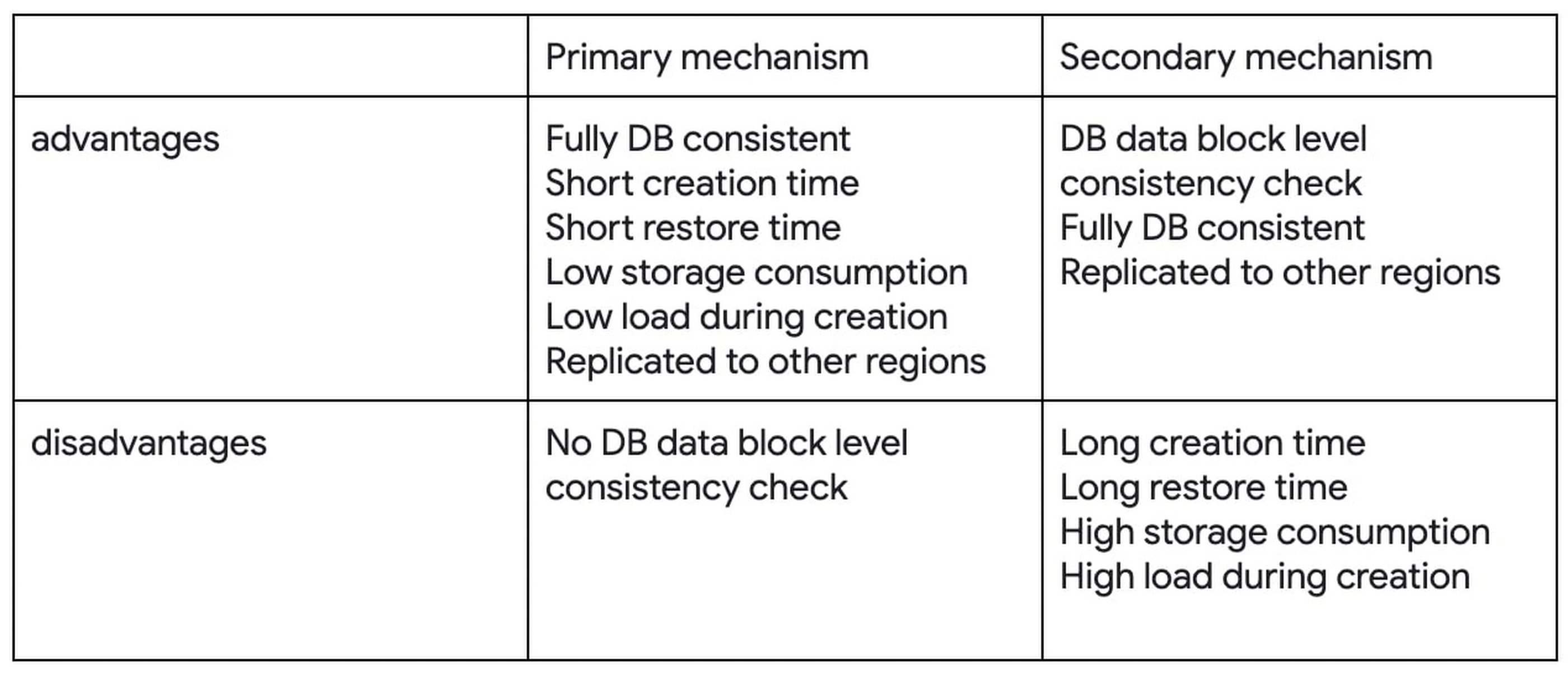
This approach achieves an RPO < 10 minutes while retaining only one full backup and a series of snapshots. Restore speed will be very high as it just means reverting to a snapshot. Storage consumption will be little: one full backup, one week (at max) of changes and the log backups from one week.
The design can be adapted to the customer’s preferences. The weekly frequency of full backups can be changed to daily without causing more storage consumption – previous backups will be overwritten. To save costs, also single-regional backups can be chosen where the strong recommendation is to have them outside of the region where the system is running. Log backups can be added to further reduce the RPO.
So how many snapshots of the database should you retain? If you snapshot every 15 minutes, chances are high that the latest snapshot already contains the error you want to recover from. In this case you must be able to go further back, so you need to manage several snapshots. And this is where Actifio proves helpful.
IMPORTANT: A number of SAP systems have cross system data synchronicity requirements (e.g.: SAP ECC and SAP CRM) and can be considered as being so closely coupled that the data consistency across all the systems needs to be ensured. When performing recovery activities for any single system this would trigger similar recovery activities in other systems. Depending on the customer specific environment additional backup mechanisms may be required to be able to ensure cross system data consistency requirements.
The Actifio backup software
Actifio (soon to be Google Cloud Backup and DR) is Google’s software for managing backups.

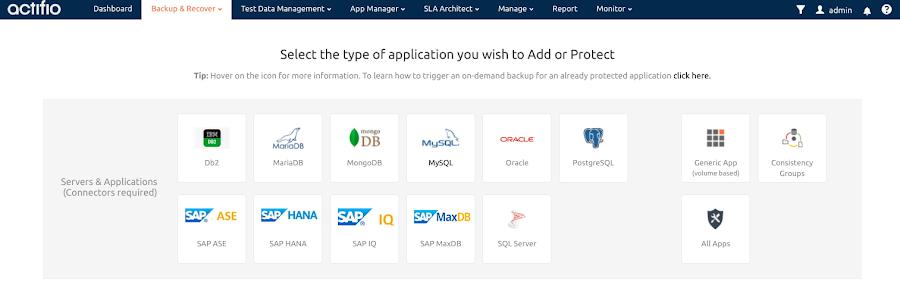
It supports GCP-native PD snapshots and the SAP-supported databases DB2, Oracle, SAP ASE, SAP HANA, SAP IQ, SAP MaxDB and SQL Server.
For SAP customers, the following benefits are of special interest:
- Provide a single management interface for database and file system backups, not limited to SAP data.
- Allow to backup on VM level instead of disk level
- Direct backup to the Sky server (“backup appliance”) with no need for an intermediate storage
With Actifio it will also be possible to determine the point in time where a logical error has occurred. It is possible to spin up 10 virtual machines each one holding a mount to a different snapshot. Administrators can then check when the error occurred – for example between snapshot 7 and 8. This reduces the data loss to a minimum.
But the options do not stop there. It is also possible to “repair” a database. Take the above example, mount snapshot 7 to a virtual machine. It contains a table that has been dropped in snapshots 8 and newer. Now it is possible to export the single table and import it into the production database. Note that this may lead to inconsistencies – but the option is there.
See also
By: Iraia Betolaza (Customer Engineer) and Thorsten Staerk (Customer Engineer)
Source: Google Cloud Blog
For enquiries, product placements, sponsorships, and collaborations, connect with us at [email protected]. We'd love to hear from you!
Our humans need coffee too! Your support is highly appreciated, thank you!