aster.cloud aster.cloud
  • /
  • Platforms
    • Public Cloud
    • On-Premise
    • Hybrid Cloud
    • Data
  • Architecture
    • Design
    • Solutions
    • Enterprise
  • Engineering
    • Automation
    • Software Engineering
    • Project Management
    • DevOps
  • Programming
    • Learning
  • Tools
  • About
  • /
  • Platforms
    • Public Cloud
    • On-Premise
    • Hybrid Cloud
    • Data
  • Architecture
    • Design
    • Solutions
    • Enterprise
  • Engineering
    • Automation
    • Software Engineering
    • Project Management
    • DevOps
  • Programming
    • Learning
  • Tools
  • About
aster.cloud aster.cloud
  • /
  • Platforms
    • Public Cloud
    • On-Premise
    • Hybrid Cloud
    • Data
  • Architecture
    • Design
    • Solutions
    • Enterprise
  • Engineering
    • Automation
    • Software Engineering
    • Project Management
    • DevOps
  • Programming
    • Learning
  • Tools
  • About
  • Data
  • Engineering

Access Larger Dataset Faster And Easier To Accelerate Your ML Models Training In Vertex AI

  • aster.cloud
  • August 19, 2022
  • 3 minute read

Vertex AI Training delivers a serverless approach to simplify the ML model training experience for customers. As such, training data does not persist on the compute clusters by design. In the past, customers had only Cloud Storage (GCS) or BigQuery (BQ) as storage options. Now, you can also use NFS shares, such as Filestore, for training jobs and access data in the NFS share as you would files in a local file system.

Built-in NFS support for custom training jobs provides the following benefits:


Partner with aster.cloud
for your next big idea.
Let us know here.


From our partners:

CITI.IO :: Business. Institutions. Society. Global Political Economy.
CYBERPOGO.COM :: For the Arts, Sciences, and Technology.
DADAHACKS.COM :: Parenting For The Rest Of Us.
ZEDISTA.COM :: Entertainment. Sports. Culture. Escape.
TAKUMAKU.COM :: For The Hearth And Home.
ASTER.CLOUD :: From The Cloud And Beyond.
LIWAIWAI.COM :: Intelligence, Inside and Outside.
GLOBALCLOUDPLATFORMS.COM :: For The World's Computing Needs.
FIREGULAMAN.COM :: For The Fire In The Belly Of The Coder.
ASTERCASTER.COM :: Supra Astra. Beyond The Stars.
BARTDAY.COM :: Prosperity For Everyone.

  • Delivers an easy way to store and access large datasets for Vertex AI Training with less of the cumbersome work involving moving training data around.
  • Training jobs execute faster by eliminating the data download steps.
  • Data streams over the network with higher throughput compared to using alternative storage solutions.

This article demonstrates how to create a Filestore instance and how to use the data that’s stored in the instance to train a model with your custom training code.

Create a Filestore instance and copy data

First let’s create a Filestore instance as our NFS file server.

In the Cloud Console, go to the Filestore Instances page and click Create instance.

 

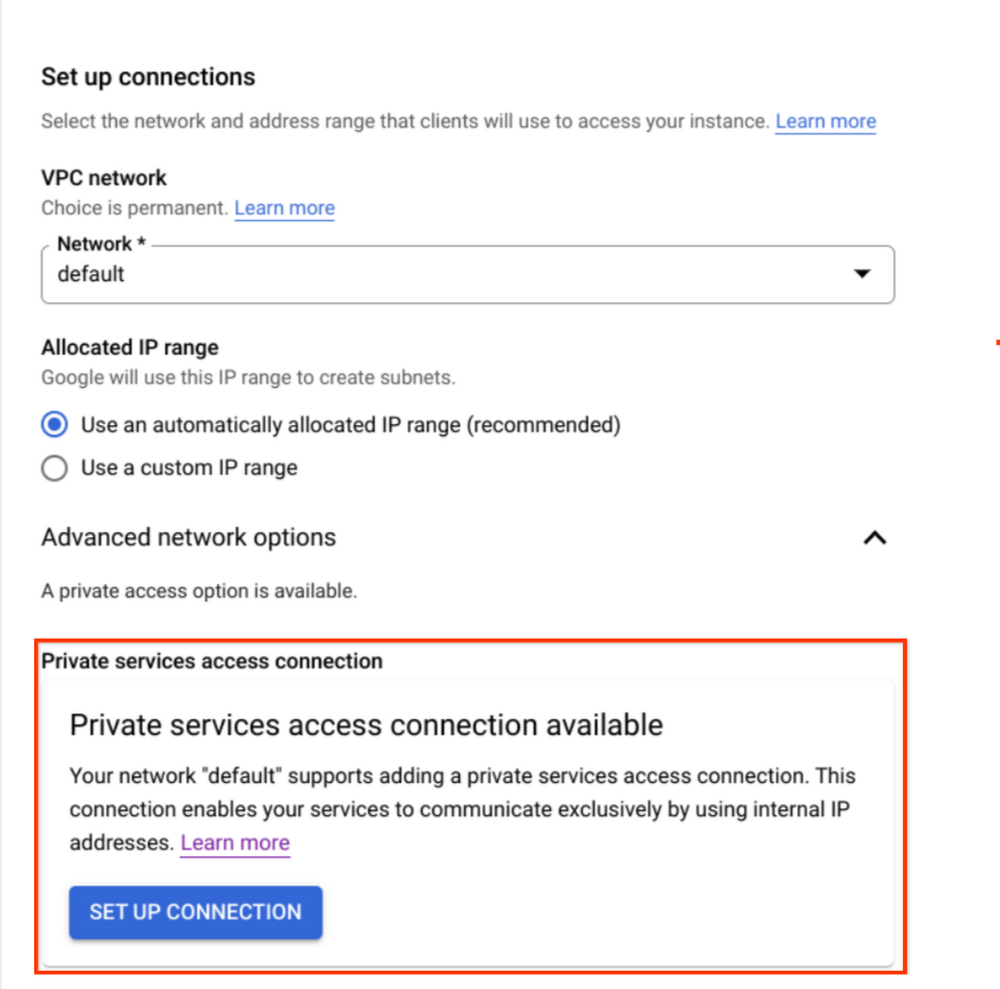
Configure the instance based on your needs, noting the following:

  • For this tutorial, we used the “default” VPC network for simplicity. You may choose any network you want, but save the network name as we will need it later.
  • Ensure that you are using “private service access” as the connection mode.

For in depth instructions, see Creating instances.
 

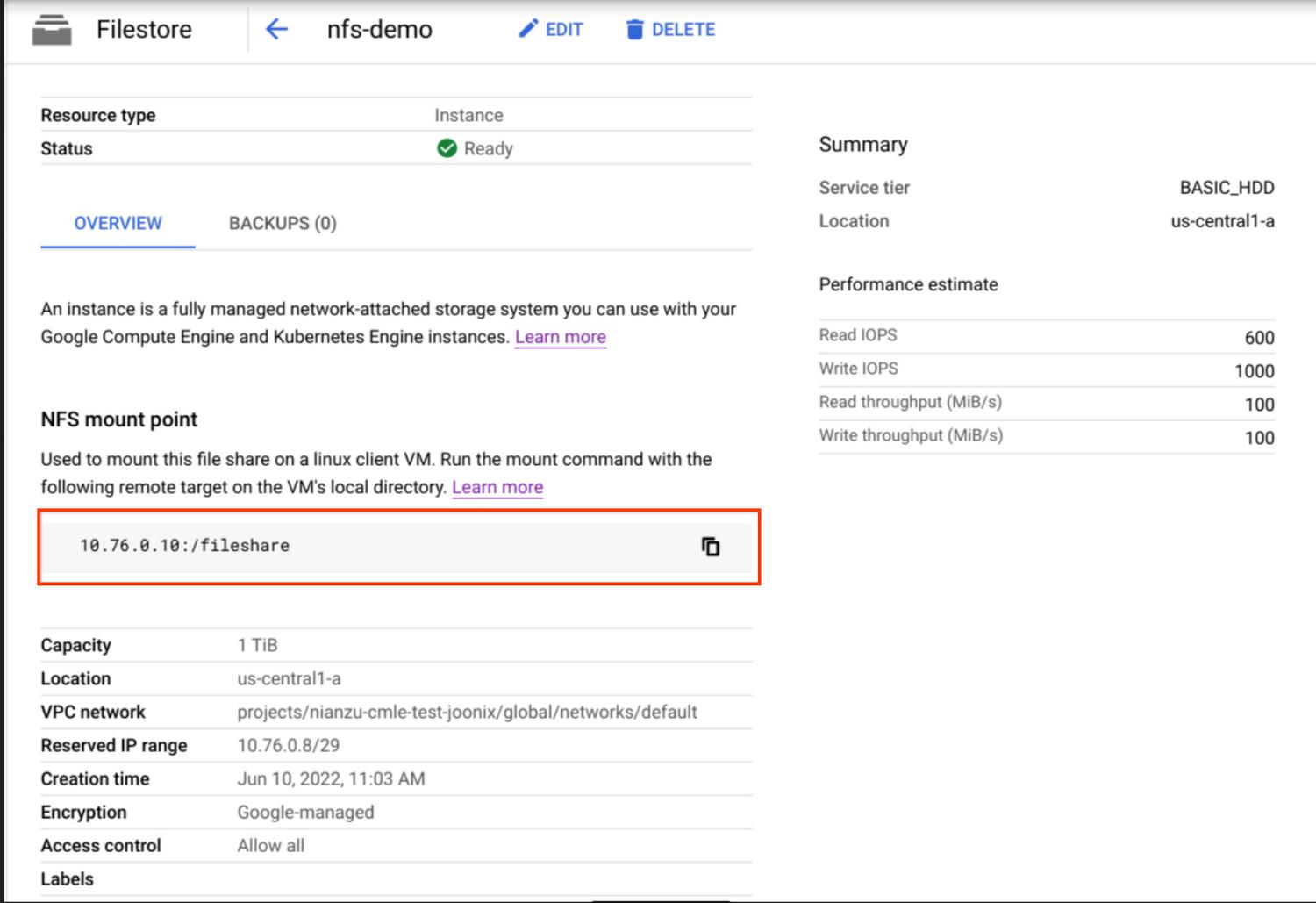
Your  new instance will show on the dashboard page. Click on the name of the instance to view the details of the instance.

Read More  Twitter Expands Strategic Partnership With Google Cloud To Improve Data Insights And Enhance Productivity


Save the NFS mount point information, which is in the form of SERVER:PATH. We will use it later.
 

Copy data to your instance by following the instructions from the official guide.

Set up VPC Network Peering

Since we chose “private service access” mode for our Filestore instance as mentioned above, we already have VPC peering established between our network and Google services. If you’re using a third party NFS solution, you may need to set up the peering yourself as instructed in Set up VPC Network Peering.

Create a Custom Job accessing NFS

Once you have the NFS share and VPC peering set up, you are ready to use it with your custom training jobs.  In this section, we will use the gcloud CLI to create a custom training job that can access the files in your NFS share.

To be specific, the process can be simplified into following general steps:

  1. Decide a mount point directory under the path /mnt/nfs/. Your NFS share will be mounted to this directory when you submit jobs.
  2. In your custom code,  you can access your NFS file share via the local path to your mount point directory.
  3. Specify  the “nfsMount” field and network fields in your training job request and submit it.

For example, we make my_mount the “Mount Point” folder. Then in our custom code, we can specify /mnt/nfs/my_mount to get the data stored in our Filestore instance:


with open('/mnt/nfs/my_mount/data.csv', 'r') as f:
  lines = f.readlines()


We may also write to the Filestore instance via that local path:

Read More  Orchestrate Looker Data Transformations With Cloud Composer


with open('/mnt/nfs/my_mount/epoch3.log', 'a') as f:
  f.write('success!\n')


Here, suppose that we built a custom container image gcr.io/PROJECT_ID/nfs-demo containing the above code for submitting our training job. We can run commands like the following:


PROJECT_ID='YOUR-PROJECT'
LOCATION=us-central1
JOB_NAME='nfs-demo'
IMAGE_URI="gcr.io/$PROJECT_ID/nfs-demo:latest"

gcloud ai custom-jobs create \
 --project=${PROJECT_ID} \
 --region=${LOCATION} \
 --display-name=${JOB_NAME} \
 --config=config.yaml


The config.yaml file describes the CustomJobSpec and it should have the network and NFS mounts settings, like the following:


network: projects/PROJECT_NUMBER/global/networks/default
workerPoolSpecs:
   - machineSpec:
       machineType: n1-standard-8
     replicaCount: 1
     containerSpec:
       imageUri: 'gcr.io/PROJECT_ID/nfs-demo:latest'
     nfsMounts:
       - server: 10.76.0.10
         path: /fileshare
         mountPoint: my_mount


Then we can check the status of your training job and see how it successfully reads/writes the data from your NFS file shares.

Summary

In this article, we used Filestore to demonstrate how to access files in an NFS share by mounting it to Vertex AI. We created a Filestore instance and VPC peering connections, and then submitted a job that can directly read from Filestore as a local directory.

By leveraging the performance and throughput benefits of streaming data from NFS shares such as Filestore, it simplifies and accelerates the process to run training jobs on Vertex AI, which empowers users to train even better models with more data.

  • To learn more about using NFS file systems with Vertex AI, see NFS support on Vertex AI training.
  • To learn more  about Vertex AI, check out this blog post from our developer advocates.


By: Manqing Feng (Software Engineering Intern) and Nathan Li (Software Engineer)
Source: Google Cloud Blog


For enquiries, product placements, sponsorships, and collaborations, connect with us at [email protected]. We'd love to hear from you!

Our humans need coffee too! Your support is highly appreciated, thank you!

aster.cloud

Related Topics
  • Data
  • Filestore
  • Google Cloud
  • NFS
  • Tutorials
  • Vertex AI
You May Also Like
Data center
View Post
  • Data
  • Public Cloud

Data Sovereignty in Spain. It’s Not Just About the Law, It’s About Efficiency

  • June 3, 2026
View Post
  • Data
  • Platforms
  • Technology

Scaling cloud and AI: Microsoft Azure’s commitment to Europe’s digital future

  • May 11, 2026
View Post
  • Data

Streamline read scalability with Cloud SQL autoscaling read pools

  • March 23, 2026
View Post
  • Data
  • Platforms
  • Public Cloud

PayPal’s historically large data migration is the foundation for its gen AI innovation

  • March 4, 2026
View Post
  • Data
  • Technology

3 obstacles to agentic AI adoption and how to overcome them

  • December 22, 2025
Points, Lines and a Question
View Post
  • Architecture
  • Design
  • Engineering
  • People

What Is The Point In Making Points?

  • November 26, 2025
View Post
  • Engineering
  • Software Engineering

Development gets better with Age

  • October 9, 2025
View Post
  • Engineering
  • Technology

Apple supercharges its tools and technologies for developers to foster creativity, innovation, and design

  • June 9, 2025

Stay Connected!
LATEST
  • 1
    IBM Study: One in Four Malicious Breaches are AI-Enabled, Costing Companies $6 Million on Average
    • July 29, 2026
  • 2
    Accelerating the frontiers of scientific discovery: Google’s $40M commitment to the Genesis Mission
    • July 26, 2026
  • 3
    3 Questions: Neural transparency and the future of AI design
    • July 17, 2026
  • 4
    Intel Invests €5 Billion to Expand Manufacturing in Europe
    • July 13, 2026
  • 5
    IBM and Red Hat Expand Lightwell with New Offerings to Build the Trust Infrastructure for AI-Era Open Source
    • July 8, 2026
  • 6
    When I Was Young
    • July 4, 2026
  • 7
    The Fastest AI Fried Chicken In The World
    • June 29, 2026
  • 8
    Zed Approves | How to Stay Cool in Extreme Heat
    • June 29, 2026
  • 9
    The AI investment surge hasn’t produced the expected results yet. That could change in 2026
    • June 26, 2026
  • 10
    Zed Approves | It’s Prime Day 2026! Time to Upgrade Your World Cup Viewing Setup and Beat the Heat
    • June 25, 2026
about
Hello World!

We are aster.cloud. We’re created by programmers for programmers.

Our site aims to provide guides, programming tips, reviews, and interesting materials for tech people and those who want to learn in general.

We would like to hear from you.

If you have any feedback, enquiries, or sponsorship request, kindly reach out to us at:

[email protected]
Most Popular
  • 1
    Zed Approves | The Best Prime Day PC Deals: Top Gaming Rigs, Workstations, and Everyday Laptops
    • June 24, 2026
  • neon-cart 2
    Zed Approves: How to Gear Up for GTA 6 This Amazon Prime Day (2026 Quick Guide)
    • June 22, 2026
  • zedreviews-valerion 3
    Father’s Day Outdoors – Build Dad the Ultimate Backyard Watch Party
    • June 20, 2026
  • zedreviews-fathers-day-50830 4
    Father’s Day Outdoors, Round Two – Gear for the Action, the Tailgate, and Beating the Heat
    • June 20, 2026
  • zedreviews-fathers-day-2147684744 5
    The Ultimate Father’s Day Gift Guide – Home Entertainment Upgrades Dad Actually Wants
    • June 20, 2026
  • /
  • Technology
  • Tools
  • About
  • Contact Us

Input your search keywords and press Enter.