In this article we’ll explore the networking components of Google Kubernetes Engine (GKE) and the various options that exist. Kubernetes is an open source platform for managing containerized workloads and services and GKE is a fully managed environment for running Kubernetes on Google Cloud infrastructure.
IP addressing
Various network components in Kubernetes utilize IP addresses and ports to communicate. IP addresses are unique addresses that identify various components in the network.
From our partners:
Components
- Containers – These are the smallest components for executing application processes. One or more containers run in a pod.
- Pods – A collection of containers that are physically grouped together. Pods are assigned to nodes.
- Nodes – Nodes are worker machines in a cluster (a collection of nodes). A node runs zero or more pods.
Services
- ClusterIP – These addresses are assigned to a service.
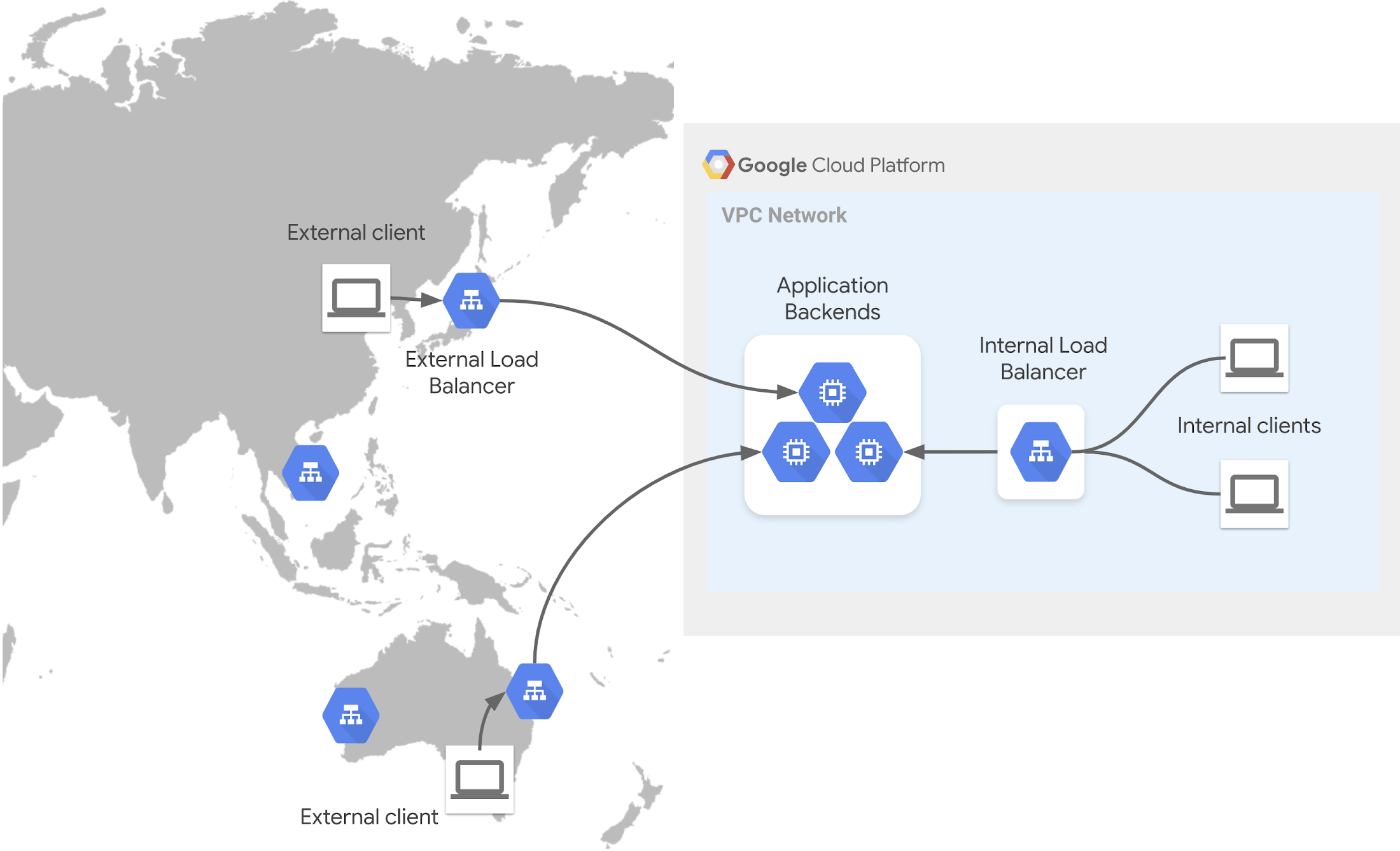
- Load balancer – Load balances internal traffic or external traffic to nodes in the cluster.
- Ingress – Special type of Load balancer that handles HTTP(S) traffic.
IP addresses are assigned from various subnets to the components and services. Variable length subnet masks (VLSM) are used to create CIDR blocks. The amount of available hosts on a subnet depends on the subnet mask used.
The formula for calculating available hosts in Google Cloud is 2n– 4, not 2n– 2, which is normally used in on-premise networks.
The flow of IP address assignment looks like this:
- Nodes are assigned IP addresses from the cluster’s VPC network
- Internal Load balancer IP addresses by default are automatically assigned from the Node IPv4 block. If necessary, you can create a specified range for your Load balancers and use the
loadBalancerIPoption to specify the address from that range. - Pods are assigned addresses from a range of addresses issued to pods running on that node. The default max pods per node is 110. To allocate an address to this number the amount is multiplied by 2 (110*2=220) and the nearest subnet is used which is /24. This allows a buffer for scheduling of the pods. This limit is customizable at creation time.
- Containers share the IP address of the Pods they run on.
- Service (Cluster IP) addresses are assigned from an address pool reserved for services.
The IP address ranges for VPC-native clusters section of the VPC-native clusters document gives you an example of planning and scoping address ranges.
Domain Naming System (DNS)
DNS allows name to IP address resolution. This allows automatic name entries to be created for services. There are a few options in GKE.
- kube-dns – Kubernetes native add-on service. Kube-dns runs on a deployment that is exposed via a cluster IP. By default pods in a cluster use this service for DNS queries. The “Using kube-dns” document describes how it works.
- Cloud DNS – This is Google Cloud DNS managed service. This can be used to manage your cluster DNS. A few benefits of Cloud DNS over kube-dns are:
- Reduces the management of a cluster-hosted DNS server.
- Supports local resolution of DNS on GKE nodes. This is done by caching responses locally, which provides both speed and scalability.
- Integrates with Google Cloud Operations monitoring suite.
Service Directory is another service from Google Cloud that can be integrated with GKE and Cloud DNS to manage services via namespaces.
The gke-networking-recipes github repo has some Service Directory examples you can try out for Internal LoadBalancers, ClusterIP, Headless & NodePort.
For a deeper understanding of DNS options in GKE please check out the article DNS on GKE: Everything you need to know.
Load Balancers
These control access and distribute traffic across clutter resources. Some options in GKE are:
Ingress
These handle HTTP(S) traffic destined to services in your cluster. They use an Ingress resource type. When this is used it creates an HTTP(S) load balancer for GKE. When configuring, you can assign a static IP address to the load balancer, to ensure that the address remains the same.
In GKE there you can provision both external and internal Ingress. The links to the guides below show you how to configure:
- Configuring ingress for internal HTTP(S) load balancing
- Configuring ingress for external load balancing
GKE allows you to take advantage of container-native load balancing which directs traffic directly to the pod IP using Network Endpoint Groups (NEGs).
Service routing
There are three main points to understand in this topic:
- Frontend – This exposes your service to clients through a frontend that accepts the traffic based on various rules. This could be a DNS name or Static IP address.
- Load balancing – Once the traffic is allowed the load balancer distributes to available resources to serve the request based on rules.
- Backend – Various endpoints that can be used in GKE.
Operations
In GKE you have several ways you can design your clusters networking:
- Standard – This mode allows the admin the ability to configure the clusters underlying infrastructure. This mode is beneficial if you need a deeper level of control and responsibility.
- Autopilot – GKE provisions and manages the cluster’s underlying infrastructure. This is pre-configured for usage and gives you a bit of hand-off management freedom.
- Private Cluster (This allows only internal IP connections). If you need a client to have access to the internet (e.g. for updates) you can use a Cloud NAT.
- Private Service Access, (Lets your VPC communicate with service producer services via private IP addresses. Private Service Connect, (Allows private consumption of services across VPC networks)
Bringing it all together
Below is a short high-level recap.
- IP addresses are assigned to various resource in your cluster
- Nodes
- Pods
- Containers
- Services
- These IP address ranges are reserved for the various resource types. You have the ability to adjust the range size to meet your requirements by subnetting. Restricting unnecessary external access to your cluster is recommended.
- By default pods have the ability to communicate across the cluster.
- To expose applications running on pods you need a service.
- Cluster IPs are assigned to services.
- For DNS resolution you can rely on the native option like kube-dns or you can utilize Google Cloud DNS within your GKE cluster.
- Load balancers can be used internally and external with your cluster to expose applications and distribute traffic.
- Ingress handles HTTP(S) traffic. This utilizes HTTP(S) load balancers service from Google cloud. Ingress can be used for internal and external configurations.
To learn more about GKE networking, check out the following:
- Documentation: IP address management strategies when migrating to GKE
- Documentation: Best practices for GKE networking
- Blog: DNS on GKE: Everything you need to know
- YouTube: GKE Concepts of Networking
Want to ask a question, find out more or share a thought? Please connect with me on Linkedin or Twitter: @ammettw.
By Ammett Williams, Developer Relations Engineer | Abdelfettah Sghiouar, Cloud Developer Advocate
Source Google Cloud
For enquiries, product placements, sponsorships, and collaborations, connect with us at [email protected]. We'd love to hear from you!
Our humans need coffee too! Your support is highly appreciated, thank you!