aster.cloud aster.cloud
  • /
  • Platforms
    • Public Cloud
    • On-Premise
    • Hybrid Cloud
    • Data
  • Architecture
    • Design
    • Solutions
    • Enterprise
  • Engineering
    • Automation
    • Software Engineering
    • Project Management
    • DevOps
  • Programming
    • Learning
  • Tools
  • About
  • /
  • Platforms
    • Public Cloud
    • On-Premise
    • Hybrid Cloud
    • Data
  • Architecture
    • Design
    • Solutions
    • Enterprise
  • Engineering
    • Automation
    • Software Engineering
    • Project Management
    • DevOps
  • Programming
    • Learning
  • Tools
  • About
aster.cloud aster.cloud
  • /
  • Platforms
    • Public Cloud
    • On-Premise
    • Hybrid Cloud
    • Data
  • Architecture
    • Design
    • Solutions
    • Enterprise
  • Engineering
    • Automation
    • Software Engineering
    • Project Management
    • DevOps
  • Programming
    • Learning
  • Tools
  • About
  • Mobile
  • Programming

Top Tips For Adopting Android’s Notification Permission

  • aster.cloud
  • August 29, 2022
  • 3 minute read

Overview

Excess notifications is a digital-wellbeing problem for users worldwide. In Android 13, we’re helping users take back control of their notification experience by introducing a new runtime permission. Users must grant this permission to an app before that app can post notifications to the notification drawer, including those related to foreground services.

For many apps, Android’s official documentation should have enough information and guidance to onboard your app to handle the new permission. If you are looking for tips to improve your app’s user experience before you target Android 13 or test your app’s integration with the permission without flashing different OS versions onto your device, then you have come to the right place!


Partner with aster.cloud
for your next big idea.
Let us know here.


From our partners:

CITI.IO :: Business. Institutions. Society. Global Political Economy.
CYBERPOGO.COM :: For the Arts, Sciences, and Technology.
DADAHACKS.COM :: Parenting For The Rest Of Us.
ZEDISTA.COM :: Entertainment. Sports. Culture. Escape.
TAKUMAKU.COM :: For The Hearth And Home.
ASTER.CLOUD :: From The Cloud And Beyond.
LIWAIWAI.COM :: Intelligence, Inside and Outside.
GLOBALCLOUDPLATFORMS.COM :: For The World's Computing Needs.
FIREGULAMAN.COM :: For The Fire In The Belly Of The Coder.
ASTERCASTER.COM :: Supra Astra. Beyond The Stars.
BARTDAY.COM :: Prosperity For Everyone.

Requesting In-Context With Target SDK <= 32

In Android 13, when your app creates its first notification channel, the user sees the notification permission prompt if your app is displaying a user-visible activity. This means that if your app creates its first channel upon launch or while running in the background, then the user sees the prompt immediately after they launch your app.

This sudden prompt may be disruptive to your app’s user journey, and is likely to increase permission denial rates. That’s because new users, who aren’t yet familiar with your app, may not feel comfortable granting access to their personal information. For those reasons, we highly recommend requesting the permission in-context — that is, when they navigate to the appropriate feature. What in-context means varies on a per-app basis, and you can find some ideas in the documentation for runtime permissions.

Read More  Compose Tooling

While it’s much easier to request the permission in-context when your app targets Android 13 (setting targetSdkVersion to 33), apps that target older versions of Android can help the OS request the permission in-context by changing when they create their first notification channels. As mentioned earlier, Android advises you to create your first channel when users are in-context.

You can also start drafting your app’s educational UI to explain why your app needs access to notifications. Our research shows that apps that explain why they need a particular permission tend to get higher opt-in rates.

If your app provides an onboarding flow for new users, you can choose to show the educational UI first, before your app creates its first notification channel and causes the notification permission prompt to appear. Please test this out with your app to verify that the timing makes sense from a new user’s perspective.

Testing Notification Permission

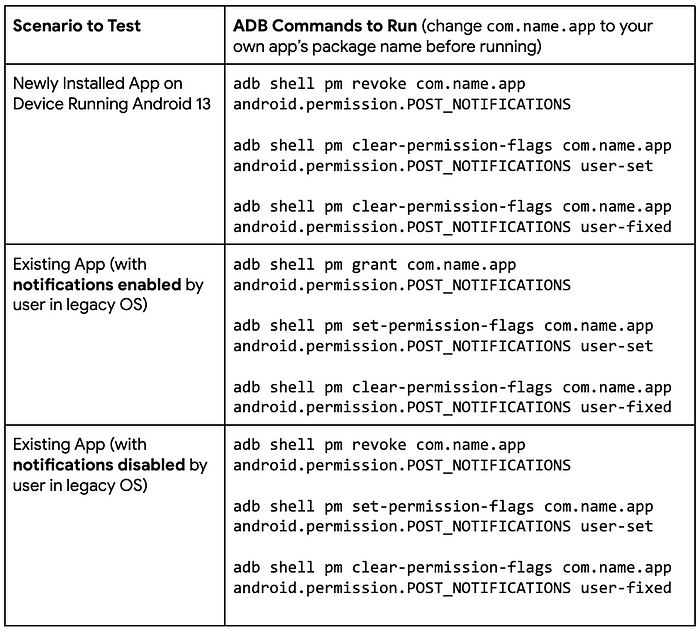
We understand that many of you have asked for easier ways to test your apps’ integration with the Notification Permission feature! We are excited to announce some new adb commands that can help streamline your testing process.

Step 1: Flash the latest version of Android 13 to your device

Step 2: Set up adb on your device

Step 3: Run the adb commands below based on the scenario you want to test…
General Best Practices When Sending Notifications

Verify Permission Before Sending Notifications:

Verify that users have enabled notifications before you try to send notifications. You can check by first calling the NotificationManager#areNotificationsEnabled() API. After the user upgrades their device to Android 13, the API reflects the user’s response to the notification permission in addition to the notifications toggle in the Settings page. Checking the permission also helps you assess the impact of having your feature depend on a permission (eg. opt-out rates) as well.

Read More  Foundation Package Preview Now Available

Handle Permission Denials:

If notifications are essential for your app and the user denies the permission, you can consider helping users understand the implications of the denial, such as showing an educational UI. In this explanation, mention that they can no longer receive notifications from your app.

Enhancing Support for Channels:

Continue to classify notifications into channels, as it allows users to select what kinds of notifications they want to receive from your app (instead of disabling your app’s notifications outright) and control the visual/auditory behavior for notifications. In addition, use meaningful channel names and descriptions to help users understand the type notifications included in the channel.

By Terence Zhang
Source Medium


For enquiries, product placements, sponsorships, and collaborations, connect with us at [email protected]. We'd love to hear from you!

Our humans need coffee too! Your support is highly appreciated, thank you!

aster.cloud

Related Topics
  • Android
  • Android 13
  • Notification
  • Target SDK
You May Also Like
aster-cloud-sms-pexels-tim-samuel-6697306
View Post
  • Programming
  • Software

Send SMS texts with Amazon’s SNS simple notification service

  • July 1, 2025
aster-cloud-website-pexels-goumbik-574069
View Post
  • Programming
  • Software

Host a static website on AWS with Amazon S3 and Route 53

  • June 27, 2025
View Post
  • Architecture
  • Data
  • Engineering
  • People
  • Programming
  • Software Engineering
  • Technology
  • Work & Jobs

Predictions: Top 25 Careers Likely In High Demand In The Future

  • June 6, 2023
View Post
  • Programming
  • Software Engineering
  • Technology

Build a Python App to Alert You When Asteroids Are Close to Earth

  • May 22, 2023
View Post
  • Programming

Illuminating Interactions: Visual State In Jetpack Compose

  • May 20, 2023
View Post
  • Computing
  • Data
  • Programming
  • Software
  • Software Engineering

The Top 10 Data Interchange Or Data Exchange Format Used Today

  • May 11, 2023
View Post
  • Gears
  • Mobile
  • Technology

Apple Watch Pride Edition Celebrates The LGBTQ+ Community

  • May 10, 2023
View Post
  • Architecture
  • Programming
  • Public Cloud

From Receipts To Riches: Save Money W/ Google Cloud & Supermarket Bills – Part 1

  • May 8, 2023

Stay Connected!
LATEST
  • 1
    IBM Study: One in Four Malicious Breaches are AI-Enabled, Costing Companies $6 Million on Average
    • July 29, 2026
  • 2
    Accelerating the frontiers of scientific discovery: Google’s $40M commitment to the Genesis Mission
    • July 26, 2026
  • 3
    3 Questions: Neural transparency and the future of AI design
    • July 17, 2026
  • 4
    Intel Invests €5 Billion to Expand Manufacturing in Europe
    • July 13, 2026
  • 5
    IBM and Red Hat Expand Lightwell with New Offerings to Build the Trust Infrastructure for AI-Era Open Source
    • July 8, 2026
  • 6
    When I Was Young
    • July 4, 2026
  • 7
    The Fastest AI Fried Chicken In The World
    • June 29, 2026
  • 8
    Zed Approves | How to Stay Cool in Extreme Heat
    • June 29, 2026
  • 9
    The AI investment surge hasn’t produced the expected results yet. That could change in 2026
    • June 26, 2026
  • 10
    Zed Approves | It’s Prime Day 2026! Time to Upgrade Your World Cup Viewing Setup and Beat the Heat
    • June 25, 2026
about
Hello World!

We are aster.cloud. We’re created by programmers for programmers.

Our site aims to provide guides, programming tips, reviews, and interesting materials for tech people and those who want to learn in general.

We would like to hear from you.

If you have any feedback, enquiries, or sponsorship request, kindly reach out to us at:

[email protected]
Most Popular
  • 1
    Zed Approves | The Best Prime Day PC Deals: Top Gaming Rigs, Workstations, and Everyday Laptops
    • June 24, 2026
  • neon-cart 2
    Zed Approves: How to Gear Up for GTA 6 This Amazon Prime Day (2026 Quick Guide)
    • June 22, 2026
  • zedreviews-valerion 3
    Father’s Day Outdoors – Build Dad the Ultimate Backyard Watch Party
    • June 20, 2026
  • zedreviews-fathers-day-50830 4
    Father’s Day Outdoors, Round Two – Gear for the Action, the Tailgate, and Beating the Heat
    • June 20, 2026
  • zedreviews-fathers-day-2147684744 5
    The Ultimate Father’s Day Gift Guide – Home Entertainment Upgrades Dad Actually Wants
    • June 20, 2026
  • /
  • Technology
  • Tools
  • About
  • Contact Us

Input your search keywords and press Enter.