aster.cloud aster.cloud
  • /
  • Platforms
    • Public Cloud
    • On-Premise
    • Hybrid Cloud
    • Data
  • Architecture
    • Design
    • Solutions
    • Enterprise
  • Engineering
    • Automation
    • Software Engineering
    • Project Management
    • DevOps
  • Programming
    • Learning
  • Tools
  • About
  • /
  • Platforms
    • Public Cloud
    • On-Premise
    • Hybrid Cloud
    • Data
  • Architecture
    • Design
    • Solutions
    • Enterprise
  • Engineering
    • Automation
    • Software Engineering
    • Project Management
    • DevOps
  • Programming
    • Learning
  • Tools
  • About
aster.cloud aster.cloud
  • /
  • Platforms
    • Public Cloud
    • On-Premise
    • Hybrid Cloud
    • Data
  • Architecture
    • Design
    • Solutions
    • Enterprise
  • Engineering
    • Automation
    • Software Engineering
    • Project Management
    • DevOps
  • Programming
    • Learning
  • Tools
  • About
  • Mobile

Helping Users Discover Apps For All Their Devices From Their Phone

  • aster.cloud
  • October 4, 2022
  • 2 minute read

Over the years, Android has evolved to support more devices such as watches, tablets, TVs, and even cars. Apps and games are a critical part of this ecosystem as they power many of the unique digital experiences that we all enjoy and rely on. As a way to make it easier for users to find your great apps across all Android devices, we are making changes to the Google Play Store, enabling users to more easily discover and install apps on other devices directly from their phone.

Updates to the Google Play Store phone app

We recently introduced three updates to the Play Store phone app that will help your users’ devices work better together: homepages for non-phone devices, a device search filter, and the ability to remotely install an app to another device.


Partner with aster.cloud
for your next big idea.
Let us know here.


From our partners:

CITI.IO :: Business. Institutions. Society. Global Political Economy.
CYBERPOGO.COM :: For the Arts, Sciences, and Technology.
DADAHACKS.COM :: Parenting For The Rest Of Us.
ZEDISTA.COM :: Entertainment. Sports. Culture. Escape.
TAKUMAKU.COM :: For The Hearth And Home.
ASTER.CLOUD :: From The Cloud And Beyond.
LIWAIWAI.COM :: Intelligence, Inside and Outside.
GLOBALCLOUDPLATFORMS.COM :: For The World's Computing Needs.
FIREGULAMAN.COM :: For The Fire In The Belly Of The Coder.
ASTERCASTER.COM :: Supra Astra. Beyond The Stars.
BARTDAY.COM :: Prosperity For Everyone.

Homepages for other devices

Users with a Wear OS watch, Android TV OS, or car with Android Automotive can navigate to the Play Store “Other devices” page on their phone app to see app and game recommendations, and editorials tailored to their non-phone devices.

  
Users can go to the “Other devices” page to get recommendations of apps and games optimized for non-phone devices.

Search device filters

Users can also find apps and games for their devices with the new device filter on the Play Store search page. Using the filter, the search results will only include apps and games that are compatible with their selected device.

Users can use the device filters to easily find apps and games optimized for their Wear watch, Android TV, or Android Auto-enabled devices.

Remote install to other devices

After finding the right app or game for their device, users can install it remotely from their phone by selecting the target device and clicking the install button.
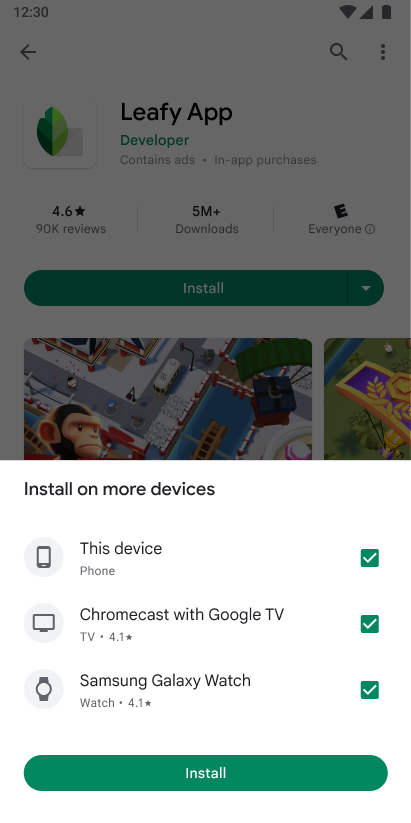
Users can remotely install apps and games to their other devices from the Play Store on their phone.
Read More  Samsung Will Gradually Remove Chargers And Earbuds From Future Phones

Changes to the Play Store website

We also recently launched a major redesign of the Play Store website. In addition to simplifying navigation, improving accessibility, and showcasing new and more useful information, the new website makes it easier for users to discover and manage their apps and games across all their devices. This means that users can access the Play Store website on their computer or non-Android phone to browse, search, and remotely install apps and games to all of their Android devices.

Users can access the Play Store website on their computer or non-Android phone to browse, search, and remotely install your apps and games to their Android devices.

These changes were designed to give developers new opportunities to showcase their multi-device app experiences, driving more engagement across the Android ecosystem.


By Marcus Leal, Product Manager, Google Play
Source Android


For enquiries, product placements, sponsorships, and collaborations, connect with us at [email protected]. We'd love to hear from you!

Our humans need coffee too! Your support is highly appreciated, thank you!

aster.cloud

Related Topics
  • Android
  • App
  • Google Play Store
You May Also Like
View Post
  • Gears
  • Mobile
  • Technology

Apple Watch Pride Edition Celebrates The LGBTQ+ Community

  • May 10, 2023
View Post
  • Mobile
  • Technology

Apple Turns (RED) To Raise Visibility For World AIDS Day

  • December 12, 2022
View Post
  • Mobile

Google Play Coffee Break With Creatrip | Setting Up Your Business For Global Reach

  • December 1, 2022
View Post
  • Mobile
  • Solutions

Telstra Announces Next Generation Adaptive Mobility And Adaptive Networks Solutions

  • November 28, 2022
View Post
  • Mobile
  • Programming

Making Jellyfish Move In Compose: Animating ImageVectors And Applying AGSL RenderEffects 🐠

  • November 27, 2022
View Post
  • Mobile
  • Programming

Faster Jetpack Compose View Interop With App Startup And Baseline Profile

  • November 27, 2022
View Post
  • Mobile
  • Programming

Faster Jetpack Compose View Interop With App Startup And Baseline Profile

  • November 22, 2022
View Post
  • Mobile

Preparing For The Android Privacy Sandbox Beta

  • November 17, 2022

Stay Connected!
LATEST
  • 1
    IBM Study: One in Four Malicious Breaches are AI-Enabled, Costing Companies $6 Million on Average
    • July 29, 2026
  • 2
    Accelerating the frontiers of scientific discovery: Google’s $40M commitment to the Genesis Mission
    • July 26, 2026
  • 3
    3 Questions: Neural transparency and the future of AI design
    • July 17, 2026
  • 4
    Intel Invests €5 Billion to Expand Manufacturing in Europe
    • July 13, 2026
  • 5
    IBM and Red Hat Expand Lightwell with New Offerings to Build the Trust Infrastructure for AI-Era Open Source
    • July 8, 2026
  • 6
    When I Was Young
    • July 4, 2026
  • 7
    The Fastest AI Fried Chicken In The World
    • June 29, 2026
  • 8
    Zed Approves | How to Stay Cool in Extreme Heat
    • June 29, 2026
  • 9
    The AI investment surge hasn’t produced the expected results yet. That could change in 2026
    • June 26, 2026
  • 10
    Zed Approves | It’s Prime Day 2026! Time to Upgrade Your World Cup Viewing Setup and Beat the Heat
    • June 25, 2026
about
Hello World!

We are aster.cloud. We’re created by programmers for programmers.

Our site aims to provide guides, programming tips, reviews, and interesting materials for tech people and those who want to learn in general.

We would like to hear from you.

If you have any feedback, enquiries, or sponsorship request, kindly reach out to us at:

[email protected]
Most Popular
  • 1
    Zed Approves | The Best Prime Day PC Deals: Top Gaming Rigs, Workstations, and Everyday Laptops
    • June 24, 2026
  • neon-cart 2
    Zed Approves: How to Gear Up for GTA 6 This Amazon Prime Day (2026 Quick Guide)
    • June 22, 2026
  • zedreviews-valerion 3
    Father’s Day Outdoors – Build Dad the Ultimate Backyard Watch Party
    • June 20, 2026
  • zedreviews-fathers-day-50830 4
    Father’s Day Outdoors, Round Two – Gear for the Action, the Tailgate, and Beating the Heat
    • June 20, 2026
  • zedreviews-fathers-day-2147684744 5
    The Ultimate Father’s Day Gift Guide – Home Entertainment Upgrades Dad Actually Wants
    • June 20, 2026
  • /
  • Technology
  • Tools
  • About
  • Contact Us

Input your search keywords and press Enter.