TL;DR – The best way to analyze your billing data is to set up the billing data export to BigQuery. We’ve created an interactive tutorial to help you through the process!
In this last post, we went over a few different options to analyze your Google Cloud billing data. The most powerful and comprehensive way to work with your billing data is to enable exporting to BigQuery. Let’s take a closer look at what this is and why it’s a good choice!
What does it do?
First things first, exporting your billing data to BigQuery is exactly what it sounds like: it exports data from your billing account (which handles the costs for all your Google Cloud resources) into BigQuery. BigQuery is a great choice for analyzing data, where you can run queries against your data. Having this data in BigQuery also makes it much easier to integrate with other tools, like Looker or Data Studio for visualization.
The actual data being exported to BigQuery are hourly records of every service your billing account is responsible for, along with detailed information like the SKU, what type of unit is being measured, and how many of that unit you’re paying for.
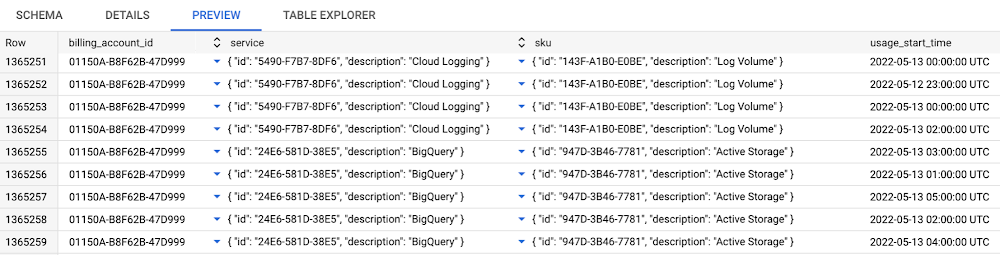
There are actually three different options for exporting data to BigQuery:
- The standard export is what we’re often referring to when we recommend everyone to set up the export to BigQuery. Here’s the full schema for the table, which contains quite a bit of detail for every row. So if you needed to know how much money you spent on Cloud Run, on October 17th, in your production project, between 2 AM and 4 AM, this is the export to use!
- In addition to the standard export, there is now a detailed export. This includes everything from the standard export, as well as even more granular data for certain services. As of writing this blog post, Compute Engine and GKE are both supported by the detailed export, and provide quite a bit of extra information. For example, you could see how much you spent on Compute Engine broken down by each individual instance. For GKE, you can also break down your costs by cluster, namespace, and even see details at the pod level!
- The final export is the pricing export, which gives you a detailed export of how much all Google Cloud services will cost for your billing account. This export can be incredibly useful for working with when programmatically creating estimates for future workloads.
In this blog post, we’ll be focusing on the standard and detailed exports.
Why should I use it?
Understanding cloud costs can be a tricky subject, and it becomes increasingly complicated as your cloud environment grows. There’s a big difference between tracking how much you’re spending on a project that hosts a single web server, versus trying to break down a large organization with hundreds of projects and thousands of people doing different levels of work in the cloud. Tracking and understanding what resources are contributing to your costs can be vital for an organization to ensure it’s spending money on the right things and to build predictions for future costs.
One of the most important reasons to enable the billing export as soon as you can is because the data isn’t retroactive. So, if you want to analyze last month’s billing data but you didn’t have the export enabled, you’re out of luck! That’s why we typically recommend enabling the export as soon as you create a billing account, so you’ll have the data when you need it.
One of the questions I’ve heard a few times is: “Why should I use the BigQuery export instead of the built-in reporting tools?”.
The built-in reporting tools are fantastic for getting quick answers and understanding your costs. The big difference here is scale and granularity. As teams and organizations become larger, it can be increasingly difficult to figure out which groups are responsible for different costs. If your organization is using a chargeback model (where one group pays for all resources and then breaks down cost details for individual teams/groups to be responsible for their usage), then you’ll very likely need the increased granularity to accurately calculate costs.
If you’re interested in learning more about how organizations can deal with cost challenges like this, I’d recommend checking out the FinOps foundation and learning resources!
I have more questions!
Here’s a few more questions that I’ve seen folks ask:
Why should I use BigQuery for this data?
All of the billing exports generate quite a large amount of data, and BigQuery is well suited to analyzing massive amounts of data in a quick and efficient manner. I think it’s a pretty amazing tool, and it’s definitely the right one to learn if you want to get your hands around something as complex as cloud billing! BigQuery also integrates with the rest of Google Cloud, so once you’re comfortable with the exports, you can start to build additional features like machine learning, or near-real-time reporting when large and unexpected charges happen.
I should also mention that BigQuery has a free tier with a data limit, so it’s even easier to get started!
I don’t know SQL. Is the export still useful?
The truth is, you’ll likely need to know SQL or work with a data analyst role to make full use of the exports. However, you can still enable the export, and then set up visualization tools with minimal effort to at least get a handle on your billing data. More often than not, folks seem to think they don’t need this level of detail now, but regret not having it down the road as their cloud usage grows!
I know some SQL, but this is a lot of data! How can I work with it?
The best resources here are the schema resources and the example queries. These are detailed resources for getting a handle on the complexity of the data and to get you up and running. And remember: it’s better to start small and improve over time. Trying to build a full cost reporting solution for an entire organization from scratch is a recipe for frustration and challenge after challenge. Start with a crawl (like being able to break down your costs by project and per month) before you walk and eventually run (like being able to create anomaly detection and and notifying teams when the resources they’re responsible for are creating unwanted cost surprises).
Go forth and export
With all of that context out of the way, I recommend trying to get familiar with the export and enabling it as soon as possible. Try using our built-in walkthrough for enabling the billing export! Not only will it help get you up and running with the export, it will also help you query some sample billing data. The level of granularity given by these exports can enable you, your team, or your entire organization to better understand what your cloud spend is doing for you, and help find opportunities for improvement!
By: Mark Mirchandani (Google Cloud Developer Advocate)
Source: Google Cloud Blog
For enquiries, product placements, sponsorships, and collaborations, connect with us at [email protected]. We'd love to hear from you!
Our humans need coffee too! Your support is highly appreciated, thank you!