aster.cloud aster.cloud
  • /
  • Platforms
    • Public Cloud
    • On-Premise
    • Hybrid Cloud
    • Data
  • Architecture
    • Design
    • Solutions
    • Enterprise
  • Engineering
    • Automation
    • Software Engineering
    • Project Management
    • DevOps
  • Programming
    • Learning
  • Tools
  • About
  • /
  • Platforms
    • Public Cloud
    • On-Premise
    • Hybrid Cloud
    • Data
  • Architecture
    • Design
    • Solutions
    • Enterprise
  • Engineering
    • Automation
    • Software Engineering
    • Project Management
    • DevOps
  • Programming
    • Learning
  • Tools
  • About
aster.cloud aster.cloud
  • /
  • Platforms
    • Public Cloud
    • On-Premise
    • Hybrid Cloud
    • Data
  • Architecture
    • Design
    • Solutions
    • Enterprise
  • Engineering
    • Automation
    • Software Engineering
    • Project Management
    • DevOps
  • Programming
    • Learning
  • Tools
  • About
  • Engineering

Easy Deployment Of MEAN Stack W/ MongoDB Atlas, Cloud Run, And Hashicorp Terraform

  • aster.cloud
  • October 27, 2022
  • 4 minute read

Easy Deployment of MEAN stack with MongoDB Atlas, Cloud Run, and Terraform

Serverless computing promises the ability to spend less time on infrastructure and more time on developing your application. But historically, if you used serverless offerings from different vendors you didn’t see this benefit. Instead, you often spent a significant amount of time configuring the different products and ensuring they can communicate with each other. We want to make this easier for everyone. We’ve started by using HashiCorp Terraform to make it easier to provision resources to run the MEAN stack on Cloud Run with MongoDB Atlas as your database. If you want to try it out, our GitHub repository is here: https://github.com/GoogleCloudPlatform/terraform-mean-cloudrun-mongodb

MEAN stack basics

If you aren’t familiar, the MEAN stack is a technology stack for building web applications. The MEAN stack is composed of four main components—MongoDB, Express, Angular, and Node.js.


Partner with aster.cloud
for your next big idea.
Let us know here.


From our partners:

CITI.IO :: Business. Institutions. Society. Global Political Economy.
CYBERPOGO.COM :: For the Arts, Sciences, and Technology.
DADAHACKS.COM :: Parenting For The Rest Of Us.
ZEDISTA.COM :: Entertainment. Sports. Culture. Escape.
TAKUMAKU.COM :: For The Hearth And Home.
ASTER.CLOUD :: From The Cloud And Beyond.
LIWAIWAI.COM :: Intelligence, Inside and Outside.
GLOBALCLOUDPLATFORMS.COM :: For The World's Computing Needs.
FIREGULAMAN.COM :: For The Fire In The Belly Of The Coder.
ASTERCASTER.COM :: Supra Astra. Beyond The Stars.
BARTDAY.COM :: Prosperity For Everyone.

  • MongoDB is responsible for data storage
  • Express.js is a Node.js web application framework for building APIs
  • Angular is a client-side JavaScript platform
  • Node.js is a server-side JavaScript runtime environment. The server uses the MongoDB Node.js driver to connect to the database and retrieve and store data

Our project runs the MEAN stack on Cloud Run (Express, Node) and MongoDB Atlas (MongoDB).

The repository uses a sample application to make it easy to understand all the pieces. In the sample used in this experiment, we have a client and server application packaged in individual containers each that use the MongoDB-Node.js driver to connect to the MongoDB Atlas database.

Below we’ll talk about how we used Terraform to make deploying and configuring this stack easier for developers and how you can try it yourself.

Read More  Learn How To Tackle Supply Chain Disruptions With SAP IBP And Google Cloud

Required One-Time Setup

To use these scripts, you’ll need to have both MongoDB Atlas and Google Cloud accounts.

MongoDB Atlas Setup

1. Login with your MongoDB Atlas Account.
2. Once you’re logged in, click on “Access Manager” at the top and select “Organization Access”
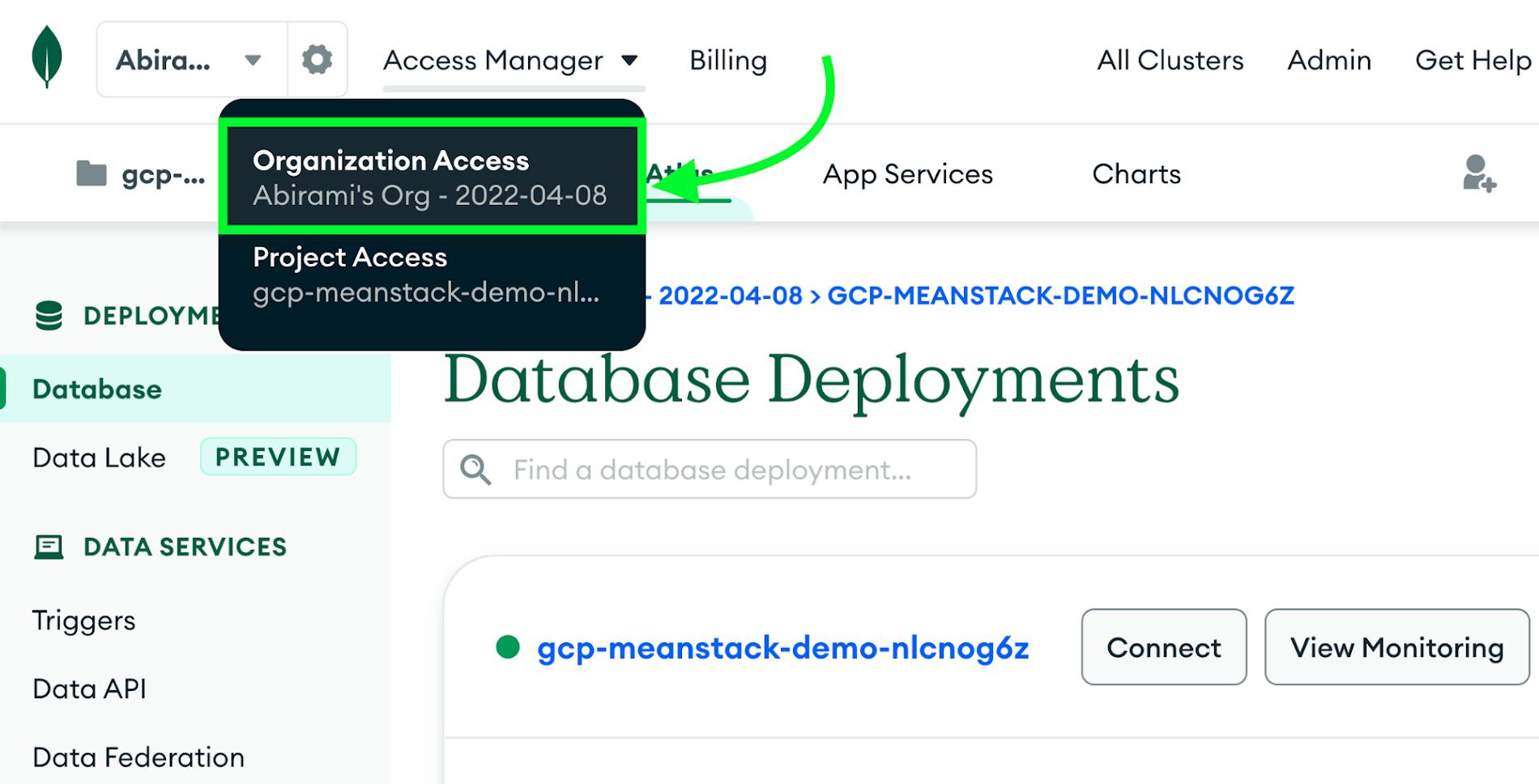
3. Select the “API Keys” tab and click the “Create API Key” button
4. Give your new key a short description and select the “Organization Owner” permission
5. Click “Next” and then make a note of your public and private keys
6. Next, you’ll need your Organization ID. In the left navigation menu, click “Settings”.7. Locate your Organization ID and copy it.
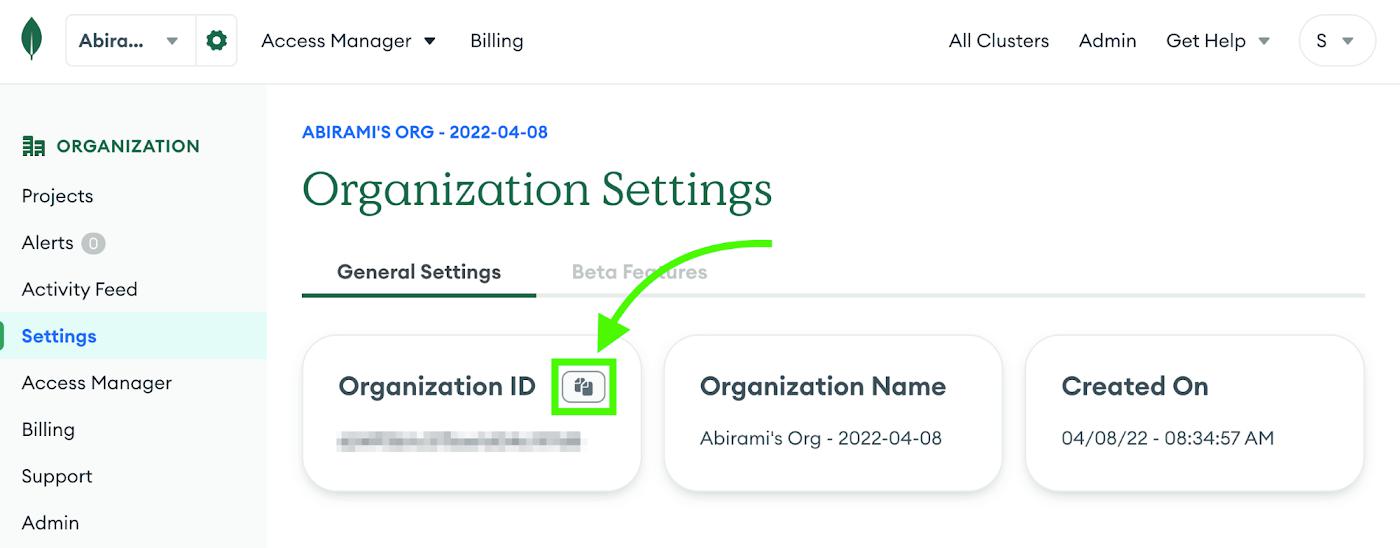
That’s everything for Atlas. Now you’re ready to move on to setting up Google Cloud!

Google Cloud Tooling and Setup

You’ll need a billing account setup on your Google Cloud account and to make note of your Billing Account ID. You can find your Billing Account ID on the billing page.

You’ll also need to pick a region for your infrastructure. Note that Google Cloud and Atlas use different names for the same region. You can find a mapping between Atlas regions and Google Cloud regions here. You’ll need a region that supports the M0 cluster tier. Choose a region close to you and make a note of both the Google Cloud and Atlas region names.

Finally, you’ll need a terminal with the Google Cloud CLI (gcloud) and Terraform installed. You can use your workstation or try Cloud Shell, which has these tools already installed. To get started in Cloud Shell with the repo cloned and ready to configure, click here.

Read More  Using AI To Increase Asset Utilization And Production Uptime For Manufacturers

Configuring the demo

If you haven’t already, clone this repo. Run terraform init to make sure Terraform is working correctly and download the provider plugins. Then, create a file in the root of the repository called terraform.tfvars with the following contents, replacing placeholders as necessary:

atlas_pub_key = “<your Atlas public key>”

atlas_priv_key = “<your Atlas private key>”

atlas_org_id = “<your Atlas organization ID>”

google_billing_account = “<your billing account ID>”

If you selected the us-central1/US_CENTRAL region then you’re ready to go. If you selected a different region, add the following to your terraform.tfvars file:

atlas_cluster_region = “<Atlas region ID>”

google_cloud_region = “<Google Cloud region ID>”

Run terraform init again to make sure there are no new errors. If you get an error, check your terraform.tfvars file.

Deploy the demo

You’re ready to deploy! You have two options: you can run terraform plan to see a full listing of everything that Terraform wants to do without any risk of accidentally creating those resources. If everything looks good, you can then run terraform apply to execute the plan.

Alternately, you can just run terraform apply on its own and it will create a plan and display it before prompting you to continue. You can learn more about the plan and apply commands in this tutorial. For this demo, we’re going to just run terraform apply:
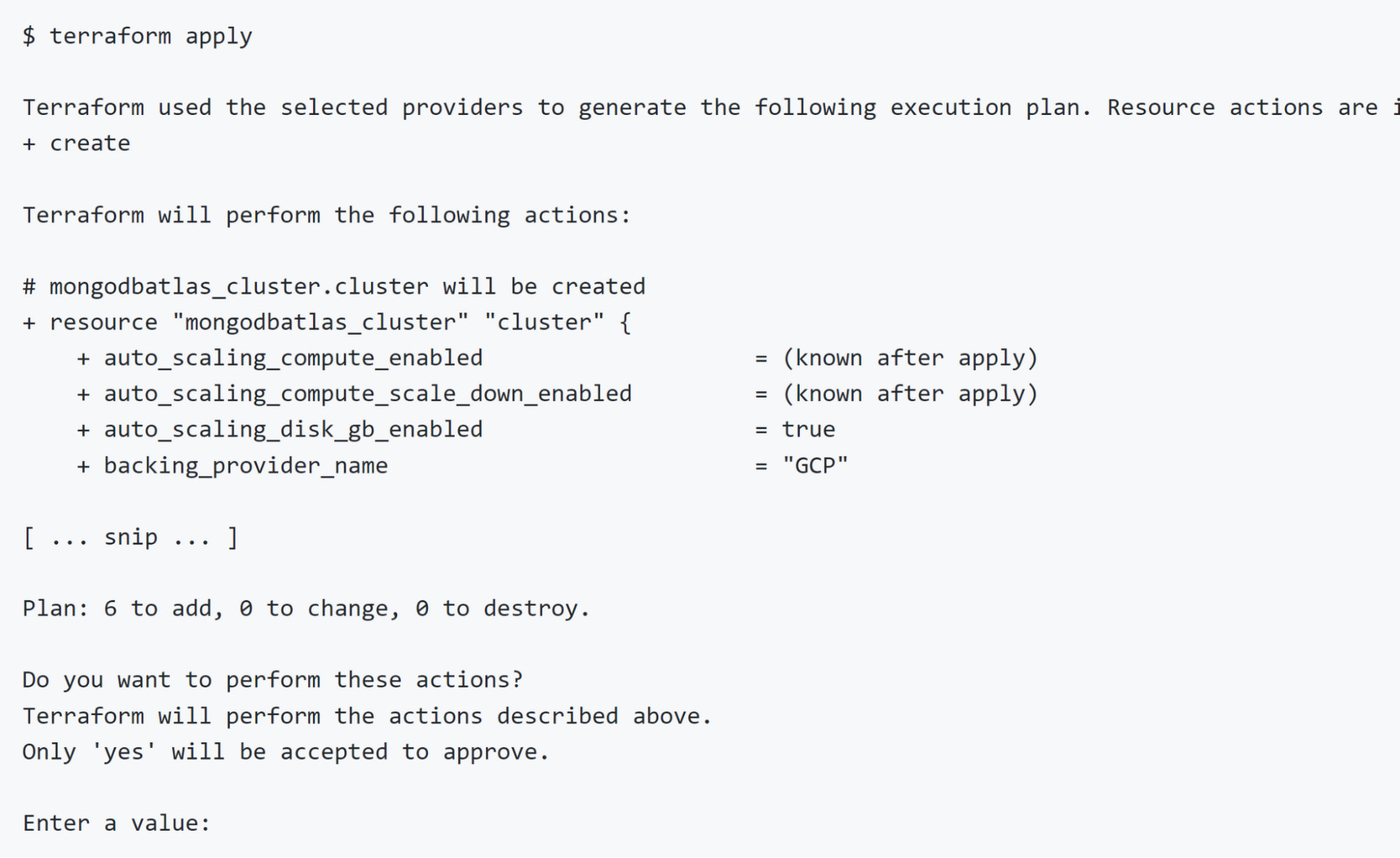
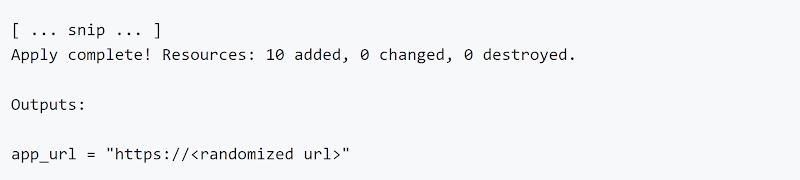
If everything looks good to you, type yes and press enter. This will take a few minutes. When it’s done, Terraform will display the URL of your application:
Open that URL in your browser and you’ll see the sample app running.

Read More  Cloud Data Loss Prevention (Cloud DLP) Overview

Cleaning up

When you’re done, run terraform destroy to clean everything up:
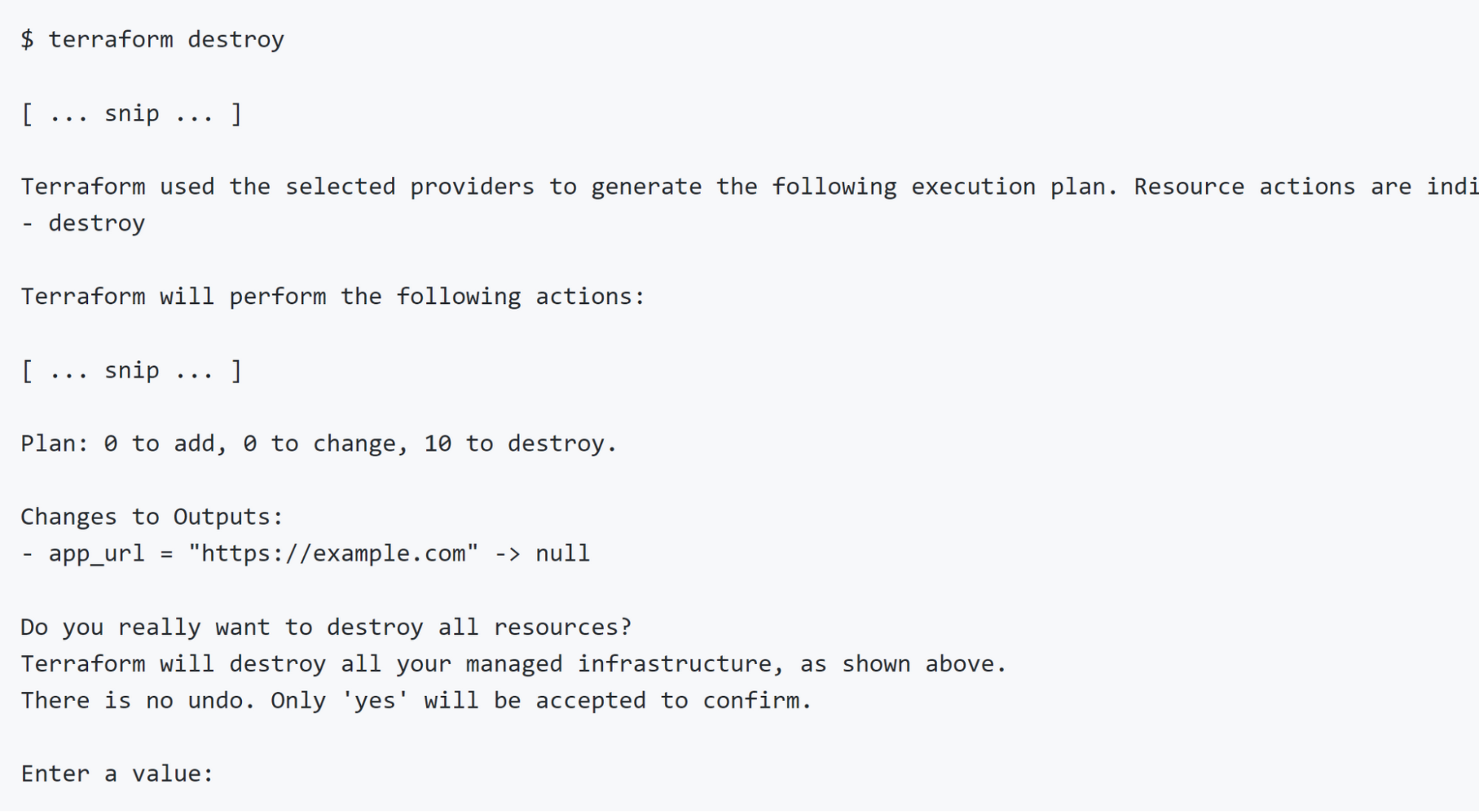
If you’re sure you want to tear everything down, type yes and press enter. This will take a few minutes. When Terraform is done everything it created will have been destroyed and you will not be billed for any further usage.

Next Steps

You can use the code in this repository to deploy your own applications. Out of the box, it will work with any application that runs in a single container and reads the MongoDB connection string from an environment variable called ATLAS_URI, but the Terraform code can easily be modified if you have different needs or to support more complex applications.

For more information please refer to the Next Steps section of the readme.


By: Aja Hammerly (Developer Advocate, Google) and Abirami Sukumaran (Developer Advocate, Google)
Source: Google Cloud Blog


For enquiries, product placements, sponsorships, and collaborations, connect with us at [email protected]. We'd love to hear from you!

Our humans need coffee too! Your support is highly appreciated, thank you!

aster.cloud

Related Topics
  • Angular
  • Express
  • Google Cloud
  • MEAN
  • MongoDB
  • MongoDB Atlas
  • Node js
  • Terraform
  • Tutorial
You May Also Like
Points, Lines and a Question
View Post
  • Architecture
  • Design
  • Engineering
  • People

What Is The Point In Making Points?

  • November 26, 2025
View Post
  • Engineering
  • Software Engineering

Development gets better with Age

  • October 9, 2025
View Post
  • Engineering
  • Technology

Apple supercharges its tools and technologies for developers to foster creativity, innovation, and design

  • June 9, 2025
View Post
  • Engineering

Just make it scale: An Aurora DSQL story

  • May 29, 2025
View Post
  • Engineering
  • Technology

Guide: Our top four AI Hypercomputer use cases, reference architectures and tutorials

  • March 9, 2025
View Post
  • Computing
  • Engineering

Why a decades old architecture decision is impeding the power of AI computing

  • February 19, 2025
View Post
  • Engineering
  • Software Engineering

This Month in Julia World

  • January 17, 2025
View Post
  • Engineering
  • Software Engineering

Google Summer of Code 2025 is here!

  • January 17, 2025

Stay Connected!
LATEST
  • 1
    Expectations vs. Reality: The AI We Thought We’d Have in 10 Years
    • June 19, 2026
  • digital-nomad-freelancer-worker-2151205464 2
    One paperwork problem – Get your Digital Nomad Visa employment documents fast from UK, EU or Singapore
    • June 16, 2026
  • 3
    Samsung Art Store Brings Art Basel to Homes Worldwide With New Curated Collection
    • June 15, 2026
  • 4
    You Do Not Need to Invest in the IPO of SpaceX, Anthropic, and OpenAI
    • June 10, 2026
  • 5
    The consequences of relying on AI for accurate news
    • June 10, 2026
  • 6
    Connecting AI agents with unstructured data using Google Cloud Storage MCP Servers
    • June 10, 2026
  • 7
    WWDC26: Apple unveils next generation of Apple Intelligence, Siri AI, powerful parental controls, and an expansive set of software improvements
    • June 8, 2026
  • 8
    IBM and Google Cloud Announce Strategic Partnership to Scale AI with Human Expertise and AI‑Powered Delivery
    • June 4, 2026
  • Data center 9
    Data Sovereignty in Spain. It’s Not Just About the Law, It’s About Efficiency
    • June 3, 2026
  • 10
    Ink vs Pixels. What you miss versus what you are actually missing.
    • June 1, 2026
about
Hello World!

We are aster.cloud. We’re created by programmers for programmers.

Our site aims to provide guides, programming tips, reviews, and interesting materials for tech people and those who want to learn in general.

We would like to hear from you.

If you have any feedback, enquiries, or sponsorship request, kindly reach out to us at:

[email protected]
Most Popular
  • 1
    Banks race to patch new cyber vulnerabilities, and other cybersecurity news
    • May 25, 2026
  • pope-leo-xiv-cq5dam-1500.844 2
    Pope Leo XIV to Publish First Encyclical on Artificial Intelligence and Human Dignity on 25 May
    • May 22, 2026
  • 3
    Portfolio to Clients, and is Strengthened by Ongoing Project Glasswing Work
    • May 20, 2026
  • reMarkable Paper Pure 4
    Everything The reMarkable Paper Pure Actually Does
    • May 14, 2026
  • 5
    Scaling cloud and AI: Microsoft Azure’s commitment to Europe’s digital future
    • May 11, 2026
  • /
  • Technology
  • Tools
  • About
  • Contact Us

Input your search keywords and press Enter.