Architecture Overview
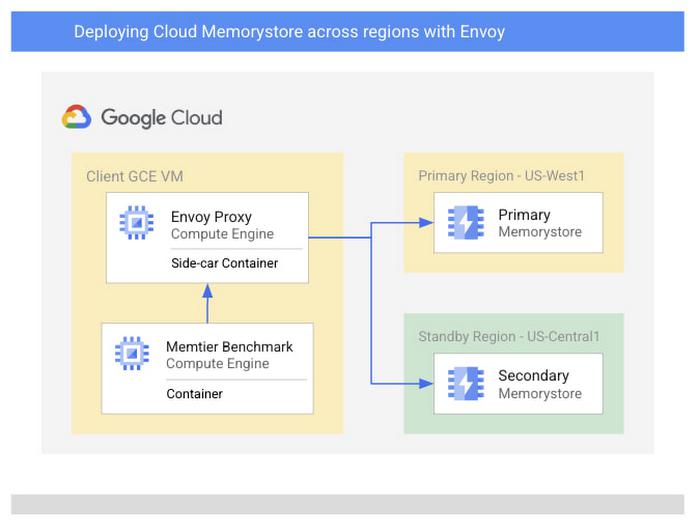
Let’s start by discussing an architecture of Google Cloud native services combined with open-source software which enables a multi-region Memorystore architecture. To do this, we’ll be using Envoy to mirror traffic to two Memorystore instances which we’ll create in separate regions. For simplicity, we’ll be using Memtier Benchmark, a popular CLI for Redis load generation, as a sample application to simulate end user traffic. In practice, feel free to use your existing application or write your own.
From our partners:
Because of Envoy’s traffic mirroring configuration, the application does not need to be aware of the various backend instances that exist and only needs to connect to the proxy. You’ll find a sample architecture below and we’ll briefly detail each of the major components.
Prerequisites
To follow along with this walkthrough, you’ll need a Google Cloud project with permissions to do the following:
- Deploy Cloud Memorystore for Redis instances (required permissions)
- Deploy GCE instances with SSH access (required permissions)
- Cloud Monitoring viewer access (required permissions)
- Access to Cloud Shell or another gCloud authenticated environment
Deploying the multi-region Memorystore backend
You’ll start by deploying a backend Memorystore for Redis cache which will serve all of your application traffic. You’ll deploy two instances in separate regions so that we can protect our deployment against regional outages. We’ve chosen regions US-West1 and US-Central1 though you are free to choose whichever regions work best for your use case.
From an authenticated cloud shell environment, this can be done as follows:
$ gcloud redis instances create memorystore-primary --size=1 --region=us-west1 --tier=STANDARD --async
$ gcloud redis instances create memorystore-standby --size=1 --region=us-central1 --tier=STANDARD --async
If you do not already have the Memorystore for Redis API enabled in your project, the command will ask you to enable the API before proceeding. While your Memorystore instances deploy, which typically takes a few minutes, you can move onto the next steps.
Creating the Client and Proxy VMs
Next, you’ll need a VM where you can deploy a Redis client and the Envoy proxy. To protect against regional failures, we’ll create a GCE instance per region. On each instance, you will deploy the two applications, Envoy and Memtier Benchmark, as containers. This type of deployment is referred to as a “sidecar architecture” which is a common Envoy deployment model. Deploying in this fashion nearly eliminates any added network latency as there is no additional physical network hop that takes place.
You can start by creating the primary region VM:
$ gcloud compute instances create client-primary --zone=us-west1-a --machine-type=e2-highcpu-8 --image-family cos-stable --image-project cos-cloud
Next, create the secondary region VM:
$ gcloud compute instances create client-standby --zone=us-central1-a --machine-type=e2-highcpu-8 --image-family cos-stable --image-project cos-cloud
Configure and Deploy the Envoy Proxy
Before deploying the proxy, you need to gather the necessary information to properly configure the Memorystore endpoints. To do this, you need the host IP addresses for the Memorystore instances you have already created. You can gather these like:
gcloud redis instances describe memorystore-primary --region us-west1 --format=json | jq -r ".host"
gcloud redis instances describe memorystore-standby --region us-central1 --format=json | jq -r ".host"
Copy these IP addresses somewhere easily accessible as you’ll use them shortly in your Envoy configuration. You can also find these addresses in the Memorystore console page under the “Primary Endpoint” columns.
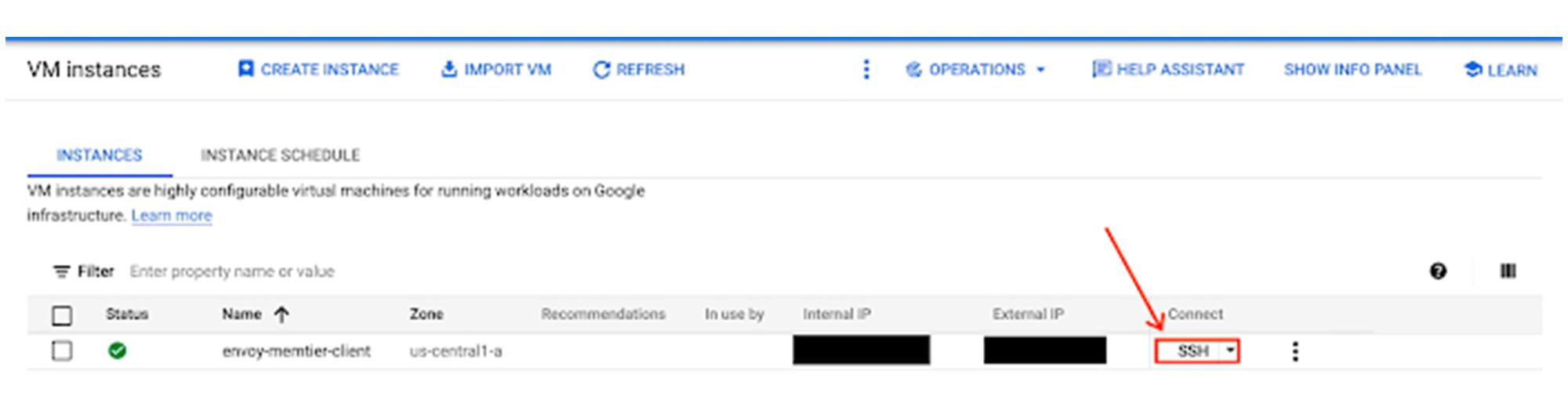
Next, you’ll need to connect to each of your newly created VM instances, so that you can deploy the Envoy Proxy. You can do this easily via SSH in the Google Cloud Console. More details can be found here.
envoy.yaml on the instance with your text editor of choice. Use the following .yaml file, entering the IP addresses of the primary and secondary instances you created:static_resources:
listeners:
- name: primary_redis_listener
address:
socket_address:
address: 0.0.0.0
port_value: 1999
filter_chains:
- filters:
- name: envoy.filters.network.redis_proxy
typed_config:
"@type": type.googleapis.com/envoy.extensions.filters.network.redis_proxy.v3.RedisProxy
stat_prefix: primary_egress_redis
settings:
op_timeout: 5s
enable_hashtagging: true
prefix_routes:
catch_all_route:
cluster: primary_redis_instance
request_mirror_policy:
cluster: secondary_redis_instance
exclude_read_commands: true
- name: secondary_redis_listener
address:
socket_address:
address: 0.0.0.0
port_value: 2000
filter_chains:
- filters:
- name: envoy.filters.network.redis_proxy
typed_config:
"@type": type.googleapis.com/envoy.extensions.filters.network.redis_proxy.v3.RedisProxy
stat_prefix: secondary_egress_redis
settings:
op_timeout: 5s
enable_hashtagging: true
prefix_routes:
catch_all_route:
cluster: secondary_redis_instance
clusters:
- name: primary_redis_instance
connect_timeout: 3s
type: STRICT_DNS
lb_policy: RING_HASH
dns_lookup_family: V4_ONLY
load_assignment:
cluster_name: primary_redis_instance
endpoints:
- lb_endpoints:
- endpoint:
address:
socket_address:
address: <primary_region_memorystore_ip>
port_value: 6379
- name: secondary_redis_instance
connect_timeout: 3s
type: STRICT_DNS
lb_policy: RING_HASH
load_assignment:
cluster_name: secondary_redis_instance
endpoints:
- lb_endpoints:
- endpoint:
address:
socket_address:
address: <secondary_region_memorystore_ip>
port_value: 6379
admin:
address:
socket_address:
address: 0.0.0.0
port_value: 8001
Listeners: This interface allows you to expose the port on which the client would connect, and define behavior of traffic received. In this case we have defined two listeners, one for each regional Memorystore instance.
Once you’ve added your Memorystore instance IP addresses, save the file locally to your container OS VM where it can be easily referenced. Make sure to repeat these steps for your secondary instance as well.
Now, you’ll use Docker to pull the official Envoy proxy image and run it with your own configuration. On primary region client machine, run this command:
$ docker run --rm -d -p 8001:8001 -p 6379:1999 -v $(pwd)/envoy.yaml:/envoy.yaml envoyproxy/envoy:v1.21.0 -c /envoy.yaml
On the standby region client machine, run this command:
$ docker run --rm -d -p 8001:8001 -p 6379:2000 -v $(pwd)/envoy.yaml:/envoy.yaml envoyproxy/envoy:v1.21.0 -c /envoy.yaml
For our standby region, we have changed the binding port to port 2000. This is to ensure that traffic from our standby clients are routed to the standby instance in the event of a regional failure which makes our primary instance unavailable.
In this example, we are deploying envoy proxy manually, but, in practice, you will implement a CI/CD pipeline which will deploy the envoy proxy and bind ports depending on your region based configuration.
Now that Envoy is deployed, you can test it by visiting the admin interface from the container VM:
$ curl -v localhost:8001/stats
If successful, you should see a print out of the various Envoy admin stats in your terminal. Without any traffic yet, these will not be particularly useful, but they allow you to ensure that your container is running and available on the network. If this command does not succeed, we recommend checking that the Envoy container is running. Common issues include syntax errors within your envoy.yaml and can be found by running your Envoy container interactively and reading the terminal output.
Deploy and Run Memtier Benchmark
After reconnecting to the primary client instance in us-west1 via SSH, you will now deploy the Memtier Benchmark utility which you’ll use to generate artificial Redis traffic. Since you are using Memtier Benchmark, you do not need to provide your own dataset. The utility will populate the cache for you using a series of set commands.
$ for i in {1..5}; do docker run --network="host" --rm -d redislabs/memtier_benchmark:1.3.0 -s 127.0.0.1 -p 6379 —threads 2 –clients 10 --test-time=300 --key-maximum=100000 --ratio=1:1 --key-prefix="memtier-$RANDOM-"; done
Validate the cache contents
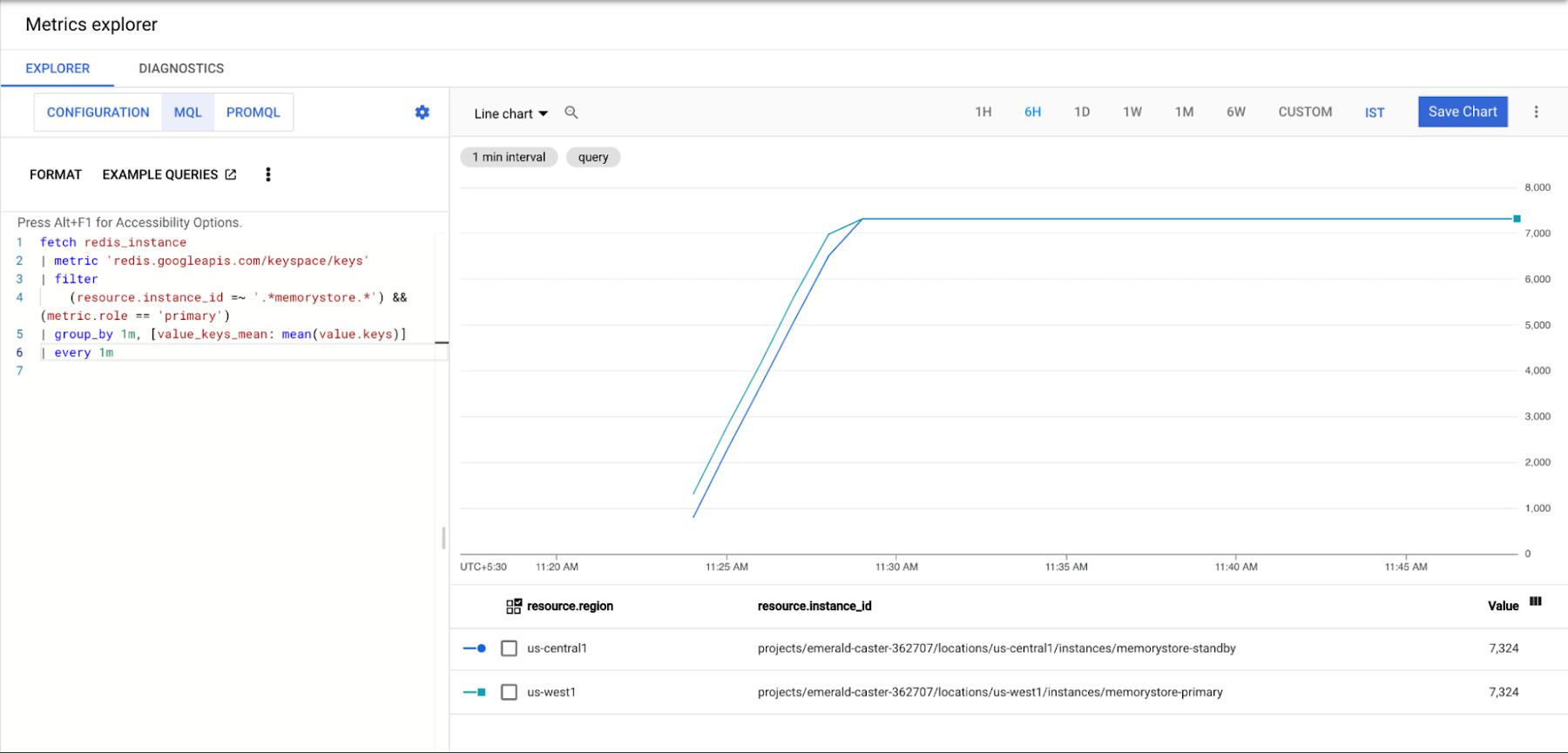
Now that we’ve generated some data from our primary region’s client, let’s ensure that it has been written to both of our regional Memorystore instances. We can do this by using cloud monitoring metrics-explorer. Next, you’ll configure the chart via “MQL” which can be selected at the top of the explorer pane. For ease, we’ve created a query which you can simply paste into your console to populate your graph:
fetch redis_instance
| metric 'redis.googleapis.com/keyspace/keys'
| filter
    (resource.instance_id =~ '.*memorystore.*') && (metric.role == 'primary')
| group_by 1m, [value_keys_mean: mean(value.keys)]
| every 1m
Simulate Regional Failure
Regional failure is a rare event. We will simulate this by deleting our primary Memorystore instance and primary client VM.
Let’s start by deleting our primary Memorystore instance like:
$ gcloud redis instances delete memorystore-primary --region=us-west1
And then our client VM like:
$ gcloud compute instances delete client-primary
Next, we’ll need to generate traffic from our secondary region client VM which we are using as our standby application.
For the sake of this example, we’ll manually perform a failover and generate traffic to save time. In practice, you’ll want to devise a failover strategy to automatically divert traffic to the standby region when the primary region becomes unavailable. Typically, this is done with the help of services like Cloud Load Balancer. Once more, ssh into the secondary region client VM from the console and run the Memtier benchmark application as mentioned in the previous section. You can validate that reads and writes are properly routing to our standby instance by viewing the console’s monitoring graphs once more.
Once the original primary Memorystore instance is available again, it will become the new standby instance based on our Envoy configuration. It will also be out of sync with our new primary instance as it has missed writes during its unavailability. We do not intend to cover a detailed solution in this post, but we find that most users opt to rely on TTL which they have set on their keys to determine when their caches will eventually be in sync.
Clean Up
If you have followed along, you’ll want to spend a few minutes cleaning up resources to avoid accruing unwanted charges. You’ll need to delete the following:
- Any deployed Memorystore instances
- Any deployed GCE instances
Memorystore instances can be deleted like:
$ gcloud redis instances delete <instance-name> --region=<region>
The GCE container OS instance can be deleted like:
$ gcloud compute instances delete <instance-name>
If you created additional instances, you can simply chain them in a single command separated by spaces.
Conclusion
While Cloud Memorystore Standard tier provides high availability, some use cases require an even higher availability guarantee. Envoy and its Redis filter make creating a multi-regional deployment simple and extensible. The outline provided above is a great place to get started. These instructions can easily be extended to support automated region failover or even dual region active-active deployments. As always, you can learn more about Cloud Memorystore through our documentation or request desired features via our public issue tracker.
By: Matt Geerling (Product Manager, Cloud Memorystore) and Kundan Kumar (Cloud Architect Manager)
Source: Google Cloud Blog
For enquiries, product placements, sponsorships, and collaborations, connect with us at [email protected]. We'd love to hear from you!
Our humans need coffee too! Your support is highly appreciated, thank you!