aster.cloud aster.cloud
  • /
  • Platforms
    • Public Cloud
    • On-Premise
    • Hybrid Cloud
    • Data
  • Architecture
    • Design
    • Solutions
    • Enterprise
  • Engineering
    • Automation
    • Software Engineering
    • Project Management
    • DevOps
  • Programming
    • Learning
  • Tools
  • About
  • /
  • Platforms
    • Public Cloud
    • On-Premise
    • Hybrid Cloud
    • Data
  • Architecture
    • Design
    • Solutions
    • Enterprise
  • Engineering
    • Automation
    • Software Engineering
    • Project Management
    • DevOps
  • Programming
    • Learning
  • Tools
  • About
aster.cloud aster.cloud
  • /
  • Platforms
    • Public Cloud
    • On-Premise
    • Hybrid Cloud
    • Data
  • Architecture
    • Design
    • Solutions
    • Enterprise
  • Engineering
    • Automation
    • Software Engineering
    • Project Management
    • DevOps
  • Programming
    • Learning
  • Tools
  • About
  • Engineering
  • Tools

Introducing Automated Failover For Private Workloads Using Cloud DNS Routing Policies With Health Checks

  • aster.cloud
  • November 18, 2022
  • 3 minute read
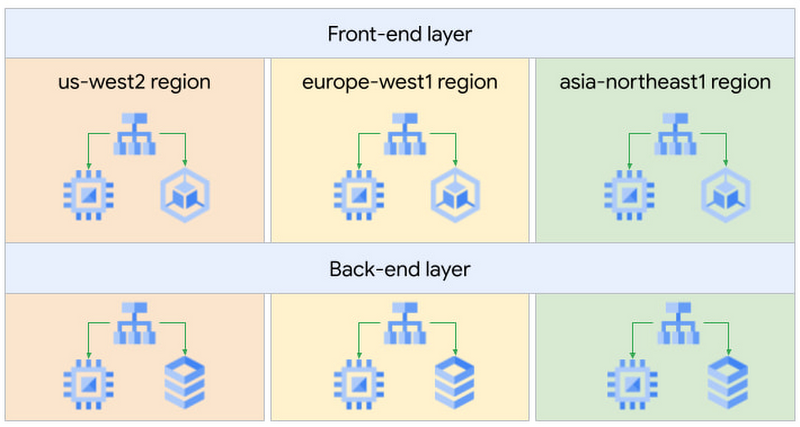
High availability is an important consideration for many customers and we’re happy to introduce health checking for private workloads in Cloud DNS to build business continuity/disaster recovery (BC/DR) architectures. Typical BC/DR architectures are built using multi-regional deployments on Google Cloud. In a previous blog post, we showed how highly available global applications can be published using Cloud DNS routing policies. The globally distributed, policy-based DNS configuration provided reliability, but in case of a failure, it required manual intervention to update the geo-location policy configuration. In this blog we will use Cloud DNS health check support for Internal Load Balancers to automatically failover to health instances.We will use the same setup we used in the previous blog. We have an internal knowledge-sharing web application. It uses a classic two-tier architecture: front-end servers tasked to serve web requests from our engineers and back-end servers containing the data for our application.Our San Francisco, Paris, and Tokyo engineers will use this application, so we decided to deploy our servers in three Google Cloud regions for better latency, performance, and lower cost.
https://storage.googleapis.com/gweb-cloudblog-publish/images/1_High_level_design.max-800x800.jpg

High level design

The wiki application is accessible in each region via an Internal Load Balancer (ILB). Engineers use the domain name wiki.example.com to connect to the front-end web app over Interconnect or VPN. The geo-location policy will use the Google Cloud region where the Interconnect or VPN lands as the source for the traffic and look for the closest available endpoint.
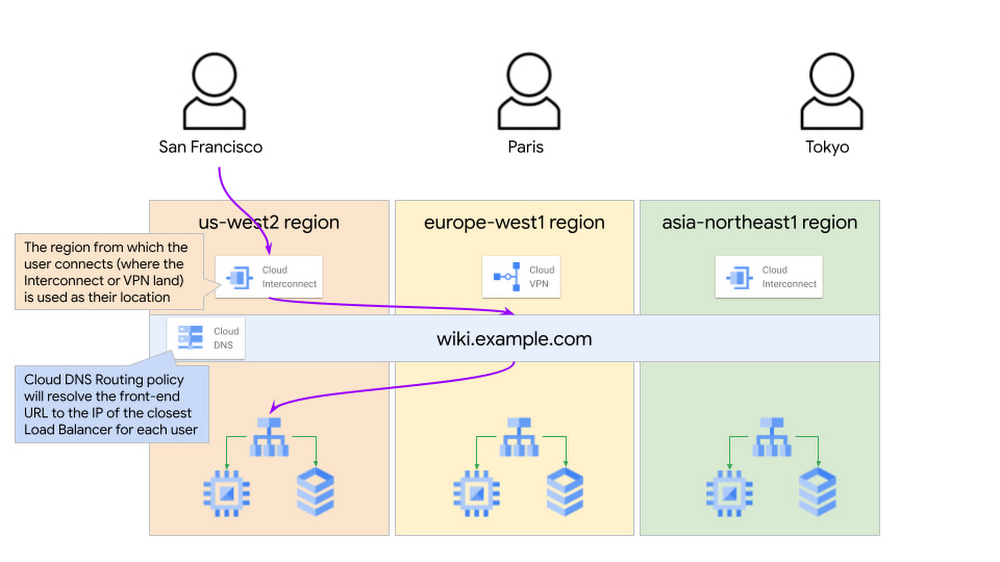
https://storage.googleapis.com/gweb-cloudblog-publish/images/2_DNS_resolution_based_on_the_location_of_.max-1000x1000.jpg

DNS resolution based on the location of the user


Partner with aster.cloud
for your next big idea.
Let us know here.


From our partners:

CITI.IO :: Business. Institutions. Society. Global Political Economy.
CYBERPOGO.COM :: For the Arts, Sciences, and Technology.
DADAHACKS.COM :: Parenting For The Rest Of Us.
ZEDISTA.COM :: Entertainment. Sports. Culture. Escape.
TAKUMAKU.COM :: For The Hearth And Home.
ASTER.CLOUD :: From The Cloud And Beyond.
LIWAIWAI.COM :: Intelligence, Inside and Outside.
GLOBALCLOUDPLATFORMS.COM :: For The World's Computing Needs.
FIREGULAMAN.COM :: For The Fire In The Belly Of The Coder.
ASTERCASTER.COM :: Supra Astra. Beyond The Stars.
BARTDAY.COM :: Prosperity For Everyone.

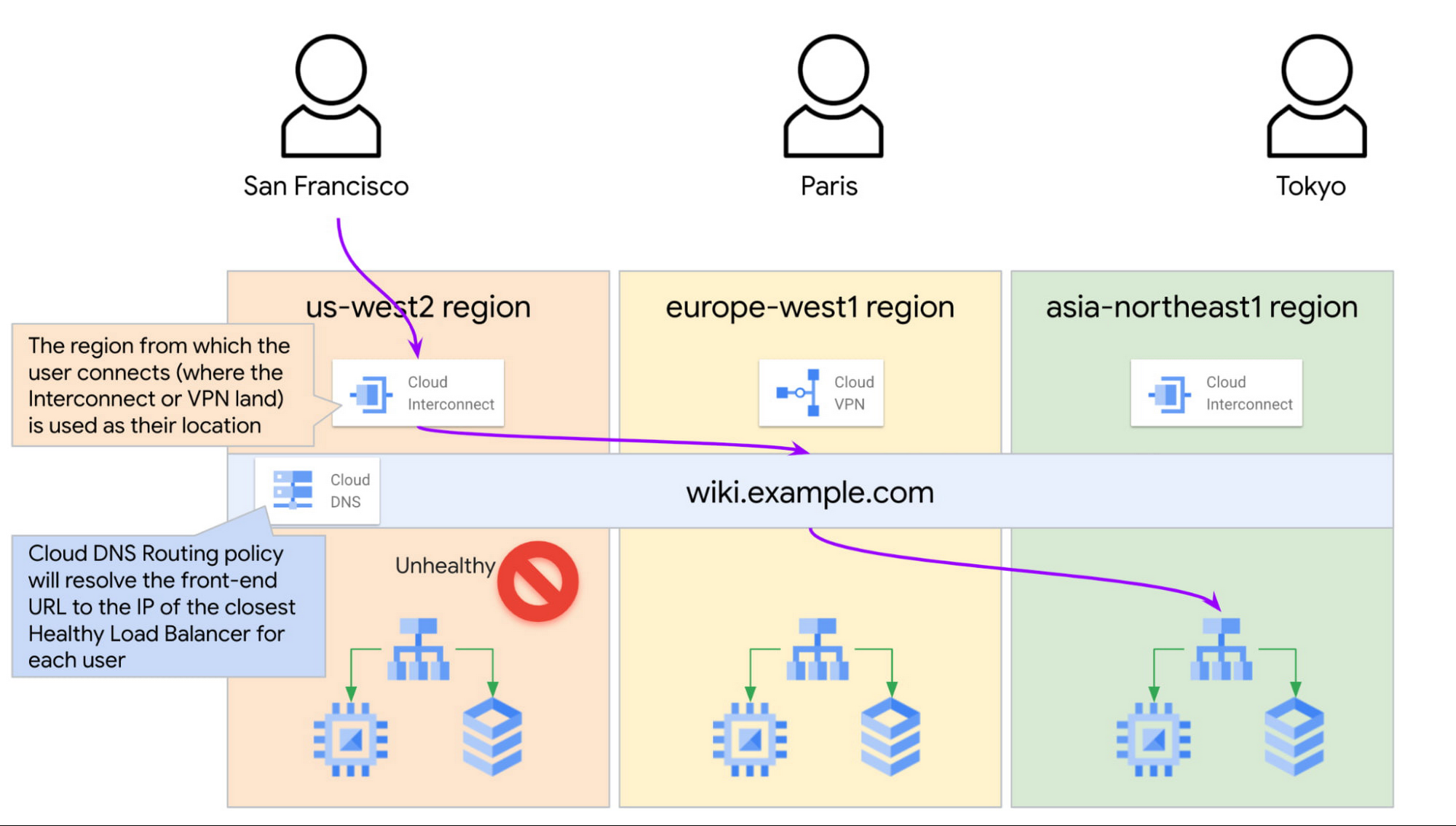
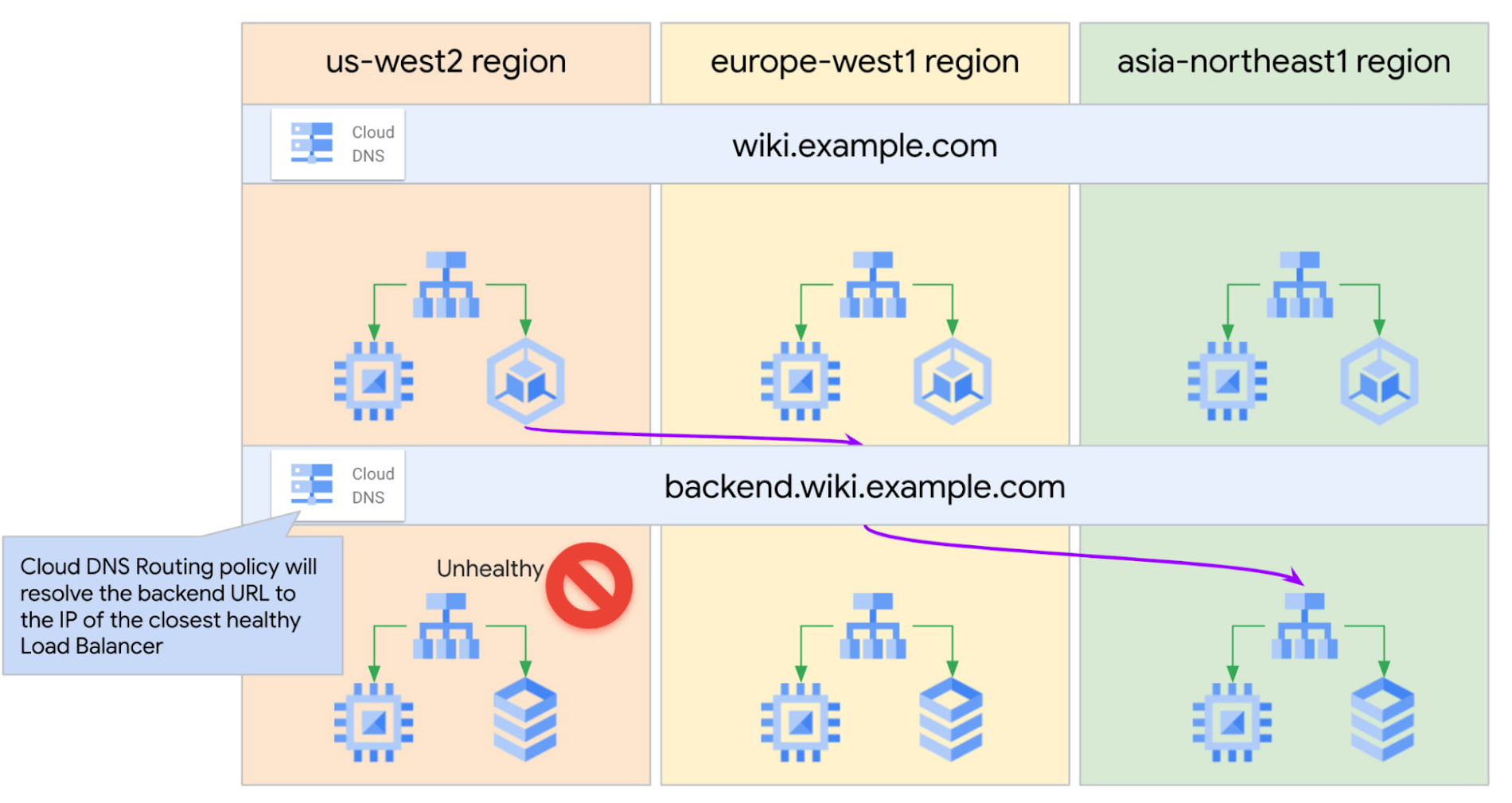
With the above setup, if our application in one of the regions goes down, we have to manually update the geo-location policy and remove the affected region from the configuration. Until someone detects the failure and updates the policy, the end users close to that region will not be able to reach the application. Not a great user experience. How can we design this better?Google Cloud is introducing Cloud DNS health check support for Internal Load balancers. For an internal TCP/UDP load balancer, we can use the existing health checks for a back-end service, and Cloud DNS will receive direct health signals from the individual back-end instances. This enables automatic failover when the endpoints fail their health checks.For example, if the US frontend service is unhealthy, Cloud DNS may return the closest region load balancer IP (in our example, Tokyo’s) to the San Francisco clients depending on the latency.
https://storage.googleapis.com/gweb-cloudblog-publish/images/3_user_and_health_of_ILBs_backends.max-2000x2000.jpg

DNS resolution based on the location of the user and health of ILBs backends

Read More  Network & Application Security In Google Cloud
Enabling the health checks for the wiki.example.com record provides us with automatic failover in case of a failure and ensures that Cloud DNS always returns only the healthy endpoints in response to the client queries. This removes manual intervention and significantly improves the failover time.The Cloud DNS routing policy configuration would look like this:Creating the Cloud DNS managed zone:
gcloud dns managed-zones create wiki-private-zone \
    --description="DNS Zone for the front-end servers of the wiki application" \
    --dns-name=wiki.example.com \
    --networks=prod-vpc \
    --visibility=private

Creating the Cloud DNS Record set:For health checking to work, we need to reference the ILB using the ILB forwarding rule name. If we use the ILB IP instead, then Cloud DNS will not check the health of the endpoint.See the official documentation page for more information on how to configure Cloud DNS routing policies with health checks.
gcloud dns record-sets create front.wiki.example.com. \
--ttl=30 \
--type=A \
--zone=wiki-private-zone \
--routing-policy-type=GEO \
--routing-policy-data="us-west2=us-ilb-forwarding-rule;europe-west1=eu-ilb-forwarding-rule;asia-northeast1=asia-ilb-forwarding-rule" \
--enable-health-checking

Note: Cloud DNS uses the health checks configured on the load balancers itself. Users do not need to configure any additional health checks for Cloud DNS. See the official documentation page for information on how to create health checks for GCP Load Balancers.With this configuration, if we were to lose the application in one region due to an incident, the health checks on the ILB would fail, and Cloud DNS would automatically resolve new user queries to the next closest healthy endpoint.We can expand this configuration to ensure that front-end servers send traffic only to healthy bank-end servers in the region closest to them.We would configure front-end servers to connect to the global hostname backend.wiki.example.com.The Cloud DNS geo-location policy with health checks will use the front-end servers’ GCP region information to resolve this hostname to the closest available healthy back-end tier Internal Load Balancer.
Read More  Moving Off CentOS? Introducing Rocky Linux Optimized For Google Cloud
https://storage.googleapis.com/gweb-cloudblog-publish/images/4_Front-end_to_back-end_communication.max-1900x1900.jpg

Front-end to back-end communication (instance to instance)

Putting it all together, we now have set up our multi-regional and multi-tiered application with DNS policies to automatically failover to a healthy endpoint closest to the end user. 

By: Truptesh Nagesh (Network Specialist, Google Cloud) and Paarth Mahajan (Network Specialist, Google Cloud)
Source: Google Cloud Blog


For enquiries, product placements, sponsorships, and collaborations, connect with us at [email protected]. We'd love to hear from you!

Our humans need coffee too! Your support is highly appreciated, thank you!

aster.cloud

Related Topics
  • Cloud DNS
  • Google Cloud
  • Networking
  • Tutorials
You May Also Like
zedreviews-fathers-day-50830
View Post
  • Gears
  • Technology
  • Tools

Father’s Day Outdoors, Round Two – Gear for the Action, the Tailgate, and Beating the Heat

  • June 20, 2026
zedreviews-fathers-day-2147684744
View Post
  • Gears
  • Technology
  • Tools

The Ultimate Father’s Day Gift Guide – Home Entertainment Upgrades Dad Actually Wants

  • June 20, 2026
View Post
  • Technology
  • Tools

IBM Launches Enterprise Advantage Service to Help Businesses Scale Agentic AI

  • January 19, 2026
Points, Lines and a Question
View Post
  • Architecture
  • Design
  • Engineering
  • People

What Is The Point In Making Points?

  • November 26, 2025
View Post
  • Engineering
  • Software Engineering

Development gets better with Age

  • October 9, 2025
View Post
  • Engineering
  • Technology

Apple supercharges its tools and technologies for developers to foster creativity, innovation, and design

  • June 9, 2025
View Post
  • Engineering

Just make it scale: An Aurora DSQL story

  • May 29, 2025
notta-ai-header
View Post
  • Featured
  • Tools

Notta vs Fireflies: Which AI Transcription Tool Deserves Your Attention in 2025?

  • May 16, 2025

Stay Connected!
LATEST
  • 1
    IBM Study: One in Four Malicious Breaches are AI-Enabled, Costing Companies $6 Million on Average
    • July 29, 2026
  • 2
    Accelerating the frontiers of scientific discovery: Google’s $40M commitment to the Genesis Mission
    • July 26, 2026
  • 3
    3 Questions: Neural transparency and the future of AI design
    • July 17, 2026
  • 4
    Intel Invests €5 Billion to Expand Manufacturing in Europe
    • July 13, 2026
  • 5
    IBM and Red Hat Expand Lightwell with New Offerings to Build the Trust Infrastructure for AI-Era Open Source
    • July 8, 2026
  • 6
    When I Was Young
    • July 4, 2026
  • 7
    The Fastest AI Fried Chicken In The World
    • June 29, 2026
  • 8
    Zed Approves | How to Stay Cool in Extreme Heat
    • June 29, 2026
  • 9
    The AI investment surge hasn’t produced the expected results yet. That could change in 2026
    • June 26, 2026
  • 10
    Zed Approves | It’s Prime Day 2026! Time to Upgrade Your World Cup Viewing Setup and Beat the Heat
    • June 25, 2026
about
Hello World!

We are aster.cloud. We’re created by programmers for programmers.

Our site aims to provide guides, programming tips, reviews, and interesting materials for tech people and those who want to learn in general.

We would like to hear from you.

If you have any feedback, enquiries, or sponsorship request, kindly reach out to us at:

[email protected]
Most Popular
  • 1
    Zed Approves | The Best Prime Day PC Deals: Top Gaming Rigs, Workstations, and Everyday Laptops
    • June 24, 2026
  • neon-cart 2
    Zed Approves: How to Gear Up for GTA 6 This Amazon Prime Day (2026 Quick Guide)
    • June 22, 2026
  • zedreviews-valerion 3
    Father’s Day Outdoors – Build Dad the Ultimate Backyard Watch Party
    • June 20, 2026
  • zedreviews-fathers-day-50830 4
    Father’s Day Outdoors, Round Two – Gear for the Action, the Tailgate, and Beating the Heat
    • June 20, 2026
  • zedreviews-fathers-day-2147684744 5
    The Ultimate Father’s Day Gift Guide – Home Entertainment Upgrades Dad Actually Wants
    • June 20, 2026
  • /
  • Technology
  • Tools
  • About
  • Contact Us

Input your search keywords and press Enter.