aster.cloud aster.cloud
  • /
  • Platforms
    • Public Cloud
    • On-Premise
    • Hybrid Cloud
    • Data
  • Architecture
    • Design
    • Solutions
    • Enterprise
  • Engineering
    • Automation
    • Software Engineering
    • Project Management
    • DevOps
  • Programming
    • Learning
  • Tools
  • About
  • /
  • Platforms
    • Public Cloud
    • On-Premise
    • Hybrid Cloud
    • Data
  • Architecture
    • Design
    • Solutions
    • Enterprise
  • Engineering
    • Automation
    • Software Engineering
    • Project Management
    • DevOps
  • Programming
    • Learning
  • Tools
  • About
aster.cloud aster.cloud
  • /
  • Platforms
    • Public Cloud
    • On-Premise
    • Hybrid Cloud
    • Data
  • Architecture
    • Design
    • Solutions
    • Enterprise
  • Engineering
    • Automation
    • Software Engineering
    • Project Management
    • DevOps
  • Programming
    • Learning
  • Tools
  • About
  • Engineering
  • Practices

Practicing The Principle Of Least Privilege With Cloud Build And Artifact Registry

  • aster.cloud
  • December 3, 2022
  • 5 minute read
People often use Cloud Build and Artifact Registry in tandem to build and store software artifacts – these include container images, to be sure, but also OS packages and language specific packages.
Consider a venn diagram where these same users are also users who use the Google Cloud project as a shared, multi-tenant environment. Because a project is a logical encapsulation for services like Cloud Build and Artifact Registry, administrators of these services want to apply the principle of least privilege in most cases.Of the numerous benefits from practicing this, reducing the blast radius of misconfigurations or malicious users is perhaps most important.Users and teams should be able to use Cloud Build and Artifact Registry safely – without the ability to disrupt or damage one another.With per-trigger service accounts in Cloud Build and per-repository permissions in Artifact Registry, let’s walk through how we can make this possible.

The before times

Let’s consider the default scenario – before we apply the principle of least privilege. In this scenario, we have a Cloud Build trigger connected to a repository.


Partner with aster.cloud
for your next big idea.
Let us know here.


From our partners:

CITI.IO :: Business. Institutions. Society. Global Political Economy.
CYBERPOGO.COM :: For the Arts, Sciences, and Technology.
DADAHACKS.COM :: Parenting For The Rest Of Us.
ZEDISTA.COM :: Entertainment. Sports. Culture. Escape.
TAKUMAKU.COM :: For The Hearth And Home.
ASTER.CLOUD :: From The Cloud And Beyond.
LIWAIWAI.COM :: Intelligence, Inside and Outside.
GLOBALCLOUDPLATFORMS.COM :: For The World's Computing Needs.
FIREGULAMAN.COM :: For The Fire In The Belly Of The Coder.
ASTERCASTER.COM :: Supra Astra. Beyond The Stars.
BARTDAY.COM :: Prosperity For Everyone.

When an event happens in your source code repository (like merging changes into the main branch), this trigger is, well, triggered, and it kicks off a build in Cloud Build to build an artifact and subsequently push that artifact to Artifact Registry.
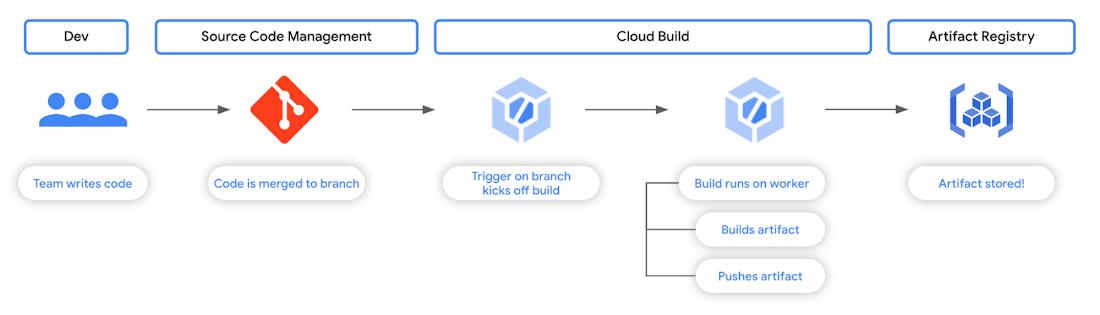
Fig. 1 – A common workflow involving Cloud Build and Artifact Registry
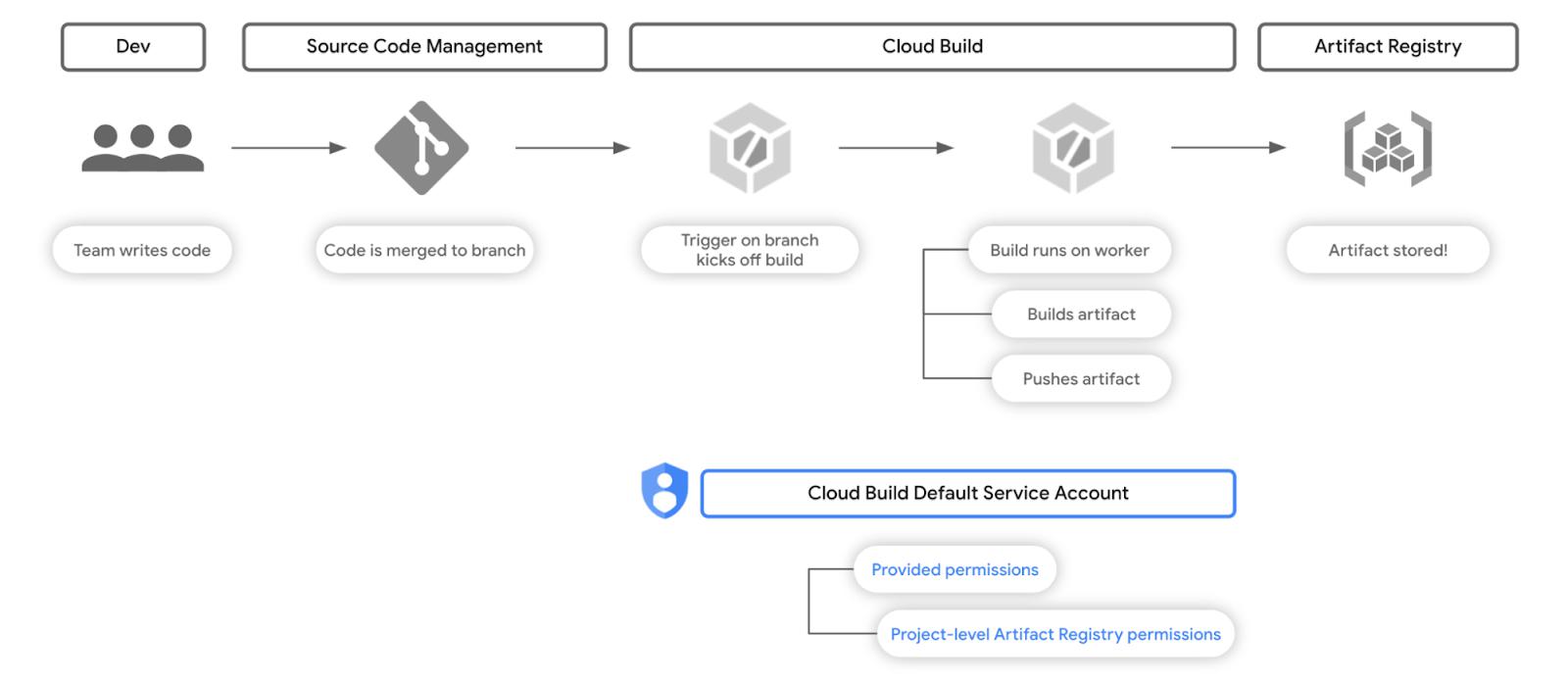
 

But what are the implications of permissions in this workflow? Well, let’s take a look at the permissions scheme. Left unspecified, a trigger will execute a build with the Cloud Build default service account. Of the several permissions granted by default to this service account are Artifact Registry permissions at the project level. 

Fig. 2 – The permissions scheme of the workflow in Fig. 1


Builds, unless specified otherwise, will run using this service account as its identity. This means those builds can interact with any artifact repository in Artifact Registry within that Google Cloud project. So let’s see how we can set this up!

Read More  Is A Cloud Migration On Your To Do List? Our Top Stories From 2021 Can Help

Putting it into practice


In this scenario, we’re going to walk through how you might set up the below workflow, in which we have a Cloud Build build trigger connected to a GitHub repository. In order to follow along, you’ll need to have a repository set up and connected to Cloud Build – instructions can be found here, and you’ll need to replace variable names with your own values.

This build trigger will kick off a build in response to any changes to the main branch in that repository. The build itself will build a container image and push it to Artifact Registry.

The key implementation detail here is that every build from this trigger will use a bespoke service account that only has permissions to a specific repository in Artifact Registry.
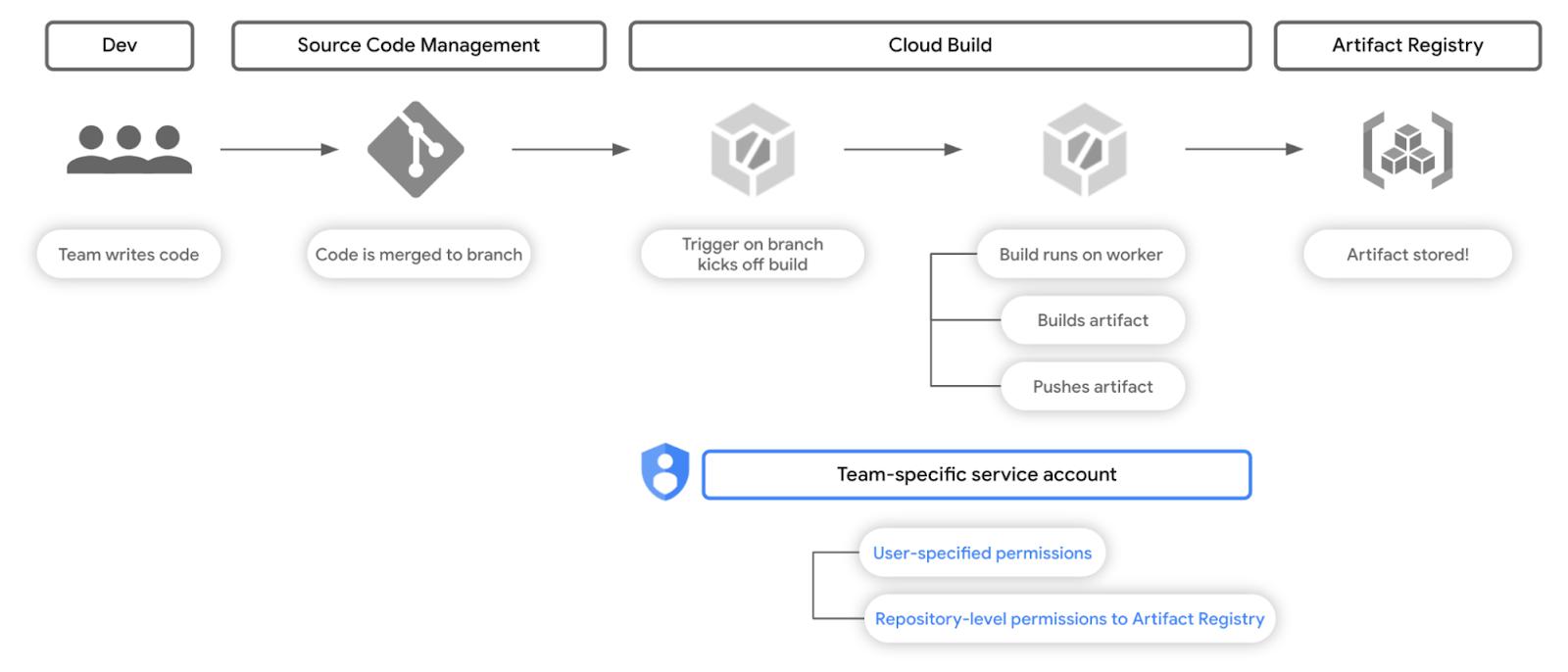
Fig. 3 – The permissions scheme of the workflow with principle of least privilege


Let’s start by creating an Artifact Registry repository for container images for a fictional team, Team A.
gcloud artifacts repositories create ${TEAM_A_REPOSITORY} \
--repository-format=docker \
--location=${REGION}

Then we’ll create a service account for Team A.
gcloud iam service-accounts create ${TEAM_A_SA} \
--display-name=$TEAM_A_SA_NAME

And now the fun part. We can create an IAM role binding between this service account and the aforementioned Artifact Registry repository; below is an example of how you would do this with gcloud:
gcloud artifacts repositories add-iam-policy-binding ${TEAM_A_REPOSITORY} --location $REGION --member="serviceAccount:${TEAM_A_SA}@${PROJECT_ID}.iam.gserviceaccount.com" --role=roles/artifactregistry.writer

What this effectively does is it gives the service account permissions that come with the artifactregistry.writer role, but only for a specific Artifact Registry repository.Now, for many moons, Cloud Build has already allowed for users to provide a specific service account for use in their build specification – for manually executed builds. You can see an example of this in the following build spec:
steps:
- name: 'bash'
  args: ['echo', 'Hello world!']
logsBucket: 'LOGS_BUCKET_LOCATION'
# provide your specific service account below
serviceAccount: 'projects/PROJECT_ID/serviceAccounts/${TEAM_A_SA}
options:
  logging: GCS_ONLY
Read More  The Take: Global Tech Antitrust Picks Up Where Anti-Globalization Left Off
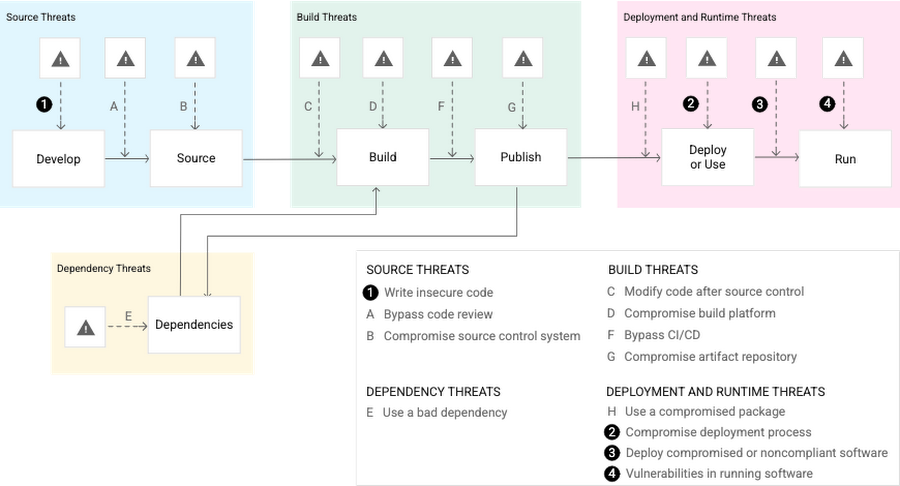
But, for many teams, automating the execution of builds and incorporating it with how code and configuration flows through their teams and systems is a must. Triggers in Cloud Build are how folks achieve this!When creating a trigger in Cloud Build, you can either connect it to a source code repository or set up your own webhook. Whatever the source may be, triggers depend on systems beyond the reach of permissions we can control in our Google Cloud project using Identity and Access Management.Let’s now consider what could happen when we do not apply the principle of least privilege when using build triggers with a Git repository.What risk are we trying to mitigate?The Supply Chain Levels for Software Artifacts (SLSA) security framework details potential threats in the software supply chain – essentially the process of how your code is written, tested, built, deployed, and run.

Fig. 4 – Threats in the software supply chain identified in the SLSA framework


With a trigger taking action to start a build based on a compromised source repo, as seen in threat B, we can see how this effect may compound in effect downstream. If builds run based on actions in a compromised repo, we have multiple threats now in play that follow.By minimizing the permissions that these builds have, we reduce the scope of impact that a compromised source repo can have. This walkthrough specifically looks at minimizing the effects of having a compromised package repo in threat G.In this example we are building out, if the source repo is compromised, only packages in the specific Artifact Registry repository created will be affected; this is because our service account associated with the trigger only has permissions to that one repository.Creating a trigger to run builds with a bespoke service account requires only one additional parameter; when using gcloud for example, you would specify the –-service-account parameter as follows:
gcloud beta builds triggers create github \
--name=team-a-build \
--region=${REGION} \
--repo-name=${TEAM_A_REPO} \
--repo-owner=${TEAM_A_REPO_OWNER} \
--pull-request-pattern=main \
--build-config=cloudbuild.yaml \
--service-account=projects/${PROJECT_ID}/serviceAccounts/${TEAM_A_SA}@${PROJECT_ID}.iam.gserviceaccount.com

Read More  Getting Started With The Security Foundations Blueprint Automation Repo
TEAM_A_REPO will be the GitHub repository you created and connected to Cloud Build earlier, TEAM_A_REPO_OWNER will be the GitHub username of the repository owner, and TEAM_A_SA will be the service account we created earlier. Aside from that, all you’ll need is a cloudbuild.yaml manifest in that repository, and your trigger will be set!With this trigger set up, you can now test the scope of permissions your builds that run based on this trigger have, verifying that they only have permission to work with the TEAM_A_REPOSITORY in Artifact Registry.

In conclusion

Configuring minimal permissions for build triggers is only one part of the bigger picture, but a great step to take no matter where you are in your journey of securing your software supply chain.

To learn more, we recommend taking a deeper dive into the SLSA security framework and Software Delivery Shield – Google Cloud’s fully managed, end-to-end solution that enhances software supply chain security across the entire software development life cycle from development, supply, and CI/CD to runtimes. Or if you’re just getting started, check out this tutorial on Cloud Build and this tutorial on Artifact Registry!


By: Anthony Bushong (Developer Relations Engineer)
Source: Google Cloud Blog


For enquiries, product placements, sponsorships, and collaborations, connect with us at [email protected]. We'd love to hear from you!

Our humans need coffee too! Your support is highly appreciated, thank you!

aster.cloud

Related Topics
  • Artifact Registry
  • Best Practice
  • Cloud Build
  • Google Cloud
  • Security
You May Also Like
Points, Lines and a Question
View Post
  • Architecture
  • Design
  • Engineering
  • People

What Is The Point In Making Points?

  • November 26, 2025
View Post
  • Engineering
  • Software Engineering

Development gets better with Age

  • October 9, 2025
View Post
  • Engineering
  • Technology

Apple supercharges its tools and technologies for developers to foster creativity, innovation, and design

  • June 9, 2025
View Post
  • Engineering

Just make it scale: An Aurora DSQL story

  • May 29, 2025
View Post
  • Engineering
  • Technology

Guide: Our top four AI Hypercomputer use cases, reference architectures and tutorials

  • March 9, 2025
View Post
  • Computing
  • Engineering

Why a decades old architecture decision is impeding the power of AI computing

  • February 19, 2025
View Post
  • Engineering
  • Software Engineering

This Month in Julia World

  • January 17, 2025
View Post
  • Engineering
  • Software Engineering

Google Summer of Code 2025 is here!

  • January 17, 2025

Stay Connected!
LATEST
  • digital-nomad-freelancer-worker-2151205464 1
    One paperwork problem – Get your Digital Nomad Visa employment documents fast from UK, EU or Singapore
    • June 16, 2026
  • 2
    Samsung Art Store Brings Art Basel to Homes Worldwide With New Curated Collection
    • June 15, 2026
  • 3
    You Do Not Need to Invest in the IPO of SpaceX, Anthropic, and OpenAI
    • June 10, 2026
  • 4
    The consequences of relying on AI for accurate news
    • June 10, 2026
  • 5
    Connecting AI agents with unstructured data using Google Cloud Storage MCP Servers
    • June 10, 2026
  • 6
    WWDC26: Apple unveils next generation of Apple Intelligence, Siri AI, powerful parental controls, and an expansive set of software improvements
    • June 8, 2026
  • 7
    IBM and Google Cloud Announce Strategic Partnership to Scale AI with Human Expertise and AI‑Powered Delivery
    • June 4, 2026
  • Data center 8
    Data Sovereignty in Spain. It’s Not Just About the Law, It’s About Efficiency
    • June 3, 2026
  • 9
    Ink vs Pixels. What you miss versus what you are actually missing.
    • June 1, 2026
  • 10
    Banks race to patch new cyber vulnerabilities, and other cybersecurity news
    • May 25, 2026
about
Hello World!

We are aster.cloud. We’re created by programmers for programmers.

Our site aims to provide guides, programming tips, reviews, and interesting materials for tech people and those who want to learn in general.

We would like to hear from you.

If you have any feedback, enquiries, or sponsorship request, kindly reach out to us at:

[email protected]
Most Popular
  • pope-leo-xiv-cq5dam-1500.844 1
    Pope Leo XIV to Publish First Encyclical on Artificial Intelligence and Human Dignity on 25 May
    • May 22, 2026
  • 2
    Portfolio to Clients, and is Strengthened by Ongoing Project Glasswing Work
    • May 20, 2026
  • reMarkable Paper Pure 3
    Everything The reMarkable Paper Pure Actually Does
    • May 14, 2026
  • 4
    Scaling cloud and AI: Microsoft Azure’s commitment to Europe’s digital future
    • May 11, 2026
  • Anthropic Institute 5
    Introducing The Anthropic Institute
    • March 11, 2026
  • /
  • Technology
  • Tools
  • About
  • Contact Us

Input your search keywords and press Enter.