Chat server architecture
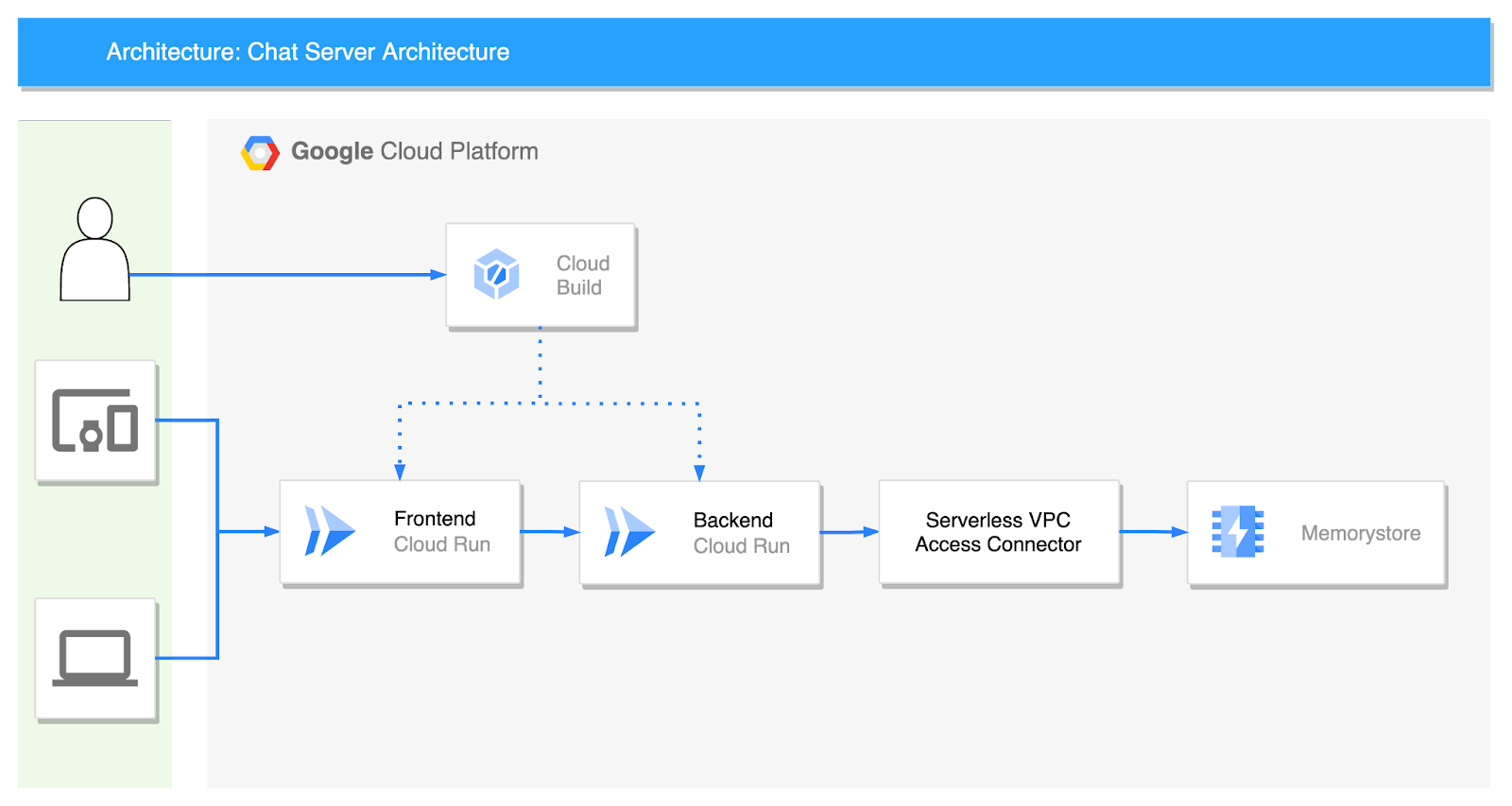
Frontend
index.html
From our partners:
The frontend service is written only in HTML. Only modify the WebSocket connection part with a URL of backend Cloud Run in the middle. This code is not perfect as it is just a sample to show the chat in action.
<!DOCTYPE html>
<html>
    <head>
        <title>Chat</title>
    </head>
    <body>
        <h1>Chat</h1>
        <h2>Room: <span id="room-id"></span><br> Your ID: <span id="client-id"></span></h2>
        <label>Room: <input type="text" id="channelId" autocomplete="off" value="foo"/></label>
        <button onclick="connect(event)">Connect</button>
        <hr>
        <form style="position: absolute; bottom:0" action="" onsubmit="sendMessage(event)">
            <input type="text" id="messageText" autocomplete="off"/>
            <button>Send</button>
        </form>
        <ul id='messages'>
        </ul>
        <script>
            var ws = null;
            function connect(event) {
                var client_id = Date.now()
                document.querySelector("#client-id").textContent = client_id;
                document.querySelector("#room-id").textContent = channelId.value;
                if (ws) ws.close()
                ws = new WebSocket(`wss://xxx-du.a.run.app/ws/${channelId.value}/${client_id}`);
                ws.onmessage = function(event) {
                    var messages = document.getElementById('messages')
                    var message = document.createElement('li')
                    var content = document.createTextNode(event.data)
                    message.appendChild(content)
                    messages.appendChild(message)
                };
                event.preventDefault()
            }
            function sendMessage(event) {
                var input = document.getElementById("messageText")
                ws.send(input.value)
                input.value = ''
                event.preventDefault()
                document.getElementById("messageText").focus()
            }
        </script>
    </body>
</html>
FROM nginx:alpine

COPY index.html /usr/share/nginx/html
steps:
 # Build the container image
 - name: 'gcr.io/cloud-builders/docker'
   args: ['build', '-t', 'gcr.io/project_id/frontend:$COMMIT_SHA', '.']
 # Push the container image to Container Registry
 - name: 'gcr.io/cloud-builders/docker'
   args: ['push', 'gcr.io/project_id/frontend:$COMMIT_SHA']
 # Deploy container image to Cloud Run
 - name: 'gcr.io/google.com/cloudsdktool/cloud-sdk'
   entrypoint: gcloud
   args:
   - 'run'
   - 'deploy'
   - 'frontend'
   - '--image'
   - 'gcr.io/project_id/frontend:$COMMIT_SHA'
   - '--region'
   - 'asia-northeast3'
   - '--port'
   - '80'
 images:
 - 'gcr.io/project_id/frontend:$COMMIT_SHA'
Backend Service
main.py
Let’s look at the server Python code first, starting with the core ChatServer class.
class RedisService:
    def __init__(self):
        self.redis_host = f"{os.environ.get('REDIS_HOST', 'redis://localhost')}"

    async def get_conn(self):
        return await aioredis.from_url(self.redis_host, encoding="utf-8", decode_responses=True)


class ChatServer(RedisService):
    def __init__(self, websocket, channel_id, client_id):
        super().__init__()
        self.ws: WebSocket = websocket
        self.channel_id = channel_id
        self.client_id = client_id
        self.redis = RedisService()

    async def publish_handler(self, conn: Redis):
        try:
            while True:
                message = await self.ws.receive_text()
                if message:
                    now = datetime.now()
                    date_time = now.strftime("%Y-%m-%d %H:%M:%S")
                    chat_message = ChatMessage(
                        channel_id=self.channel_id, client_id=self.client_id, time=date_time, message=message
                    )
                    await conn.publish(self.channel_id, json.dumps(asdict(chat_message)))
        except Exception as e:
            logger.error(e)

    async def subscribe_handler(self, pubsub: PubSub):
        await pubsub.subscribe(self.channel_id)
        try:
            while True:
                message = await pubsub.get_message(ignore_subscribe_messages=True)
                if message:
                    data = json.loads(message.get("data"))
                    chat_message = ChatMessage(**data)
                    await self.ws.send_text(f"[{chat_message.time}] {chat_message.message} ({chat_message.client_id})")
        except Exception as e:
            logger.error(e)

    async def run(self):
        conn: Redis = await self.redis.get_conn()
        pubsub: PubSub = conn.pubsub()

        tasks = [self.publish_handler(conn), self.subscribe_handler(pubsub)]
        results = await asyncio.gather(*tasks)

        logger.info(f"Done task: {results}")
@app.websocket("/ws/{channel_id}/{client_id}")
async def websocket_endpoint(websocket: WebSocket, channel_id: str, client_id: int):
    await manager.connect(websocket)

    chat_server = ChatServer(websocket, channel_id, client_id)
    await chat_server.run()
import asyncio
import json
import logging
import os
from dataclasses import dataclass, asdict
from datetime import datetime
from typing import List

import aioredis
from aioredis.client import Redis, PubSub
from fastapi import FastAPI, WebSocket

logging.basicConfig(level=logging.INFO)
logger = logging.getLogger(__name__)

app = FastAPI()


class ConnectionManager:
    def __init__(self):
        self.active_connections: List[WebSocket] = []

    async def connect(self, websocket: WebSocket):
        await websocket.accept()
        self.active_connections.append(websocket)

    def disconnect(self, websocket: WebSocket):
        self.active_connections.remove(websocket)

    async def send_personal_message(self, message: str, websocket: WebSocket):
        await websocket.send_text(message)

    async def broadcast(self, message: dict):
        for connection in self.active_connections:
            await connection.send_json(message, mode="text")


manager = ConnectionManager()


@dataclass
class ChatMessage:
    channel_id: str
    client_id: int
    time: str
    message: str
FROM python:3.8-slim
WORKDIR /usr/src/app
COPY requirements.txt  ./
RUN pip install -r requirements.txt
COPY . .
CMD [ "uvicorn", "main:app", "--host", "0.0.0.0" ]
aioredis==2.0.1
fastapi==0.85.0
uvicorn[standard]
steps:
 # Build the container image
 - name: 'gcr.io/cloud-builders/docker'
   args: ['build', '-t', 'gcr.io/project_id/backend:$COMMIT_SHA', '.']
 # Push the container image to Container Registry
 - name: 'gcr.io/cloud-builders/docker'
   args: ['push', 'gcr.io/project_id/backend:$COMMIT_SHA']
 # Deploy container image to Cloud Run
 - name: 'gcr.io/google.com/cloudsdktool/cloud-sdk'
   entrypoint: gcloud
   args:
   - 'run'
   - 'deploy'
   - 'backend'
   - '--image'
   - 'gcr.io/project_id/backend:$COMMIT_SHA'
   - '--region'
   - 'asia-northeast3'
   - '--port'
   - '8000'
   - '--update-env-vars'
   - 'REDIS_HOST=redis://10.87.130.75'
 images:
 - 'gcr.io/project_id/backend:$COMMIT_SHA'
Cloud Build
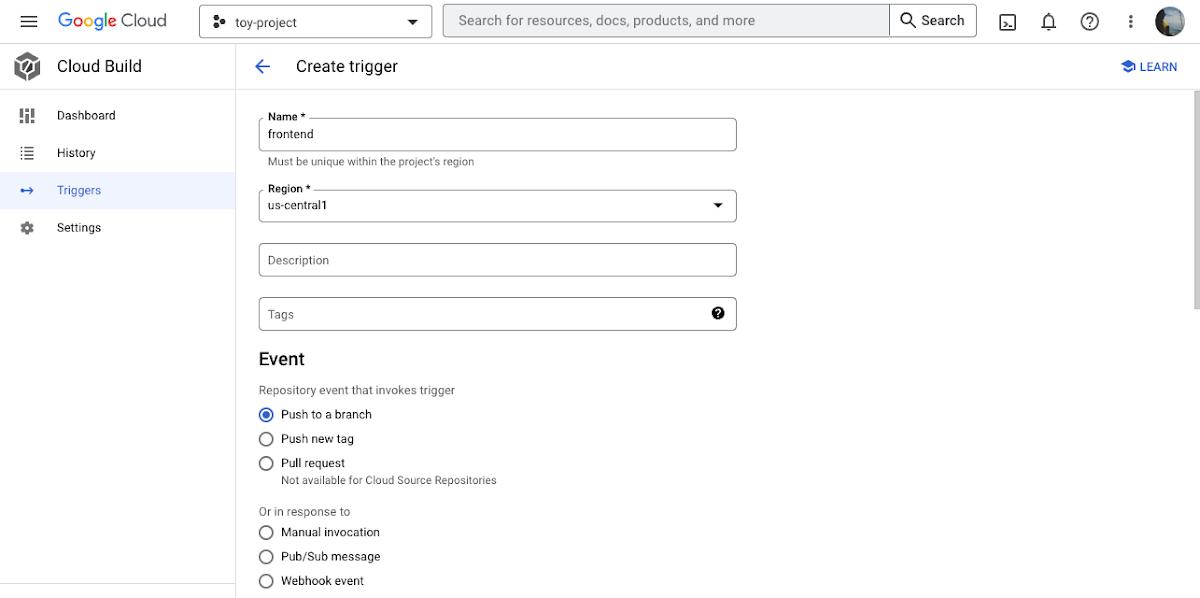
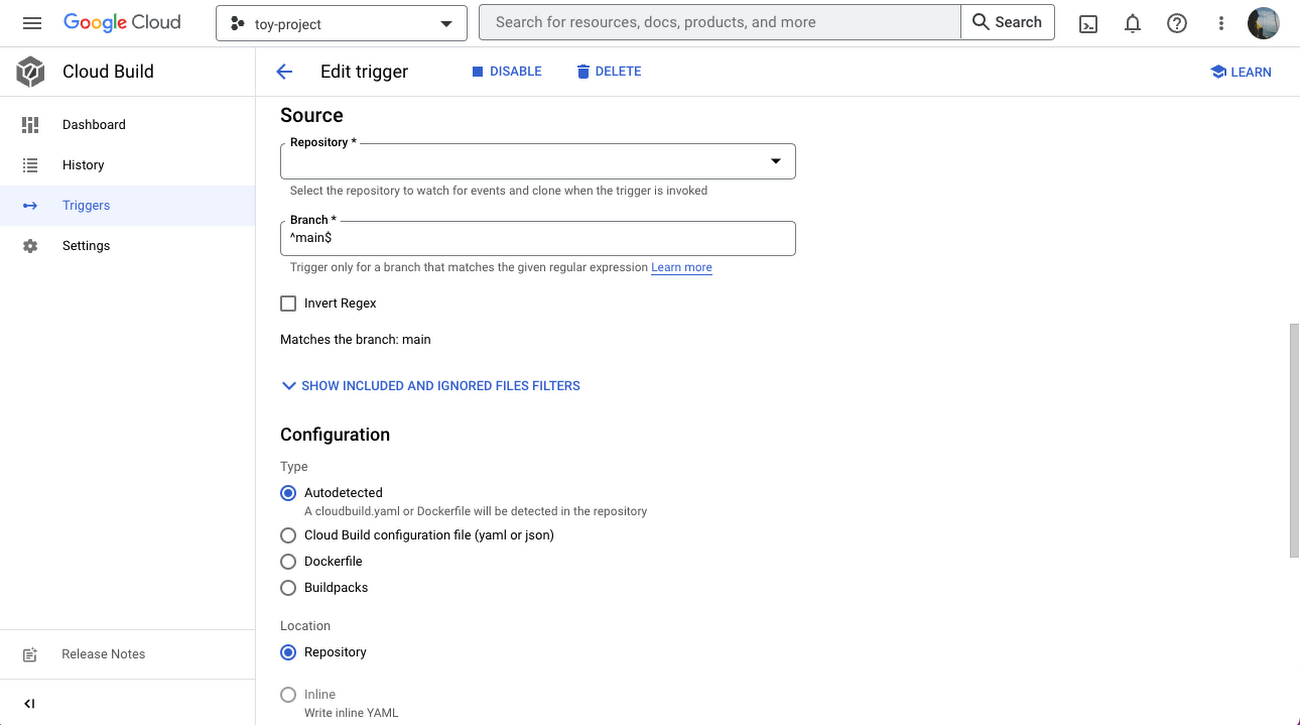
You can set Cloud Build to automatically build and deploy from Cloud Run when the source code is pushed to GitHub. Just select “Create trigger” and enter the required values. First, select “Push to a branch” for Event.
Serverless VPC access connector
Since both the Frontend service and the Backend service currently exist in the Internet network, you’ll need a serverless VPC access connector to connect to the memorystore in the private band. You can do this by following this example code:
bash
gcloud compute networks vpc-access connectors create chat-connector \
--region=us-central1 \
--network=default \
--range=10.100.0.0/28 \
--min-instances=2 \
--max-instances=10 \
--machine-type=e2-micro
Create memorystore
To create the memorystore that will pass chat messages, use this code:
bash
gcloud redis instances create myinstance --size=2 --region=us-central1 \
    --redis-version=redis_6_X
Wrap-up
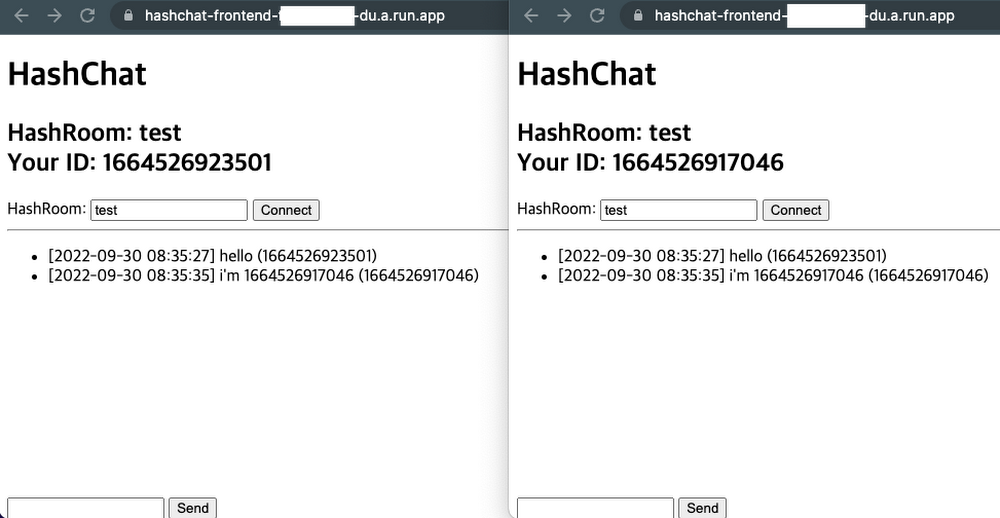
In this article, I built a serverless chat server using Cloud Run. By using Firestore instead of Memorystore, it is also possible to take the entire architecture serverless. Also, since the code is written on a container basis, it is easy to change to another environment such as GKE Autopilot, but Cloud Run is already a great platform for deploying microservices. Instances grow quickly and elastically according to the number of users connecting, so why would I need to choose another platform? Try it out now in the Cloud Console.
By: Jaeyeon Baek (Google Cloud Champion Innovator)
Source: Google Cloud Blog
For enquiries, product placements, sponsorships, and collaborations, connect with us at [email protected]. We'd love to hear from you!
Our humans need coffee too! Your support is highly appreciated, thank you!