aster.cloud aster.cloud
  • /
  • Platforms
    • Public Cloud
    • On-Premise
    • Hybrid Cloud
    • Data
  • Architecture
    • Design
    • Solutions
    • Enterprise
  • Engineering
    • Automation
    • Software Engineering
    • Project Management
    • DevOps
  • Programming
    • Learning
  • Tools
  • About
  • /
  • Platforms
    • Public Cloud
    • On-Premise
    • Hybrid Cloud
    • Data
  • Architecture
    • Design
    • Solutions
    • Enterprise
  • Engineering
    • Automation
    • Software Engineering
    • Project Management
    • DevOps
  • Programming
    • Learning
  • Tools
  • About
aster.cloud aster.cloud
  • /
  • Platforms
    • Public Cloud
    • On-Premise
    • Hybrid Cloud
    • Data
  • Architecture
    • Design
    • Solutions
    • Enterprise
  • Engineering
    • Automation
    • Software Engineering
    • Project Management
    • DevOps
  • Programming
    • Learning
  • Tools
  • About
  • Computing
  • Engineering

How To Create A Linux VM Instance In Compute Engine

  • aster.cloud
  • December 23, 2022
  • 3 minute read
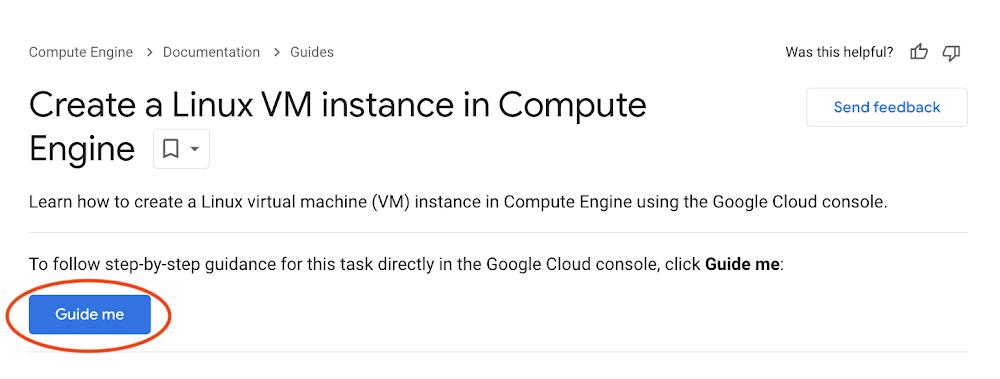
There is a new way to supercharge your learning of Google Cloud! Next time you are interested in learning Google Cloud skills or features, check out embedded interactive tutorials. Interactive tutorials are step by step tutorials that help you learn about Google Cloud. They are embedded directly into the Google Cloud console, so there is no context switching. These tutorials integrate with Cloud Shell and Cloud Code to provide a preconfigured development environment to allow you to learn quickly.In this blog post we’ll walk through how to Create a Linux VM instance In Compute Engine interactive tutorial together. You can find Interactive tutorials directly in the Google Clouddocumentation via a “Guide Me” button. This button takes you directly to the tutorial.

Guide Me Button In Create A Linux VM in Compute Engine Documentation

Walk Through


Partner with aster.cloud
for your next big idea.
Let us know here.


From our partners:

CITI.IO :: Business. Institutions. Society. Global Political Economy.
CYBERPOGO.COM :: For the Arts, Sciences, and Technology.
DADAHACKS.COM :: Parenting For The Rest Of Us.
ZEDISTA.COM :: Entertainment. Sports. Culture. Escape.
TAKUMAKU.COM :: For The Hearth And Home.
ASTER.CLOUD :: From The Cloud And Beyond.
LIWAIWAI.COM :: Intelligence, Inside and Outside.
GLOBALCLOUDPLATFORMS.COM :: For The World's Computing Needs.
FIREGULAMAN.COM :: For The Fire In The Belly Of The Coder.
ASTERCASTER.COM :: Supra Astra. Beyond The Stars.
BARTDAY.COM :: Prosperity For Everyone.

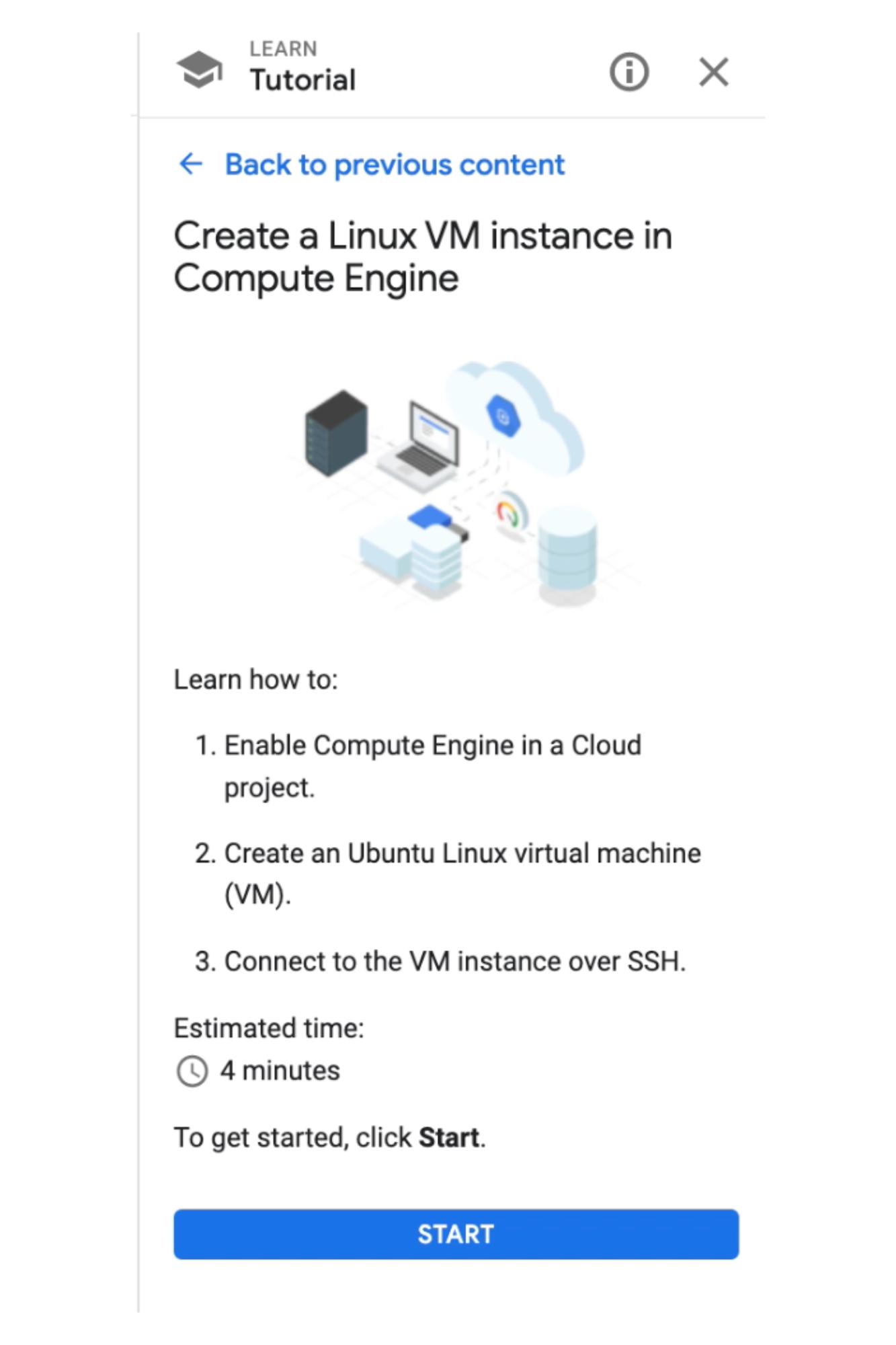
Create Linux VM Start panel

On the first panel of all interactive tutorials users will learn the specific steps of each tutorial and the estimated time to complete this tutorial! We’ll click Start to begin the tutorial. 

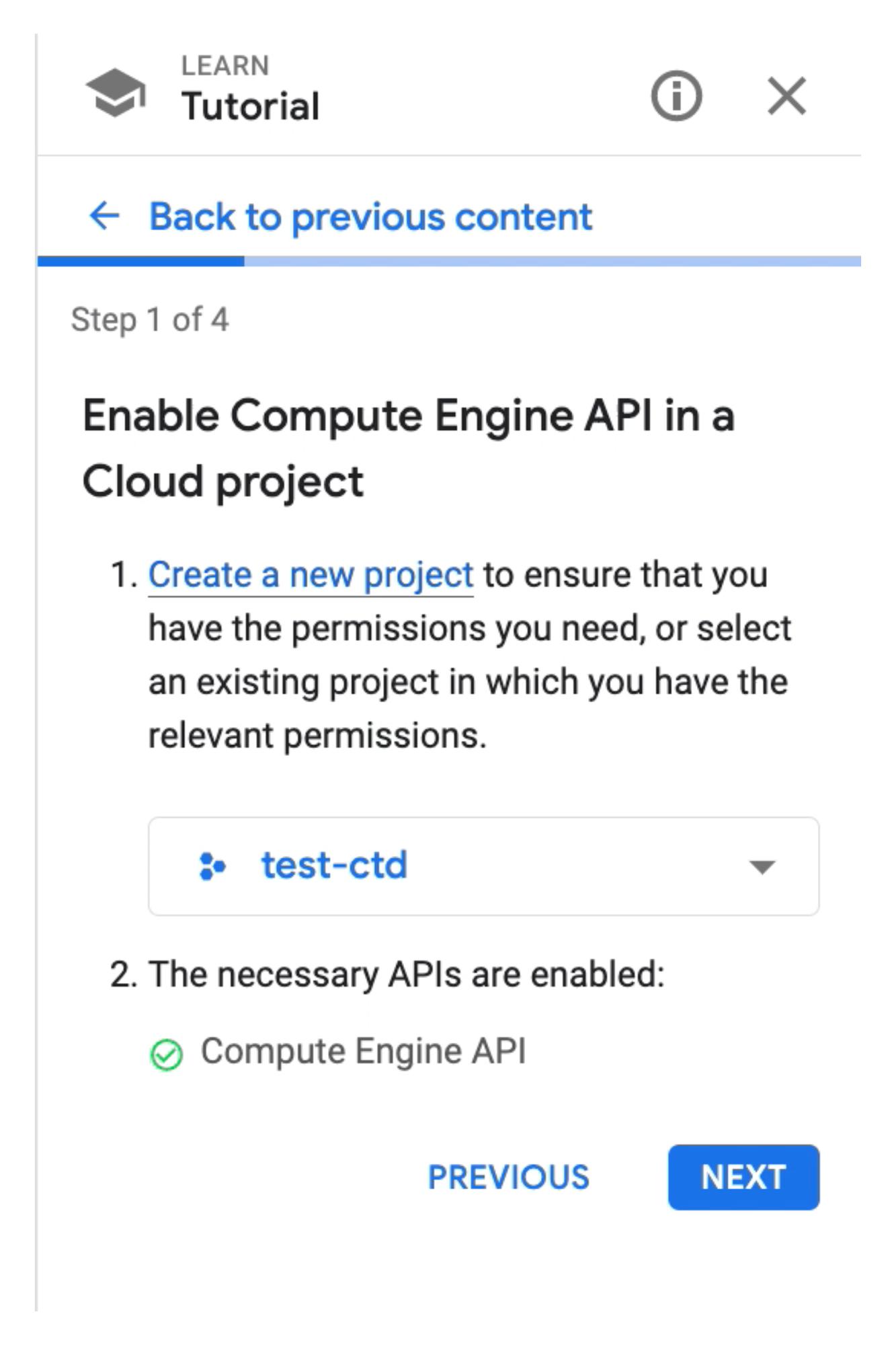
Create Linux VM Step 1 panel

The first step is to enable the Compute Engine API in a Cloud Project. According to the instructions, we’ll need to first select a project or create a new one. I’ll use an existing project called <b>test-ctd</b>. The next step is to enable the necessary APIs, because the project <b>test-ctd</b>already has this API enabled, which is reflected in the green check mark.

Step 2
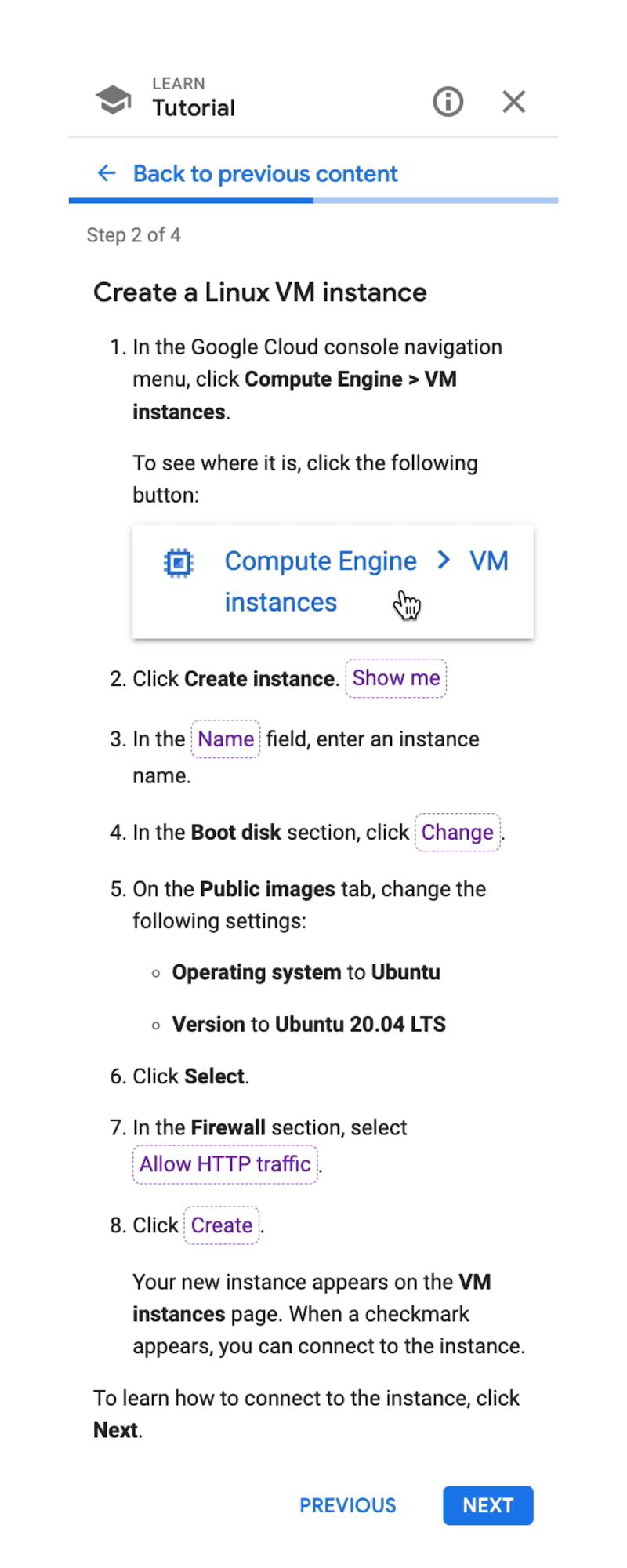
 

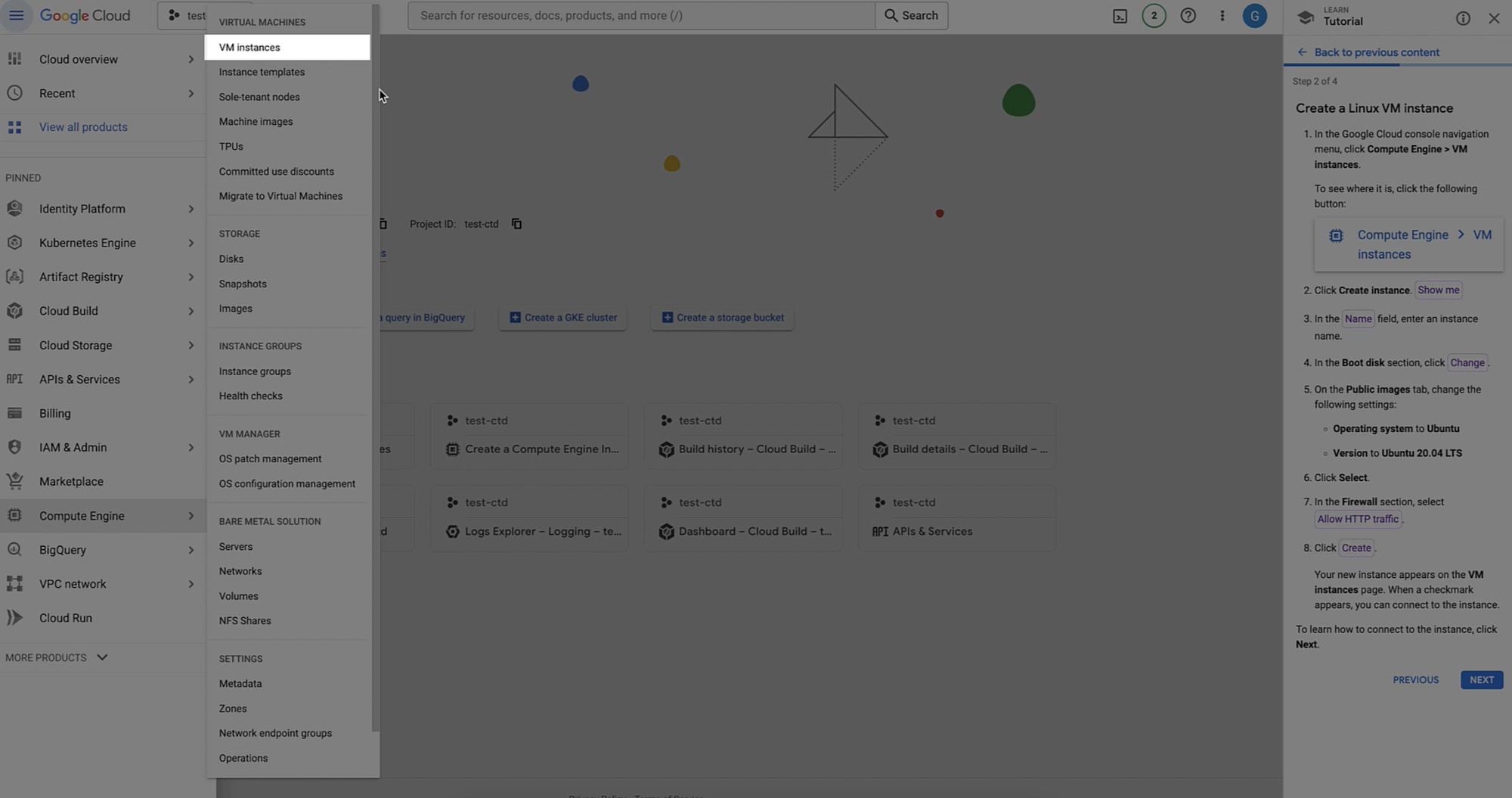
Create Linux VM Step 2 panel
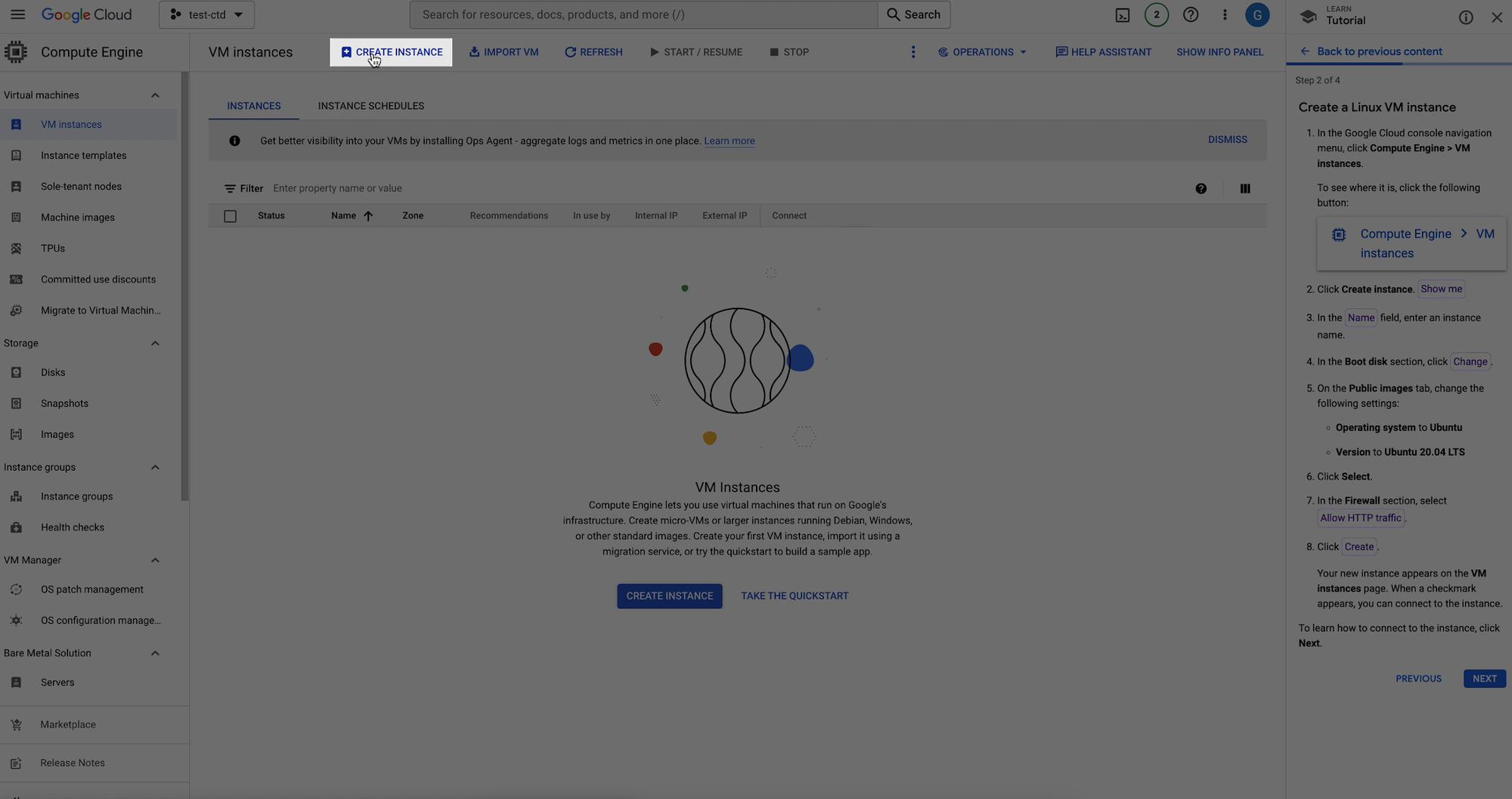
The second step walks us through how to create a Linux VM instance. First starting with navigating to the menu and clicking “VM instances”, which appears under “Compute Engine”. If you are having difficulties finding specific buttons or knowing where to navigate, use the spotlight feature. The spotlight feature is a common feature in interactive tutorials that helps highlight different sections of the web page detailed in the tutorial. Spotlight buttons are either purple or blue buttons. Use them to guide you through the tutorial. 

Example of Spotlight feature

Read More  Edge Computing—Building Enterprise Edge Applications With Google Cloud
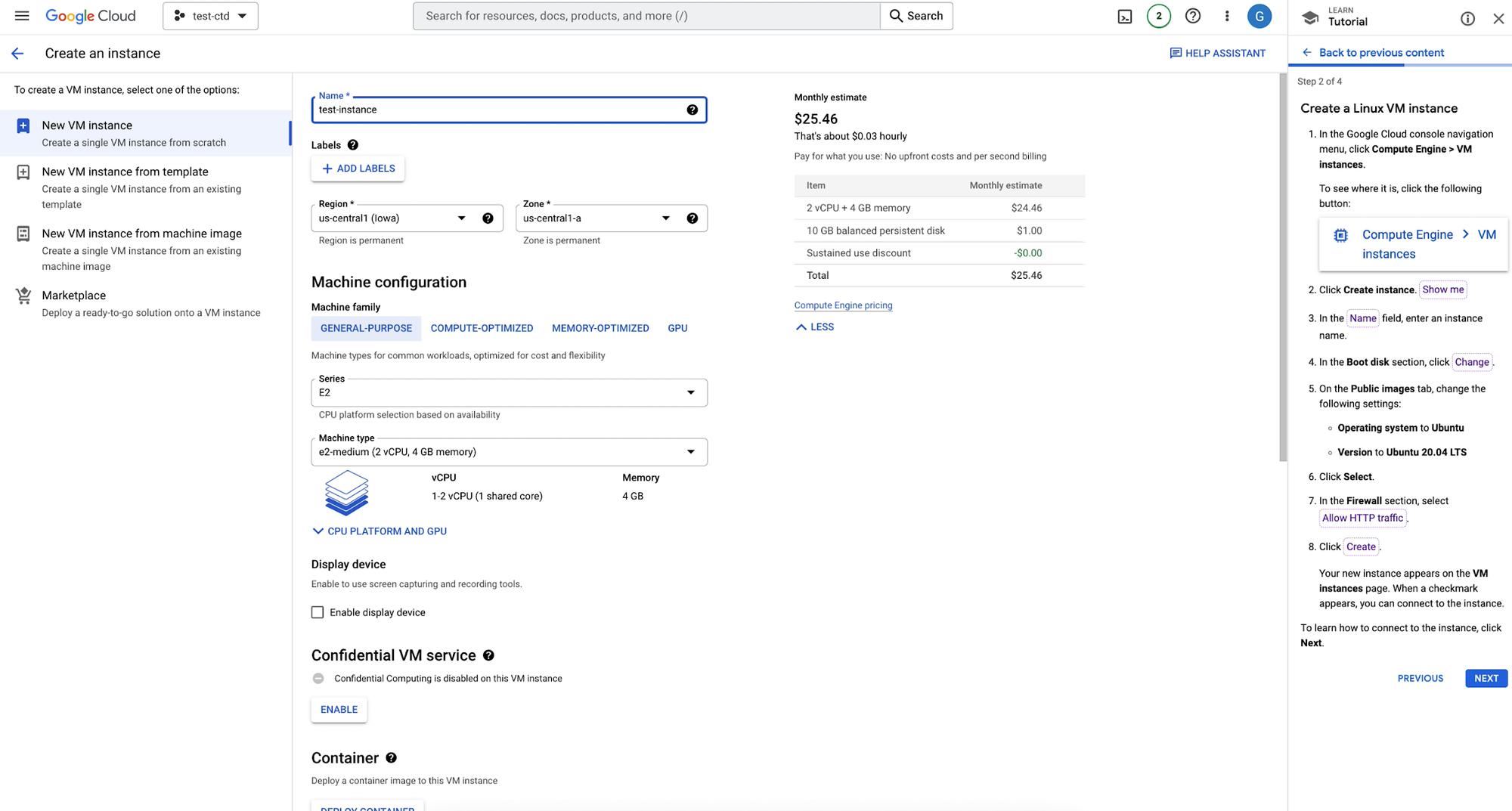
For the next instruction “Create Instance ”, we’ll use the spotlight feature and click on the highlighted show me button. Next we’ll enter an instance name, I’ll use the the name ‘test-instance’ 

Naming VM Instance

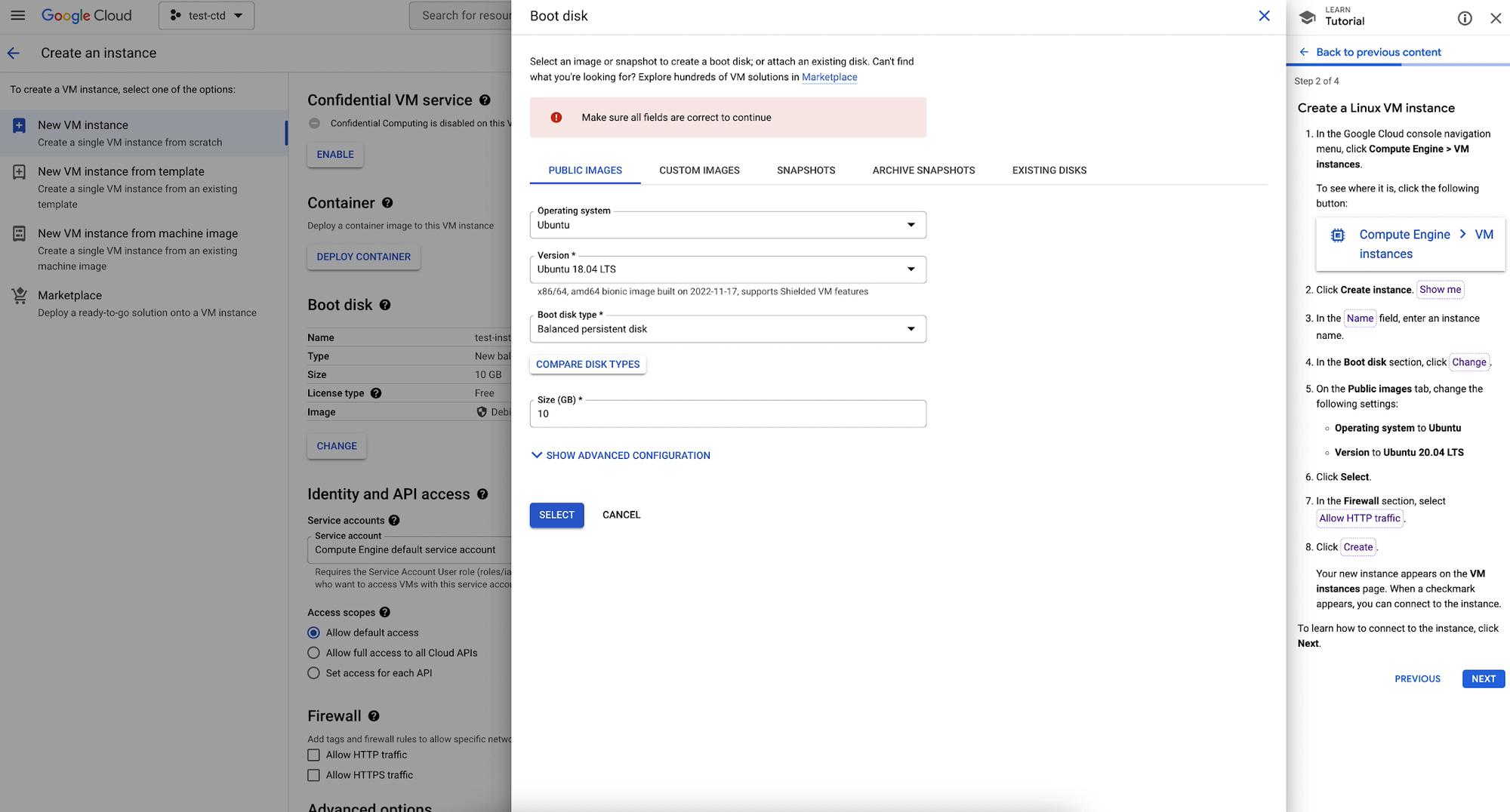
We’ll change the following setting on the Public Images tab, to the operating system listed in the tutorial which is Ubuntu 20.04 LTS and click the select button. 

Choose Operating System

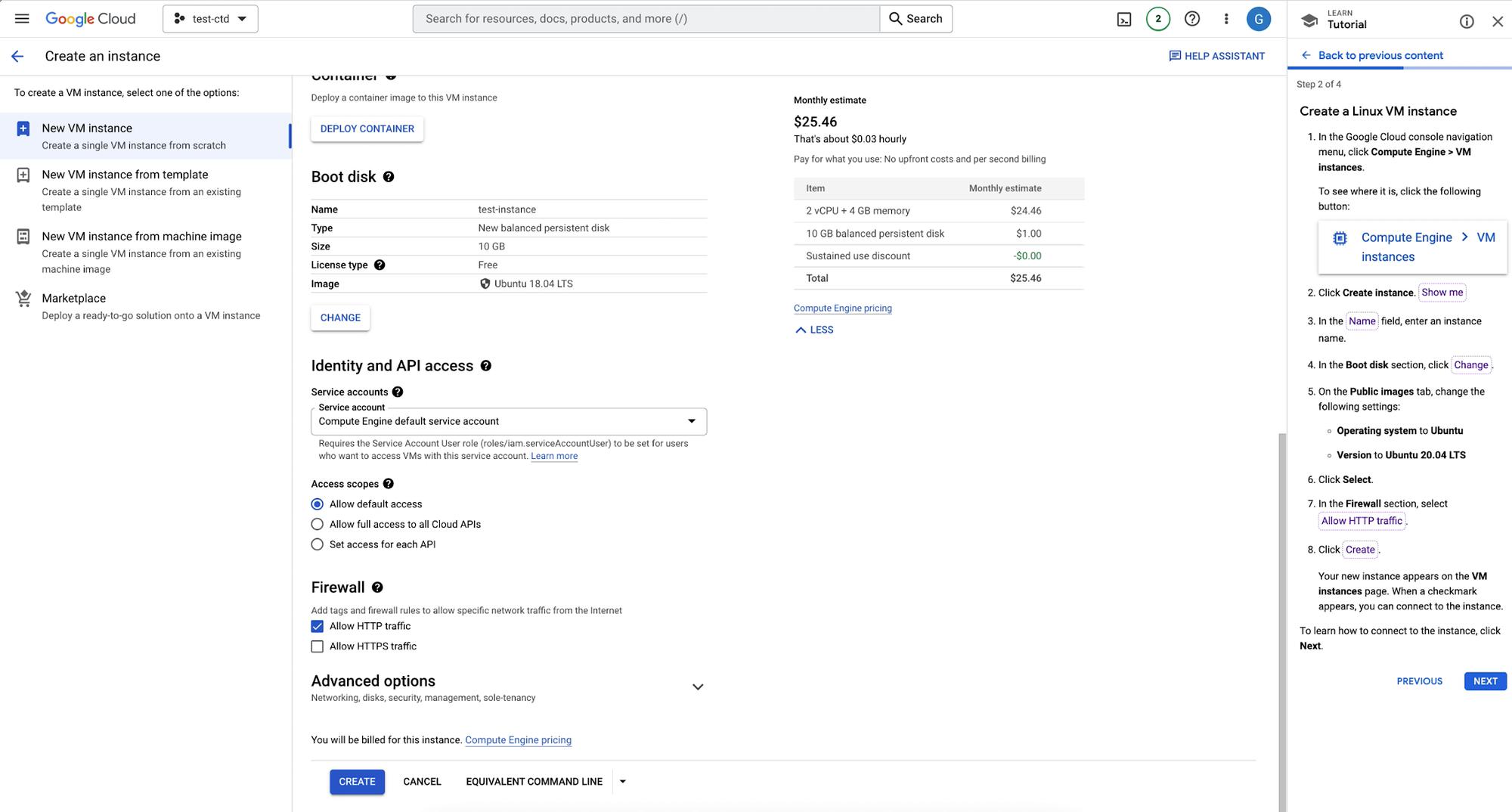
In the firewall section, we’ll tick the box Allow HTTP traffic and clicking createNow we see our new instance on the VM instances page. Let’s click next to move on to the next instructions 

Choose Firewall

Step 3

The third step is to Connect to the VM instance. To find the Connect column, we’ll use a spotlight to highlight SSH, by clicking it a new cmd dialog opens and shows that we are connected to the VM terminal!
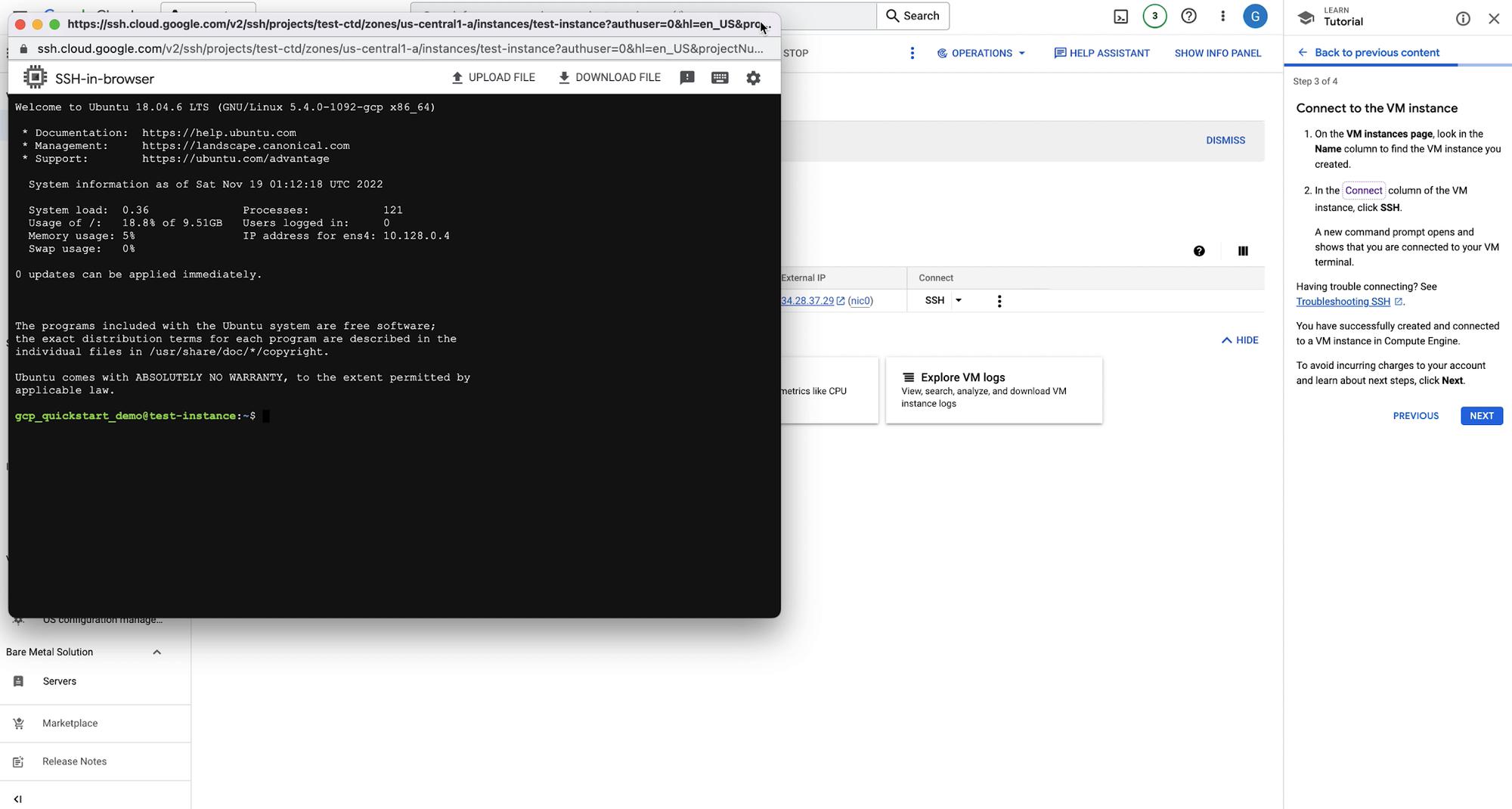
 

SSH into VM

Step 4

On the final panel you’ll see other interactive tutorials to learn more about Compute Engine. Finally you’ll see information to clean up the instances so you don’t incur additional charges. We can click FINISH to wrap up this tutorial.
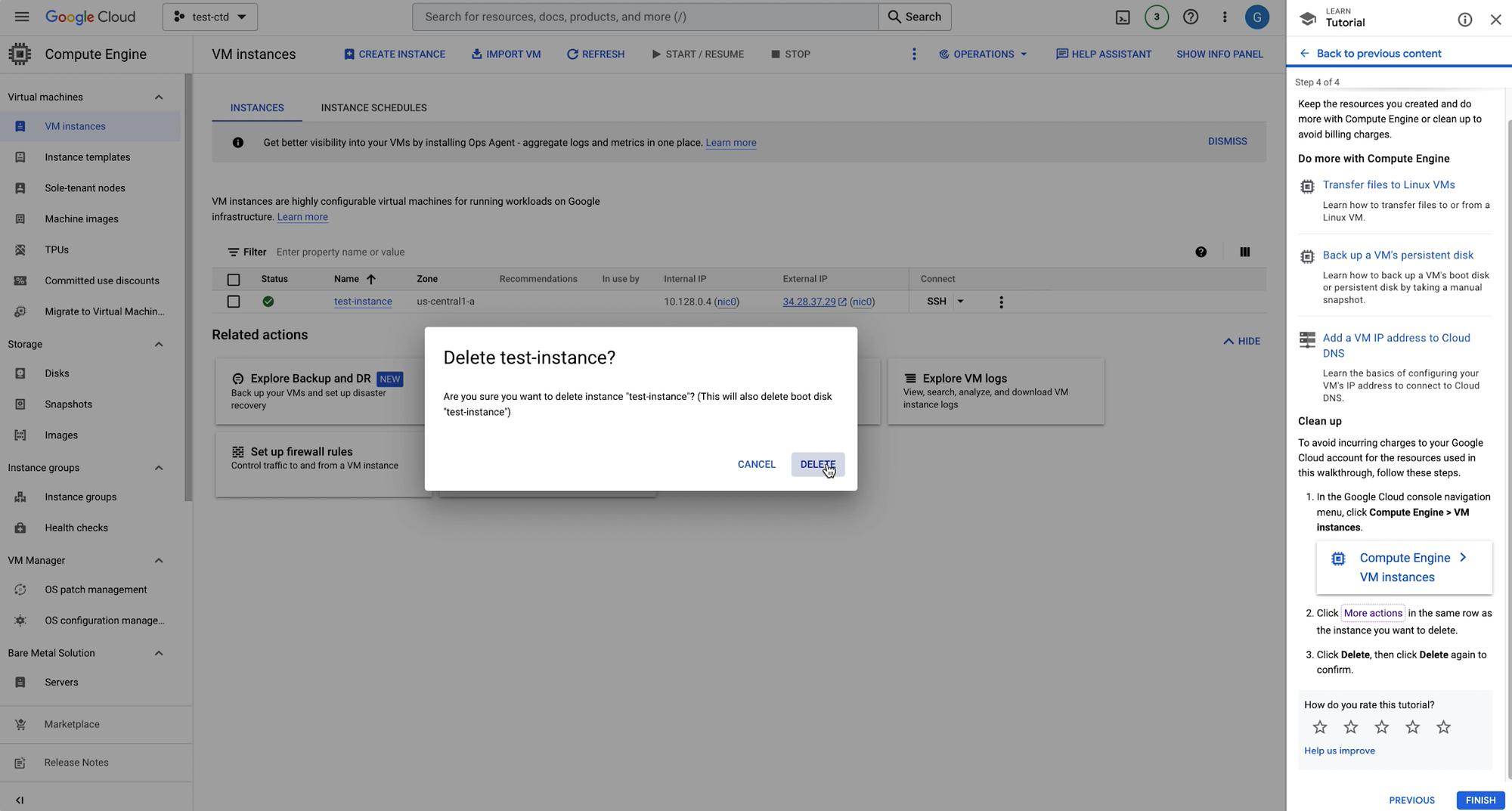
 

Delete VM Instance

Next Steps

There you have it! You’ve created a Linux VM Instance in Compute Engine with the help of interactive tutorials. If you’d like to follow another interactive tutorial, check out this Create a Windows Server VM instance in Compute Engine tutorial.


By: Bukola Ayodele (Developer Advocate)
Source: Google Cloud Blog


For enquiries, product placements, sponsorships, and collaborations, connect with us at [email protected]. We'd love to hear from you!

Our humans need coffee too! Your support is highly appreciated, thank you!

aster.cloud

Related Topics
  • Compute Engine
  • Google Cloud
  • Linux
  • Tutorial
You May Also Like
View Post
  • Computing
  • Multi-Cloud
  • Technology

Wiz: 80% of cloud breaches are caused by basic mistakes

  • April 13, 2026
View Post
  • Computing
  • Multi-Cloud
  • Technology

Contact center monitoring best practices for CX leaders

  • April 9, 2026
View Post
  • Computing
  • Multi-Cloud
  • Technology

Cloud vs. local backup: Which is right for your organization?

  • April 9, 2026
View Post
  • Computing
  • Multi-Cloud
  • Technology

Why channel partners must design for tech sovereignty

  • April 7, 2026
View Post
  • Computing
  • Multi-Cloud
  • Technology

“A lot of other cloud vendors have been let off the hook”: Oracle leans hard on one-size-fits-all appeal of OCI for enterprises

  • March 30, 2026
View Post
  • Computing
  • Technology

Google Cloud and NVIDIA expand AI innovation across industries at GTC 2026

  • March 17, 2026
View Post
  • Computing
  • Multi-Cloud
  • Technology

Last year in AWS with Corey Quinn

  • March 9, 2026
View Post
  • Computing
  • Multi-Cloud
  • Technology

A guide to contact center security best practices

  • March 6, 2026

Stay Connected!
LATEST
  • 1
    Expectations vs. Reality: The AI We Thought We’d Have in 10 Years
    • June 19, 2026
  • digital-nomad-freelancer-worker-2151205464 2
    One paperwork problem – Get your Digital Nomad Visa employment documents fast from UK, EU or Singapore
    • June 16, 2026
  • 3
    Samsung Art Store Brings Art Basel to Homes Worldwide With New Curated Collection
    • June 15, 2026
  • 4
    You Do Not Need to Invest in the IPO of SpaceX, Anthropic, and OpenAI
    • June 10, 2026
  • 5
    The consequences of relying on AI for accurate news
    • June 10, 2026
  • 6
    Connecting AI agents with unstructured data using Google Cloud Storage MCP Servers
    • June 10, 2026
  • 7
    WWDC26: Apple unveils next generation of Apple Intelligence, Siri AI, powerful parental controls, and an expansive set of software improvements
    • June 8, 2026
  • 8
    IBM and Google Cloud Announce Strategic Partnership to Scale AI with Human Expertise and AI‑Powered Delivery
    • June 4, 2026
  • Data center 9
    Data Sovereignty in Spain. It’s Not Just About the Law, It’s About Efficiency
    • June 3, 2026
  • 10
    Ink vs Pixels. What you miss versus what you are actually missing.
    • June 1, 2026
about
Hello World!

We are aster.cloud. We’re created by programmers for programmers.

Our site aims to provide guides, programming tips, reviews, and interesting materials for tech people and those who want to learn in general.

We would like to hear from you.

If you have any feedback, enquiries, or sponsorship request, kindly reach out to us at:

[email protected]
Most Popular
  • 1
    Banks race to patch new cyber vulnerabilities, and other cybersecurity news
    • May 25, 2026
  • pope-leo-xiv-cq5dam-1500.844 2
    Pope Leo XIV to Publish First Encyclical on Artificial Intelligence and Human Dignity on 25 May
    • May 22, 2026
  • 3
    Portfolio to Clients, and is Strengthened by Ongoing Project Glasswing Work
    • May 20, 2026
  • reMarkable Paper Pure 4
    Everything The reMarkable Paper Pure Actually Does
    • May 14, 2026
  • 5
    Scaling cloud and AI: Microsoft Azure’s commitment to Europe’s digital future
    • May 11, 2026
  • /
  • Technology
  • Tools
  • About
  • Contact Us

Input your search keywords and press Enter.