aster.cloud aster.cloud
  • /
  • Platforms
    • Public Cloud
    • On-Premise
    • Hybrid Cloud
    • Data
  • Architecture
    • Design
    • Solutions
    • Enterprise
  • Engineering
    • Automation
    • Software Engineering
    • Project Management
    • DevOps
  • Programming
    • Learning
  • Tools
  • About
  • /
  • Platforms
    • Public Cloud
    • On-Premise
    • Hybrid Cloud
    • Data
  • Architecture
    • Design
    • Solutions
    • Enterprise
  • Engineering
    • Automation
    • Software Engineering
    • Project Management
    • DevOps
  • Programming
    • Learning
  • Tools
  • About
aster.cloud aster.cloud
  • /
  • Platforms
    • Public Cloud
    • On-Premise
    • Hybrid Cloud
    • Data
  • Architecture
    • Design
    • Solutions
    • Enterprise
  • Engineering
    • Automation
    • Software Engineering
    • Project Management
    • DevOps
  • Programming
    • Learning
  • Tools
  • About
  • Engineering

How To Build And Push A Docker Image With Cloud Build

  • aster.cloud
  • January 8, 2023
  • 3 minute read
If you want to create a serverless service, you’ll want to check out Cloud Build.Cloud Build is a popular Google Cloud service that allows you to execute your builds on Google Cloud. Cloud Build can import source code from various repositories or cloud storage spaces, execute a build to your specifications, and produce artifacts such as Docker containers or Java archives. Cloud Build is serverless, which means it scales up and down with no infrastructure to set up, upgrade, or scale. In this blog post, we’ll learn how to build and push a Docker image with Cloud Build. If you want to follow along with this blog post, check out this tutorial.

Step 1

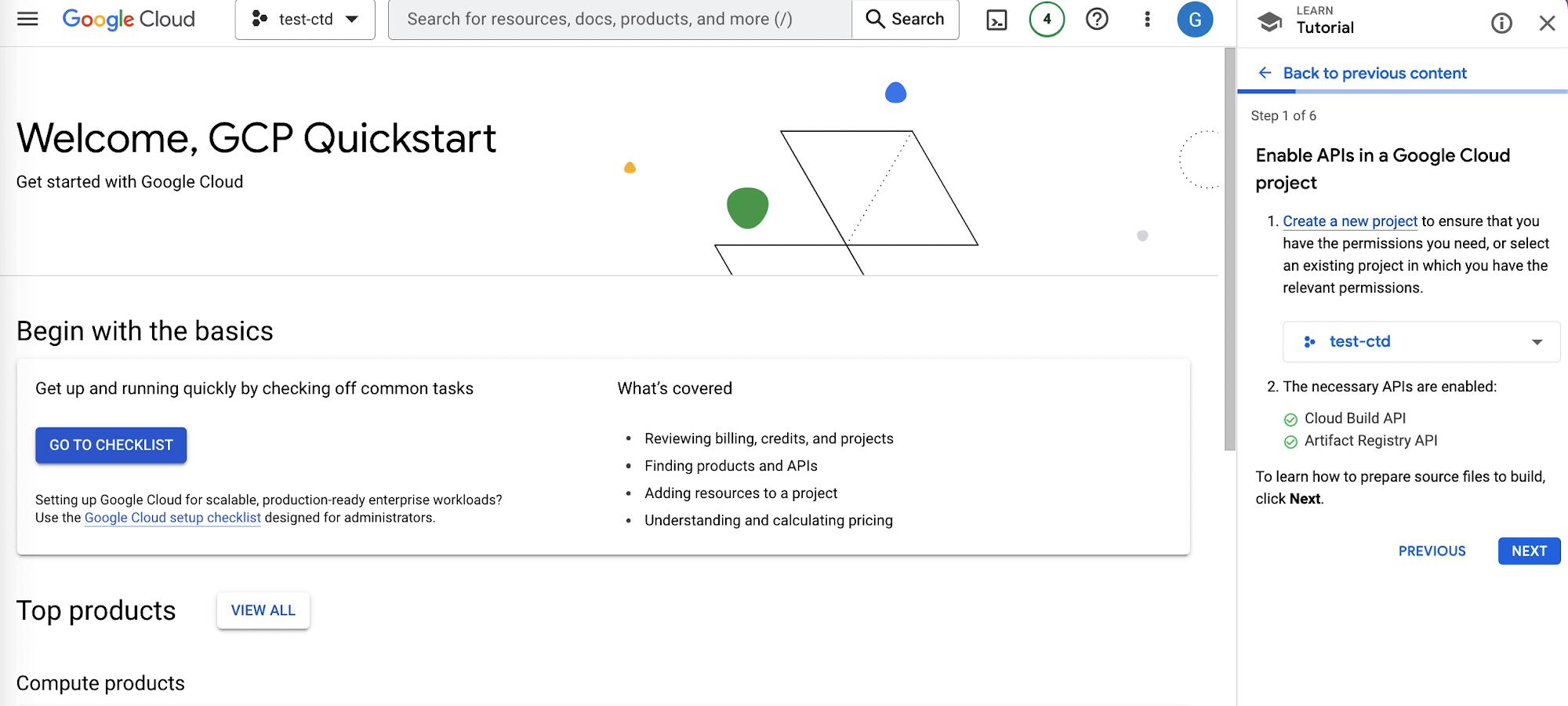
The first step is to create a new project, we’ll use an existing project called “test-ctd” and enable Google Cloud APIs like Cloud Build API, Artifact Registry API. If you have billing enabled and or are in your free trial mode you’ll be able to enable the necessary APIs.


Partner with aster.cloud
for your next big idea.
Let us know here.


From our partners:

CITI.IO :: Business. Institutions. Society. Global Political Economy.
CYBERPOGO.COM :: For the Arts, Sciences, and Technology.
DADAHACKS.COM :: Parenting For The Rest Of Us.
ZEDISTA.COM :: Entertainment. Sports. Culture. Escape.
TAKUMAKU.COM :: For The Hearth And Home.
ASTER.CLOUD :: From The Cloud And Beyond.
LIWAIWAI.COM :: Intelligence, Inside and Outside.
GLOBALCLOUDPLATFORMS.COM :: For The World's Computing Needs.
FIREGULAMAN.COM :: For The Fire In The Belly Of The Coder.
ASTERCASTER.COM :: Supra Astra. Beyond The Stars.
BARTDAY.COM :: Prosperity For Everyone.

Enable APIs In Google Cloud Project

Step 2

The second step is to prepare the source files. We’ll open the Cloud Shell, where we’ll be able to create a directory called “quickstart-docker” with the commands in the image below
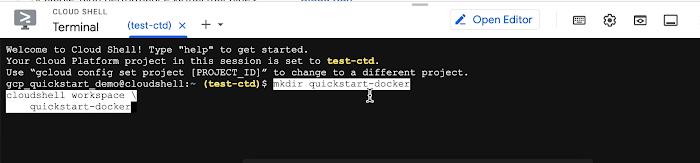
Create Quickstart Directory
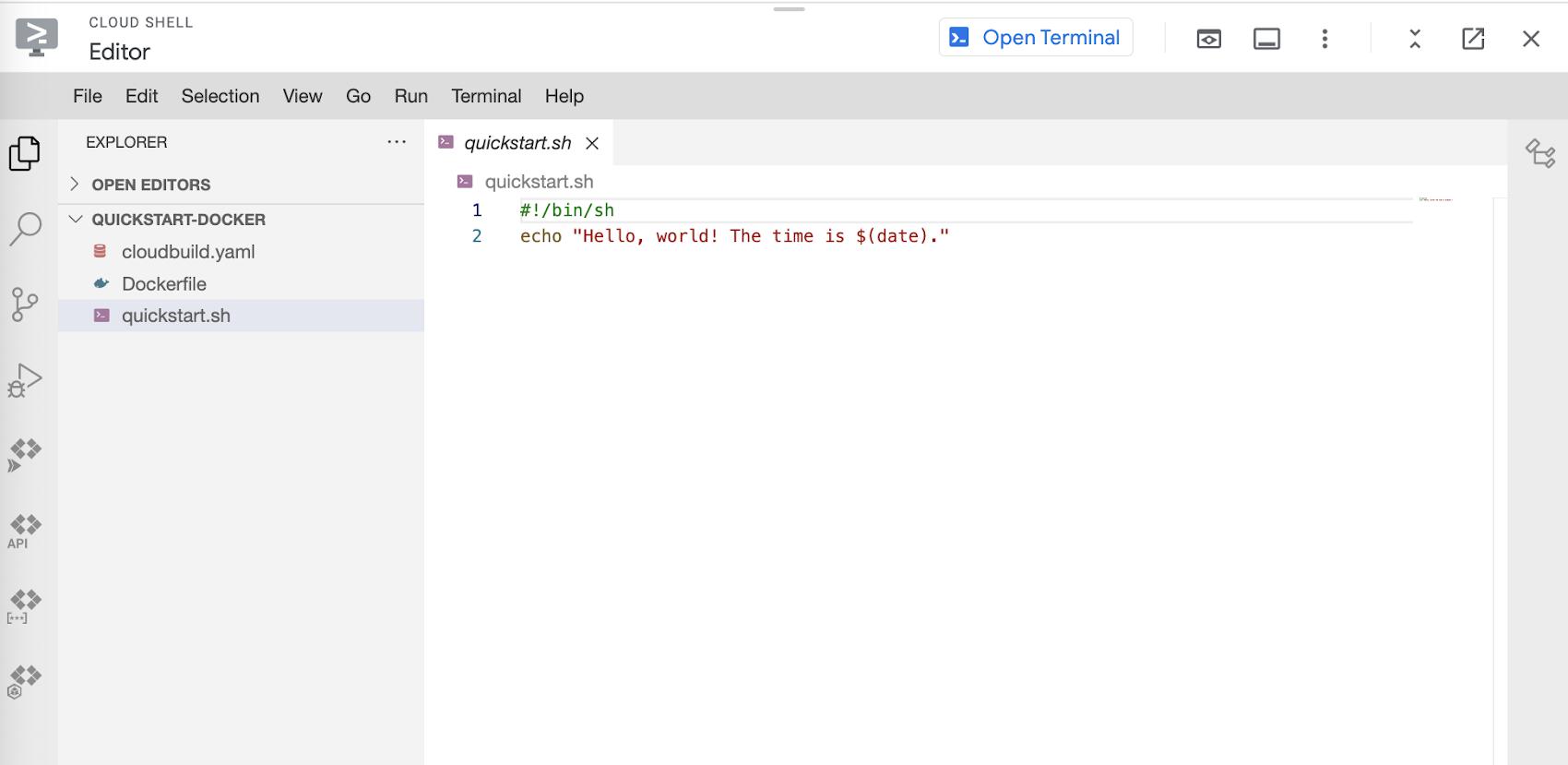
Running this command brings us to the Cloud Shell Editor, where we’ll create a file named quickstart.sh in the quickstart-docker folder we previously created. The file will hold a small command, which you’ll see in the image below. 

Creating Quickstart.sh File

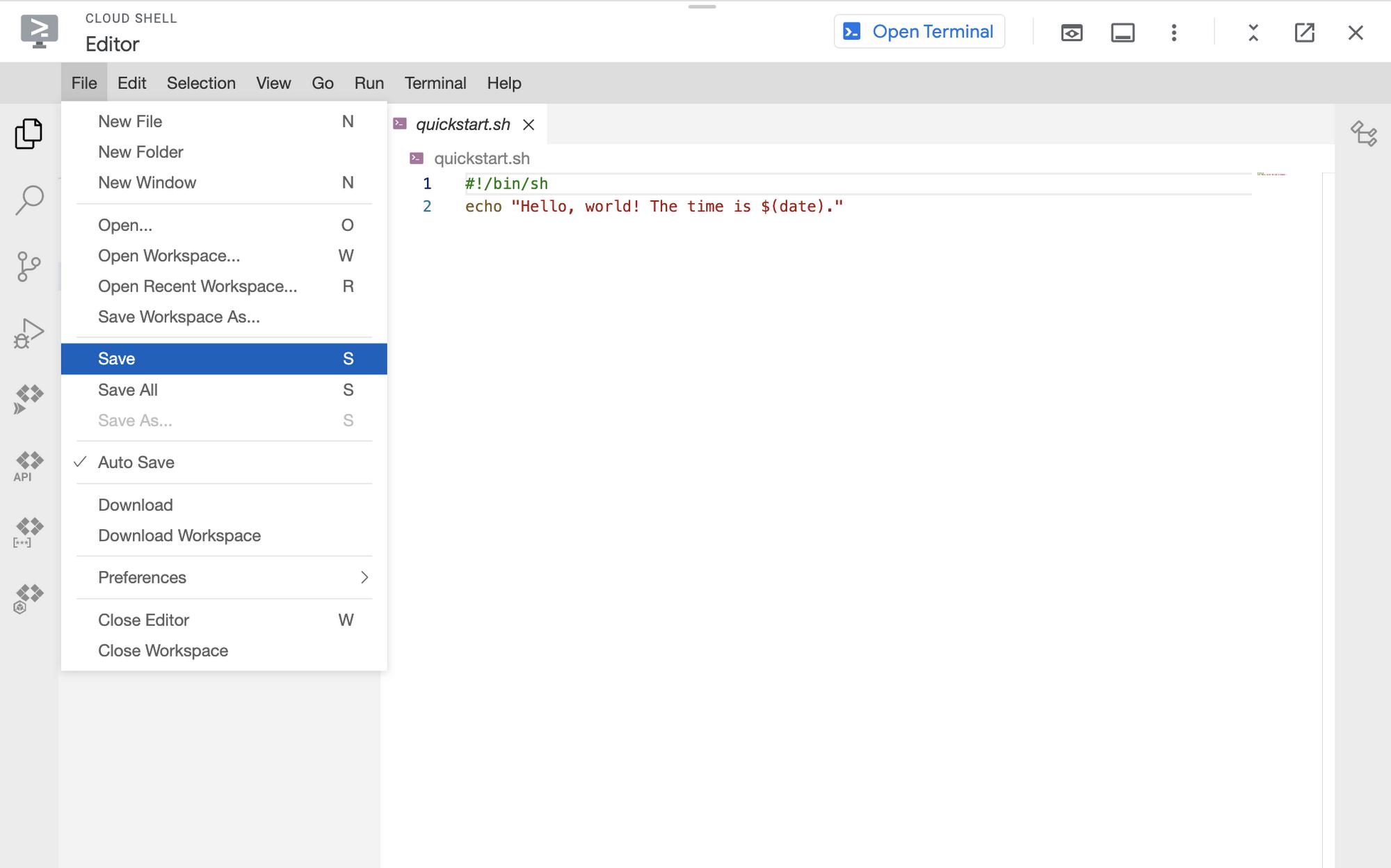
Make sure to save the file, by clicking File > Save in the top navigation bar. 

How To Save Quickstart.sh File

Read More  Speech AI Year In Review
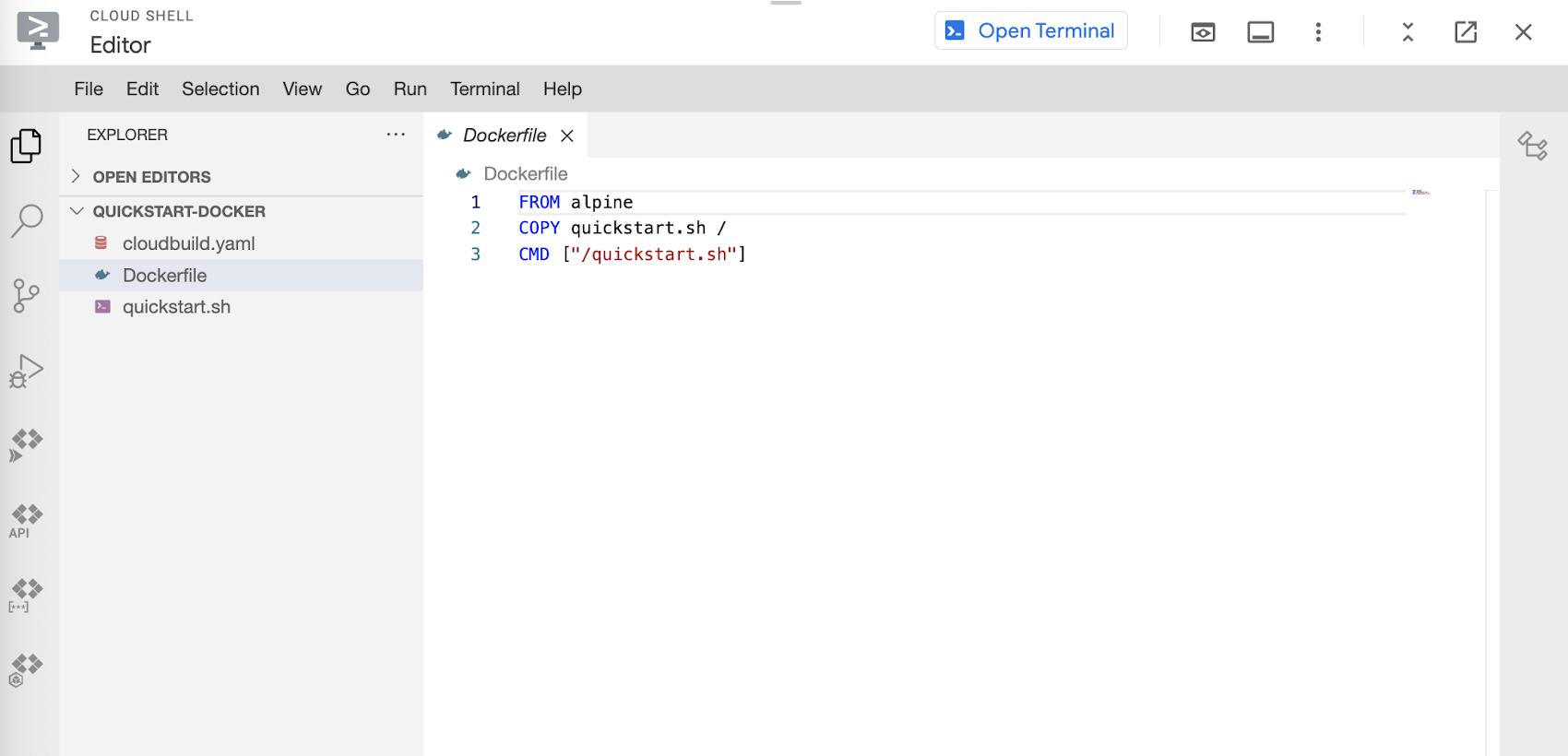
Next we’ll create the Dockerfile, which Cloud build will execute. In the dockerfile we’ll add a small script to run quickstart.sh. Make sure to save this file as well. 

Create Dockerfile

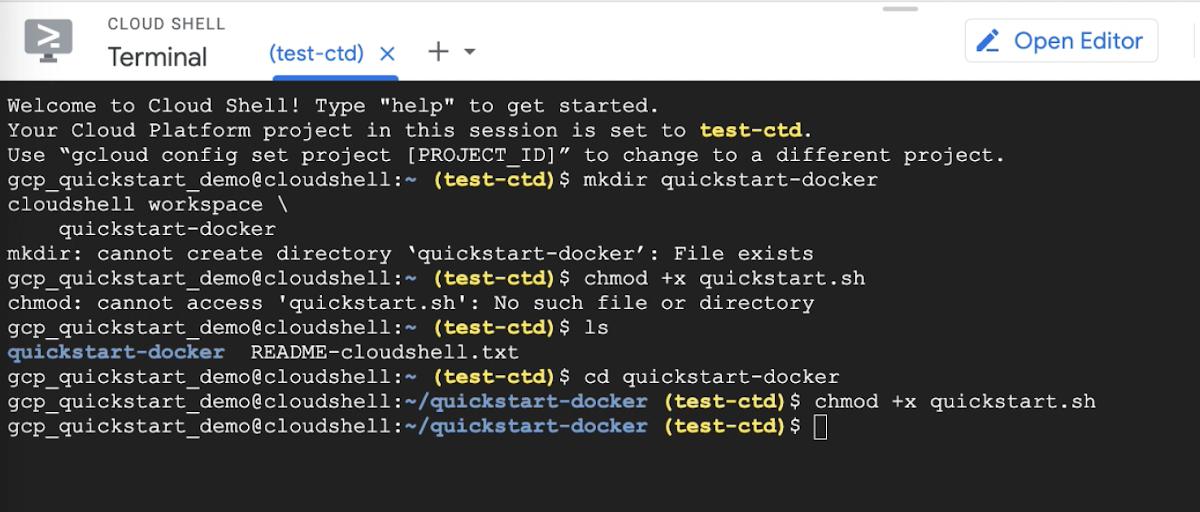
We’ll return to the terminal where we’ll run the command in the image below, to make quickstart.sh executable. 

Command To Quickstart.sh Executable

Step 3

We’ll move on to the third step, which is to create a new Docker repository in the repository in Artifact Registry.


We’ll start by creating a new Docker repo named quickstart-docker-repo in the location us-west2 with the description “Docker repository”. The command to run this action is depicted below
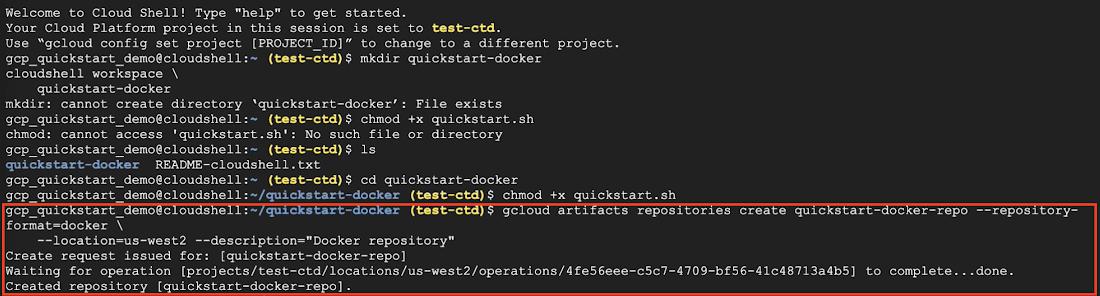
Add File To Artifact Registry
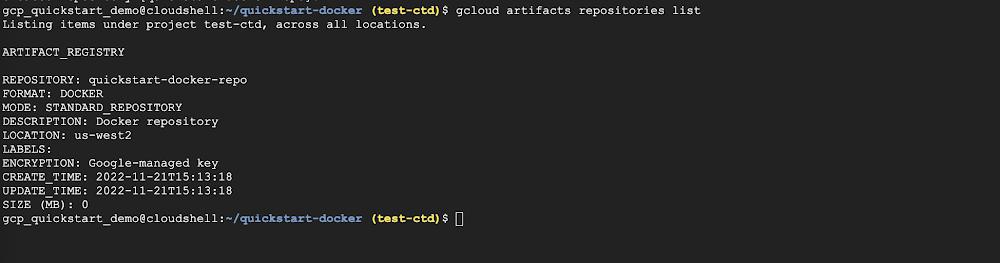
Next we’ll verify that the repository was created by running the command below. After running the command we see quickstart-docker repo is in the Artifact Registry. 

Check Files in Artifact Registry

Step 4

Next we’ll navigate to Cloud Build > History to see the build we executed. If you click on the particular build you’ll be able to see the details of the build summary like the build log, execution details, and build artifacts.
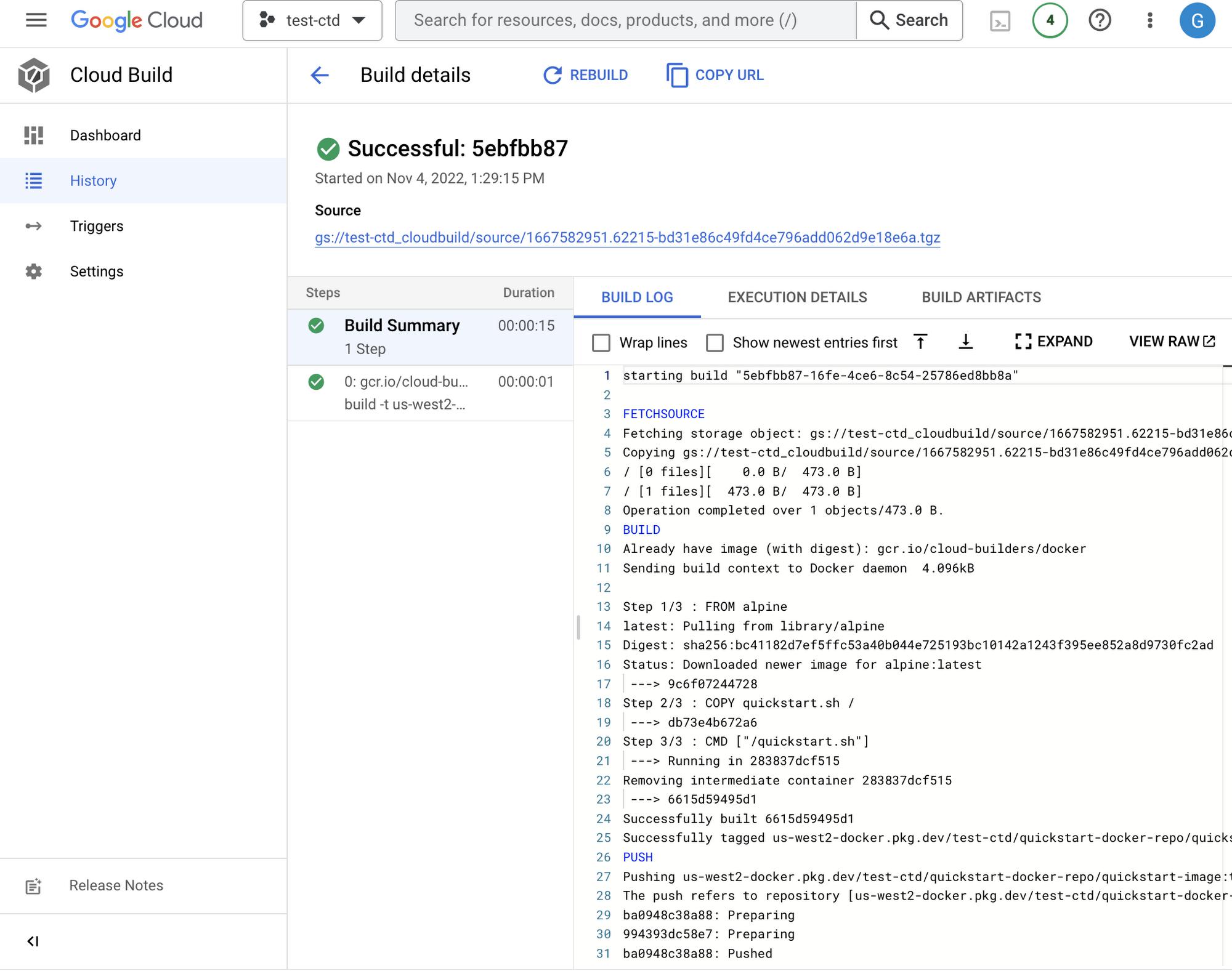
Build History

Step 5

For the final step, we will delete the resources created to prevent incurring charges. Go back to the navigation bar and visit Artifact Registry Next we’ll select our recently created quickstart-docker-repo and click DELETE.
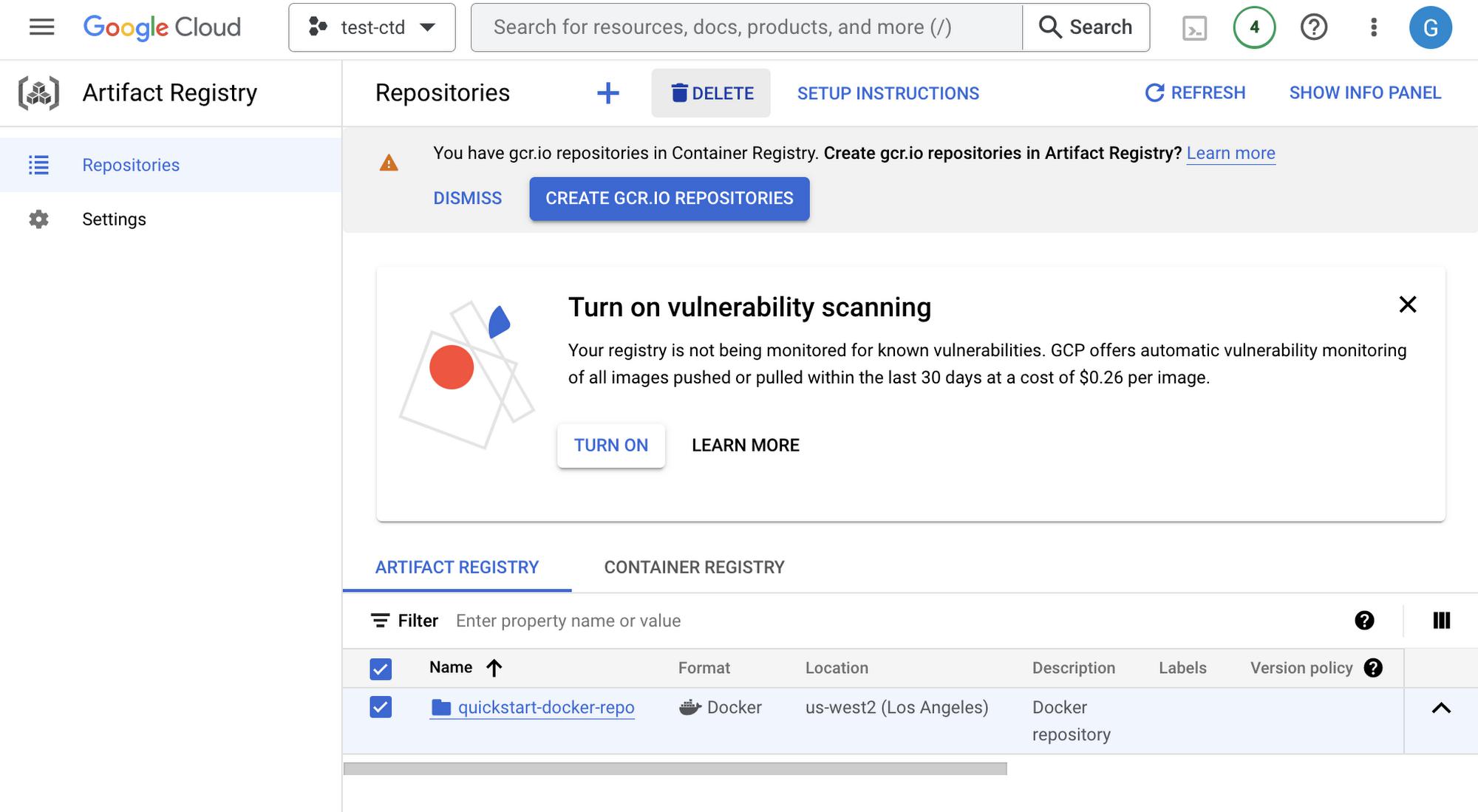
Delete Resource

In Conclusion

There you have it! Now you’ve learned how easy it is to build and push a Docker image with Cloud Build. If you’d like to follow another Google Cloud tutorial visit this blog post.

Read More  Find Logs Fast With New “tail -f” Functionality In Cloud Logging


By: Bukola Ayodele (Developer Advocate)
Source: Google Cloud Blog


For enquiries, product placements, sponsorships, and collaborations, connect with us at [email protected]. We'd love to hear from you!

Our humans need coffee too! Your support is highly appreciated, thank you!

aster.cloud

Related Topics
  • Cloud Build
  • Docker
  • Google Cloud
  • Serverless
  • Tutorials
You May Also Like
Points, Lines and a Question
View Post
  • Architecture
  • Design
  • Engineering
  • People

What Is The Point In Making Points?

  • November 26, 2025
View Post
  • Engineering
  • Software Engineering

Development gets better with Age

  • October 9, 2025
View Post
  • Engineering
  • Technology

Apple supercharges its tools and technologies for developers to foster creativity, innovation, and design

  • June 9, 2025
View Post
  • Engineering

Just make it scale: An Aurora DSQL story

  • May 29, 2025
View Post
  • Engineering
  • Technology

Guide: Our top four AI Hypercomputer use cases, reference architectures and tutorials

  • March 9, 2025
View Post
  • Computing
  • Engineering

Why a decades old architecture decision is impeding the power of AI computing

  • February 19, 2025
View Post
  • Engineering
  • Software Engineering

This Month in Julia World

  • January 17, 2025
View Post
  • Engineering
  • Software Engineering

Google Summer of Code 2025 is here!

  • January 17, 2025

Stay Connected!
LATEST
  • 1
    Expectations vs. Reality: The AI We Thought We’d Have in 10 Years
    • June 19, 2026
  • digital-nomad-freelancer-worker-2151205464 2
    One paperwork problem – Get your Digital Nomad Visa employment documents fast from UK, EU or Singapore
    • June 16, 2026
  • 3
    Samsung Art Store Brings Art Basel to Homes Worldwide With New Curated Collection
    • June 15, 2026
  • 4
    You Do Not Need to Invest in the IPO of SpaceX, Anthropic, and OpenAI
    • June 10, 2026
  • 5
    The consequences of relying on AI for accurate news
    • June 10, 2026
  • 6
    Connecting AI agents with unstructured data using Google Cloud Storage MCP Servers
    • June 10, 2026
  • 7
    WWDC26: Apple unveils next generation of Apple Intelligence, Siri AI, powerful parental controls, and an expansive set of software improvements
    • June 8, 2026
  • 8
    IBM and Google Cloud Announce Strategic Partnership to Scale AI with Human Expertise and AI‑Powered Delivery
    • June 4, 2026
  • Data center 9
    Data Sovereignty in Spain. It’s Not Just About the Law, It’s About Efficiency
    • June 3, 2026
  • 10
    Ink vs Pixels. What you miss versus what you are actually missing.
    • June 1, 2026
about
Hello World!

We are aster.cloud. We’re created by programmers for programmers.

Our site aims to provide guides, programming tips, reviews, and interesting materials for tech people and those who want to learn in general.

We would like to hear from you.

If you have any feedback, enquiries, or sponsorship request, kindly reach out to us at:

[email protected]
Most Popular
  • 1
    Banks race to patch new cyber vulnerabilities, and other cybersecurity news
    • May 25, 2026
  • pope-leo-xiv-cq5dam-1500.844 2
    Pope Leo XIV to Publish First Encyclical on Artificial Intelligence and Human Dignity on 25 May
    • May 22, 2026
  • 3
    Portfolio to Clients, and is Strengthened by Ongoing Project Glasswing Work
    • May 20, 2026
  • reMarkable Paper Pure 4
    Everything The reMarkable Paper Pure Actually Does
    • May 14, 2026
  • 5
    Scaling cloud and AI: Microsoft Azure’s commitment to Europe’s digital future
    • May 11, 2026
  • /
  • Technology
  • Tools
  • About
  • Contact Us

Input your search keywords and press Enter.