aster.cloud aster.cloud
  • /
  • Platforms
    • Public Cloud
    • On-Premise
    • Hybrid Cloud
    • Data
  • Architecture
    • Design
    • Solutions
    • Enterprise
  • Engineering
    • Automation
    • Software Engineering
    • Project Management
    • DevOps
  • Programming
    • Learning
  • Tools
  • About
  • /
  • Platforms
    • Public Cloud
    • On-Premise
    • Hybrid Cloud
    • Data
  • Architecture
    • Design
    • Solutions
    • Enterprise
  • Engineering
    • Automation
    • Software Engineering
    • Project Management
    • DevOps
  • Programming
    • Learning
  • Tools
  • About
aster.cloud aster.cloud
  • /
  • Platforms
    • Public Cloud
    • On-Premise
    • Hybrid Cloud
    • Data
  • Architecture
    • Design
    • Solutions
    • Enterprise
  • Engineering
    • Automation
    • Software Engineering
    • Project Management
    • DevOps
  • Programming
    • Learning
  • Tools
  • About
  • Technology

Switch From ICloud To Nextcloud

  • aster.cloud
  • March 14, 2023
  • 3 minute read

Image by: Opensource.com

Nextcloud is your very own open source cloud. Here’s how to make the switch.


Partner with aster.cloud
for your next big idea.
Let us know here.


From our partners:

CITI.IO :: Business. Institutions. Society. Global Political Economy.
CYBERPOGO.COM :: For the Arts, Sciences, and Technology.
DADAHACKS.COM :: Parenting For The Rest Of Us.
ZEDISTA.COM :: Entertainment. Sports. Culture. Escape.
TAKUMAKU.COM :: For The Hearth And Home.
ASTER.CLOUD :: From The Cloud And Beyond.
LIWAIWAI.COM :: Intelligence, Inside and Outside.
GLOBALCLOUDPLATFORMS.COM :: For The World's Computing Needs.
FIREGULAMAN.COM :: For The Fire In The Belly Of The Coder.
ASTERCASTER.COM :: Supra Astra. Beyond The Stars.
BARTDAY.COM :: Prosperity For Everyone.

If you’re wary of committing your data to cloud services controlled by a corporation but love the convenience of remote storage and easy web-based access, you’re not alone. The cloud is popular because of what it can do. But the cloud doesn’t have to be closed. Luckily, the open source Nextcloud project provides a personal and private cloud application suite.

It’s easy to install and import data—including contacts, calendars, and photos. The real trick is getting your data from cloud providers like iCloud. In this article, I demonstrate the steps you need to take to migrate your digital life to Nextcloud.

Migrate your data to Nextcloud

As with Android devices, first you must transfer existing data from Apple’s iCloud to Nextcloud. Then you can set up two new accounts for your Apple devices to fully automatically synchronize address books and appointments. Apple supports CalDAV for calendars and CardDAV for contacts, so you don’t even need to install an extra app.

To export your address book, you can either open the Contacts app on your iPhone/iPad or log into iCloud in your web browser:

  1. Select all address book entries you want to transfer to Nextcloud and choose File > Export > Export vCard to save a .vcf file on your local disk.
  2. Import the .vcf file into Nextcloud. To do this, select the Contacts app, click Settings at the bottom left and select the Import contacts button. In the following dialogue window, click Select local file, and open the previously saved vCard.
Read More  New LF Climate Finance Foundation To Host Open Source Initiative To Address Climate Risk And Opportunity In Financial Sector

To set up a CardDAV account on your iPhone or iPad, go to Settings > Contacts > Accounts > Add Account:

  1. Select Other and then Add CardDAV account. In the Server field, enter the URL of Nextcloud (for example, https://nextcloudpi.local). Below this is space for the username and password of the Nextcloud account. Open the Advanced Settings for the new account.
  2. Ensure the Use SSL option is enabled. The account URL is usually set correctly. It contains, amongst other things, the host name of your Nextcloud and your user name.

To create a new account on macOS for synchronizing address books, open the Contacts app and select Add Account from the Contacts menu. Activate the checkbox Other Contacts Account and click on Continue. You can accept the CardDAV entry. In the Account Type drop-down menu, select Manual entry.
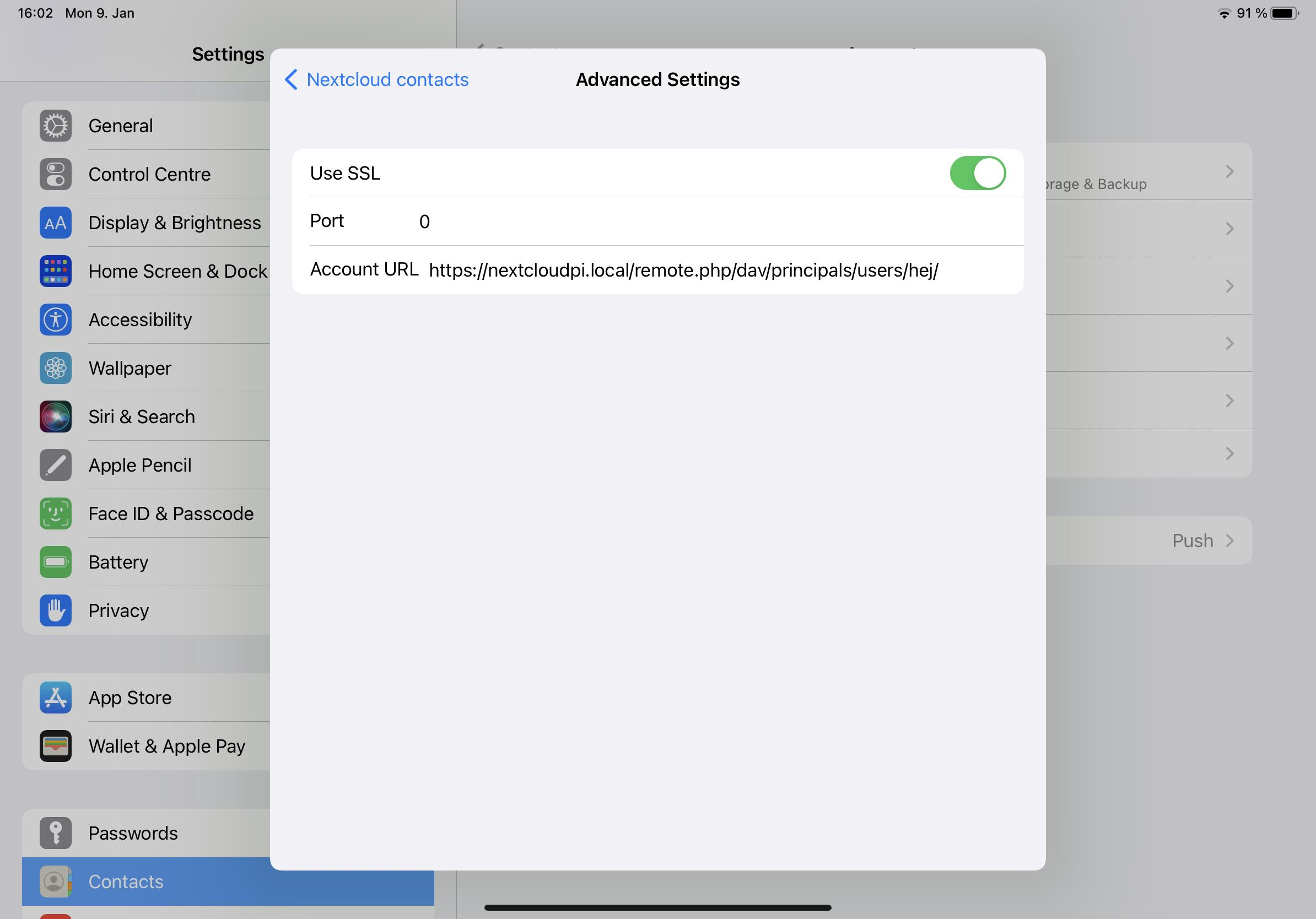
Image of advanced settings in Nextcloud.
(Heike Jurzik, CC BY-SA 4.0)

Enter your Nextcloud user name, password, and server address. The current macOS version requires you to specify port 443 (for SSL) in the server address. For example, if the address of your Nextcloud is https://nextcloudpi.local and the username is hej, then enter the following in the field:

https://nextcloudpi.local:443/remote.php/dav/principals/users/hej

Syncing your calendars

Exporting your calendars works similarly. Through the Calendar app, you can do this with iCloud in the browser, on your smartphone/tablet, or the macOS desktop.

First, set the calendar to public. This doesn’t mean that everyone can access your calendar. It’s only used to generate a link for the calendar subscription. Copy the URL to the clipboard. It’s not yet possible to import the calendar directly into Nextcloud because you don’t need a link for this, but an .ics file (iCalendar). Here is how to generate such a file from the link:

  1. Copy the link to the clipboard
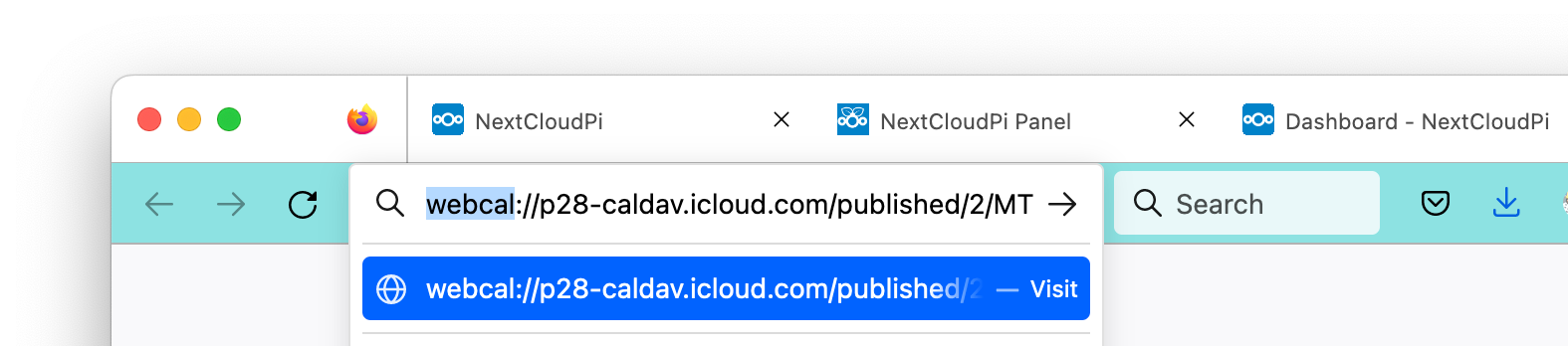
  2. Paste the link into the address bar of a web browser
  3. Change the beginning of the URL and replace webcal with http
  4. Press Enter and save the .ics file on your disk
Read More  Learning How To Learn
Image showing how to save the .ics file on your disk.
(Heike Jurzik, CC BY-SA 4.0)

You can now import the .ics file. To do this, open the Calendar app in Nextcloud, click Calendar settings at the bottom left and then Import calendar. Select the .ics file you saved in the file manager.

Repeat this process for all iCloud calendars. After that, it’s time to replace the old iCloud synchronization service.

Synchronizing events

To synchronize new events with Nextcloud, set up a new account on your client devices (smartphone, tablet, desktop):

  • iPhone/iPad: Settings / Calendar / Accounts / Add Account, select Other and then choose Add CalDAV Account. In the Server field, enter your local Nextcloud URL, which is https://nextcloudpi.local. You can see a space for the username and password of the Nextcloud account.
  • macOS: Open the Calendar app and select Add Account from the Calendar menu. Activate the checkbox Other CalDAV Account and click Continue. From the Account Type drop-down menu, select Manual entry. Enter your Nextcloud username and password as well as the Nextcloud server address. Don’t forget to specify the port 443 (for SSL) in the server address; otherwise the account setup will fail.

Tip: If you want to synchronize other files like documents, photos, videos, and so on, in addition to your contacts and calendars, you can install the Nextcloud app offered in the App Store.


This article has been adapted from Heike Jurzik’s book, Nextcloud on the Raspberry Pi.

By: Heike Jurzik
Originally published at Opensource

Source: Cyberpogo


For enquiries, product placements, sponsorships, and collaborations, connect with us at [email protected]. We'd love to hear from you!

Our humans need coffee too! Your support is highly appreciated, thank you!

aster.cloud

Related Topics
  • Apple
  • iCloud
  • Nextcloud
  • Open Source
  • Tutorial
You May Also Like
View Post
  • Gears
  • Technology

Samsung Art Store Brings Art Basel to Homes Worldwide With New Curated Collection

  • June 15, 2026
View Post
  • Technology

The consequences of relying on AI for accurate news

  • June 10, 2026
View Post
  • Gears
  • Technology

WWDC26: Apple unveils next generation of Apple Intelligence, Siri AI, powerful parental controls, and an expansive set of software improvements

  • June 8, 2026
View Post
  • Technology

IBM and Google Cloud Announce Strategic Partnership to Scale AI with Human Expertise and AI‑Powered Delivery

  • June 4, 2026
View Post
  • Technology

Banks race to patch new cyber vulnerabilities, and other cybersecurity news

  • May 25, 2026
pope-leo-xiv-cq5dam-1500.844
View Post
  • Technology

Pope Leo XIV to Publish First Encyclical on Artificial Intelligence and Human Dignity on 25 May

  • May 22, 2026
View Post
  • Technology

Portfolio to Clients, and is Strengthened by Ongoing Project Glasswing Work

  • May 20, 2026
reMarkable Paper Pure
View Post
  • Gears
  • Technology

Everything The reMarkable Paper Pure Actually Does

  • May 14, 2026

Stay Connected!
LATEST
  • 1
    Expectations vs. Reality: The AI We Thought We’d Have in 10 Years
    • June 19, 2026
  • digital-nomad-freelancer-worker-2151205464 2
    One paperwork problem – Get your Digital Nomad Visa employment documents fast from UK, EU or Singapore
    • June 16, 2026
  • 3
    Samsung Art Store Brings Art Basel to Homes Worldwide With New Curated Collection
    • June 15, 2026
  • 4
    You Do Not Need to Invest in the IPO of SpaceX, Anthropic, and OpenAI
    • June 10, 2026
  • 5
    The consequences of relying on AI for accurate news
    • June 10, 2026
  • 6
    Connecting AI agents with unstructured data using Google Cloud Storage MCP Servers
    • June 10, 2026
  • 7
    WWDC26: Apple unveils next generation of Apple Intelligence, Siri AI, powerful parental controls, and an expansive set of software improvements
    • June 8, 2026
  • 8
    IBM and Google Cloud Announce Strategic Partnership to Scale AI with Human Expertise and AI‑Powered Delivery
    • June 4, 2026
  • Data center 9
    Data Sovereignty in Spain. It’s Not Just About the Law, It’s About Efficiency
    • June 3, 2026
  • 10
    Ink vs Pixels. What you miss versus what you are actually missing.
    • June 1, 2026
about
Hello World!

We are aster.cloud. We’re created by programmers for programmers.

Our site aims to provide guides, programming tips, reviews, and interesting materials for tech people and those who want to learn in general.

We would like to hear from you.

If you have any feedback, enquiries, or sponsorship request, kindly reach out to us at:

[email protected]
Most Popular
  • 1
    Banks race to patch new cyber vulnerabilities, and other cybersecurity news
    • May 25, 2026
  • pope-leo-xiv-cq5dam-1500.844 2
    Pope Leo XIV to Publish First Encyclical on Artificial Intelligence and Human Dignity on 25 May
    • May 22, 2026
  • 3
    Portfolio to Clients, and is Strengthened by Ongoing Project Glasswing Work
    • May 20, 2026
  • reMarkable Paper Pure 4
    Everything The reMarkable Paper Pure Actually Does
    • May 14, 2026
  • 5
    Scaling cloud and AI: Microsoft Azure’s commitment to Europe’s digital future
    • May 11, 2026
  • /
  • Technology
  • Tools
  • About
  • Contact Us

Input your search keywords and press Enter.