We are excited to announce the public preview of search indexes and related SQL SEARCH functions in BigQuery. This is a new capability in BigQuery that allows you to use standard BigQuery SQL to easily find unique data elements buried in unstructured text and semi-structured JSON, without having to know the table schemas in advance. By making row lookups in BigQuery efficient, you now have a powerful columnar store and text search in a single data platform. This allows for performance and cost gains when you need to find rows of data instead of an aggregation. For example, identifying the rows of data associated with a user for GDPR reporting or finding specific error codes in a text payload. These search indexes are fully serverless and fully managed by BigQuery. As soon as data is available in BigQuery, it will be retrievable with the SEARCH functions.

Let’s look at some other examples of when to use search functions and indexes in BigQuery.
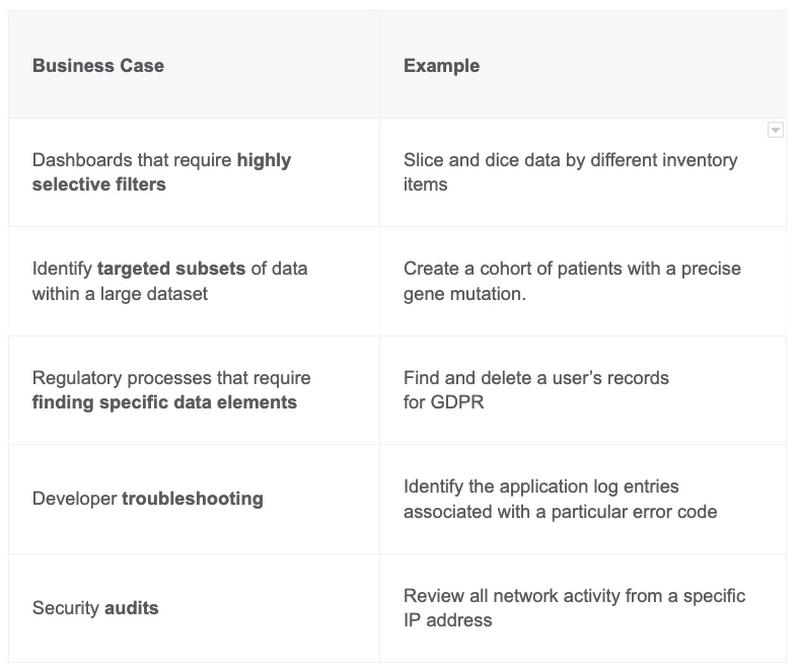

With BigQuery’s ability to search within text and avoid triggering heavy table scans, our partners have already started exploring new applications they can provide their customers.
One such partner is Exabeam, a cybersecurity leader, who provides their customers with a modern security analytics platform that powers teams with analytics-driven insights to uncover, investigate and resolve threats outdated tools miss. With BigQuery features like search that support different types of query patterns from within the same data platform, they are able to use BigQuery for a variety of storage types (hot, warm, and detection). Sanjay Chaudhary, VP of Products at Exabeam explains that, “We are able to ingest data from over 500 security vendors, convert unstructured data into security events, and create a common platform to store them in a cost effective way. The scale and power of Google’s data cloud enables our customers to search multi-year data and detect threats in seconds.”
Other BigQuery customers have unlocked ways of modernizing existing security analytics tools. Mach5 offers their customers a new way to run OpenSearch by leveraging BigQuery as a backend data store that provides OpenSearch dashboards and API compatibility but with BigQuery scale and a lower TCO. “Traditional search systems designed for pre-cloud architectures are no longer maintainable or economical at scale. Mach5 modernizes search-based analytics for the cloud leveraging BigQuery’s capabilities.” says Vinayak Borkar, CEO of Mach5.
How search in BigQuery works
Search indexes are a reverse index that sits alongside your primary BigQuery data that accelerates point lookups (i.e. find a needle in a haystack of data). This is because search indexes give BigQuery insight into where the specific elements of data are located in the table’s underlying storage. Since the data goes through a tokenization process, it allows more flexibility than SQL when it comes to text searching nuances like case sensitivity.
Let’s take a closer look at some benefits offered by this feature and how it works.
- Search at scale – petabyte scale to store all real-time and historical logs: For security analytics, threats are no longer system specific and are coming from on-prem, multiple clouds, and Kubernetes. For example, if a hacker got into GCP, they probably got into other components of your solution too and you want to review and track that in one location. Users need a central location to store their data. With BigQuery, you have limitless scalability and ultra fast query performance. Users can even search across multiple columns at once and don’t need to worry about where the element they are looking for is stored.
- No new pricing models – pay only for the index storage required: BigQuery provides a cost effective solution. We only charge for extra storage required for the index but all maintenance costs are free. When used effectively, queries scan significantly less data which results in cost savings. Let’s walk through an example. Say you have to remove all data for user ‘Bob’ who appears in only 10 records of your petabyte of data for GDPR compliance. Historically, you would need to scan that entire table and pay for that processing which could be several terabytes in size. Aftering adding indexes to your BigQuery table, only the subset of rows that contain the data are touched leading to significantly less cost.
- Fully managed – no manual maintenance required: Like other BigQuery features, search indexes are fully managed. This means once you create the index, BigQuery handles the rest in the background alleviating costly maintenance. In addition, all incremental changes to the data are automatically refreshed and results are always accurate and up to date.
- JSON Integration – search over semi-structured data. Security logs have variable schemas, types, and come from multiple sources making the data unpredictable. Companies can now have the flexibility of storing their data as JSON but with the ease-of-use of SQL for their queries. This eliminates the need for complex pipelines to transform and maintain data saving cost and resources.
Using search to improve log analytics on BigQuery
These search capabilities are one of many ways that customers are improving their log analytics capabilities in BigQuery. Due to the proliferation of digital services, SaaS applications and IoT devices, enterprises are finding it extremely difficult to analyze the petabytes of logs they accumulate. This makes identifying security threats from logs cumbersome and expensive. Search is one of the features that make BigQuery an ideal solution for logs analysis and centralized security analytics.
Customers have found that using BigQuery as a centralized analytics platform can help answer various troubleshooting scenarios. Recently, Google Cloud has released Community Security Analytics(CSA), which is a set of open-sourced queries and rules designed to help you detect common cloud-based threats leveraging BigQuery.
For customers who want to jumpstart their log analysis using BigQuery, Log Analytics is an upcoming feature of Cloud Logging, now in Preview (sign-up). This new interface brings the power of BigQuery and SQL to your logs. With a user interface optimized for logs analysis, Log Analytics provides a seamless way to aggregate and analyze your logs in Cloud Logging.
For an introduction to building a security analytics platform on BigQuery, you can view this session from the recent Google Data Cloud Summit.
Getting started
This feature is now in public preview. You can simply add search indexes to your existing table and query the data using SQL statements as shown below.
# To create the search index over existing BQ tableCREATE SEARCH INDEX logs_index ON `logs_table` (ALL COLUMNS);# Query IP addressSELECT * FROM `logs_table` AS LOGS WHERE SEARCH(LOGS, "`999.888.777.666`");
To learn more, read the documentation for an overview, clarifications, or technical details. Enroll in the public preview of JSON if you would like to try fast searches over semi-structured data.
By: Srinidhi Raghavan (Software Engineer, Google Cloud) and Christopher Crosbie (Product Manager, Google Cloud)
Source: Google Cloud Blog
For enquiries, product placements, sponsorships, and collaborations, connect with us at [email protected]. We'd love to hear from you!
Our humans need coffee too! Your support is highly appreciated, thank you!