The ability to customize applications is one of the great strengths of open source.
Disabilities significantly impact people’s lives. As someone with dyspraxia and dyslexia, I can tell you that is true. One thing that mitigates my difficulties is the technology I use, such as a screen-reader and task manager. I’ve set up an ecosystem of sorts that helps me manage a variety of difficulties that I believe could be useful to you whether or not you have dyspraxia or dyslexia. If you love good software and want to improve how you work, then maybe my workflow will be helpful to you, too.
Nextcloud
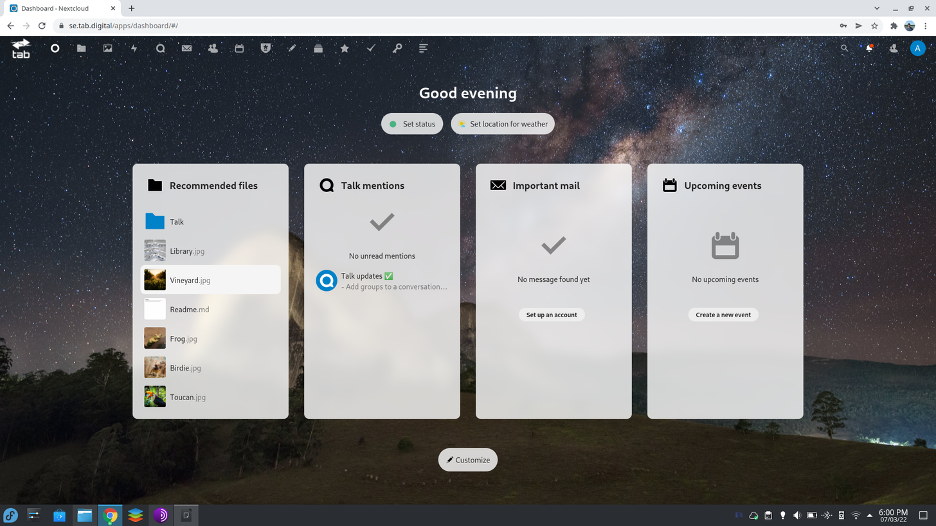
Nextcloud was the first solution I found out about from a YouTube channel called the Linux Experiment. Nextcloud is a productivity suite you run on your own server. I set mine up on a Raspberry Pi, but you can find preconfigured versions on Linode, Vultr, or Digital Ocean. Nextcloud can replace Microsoft Office 365 and Google Apps (Docs, Drive, and so on) while also being encrypted, private, and entirely under your control.
From our partners:
Nextcloud, on its own, is basically a file manager and text editor on the Internet. However, because it’s structured around plug-ins, it has what is essentially an app store (except that all the apps are free). You can install an office suite (powered by Collabora Office), task manager, contacts, calendar, notes (similar to Notion), podcast application, music player, video conferencing, chat, and much more.
One of the standout things about Nextcloud is its dashboard, where you can see all of your information at once. The dashboard reminds me a little of the Windows 8 start menu, which many people liked. I think Nextcloud’s version is more aesthetically pleasing than the old Windows 8 start menu. This is important because it allows me to see my information at a glance. The dashboard lets me take in a lot of data at once and then decide my next course of action.
You can use your Nextcloud environment on any device because its APIs and applications are available on every platform. You can access it from anywhere and store all of your files in one place.
One way that it can work with any operating system is over WebDAV, a technology that uses HTTP and HTTPS to connect to a remote server over standard Internet ports (80 and 443). This means you can add data from Nextcloud to any appropriate application on any operating system, such as a calendaring app to manage your day or a file manager to view files saved on your Nextcloud server.
You can also use Nextcloud as a Progressive Web Application, meaning you can install your Nextcloud website as an application on most operating systems (except for Safari on iOS, which does not support web applications). Many operating systems, particularly Windows, Chrome OS, and Linux, treat web applications as native applications. The result is that you can have notifications of new activity on your Nextcloud just as if it was a local desktop application. It also means that Nextcloud’s task manager and notes app can follow you everywhere, regardless of what device you’re using.
Some operating systems offer integration between your phone and your desktop, allowing you to view Android apps and notifications on your Windows device and even being able to respond to messages and calls on your desktop. For me, the difficulty with this is that my brain gets accustomed to one device, and I forget how notifications and applications work on another device. Nextcloud, however, allows you to have location and SMS notifications between Nextcloud and your Android device. The impact is that you can do all your personal work on one single web application that doesn’t change.
This also prevents me from being overwhelmed with multiple tabs. Modern web browsers can have upwards of a hundred tabs, but it’s difficult sometimes to remember what each tab is for. With Nextcloud, you can access many apps within one tab.
Photoprism
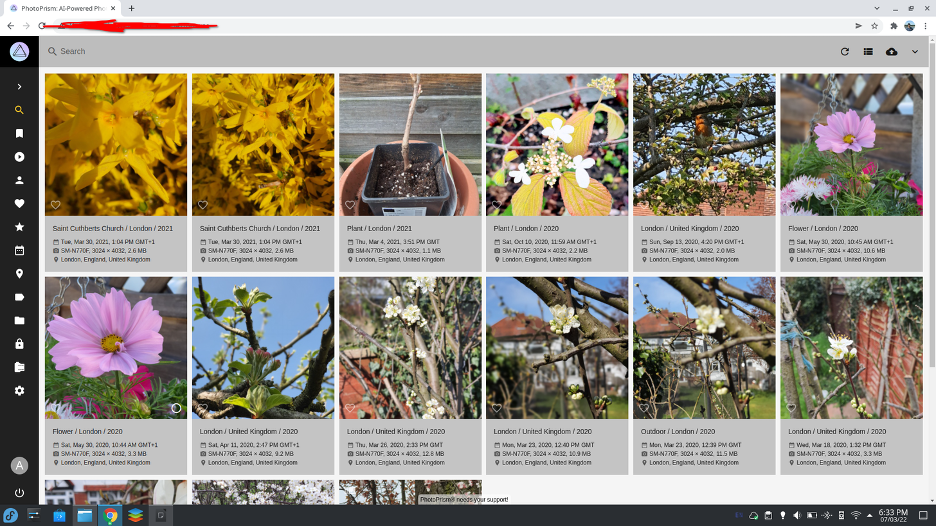
Photoprism is an open source photo gallery and storage repository that relies on Google’s TensorFlow technology, which is also used in the Google Photos application. I use Photoprism to store my photos because it tells me the date, place, time, and device the photos were taken on at a glance.
Photoprism is accessible as a Progressive Web Application, which means it’s possible to access any device on every device. As with Nextcloud, it’s also possible to access using a WebDAV client, even if your device doesn’t allow web applications. This enables most devices to treat your Photoprism instance as a native application, so you can upload and download photos directly to and from your device. The interface is the same regardless of which device it is used on, allowing those with learning difficulties to develop muscle memory for each of the applications mentioned here, making them far easier to use. You can use Photoprism on most devices.
Photoprism is available on preconfigured Digital Ocean, or you can self-host (primarily as a container application, so be sure to read up on containers before attempting).
OpenDyslexic Font
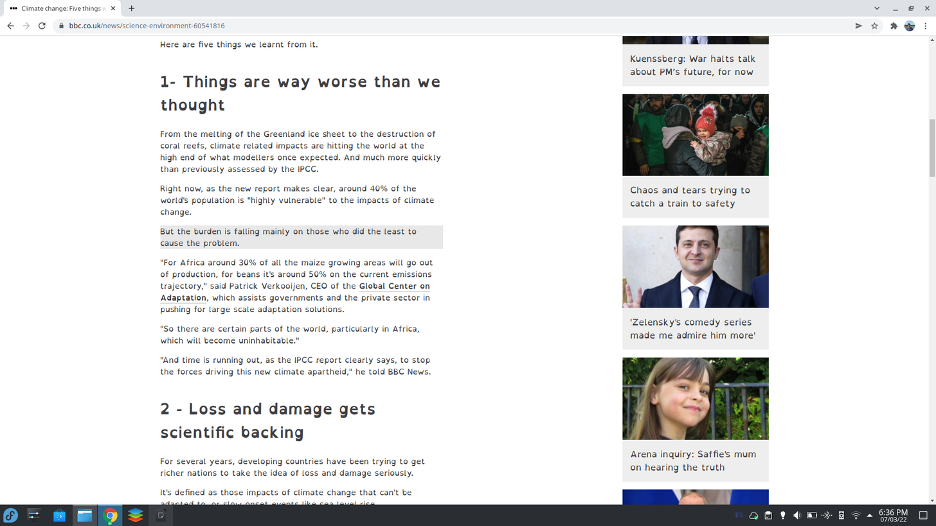
OpenDyslexic font is an open source font that uses evenly spaced letters and an italic typeface. It aims to make it easier for people with dyslexia to read the direction of the letters such as “a” and “d” by using a weighted bottom.
Of course, whether OpenDyslexic improves readability for you depends entirely on your own perception. It doesn’t work for everyone, but there are many open source fonts out there, and it can pay dividends to find a font that works well for you.
Open source accessibility
Making applications that work well for users with learning disabilities, physical disabilities, or just users who have preferences a little different from another user makes open source better for everyone. The ability to customize applications is one of the great strengths of open source. If you’re a developer making more options possible, keep up the great work. If you’re a user benefitting from all the choices you have in open source applications, let us know about what you use.
For enquiries, product placements, sponsorships, and collaborations, connect with us at [email protected]. We'd love to hear from you!
Our humans need coffee too! Your support is highly appreciated, thank you!