aster.cloud aster.cloud
  • /
  • Platforms
    • Public Cloud
    • On-Premise
    • Hybrid Cloud
    • Data
  • Architecture
    • Design
    • Solutions
    • Enterprise
  • Engineering
    • Automation
    • Software Engineering
    • Project Management
    • DevOps
  • Programming
    • Learning
  • Tools
  • About
  • /
  • Platforms
    • Public Cloud
    • On-Premise
    • Hybrid Cloud
    • Data
  • Architecture
    • Design
    • Solutions
    • Enterprise
  • Engineering
    • Automation
    • Software Engineering
    • Project Management
    • DevOps
  • Programming
    • Learning
  • Tools
  • About
aster.cloud aster.cloud
  • /
  • Platforms
    • Public Cloud
    • On-Premise
    • Hybrid Cloud
    • Data
  • Architecture
    • Design
    • Solutions
    • Enterprise
  • Engineering
    • Automation
    • Software Engineering
    • Project Management
    • DevOps
  • Programming
    • Learning
  • Tools
  • About
  • Engineering

Easy Deployment Of MEAN Stack W/ MongoDB Atlas, Cloud Run, And Hashicorp Terraform

  • aster.cloud
  • October 27, 2022
  • 4 minute read

Easy Deployment of MEAN stack with MongoDB Atlas, Cloud Run, and Terraform

Serverless computing promises the ability to spend less time on infrastructure and more time on developing your application. But historically, if you used serverless offerings from different vendors you didn’t see this benefit. Instead, you often spent a significant amount of time configuring the different products and ensuring they can communicate with each other. We want to make this easier for everyone. We’ve started by using HashiCorp Terraform to make it easier to provision resources to run the MEAN stack on Cloud Run with MongoDB Atlas as your database. If you want to try it out, our GitHub repository is here: https://github.com/GoogleCloudPlatform/terraform-mean-cloudrun-mongodb

MEAN stack basics

If you aren’t familiar, the MEAN stack is a technology stack for building web applications. The MEAN stack is composed of four main components—MongoDB, Express, Angular, and Node.js.


Partner with aster.cloud
for your next big idea.
Let us know here.


From our partners:

CITI.IO :: Business. Institutions. Society. Global Political Economy.
CYBERPOGO.COM :: For the Arts, Sciences, and Technology.
DADAHACKS.COM :: Parenting For The Rest Of Us.
ZEDISTA.COM :: Entertainment. Sports. Culture. Escape.
TAKUMAKU.COM :: For The Hearth And Home.
ASTER.CLOUD :: From The Cloud And Beyond.
LIWAIWAI.COM :: Intelligence, Inside and Outside.
GLOBALCLOUDPLATFORMS.COM :: For The World's Computing Needs.
FIREGULAMAN.COM :: For The Fire In The Belly Of The Coder.
ASTERCASTER.COM :: Supra Astra. Beyond The Stars.
BARTDAY.COM :: Prosperity For Everyone.

  • MongoDB is responsible for data storage
  • Express.js is a Node.js web application framework for building APIs
  • Angular is a client-side JavaScript platform
  • Node.js is a server-side JavaScript runtime environment. The server uses the MongoDB Node.js driver to connect to the database and retrieve and store data

Our project runs the MEAN stack on Cloud Run (Express, Node) and MongoDB Atlas (MongoDB).

The repository uses a sample application to make it easy to understand all the pieces. In the sample used in this experiment, we have a client and server application packaged in individual containers each that use the MongoDB-Node.js driver to connect to the MongoDB Atlas database.

Below we’ll talk about how we used Terraform to make deploying and configuring this stack easier for developers and how you can try it yourself.

Read More  Fast And Effective Tools For CNCF And Open Source Project Websites

Required One-Time Setup

To use these scripts, you’ll need to have both MongoDB Atlas and Google Cloud accounts.

MongoDB Atlas Setup

1. Login with your MongoDB Atlas Account.
2. Once you’re logged in, click on “Access Manager” at the top and select “Organization Access”
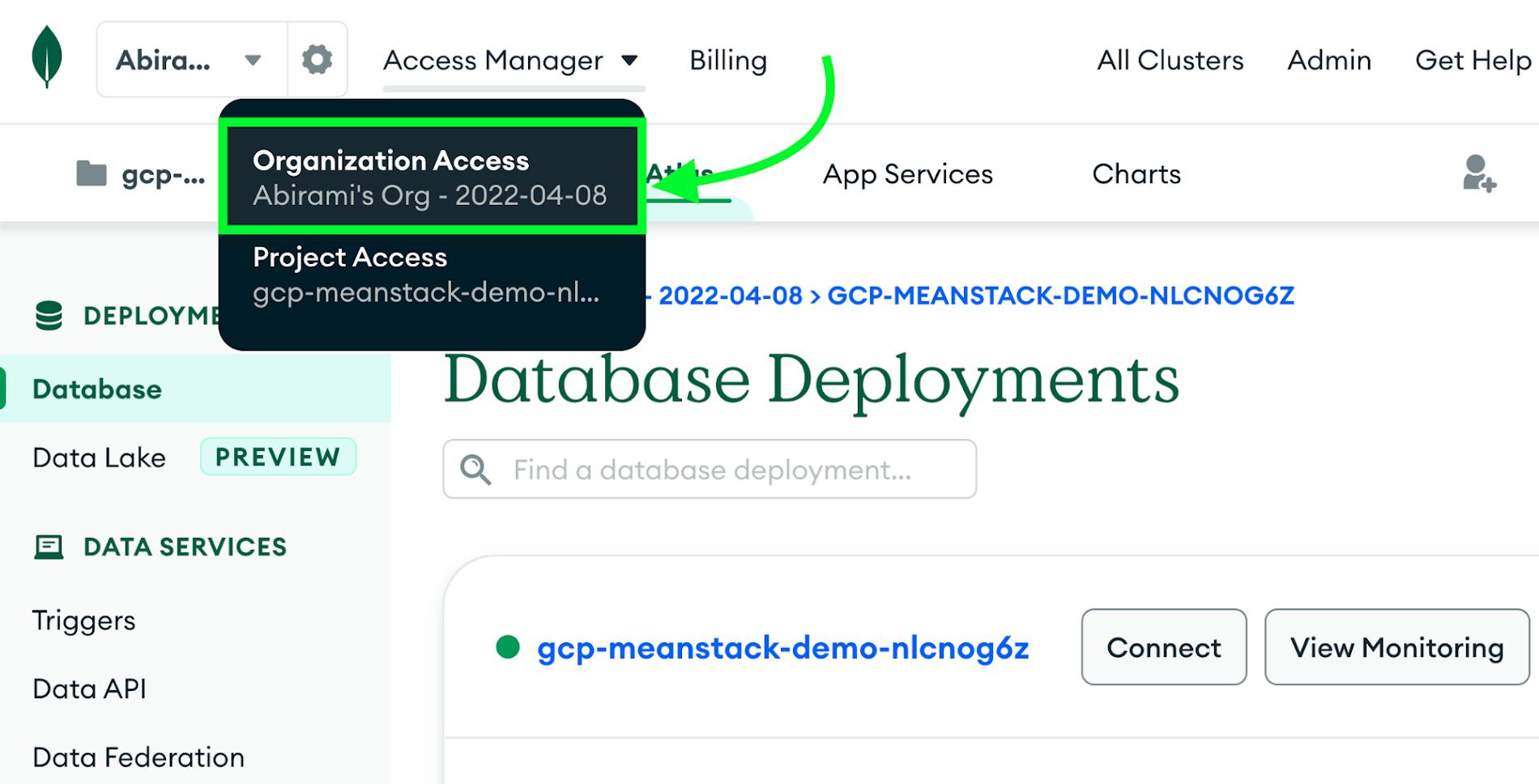
3. Select the “API Keys” tab and click the “Create API Key” button
4. Give your new key a short description and select the “Organization Owner” permission
5. Click “Next” and then make a note of your public and private keys
6. Next, you’ll need your Organization ID. In the left navigation menu, click “Settings”.7. Locate your Organization ID and copy it.
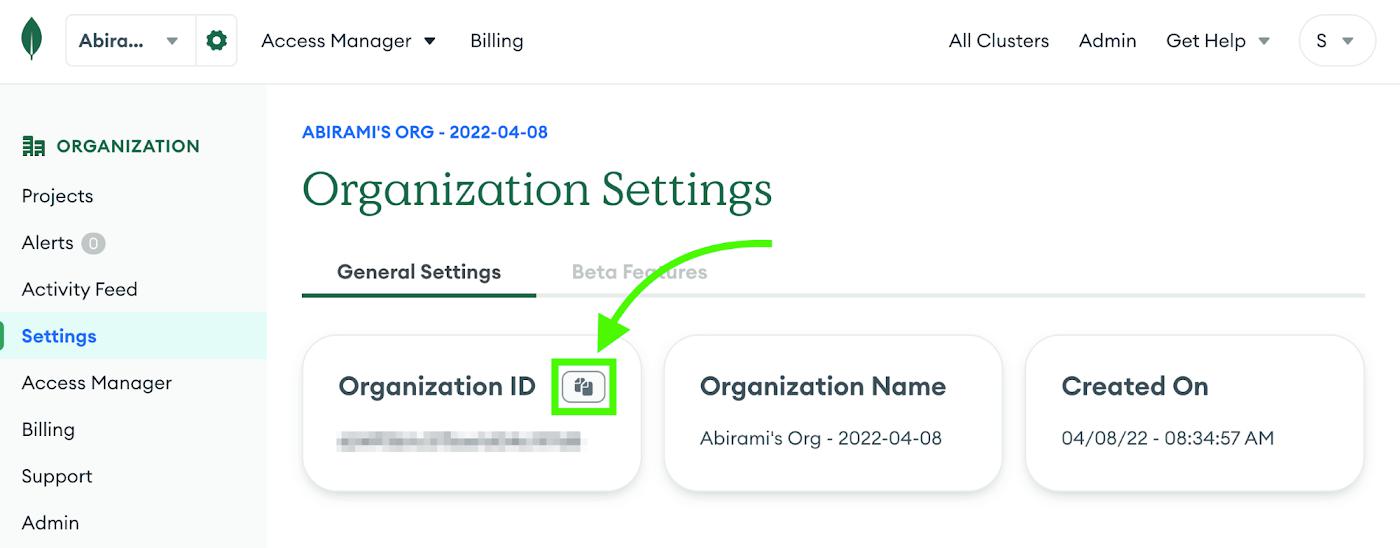
That’s everything for Atlas. Now you’re ready to move on to setting up Google Cloud!

Google Cloud Tooling and Setup

You’ll need a billing account setup on your Google Cloud account and to make note of your Billing Account ID. You can find your Billing Account ID on the billing page.

You’ll also need to pick a region for your infrastructure. Note that Google Cloud and Atlas use different names for the same region. You can find a mapping between Atlas regions and Google Cloud regions here. You’ll need a region that supports the M0 cluster tier. Choose a region close to you and make a note of both the Google Cloud and Atlas region names.

Finally, you’ll need a terminal with the Google Cloud CLI (gcloud) and Terraform installed. You can use your workstation or try Cloud Shell, which has these tools already installed. To get started in Cloud Shell with the repo cloned and ready to configure, click here.

Read More  Detect Spoofing Exceptions In Financial Markets With Google Cloud And GTS

Configuring the demo

If you haven’t already, clone this repo. Run terraform init to make sure Terraform is working correctly and download the provider plugins. Then, create a file in the root of the repository called terraform.tfvars with the following contents, replacing placeholders as necessary:

atlas_pub_key = “<your Atlas public key>”

atlas_priv_key = “<your Atlas private key>”

atlas_org_id = “<your Atlas organization ID>”

google_billing_account = “<your billing account ID>”

If you selected the us-central1/US_CENTRAL region then you’re ready to go. If you selected a different region, add the following to your terraform.tfvars file:

atlas_cluster_region = “<Atlas region ID>”

google_cloud_region = “<Google Cloud region ID>”

Run terraform init again to make sure there are no new errors. If you get an error, check your terraform.tfvars file.

Deploy the demo

You’re ready to deploy! You have two options: you can run terraform plan to see a full listing of everything that Terraform wants to do without any risk of accidentally creating those resources. If everything looks good, you can then run terraform apply to execute the plan.

Alternately, you can just run terraform apply on its own and it will create a plan and display it before prompting you to continue. You can learn more about the plan and apply commands in this tutorial. For this demo, we’re going to just run terraform apply:
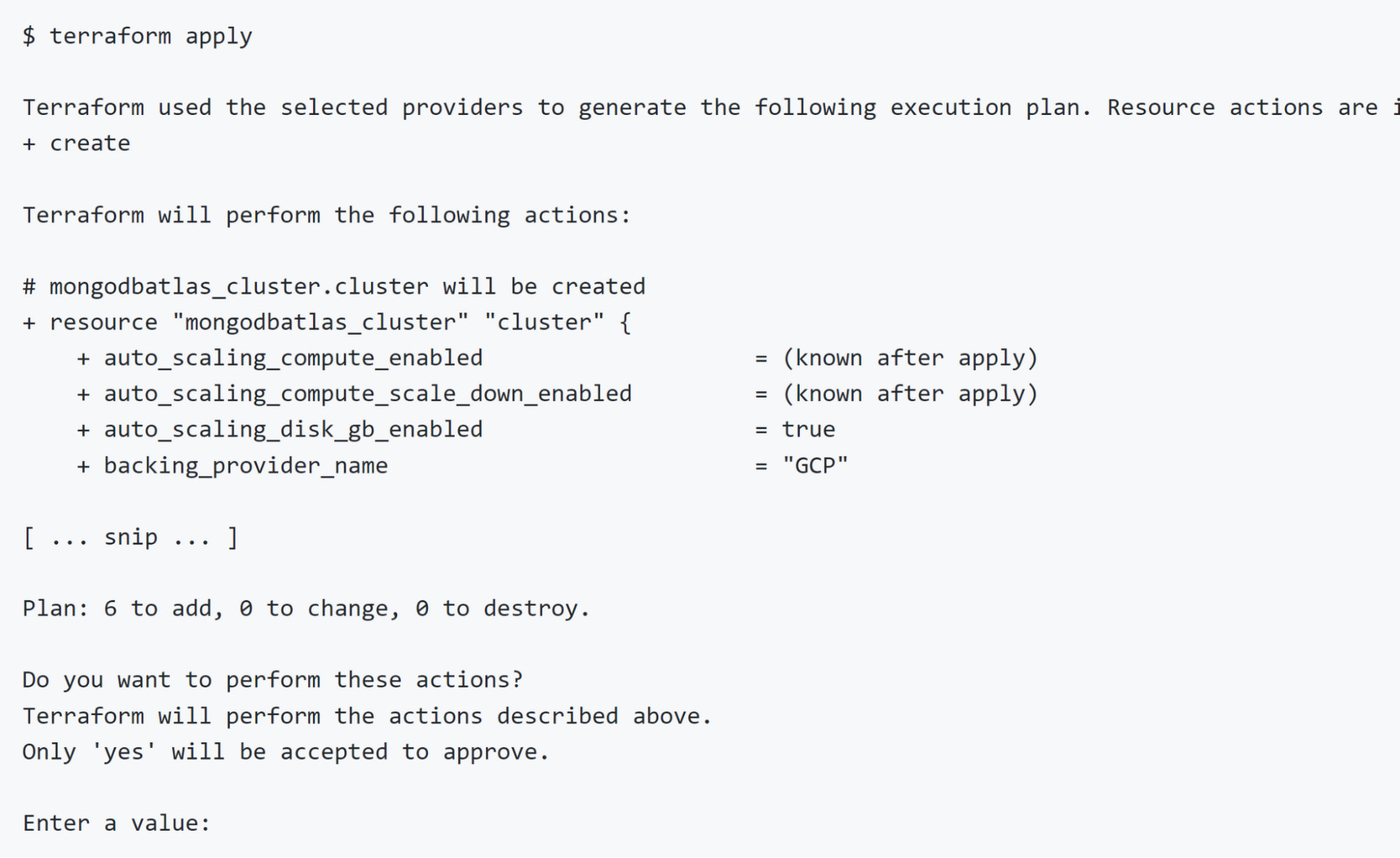
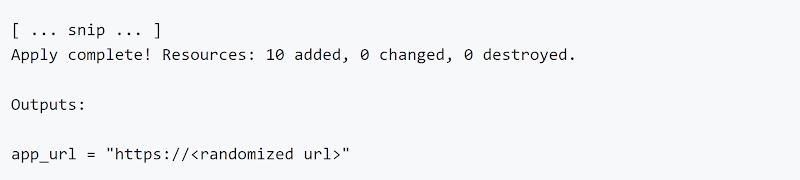
If everything looks good to you, type yes and press enter. This will take a few minutes. When it’s done, Terraform will display the URL of your application:
Open that URL in your browser and you’ll see the sample app running.

Read More  Are Your SLOs Realistic? How To Analyze Your Risks Like An SRE

Cleaning up

When you’re done, run terraform destroy to clean everything up:
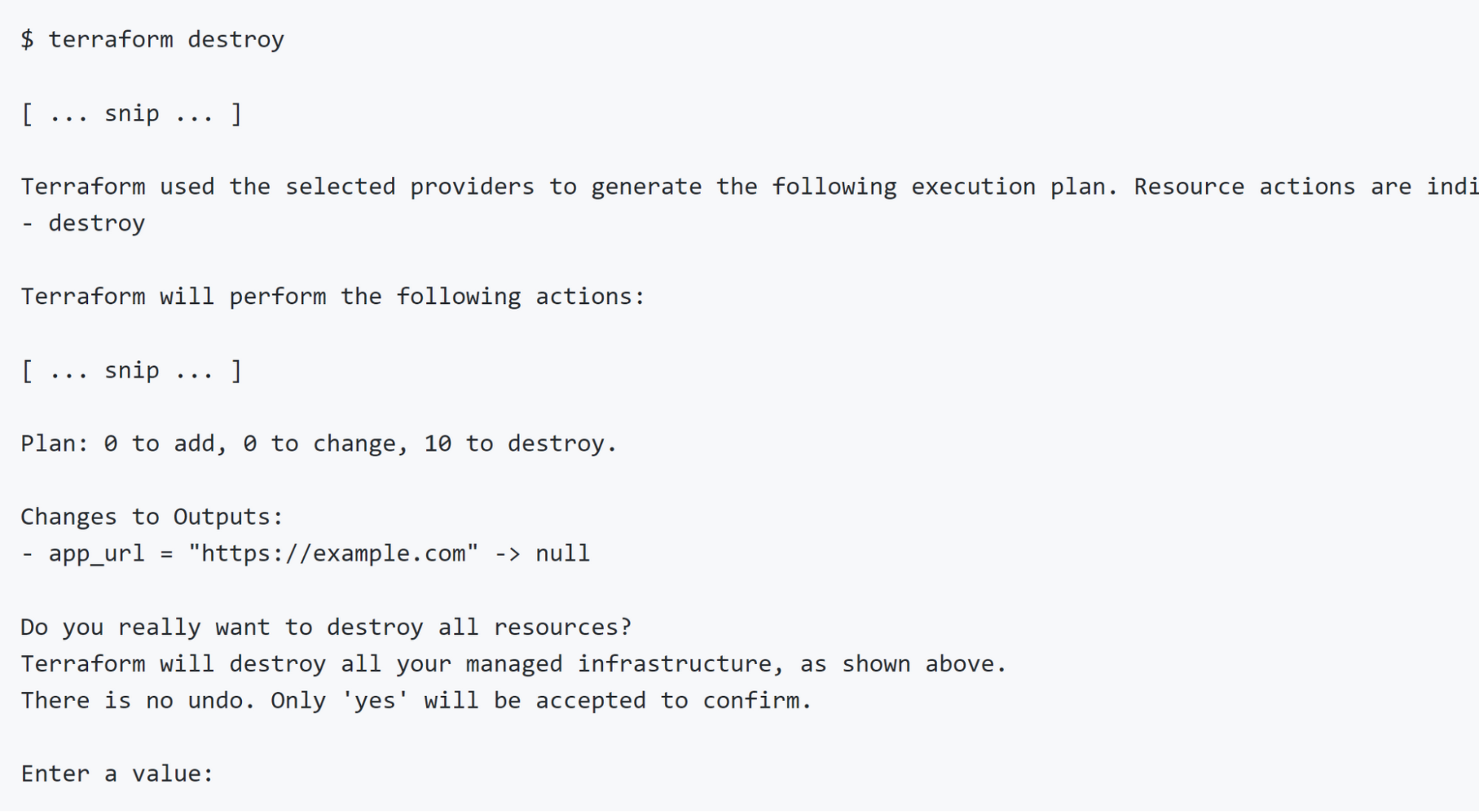
If you’re sure you want to tear everything down, type yes and press enter. This will take a few minutes. When Terraform is done everything it created will have been destroyed and you will not be billed for any further usage.

Next Steps

You can use the code in this repository to deploy your own applications. Out of the box, it will work with any application that runs in a single container and reads the MongoDB connection string from an environment variable called ATLAS_URI, but the Terraform code can easily be modified if you have different needs or to support more complex applications.

For more information please refer to the Next Steps section of the readme.


By: Aja Hammerly (Developer Advocate, Google) and Abirami Sukumaran (Developer Advocate, Google)
Source: Google Cloud Blog


For enquiries, product placements, sponsorships, and collaborations, connect with us at [email protected]. We'd love to hear from you!

Our humans need coffee too! Your support is highly appreciated, thank you!

aster.cloud

Related Topics
  • Angular
  • Express
  • Google Cloud
  • MEAN
  • MongoDB
  • MongoDB Atlas
  • Node js
  • Terraform
  • Tutorial
You May Also Like
Points, Lines and a Question
View Post
  • Architecture
  • Design
  • Engineering
  • People

What Is The Point In Making Points?

  • November 26, 2025
View Post
  • Engineering
  • Software Engineering

Development gets better with Age

  • October 9, 2025
View Post
  • Engineering
  • Technology

Apple supercharges its tools and technologies for developers to foster creativity, innovation, and design

  • June 9, 2025
View Post
  • Engineering

Just make it scale: An Aurora DSQL story

  • May 29, 2025
View Post
  • Engineering
  • Technology

Guide: Our top four AI Hypercomputer use cases, reference architectures and tutorials

  • March 9, 2025
View Post
  • Computing
  • Engineering

Why a decades old architecture decision is impeding the power of AI computing

  • February 19, 2025
View Post
  • Engineering
  • Software Engineering

This Month in Julia World

  • January 17, 2025
View Post
  • Engineering
  • Software Engineering

Google Summer of Code 2025 is here!

  • January 17, 2025

Stay Connected!
LATEST
  • 1
    Synthetic data could ease people’s concerns about privacy breaches. But who gets to create it?
    • September 15, 2026
  • 2
    Apple Flagship Hardware Launch for September 2026
    • September 10, 2026
  • 3
    Multi-cloud with AWS and Azure just got a whole lot easier thanks to a new interconnect service
    • September 2, 2026
  • 4
    VMware targets ‘three core AI cost drivers’ with new Private AI Cloud service
    • September 2, 2026
  • Agentic AI is spurring a ‘fundamental shift’ in cloud infrastructure consumption
    • August 17, 2026
  • Why real SaaS resilience means breaking free of the hyperscaler
    • August 11, 2026
  • 7
    Digital sovereignty in the age of AI: You don’t have to choose between control and innovation
    • August 10, 2026
  • 8
    Broadcom eyes security, performance boosts with vDefend and Avi Load Balancer updates
    • August 7, 2026
  • 9
    IBM Study: One in Four Malicious Breaches are AI-Enabled, Costing Companies $6 Million on Average
    • July 29, 2026
  • 10
    Accelerating the frontiers of scientific discovery: Google’s $40M commitment to the Genesis Mission
    • July 26, 2026
about
Hello World!

We are aster.cloud. We’re created by programmers for programmers.

Our site aims to provide guides, programming tips, reviews, and interesting materials for tech people and those who want to learn in general.

We would like to hear from you.

If you have any feedback, enquiries, or sponsorship request, kindly reach out to us at:

[email protected]
Most Popular
  • 1
    3 Questions: Neural transparency and the future of AI design
    • July 17, 2026
  • 2
    Intel Invests €5 Billion to Expand Manufacturing in Europe
    • July 13, 2026
  • 3
    IBM and Red Hat Expand Lightwell with New Offerings to Build the Trust Infrastructure for AI-Era Open Source
    • July 8, 2026
  • 4
    When I Was Young
    • July 4, 2026
  • 5
    The Fastest AI Fried Chicken In The World
    • June 29, 2026
  • /
  • Technology
  • Tools
  • About
  • Contact Us

Input your search keywords and press Enter.