aster.cloud aster.cloud
  • /
  • Platforms
    • Public Cloud
    • On-Premise
    • Hybrid Cloud
    • Data
  • Architecture
    • Design
    • Solutions
    • Enterprise
  • Engineering
    • Automation
    • Software Engineering
    • Project Management
    • DevOps
  • Programming
    • Learning
  • Tools
  • About
  • /
  • Platforms
    • Public Cloud
    • On-Premise
    • Hybrid Cloud
    • Data
  • Architecture
    • Design
    • Solutions
    • Enterprise
  • Engineering
    • Automation
    • Software Engineering
    • Project Management
    • DevOps
  • Programming
    • Learning
  • Tools
  • About
aster.cloud aster.cloud
  • /
  • Platforms
    • Public Cloud
    • On-Premise
    • Hybrid Cloud
    • Data
  • Architecture
    • Design
    • Solutions
    • Enterprise
  • Engineering
    • Automation
    • Software Engineering
    • Project Management
    • DevOps
  • Programming
    • Learning
  • Tools
  • About
  • Tech
  • Tools

How To Install Vokoscreen Video Desktop Recorder For Ubuntu

  • root
  • August 26, 2019
  • 2 minute read

Overview

Vokoscreen is a video desktop recorder for Ubuntu that allows selection of the screen area, setting the number of frames, and even provide a zoom function on the area the cursor is located.


Partner with aster.cloud
for your next big idea.
Let us know here.


From our partners:

CITI.IO :: Business. Institutions. Society. Global Political Economy.
CYBERPOGO.COM :: For the Arts, Sciences, and Technology.
DADAHACKS.COM :: Parenting For The Rest Of Us.
ZEDISTA.COM :: Entertainment. Sports. Culture. Escape.
TAKUMAKU.COM :: For The Hearth And Home.
ASTER.CLOUD :: From The Cloud And Beyond.
LIWAIWAI.COM :: Intelligence, Inside and Outside.
GLOBALCLOUDPLATFORMS.COM :: For The World's Computing Needs.
FIREGULAMAN.COM :: For The Fire In The Belly Of The Coder.
ASTERCASTER.COM :: Supra Astra. Beyond The Stars.
BARTDAY.COM :: Prosperity For Everyone.

Prerequisites

  • Ubuntu 18.04


Installation

01. Install using the following commands


$ sudo apt-get update

$ sudo apt-get install vokoscreen


02. Once installed can access the application using the launcher
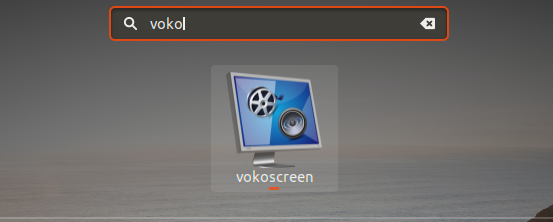
 

or via the command line

$ vokoscreen


03. It will open the Vokoscreen user interface.
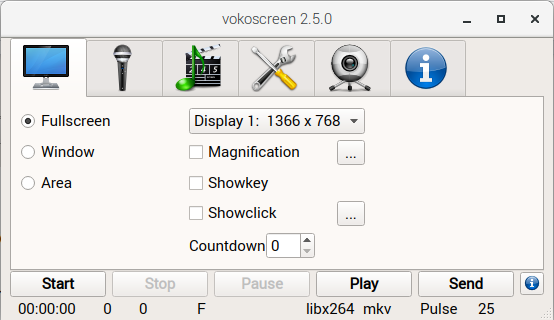


Features

Recording Area

  • Fullscreen – records the whole content of the desktop
  • Window – allows selecting an application window to record
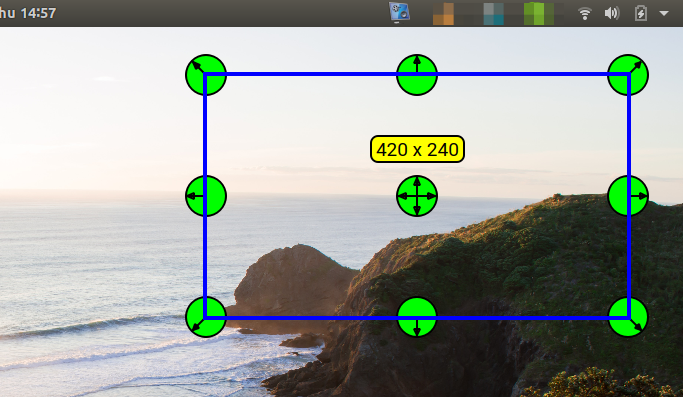
  • Area – will open a floating selection with edit to allow which section of the screen can be recorded


Area Selection
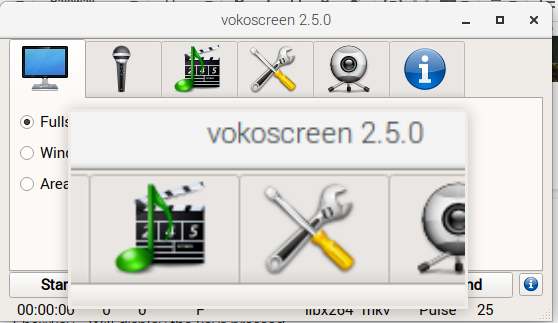
  • Magnification – Enables a zoom on the cursor
  • Showkey – Will display the keys pressed
  • Showclick – Shows a circle around the cursor to highlight any click event


Magnification
 

Audio Input
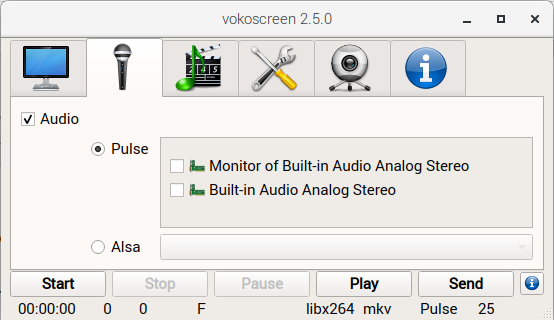
Determine the source of the audio to include in the Video recording. You can record any audio output from the operating system. An example is when you are recording a video conference and need to save a recording for future reference on participants that are not able to join.


Video Output Format
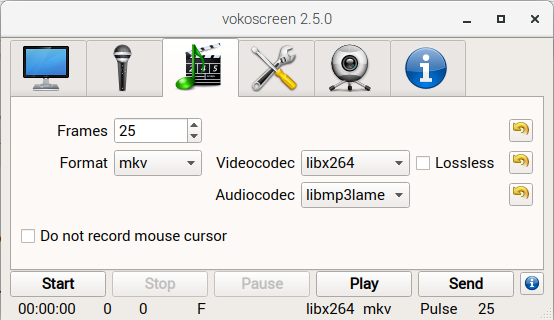
The “Frames” option determine the number of frames to include per second. Other settings include the output “Format” (MKV, MP4 and GIF), “Videocodec” (libx264, mpeg4 and huffyuv) and “Audiocodec” (libmp3lame, libvorbis, pcm_s16le, and aac).


Other Settings
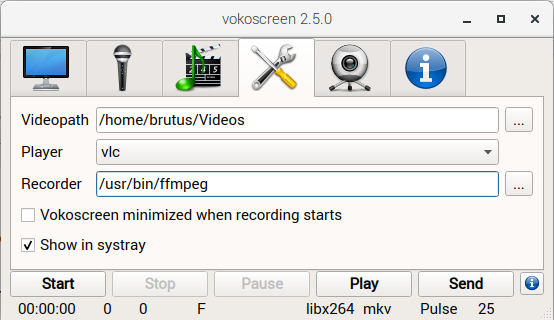
The directory on where to place the video recording can be configured using the “Videopath” option. The “Player” will be opened after a recording is completed and the “Play” button is selected.

Read More  Cloud Support API: Building A "Red Button" For Creating Critical Cases


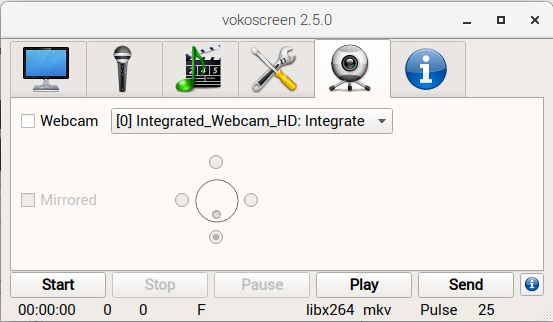
Webcam Settings

When enabled allows recording the video recorder by the system camera.


For enquiries, product placements, sponsorships, and collaborations, connect with us at [email protected]. We'd love to hear from you!

Our humans need coffee too! Your support is highly appreciated, thank you!

root

Related Topics
  • Desktop Recorder
  • How To
  • Install
  • Ubuntu
  • Vokoscreen
You May Also Like
Smartphone hero image
View Post
  • Gears
  • Tech

Zed Approves | Smartphones for Every Budget Range

  • January 29, 2026
View Post
  • Technology
  • Tools

IBM Launches Enterprise Advantage Service to Help Businesses Scale Agentic AI

  • January 19, 2026
Early Black Friday Gears
View Post
  • Tech

Friday Deals – And It’s Not Even Black Friday Yet

  • November 13, 2025
notta-ai-header
View Post
  • Featured
  • Tools

Notta vs Fireflies: Which AI Transcription Tool Deserves Your Attention in 2025?

  • May 16, 2025
Getting things done makes her feel amazing
View Post
  • Computing
  • Data
  • Featured
  • Learning
  • Tech
  • Technology

Nurturing Minds in the Digital Revolution

  • April 25, 2025
View Post
  • Tech

Deep dive into AI with Google Cloud’s global generative AI roadshow

  • February 18, 2025
Volvo Group: Confidently ahead at CES
View Post
  • Tech

Volvo Group: Confidently ahead at CES

  • January 8, 2025
zedreviews-ces-2025-social-meta
View Post
  • Featured
  • Gears
  • Tech
  • Technology

What Not to Miss at CES 2025

  • January 6, 2025

Stay Connected!
LATEST
  • digital-nomad-freelancer-worker-2151205464 1
    One paperwork problem – Get your Digital Nomad Visa employment documents fast from UK, EU or Singapore
    • June 16, 2026
  • 2
    Samsung Art Store Brings Art Basel to Homes Worldwide With New Curated Collection
    • June 15, 2026
  • 3
    You Do Not Need to Invest in the IPO of SpaceX, Anthropic, and OpenAI
    • June 10, 2026
  • 4
    The consequences of relying on AI for accurate news
    • June 10, 2026
  • 5
    Connecting AI agents with unstructured data using Google Cloud Storage MCP Servers
    • June 10, 2026
  • 6
    WWDC26: Apple unveils next generation of Apple Intelligence, Siri AI, powerful parental controls, and an expansive set of software improvements
    • June 8, 2026
  • 7
    IBM and Google Cloud Announce Strategic Partnership to Scale AI with Human Expertise and AI‑Powered Delivery
    • June 4, 2026
  • Data center 8
    Data Sovereignty in Spain. It’s Not Just About the Law, It’s About Efficiency
    • June 3, 2026
  • 9
    Ink vs Pixels. What you miss versus what you are actually missing.
    • June 1, 2026
  • 10
    Banks race to patch new cyber vulnerabilities, and other cybersecurity news
    • May 25, 2026
about
Hello World!

We are aster.cloud. We’re created by programmers for programmers.

Our site aims to provide guides, programming tips, reviews, and interesting materials for tech people and those who want to learn in general.

We would like to hear from you.

If you have any feedback, enquiries, or sponsorship request, kindly reach out to us at:

[email protected]
Most Popular
  • pope-leo-xiv-cq5dam-1500.844 1
    Pope Leo XIV to Publish First Encyclical on Artificial Intelligence and Human Dignity on 25 May
    • May 22, 2026
  • 2
    Portfolio to Clients, and is Strengthened by Ongoing Project Glasswing Work
    • May 20, 2026
  • reMarkable Paper Pure 3
    Everything The reMarkable Paper Pure Actually Does
    • May 14, 2026
  • 4
    Scaling cloud and AI: Microsoft Azure’s commitment to Europe’s digital future
    • May 11, 2026
  • Anthropic Institute 5
    Introducing The Anthropic Institute
    • March 11, 2026
  • /
  • Technology
  • Tools
  • About
  • Contact Us

Input your search keywords and press Enter.