aster.cloud aster.cloud
  • /
  • Platforms
    • Public Cloud
    • On-Premise
    • Hybrid Cloud
    • Data
  • Architecture
    • Design
    • Solutions
    • Enterprise
  • Engineering
    • Automation
    • Software Engineering
    • Project Management
    • DevOps
  • Programming
    • Learning
  • Tools
  • About
  • /
  • Platforms
    • Public Cloud
    • On-Premise
    • Hybrid Cloud
    • Data
  • Architecture
    • Design
    • Solutions
    • Enterprise
  • Engineering
    • Automation
    • Software Engineering
    • Project Management
    • DevOps
  • Programming
    • Learning
  • Tools
  • About
aster.cloud aster.cloud
  • /
  • Platforms
    • Public Cloud
    • On-Premise
    • Hybrid Cloud
    • Data
  • Architecture
    • Design
    • Solutions
    • Enterprise
  • Engineering
    • Automation
    • Software Engineering
    • Project Management
    • DevOps
  • Programming
    • Learning
  • Tools
  • About
  • Platforms

Scale In At Your Own Pace With Compute Engine Autoscaler Controls

  • aster.cloud
  • October 21, 2020
  • 2 minute read

In a Compute Engine environment, managed instance groups (MIGs) offer autoscaling that lets you automatically change an instance group’s capacity based on current load, so you can rightsize your environment—and your costs. Autoscaling adds more virtual machines (VMs) to a MIG when there is more load (scaling out), and deletes VMs when the need for VMs is lesser (scaling in).

When load declines, the autoscaler removes all unused capacity. This allows you to save costs but might cause the autoscaler to scale in abruptly. For example, if the load goes down by 50%, the autoscaler removes ~50% of your VMs immediately after a 10-minute stabilization period. Deleting VMs so abruptly might not work well for some workloads. For example, if your VMs take many minutes to initialize you might want to slow down the rate at which you scale in to maintain capacity for imminent load spikes.


Partner with aster.cloud
for your next big idea.
Let us know here.


From our partners:

CITI.IO :: Business. Institutions. Society. Global Political Economy.
CYBERPOGO.COM :: For the Arts, Sciences, and Technology.
DADAHACKS.COM :: Parenting For The Rest Of Us.
ZEDISTA.COM :: Entertainment. Sports. Culture. Escape.
TAKUMAKU.COM :: For The Hearth And Home.
ASTER.CLOUD :: From The Cloud And Beyond.
LIWAIWAI.COM :: Intelligence, Inside and Outside.
GLOBALCLOUDPLATFORMS.COM :: For The World's Computing Needs.
FIREGULAMAN.COM :: For The Fire In The Belly Of The Coder.
ASTERCASTER.COM :: Supra Astra. Beyond The Stars.
BARTDAY.COM :: Prosperity For Everyone.


Introducing scale-in controls

New scale-in controls in Compute Engine let you limit the VM deletion rate by preventing the autoscaler from reducing a MIG’s size by more VM instances than your workload can tolerate to lose.

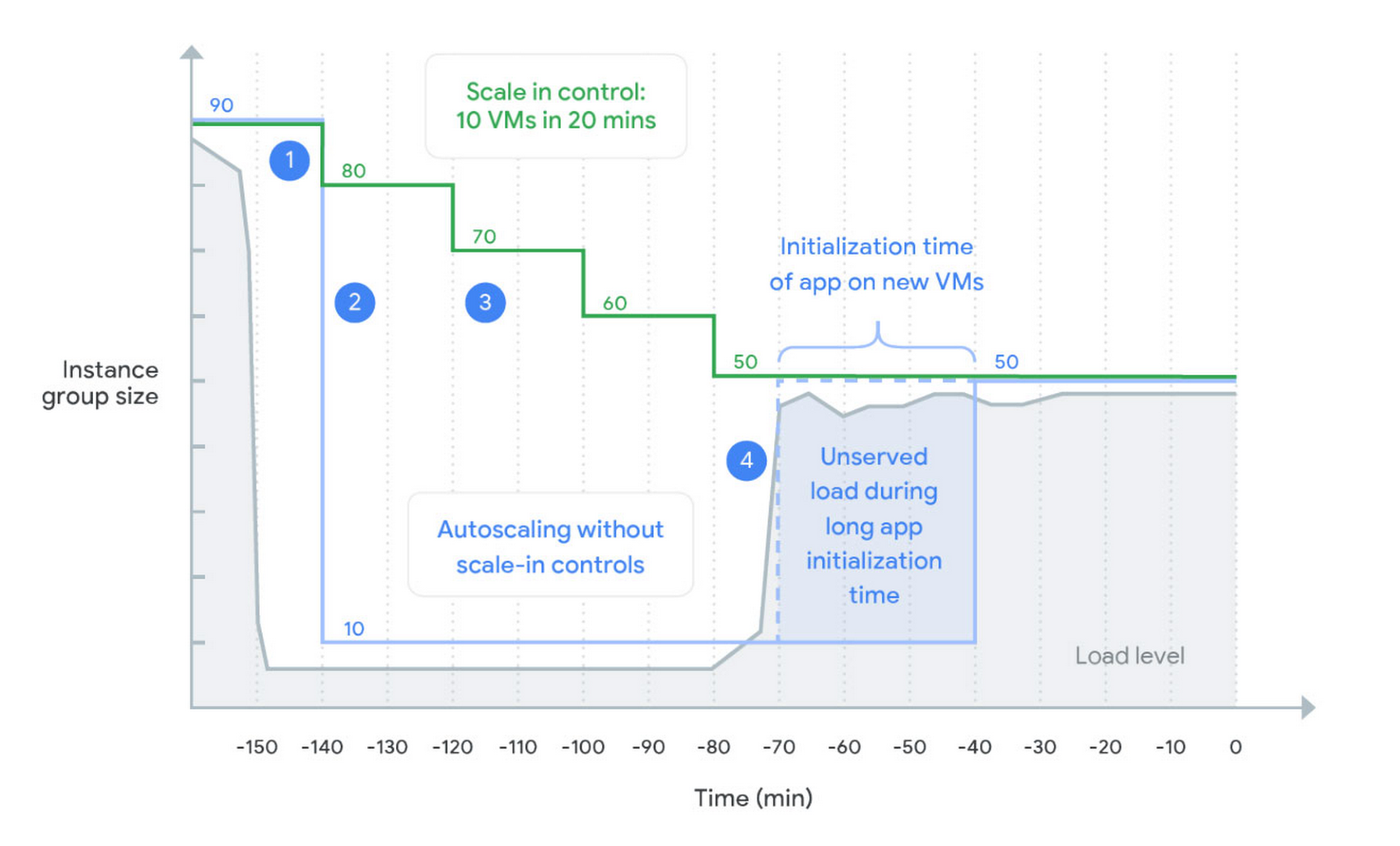
When you configure autoscaler scale-in controls, you control the speed at which you scale in. The autoscaler never scales in faster than your configured rate, as shown in this diagram:
scale-in controls.jpg
  1. When load declines, the autoscaler maintains the size for the group at a level required to serve the peak load observed in the last 10 minutes (the stabilization period). This works the same with and without scale-in controls.
  2. An autoscaler without scale-in controls keeps only enough instances required to handle the recently observed load. After the stabilization period, the autoscaler removes all unneeded instances in one step. A sudden drop in load can lead to a dramatic reduction of instance group size.
  3. An autoscaler with scale-in controls limits how many VM instances can be removed in a given period of time (here 10 VMs in 20 minutes). This slows down the instance reduction rate.
  4. With the load spikes again, the autoscaler adds new instances. However, because VMs take a long time to initialize, the new VMs aren’t ready to serve the load. With scale-in controls, the previous capacity wasn’t deleted yet, allowing existing VMs to serve the spike.
Read More  Securing Apps For Googlers Using Anthos Service Mesh


Getting started

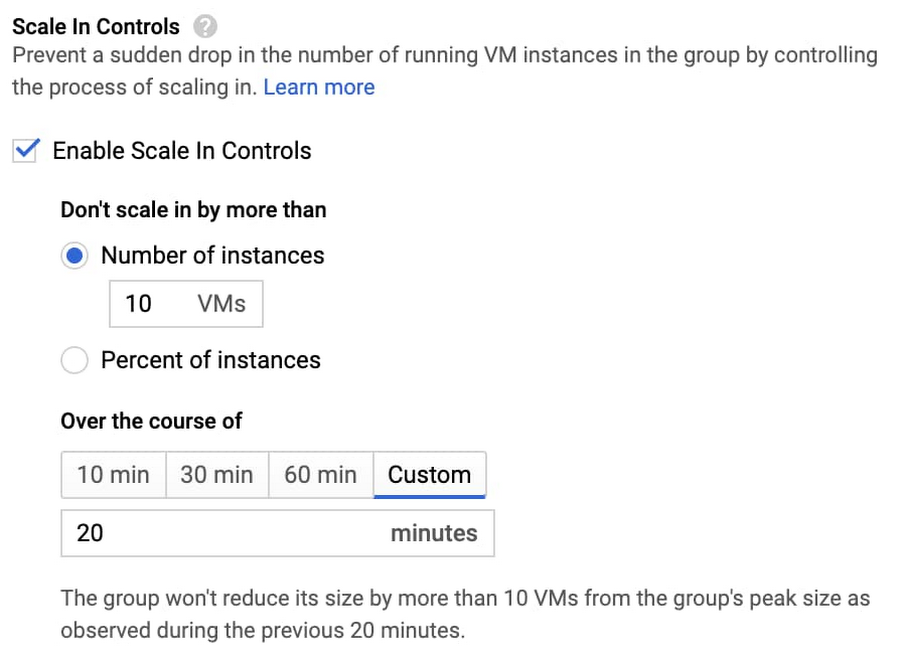
You can set up scale-in controls in the Google Cloud Console. Select an autoscaled MIG from the instance groups page and click Edit group. Under the Autoscaling section, set your scale-in controls:
gcp console scale-in controls.jpg

You can also configure scale-in controls programmatically. Here’s the same command written using CLI (gcloud):

$ gcloud compute instance-groups managed update-autoscaling autoscaled-group \
    --scale-in-control max-scaled-in-replicas=10,time-window=1200

For more details including configuration using API refer to the documentation.

Try scale-in controls today

Scale-in controls are generally available across all regions. For more information on how you can control the scale-in rate, check out the docs.


By Pawel Wenda Product Manager
Source https://cloud.google.com/blog/products/compute/compute-engine-managed-instance-groups-get-scale-in-controls

For enquiries, product placements, sponsorships, and collaborations, connect with us at [email protected]. We'd love to hear from you!

Our humans need coffee too! Your support is highly appreciated, thank you!

aster.cloud

Related Topics
  • Autoscaler
  • CLI
  • Compute Engine
  • Google Cloud
You May Also Like
View Post
  • Data
  • Platforms
  • Technology

Scaling cloud and AI: Microsoft Azure’s commitment to Europe’s digital future

  • May 11, 2026
View Post
  • Data
  • Platforms
  • Public Cloud

PayPal’s historically large data migration is the foundation for its gen AI innovation

  • March 4, 2026
View Post
  • Platforms
  • Technology

Microsoft Sovereign Cloud adds governance, productivity and support for large AI models securely running even when completely disconnected 

  • March 3, 2026
Google Cloud and Smart Communications
View Post
  • Platforms
  • Technology

Smart Communications, Inc. Dials into Google Cloud AI to Help Personalize Digital Services for Filipinos

  • October 25, 2024
View Post
  • Platforms
  • Public Cloud

Empowering builders with the new AWS Asia Pacific (Malaysia) Region

  • August 30, 2024
Red Hat and Globe Telecoms
View Post
  • Platforms
  • Technology

Globe Collaborates with Red Hat Open Innovation Labs to Modernize IT Infrastructure for Greater Agility and Scalability

  • August 19, 2024
Huawei Cloud Cairo Region Goes Live
View Post
  • Cloud-Native
  • Computing
  • Platforms

Huawei Cloud Goes Live in Egypt

  • May 24, 2024
Asteroid
View Post
  • Computing
  • Platforms
  • Technology

Asteroid Institute And Google Cloud Identify 27,500 New Asteroids, Revolutionizing Minor Planet Discovery With Cloud Technology

  • April 30, 2024

Stay Connected!
LATEST
  • 1
    IBM Study: One in Four Malicious Breaches are AI-Enabled, Costing Companies $6 Million on Average
    • July 29, 2026
  • 2
    Accelerating the frontiers of scientific discovery: Google’s $40M commitment to the Genesis Mission
    • July 26, 2026
  • 3
    3 Questions: Neural transparency and the future of AI design
    • July 17, 2026
  • 4
    Intel Invests €5 Billion to Expand Manufacturing in Europe
    • July 13, 2026
  • 5
    IBM and Red Hat Expand Lightwell with New Offerings to Build the Trust Infrastructure for AI-Era Open Source
    • July 8, 2026
  • 6
    When I Was Young
    • July 4, 2026
  • 7
    The Fastest AI Fried Chicken In The World
    • June 29, 2026
  • 8
    Zed Approves | How to Stay Cool in Extreme Heat
    • June 29, 2026
  • 9
    The AI investment surge hasn’t produced the expected results yet. That could change in 2026
    • June 26, 2026
  • 10
    Zed Approves | It’s Prime Day 2026! Time to Upgrade Your World Cup Viewing Setup and Beat the Heat
    • June 25, 2026
about
Hello World!

We are aster.cloud. We’re created by programmers for programmers.

Our site aims to provide guides, programming tips, reviews, and interesting materials for tech people and those who want to learn in general.

We would like to hear from you.

If you have any feedback, enquiries, or sponsorship request, kindly reach out to us at:

[email protected]
Most Popular
  • 1
    Zed Approves | The Best Prime Day PC Deals: Top Gaming Rigs, Workstations, and Everyday Laptops
    • June 24, 2026
  • neon-cart 2
    Zed Approves: How to Gear Up for GTA 6 This Amazon Prime Day (2026 Quick Guide)
    • June 22, 2026
  • zedreviews-valerion 3
    Father’s Day Outdoors – Build Dad the Ultimate Backyard Watch Party
    • June 20, 2026
  • zedreviews-fathers-day-50830 4
    Father’s Day Outdoors, Round Two – Gear for the Action, the Tailgate, and Beating the Heat
    • June 20, 2026
  • zedreviews-fathers-day-2147684744 5
    The Ultimate Father’s Day Gift Guide – Home Entertainment Upgrades Dad Actually Wants
    • June 20, 2026
  • /
  • Technology
  • Tools
  • About
  • Contact Us

Input your search keywords and press Enter.