
Australian universities have responded in a number of ways to help prevent the spread of COVID-19. These include delaying enrolments, moving semester breaks forward, abolishing late payment fees and moving courses online.
Engaging students in online content is easier said than done. Research shows results can improve with the use of techniques such as shortening content and making it more focused, and establishing rapport between the lecturer and students.
From our partners:
Students’ views on online learning can be mixed. Some research shows they can find online simulations such as in physics and engineering to be efficient, but say completing many online modules takes too long.
If you’ve found yourself having to study your university course online, here are some ways to ensure you’re ready for your virtual experience.
1. Laptop and software
It goes without saying that, to learn online, you need a laptop or a desktop PC with a reliable internet connection. You will need this to participate in the virtual class, for writing essays and other assignments, and navigating your university’s learning management system – such as Moodle or Blackboard.
Connecting your phone’s earphones to your computer is perhaps the cheapest alternative to a speaker and microphone.
You might see advertisements for a webcam with a fancy 4K definition. While this will provide a high quality video, you are unlikely to need this to participate in your online class. A high resolution camera uses a lot of data and requires a high speed internet connection.
So it’s advisable to use a webcam with no more than 720p resolution to reduce the amount of bandwidth you use (to use less of your data). Most laptops’ webcams have a resolution of 720p.
You can check the resolution of your webcam here.
If you do not have access to a computer at home, you can check with your university library about borrowing a laptop. Many universities loan laptops as part of their student services. But this may be as hard as getting your hands on a roll of a toilet paper. So put your request in early.
If you need access to a specific software, such as the Microsoft Office package, you should also check with your university library if it provides a free login for students to use the software. All Australian university and school students have free access to the Microsoft Office package, but there may be others your university has signed up to.
2. Make sure you know how much data you’re using
Most Australian universities are running their virtual classes via Zoom video conferencing software. By now you would have received instructions on how to download and set up your Zoom account.
But it’s important to know how much data you will need and whether your internet speed is enough.
A typical one hour 720p video call would use almost 540MB of data download (data received) and the same for upload (data you sent). This means, on average, total data use per hour may be more than 1GB.
Netflix, in comparison, uses 1GB per hour for standard definition, and 3GB per hour for HD streaming.
Assuming you are enrolled in four units this semester, you may need to attend up to eight hours of lectures and eight hours of tutorials per week. This brings your consumption to a rough average of 16GB per week. You will also need to account for browsing and other general use.
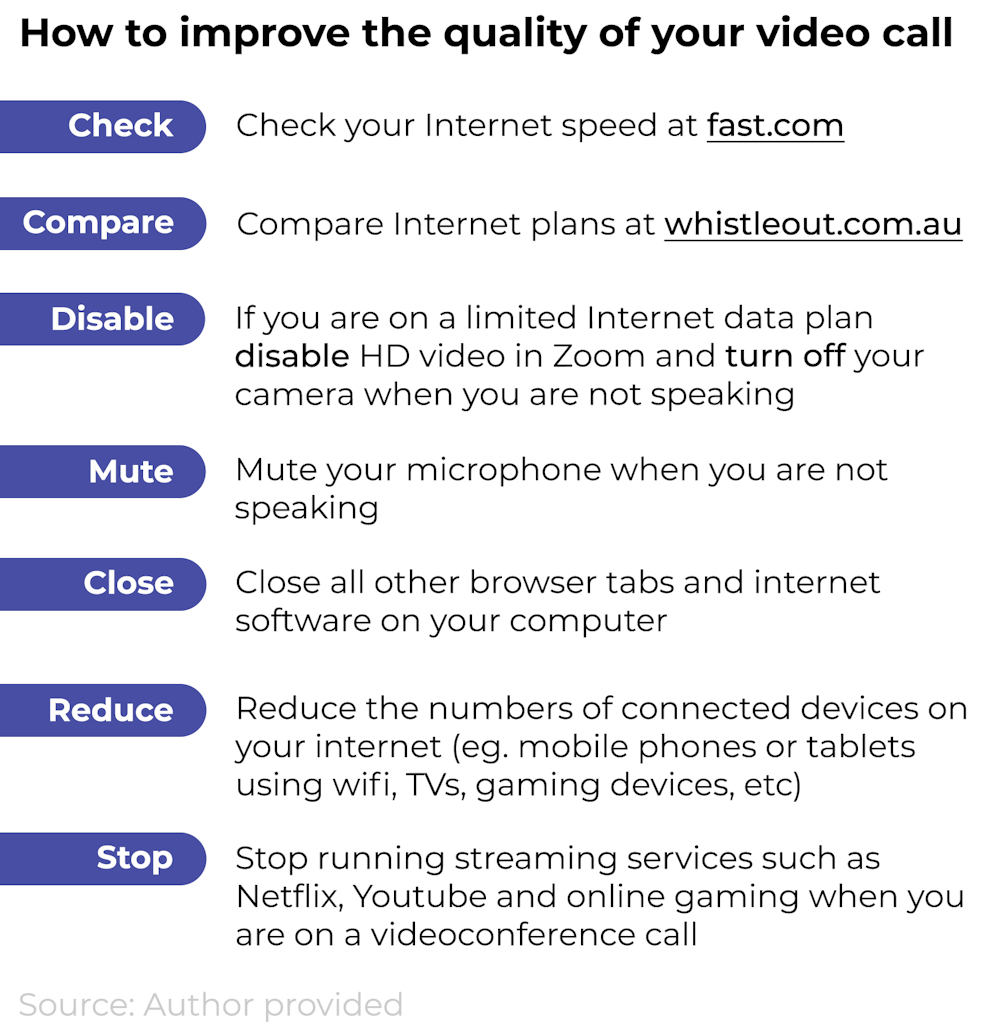
Below are some extra tips for improving the quality of your video call.
3. Set yourself up with a university VPN
Many universities provide staff and students with a Virtual Private Network (VPN), to access the university’s services when off campus.
If you are overseas, this may be essential. A VPN gives students and staff secure access to the university network. When you install the university VPN client on your computer, it will create a kind of a secure, private “tunnel” so the data exchanged between your computer and the university network won’t be seen by other internet users.
Some universities have set up a VPN specifically to help students in China impacted by the COVID-19 travel restrictions.
Regardless of your location, accessing university services (e-learnning platform such as Moodle, Blackboard, special software and journals) via VPN will simplify many of the security and access control policies enforced by your university such as dual and two- factor authentication.
Accessing the university library website via VPN will also give you free access to many paid research databases. As with any networking resource, if multiple students are accessing it at the same time, there is a chance of congestion.
For information on how to set up a VPN connection on your computer, consult your university library or IT support department.
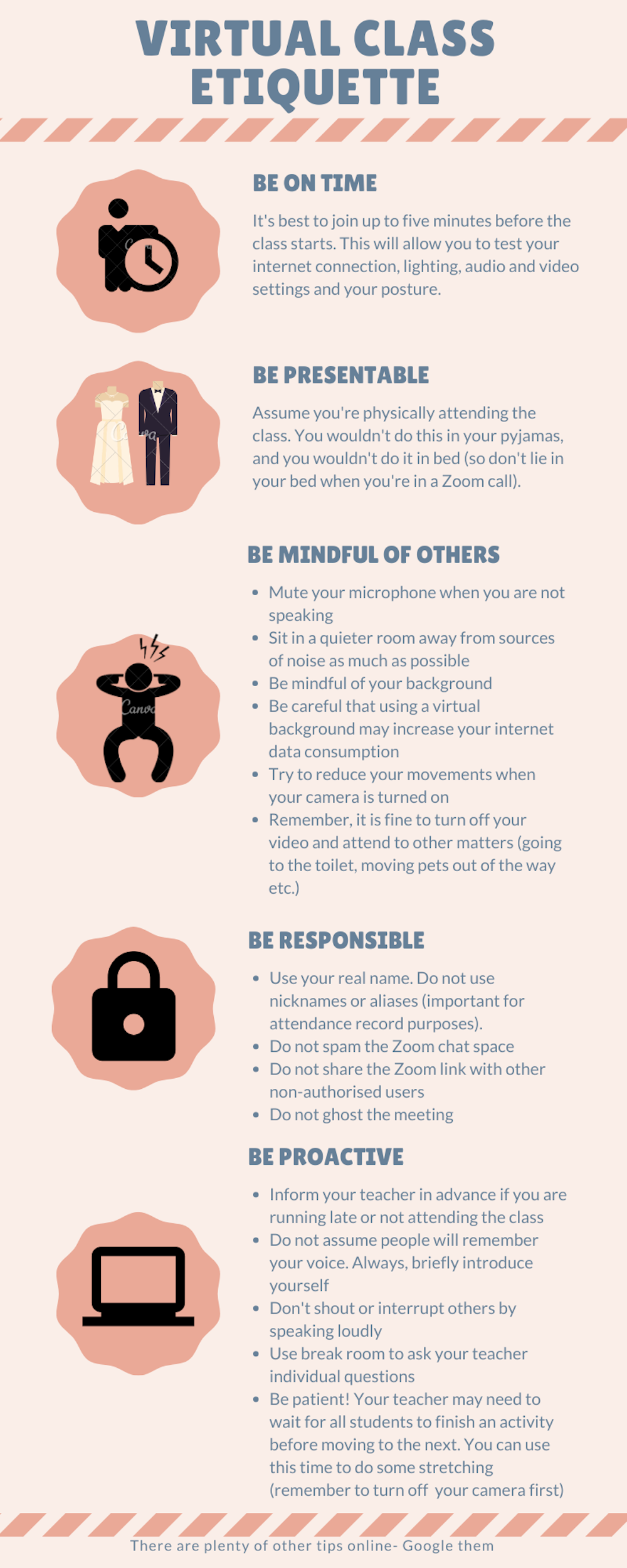
4. Abide by some basic etiquette rules
A final point to remember is though you are attending classes from home, this doesn’t mean you should behave as if at home. An online classroom is a professional environment.
There are some basic etiquette rules for online learning, which include:
- be on time for class. Try to login five minutes before so you can make sure your audio, video and other features are set up
- wear the kind of clothes you would wear to class. Just because it’s virtual, doesn’t mean you can be in bed while Zooming in
- mute your microphone when others are speaking
- try to reduce your movements when your camera is turned on
- don’t assume people will remember your name and introduce yourself when you speak
- don’t shout over, or interrupt, others who are speaking.

Mahmoud Elkhodr, Lecturer in Information and Communication Technologies, CQUniversity Australia; Belal Alsinglawi, PhD Candidate in Data Science and ICT Lecturer, Western Sydney University, and Omar Mubin, Senior Lecturer in human-centred computing & human-computer interaction, Western Sydney University
This article is republished from The Conversation under a Creative Commons license. Read the original article.
For enquiries, product placements, sponsorships, and collaborations, connect with us at [email protected]. We'd love to hear from you!
Our humans need coffee too! Your support is highly appreciated, thank you!